មើលព័ត៌មានលម្អិតការកក់
ប្រើ ប្រអប់ស្វែងរក ដើម្បីស្វែងរកភ្ញៀវតាមឈ្មោះពេញដែលមានចន្លោះ នាមត្រកូល លេខបន្ទប់ លេខការកក់ ឬលេខ OTA។
បំបែកការស្វែងរកច្រើនដោយសញ្ញាក្បៀស សញ្ញាចុចក្បៀស tab ឬបន្ទាត់ថ្មី។
អ្នកក៏អាចប្រើសញ្ញាបំបែកទទឹងពេញ , ; និង 、 បានដែរ។
ការវាយបញ្ចូលនឹងត្រងតែផ្ទាំងបច្ចុប្បន្នប៉ុណ្ណោះ។ ដើម្បីស្វែងរកកាលបរិច្ឆេទផ្សេង វាយពាក្យមួយ ហើយចុច All dates។ ក្នុង Calendar ម៉ឺនុយទម្លាក់ចុះនឹងបើកនៅពេលអ្នកវាយ។
មើលព័ត៌មានលម្អិតការកក់ ព័ត៌មានទំនាក់ទំនងភ្ញៀវ និងការចាត់តាំងបន្ទប់ពី Operations View។
ទៅកាន់: Operations View
ប្រអប់ព័ត៌មានលម្អិតការកក់ ប្រើស្លាកស្ថានភាពដូចគ្នានឹងទំព័រការកក់។ វារួមបញ្ចូលស្លាកដែលបានបកប្រែ ដូចជា No Show នៅក្នុងលំហូរកែសម្រួល។
| Tab | បង្ហាញអ្វី | ពេលណាត្រូវប្រើ |
|---|---|---|
| Check-outs | ភ្ញៀវចាកចេញថ្ងៃនេះ | ការចេញពេលព្រឹក |
| Stay-overs | ភ្ញៀវបន្តស្នាក់នៅ | ការត្រួតពិនិត្យបន្ទប់ពាក់កណ្ដាលថ្ងៃ |
| Check-ins | ភ្ញៀវមកដល់ថ្ងៃនេះ | ការមកដល់ពេលរសៀល |
| Calendar | បន្ទាត់ពេលវេលាបន្ទប់តាមកាលបរិច្ឆេទពីឃ្លាំងទិន្នន័យការកក់ដែលចែករំលែក | ការរៀបចំបន្ទប់ និងពិនិត្យការកាន់កាប់បន្ទប់ |
| Fresh data window | ប្រើទិន្នន័យបច្ចុប្បន្នខណៈអ្នកធ្វើការ បន្ទាប់មកធ្វើ refresh នៅពេលមាន trigger ធម្មតា | ធ្វើឱ្យការប្ដូរផ្ទាំងមានអារម្មណ៍ភ្លាមៗ |
| Payments | សមតុល្យត្រូវបង់ ប្រាក់កក់ ការទូទាត់បន្ទប់ និងសង្ខេបប័ណ្ណចំណាយ | ពិនិត្យថ្លៃមុនពេលចុះចេញ |
| Modal header | ស្លាកលេខបញ្ជាក់នៅពេលមាន | ផ្ទៀងផ្ទាត់ការកក់បានលឿន |
| Do Not Move lock | ស្លាកចាក់សោលើបន្ទប់ដែលបានកក់ | ជៀសវាងការផ្លាស់ទីការកក់ដែលត្រូវនៅកន្លែងដដែល |
| ACI device-flow badge | បង្ហាញថា Assisted Check-In ប្រើឧបករណ៍មួយ ឬពីរ | រៀបចំឧបករណ៍បុគ្គលិក និងភ្ញៀវឱ្យត្រឹមត្រូវ |
| Mobile tabs | ជួរ tab ទទឹងពេញលើទូរសព្ទ និង tablet តូច | ធ្វើឱ្យ Check-outs, Stay-overs, និង Check-ins នៅតែមើលឃើញ |
| Active-tab search | ការវាយបញ្ចូលនឹងត្រង cards និងជួរដេកក្នុងកាលបរិច្ឆេទអាជីវកម្មដែលបានជ្រើស | បង្រួមបញ្ជីបច្ចុប្បន្ន |
| Reservation dropdown | All dates ស្វែងរក reservations គ្រប់កាលបរិច្ឆេទ | បើកការកក់ពីកាលបរិច្ឆេទផ្សេង |
បើ PMS ដែលអ្នកជ្រើសមិនមានព័ត៌មានសម្គាល់ដែលអាចប្រើបាន Streamliner នឹងបង្ហាញស្ថានភាពសម្រាប់ស្ដារឡើងវិញ។ ប្រើ Settings ដើម្បីបញ្ចប់ការកំណត់ PMS បន្ទាប់មកព្យាយាមទំព័រឡើងវិញ។
ឧបករណ៍ Auto-assign Room/Lockers នឹងលាក់នៅពេល Settings → Room Access ជា Keycard Encoding។ វាបង្កើតតែ PIN សោឆ្លាតវៃ និងកូដប្រអប់ដាក់ឥវ៉ាន់ប៉ុណ្ណោះ។
ចូលប្រើ Operations View
- ពីផ្ទាំងគ្រប់គ្រងមេ ចុច Operations View
- ជ្រើសផ្ទាំងមួយ៖ Check-outs, Stay-overs, ឬ Check-ins
- ចុចលើការកក់ណាមួយ ដើម្បីបើកព័ត៌មានលម្អិតពេញលេញ
✓ រាល់ផ្ទាំងការកក់នឹងធ្វើការផ្ទុកឡើងវិញនៅផ្ទៃខាងក្រោយម្តង នៅពេលអ្នកបើកវាលើកដំបូង។ វាអនុវត្តចំពោះ Check-ins, Stay-overs, និង Check-outs។ បើទំព័រនៅថ្មី អ្នកនឹងនៅតែឃើញជួរដេកដែលបាន cache នៅលើអេក្រង់។ បើវាចាស់ Streamliner នឹងរក្សាជួរដេកបច្ចុប្បន្នឲ្យមើលឃើញ ហើយធ្វើ refresh នៅផ្ទៃក្រោយ។ អ្នកអាចបន្តធ្វើការងារបាន ខណៈការអាប់ដេតកំពុងបញ្ចប់។
ថ្ងៃដែលបានជ្រើសនឹងនៅជាប់នឹង timezone របស់សណ្ឋាគារអ្នក។ timezone របស់ browser មិនប្ដូរថ្ងៃដែលអ្នកកំពុងមើលទេ។ Stay-overs ប្រើថ្ងៃរបស់ property ដែលបានជ្រើសនៅពេលផ្ទុក។ វានៅតែដូចនេះ ទោះថ្ងៃដែលបានជ្រើសខុសពីថ្ងៃ UTC បច្ចុប្បន្នក៏ដោយ។
ប៊ូតុងសកម្មភាពនឹងផ្លាស់ទៅជួរផ្ទាល់ខ្លួននៅពីលើ tab។ tab នៅតែបង្ហាញអក្សរពេញ ដូច្នេះអ្នកនៅតែឃើញ Check-outs, Stay-overs, និង Check-ins។
ក្នុង modal ព័ត៌មានលម្អិត reservation សកម្មភាពខាងក្រោមអាចបង្ហាញជា icons only ដើម្បីសន្សំកន្លែង។ ប្រើរូបតំណាង X ដើម្បីបិទ modal។
ជម្រើសបង្ហាញ
ប្ដូររវាងរបៀបបង្ហាញពីរ ដោយប្រើ toolbar:
- Card View: កាតមើលងាយ ដែលបង្ហាញរូបភ្ញៀវ និងព័ត៌មានសំខាន់ៗភ្លាមៗ
- Table View: បញ្ជីសង្ខេបដែលអាចតម្រៀបបាន សម្រាប់គ្រប់គ្រង reservations ច្រើន
អានចំនួនសរុបការចេញ
ក្នុង Check-outs បន្ទះចំនួនសរុបរួមបញ្ចូល room cards ដែលមានភ្ញៀវស្នាក់នៅ គ្រប់ទំព័រ។ វារួមបញ្ចូលភ្ញៀវដែលមានស្ថានភាព Checked In និង Due Out។ ភ្ញៀវ Due-out នៅតែស្ថិតក្នុងសណ្ឋាគារ រហូតដល់ការចុះចេញបានបញ្ចប់។
ការកក់មួយដែលមានច្រើនបន្ទប់អាចបន្ថែម room card ច្រើនជាងមួយ។ ប្រើចំនួនសរុប ដើម្បីយល់ពីការចាកចេញដែលនៅរង់ចាំទាំងអស់ មិនមែនតែ card ដែលមើលឃើញទេ។ ប្រើឧបករណ៍បញ្ជាទំព័រ ដើម្បីពិនិត្យការកក់នីមួយៗ។
Reservation មួយអាចពង្រីកទៅជា room cards ច្រើន។ room card ដែលមានភ្ញៀវស្នាក់នៅនីមួយៗ នឹងរួមចំណែកក្នុងចំនួនសរុបការចុះចេញដែលនៅរង់ចាំ។ វារក្សាបន្ទប់ Due-out ឱ្យអាចចុះចេញបាន រហូតដល់ភ្ញៀវចាកចេញ។
បើក Calendar View
ប្រើ Calendar នៅពេលអ្នកត្រូវការមើលបន្ទាត់ពេលវេលាបន្ទប់ ជំនួសបញ្ជី។
- បើក sidebar ខាងឆ្វេង។
- ចុច Calendar។
- ពិនិត្យការស្នាក់នៅតាមបន្ទប់ និងកាលបរិច្ឆេទ។
✓ Calendar បង្ហាញក្នុង production សម្រាប់អ្នកប្រើដែលមានសិទ្ធិអាន reservation។ ពេលអ្នកទៅកាន់រយៈពេលមុន ឬបន្ទាប់ Streamliner រក្សាទីតាំង scroll បន្ទប់របស់អ្នក។
Calendar ប្រើ reservation cache ដែលចែករំលែក។ ជាទូទៅវាបើកលឿនជាងការទាញពី PMS ដោយផ្ទាល់។ បើអ្នកទើបតែប្តូរ reservation ក្នុង PMS សូមចុច Refresh បន្ទាប់ពីរង់ចាំបន្តិច។
បើ range មាននៅក្នុង cache រួច Refresh នឹងបង្ហាញ calendar បច្ចុប្បន្នភ្លាមៗ។ Streamliner សាងសង់ទិន្នន័យ PMS និងលិបិក្រមស្វែងរកនៅផ្ទៃក្រោយ។ Calendar បច្ចុប្បន្នរបស់អ្នកនៅតែបង្ហាញរហូតដល់ snapshot ថ្មីរួចរាល់។ បើ range មិនពេញលេញ refresh នៅតែរង់ចាំថ្ងៃដែលខ្វះ។
Streamliner រក្សា room column, date headers, background ជួរដេក និង scroll container ឲ្យនៅបង្ហាញ។ មានតែ reservation bars និង occupancy cells ប៉ុណ្ណោះដែលបង្ហាញ loading placeholders។
Streamliner មិនធ្វើ refresh ទិន្នន័យ reservation ម្តងហើយម្តងទៀត ខណៈអ្នកកំពុងប្រើអេក្រង់មួយយ៉ាងសកម្មទេ។ វាធ្វើ refresh បន្ទាប់ពីការរុករក ការផ្តោតបង្អួច សកម្មភាព reservation ឬ Refresh។ វាក៏ធ្វើ refresh នៅពេលអ្នកត្រឡប់មកវិញ បន្ទាប់ពីនៅឆ្ងាយ ឬអេក្រង់ស្ថិតក្នុងដំណេកលើស 30 នាទី។
បើអ្នកចុច Refresh ខណៈ Cloudbeds កំពុងរវល់ Streamliner នឹងរក្សាបញ្ជីបច្ចុប្បន្នឲ្យមើលឃើញ។ ទិន្នន័យថ្មីបំផុតនឹងបង្ហាញបន្ទាប់ពី background refresh បញ្ចប់។
ក្នុង mode Agenda បញ្ជីឥឡូវអាចរំកិលបានពេញលេញនៅក្នុង card។ បើអ្នកមិនអាចទៅដល់ធាតុចុងក្រោយ សូម refresh ម្តង។
toolbar នឹង wrap លើទូរសព្ទ និង tablet តូច។ search box នឹងធ្លាក់ទៅជួរផ្ទាល់ខ្លួនពេញទទឹង ដូច្នេះវានៅក្នុង calendar card។
ត្រង tab សកម្ម
ប្រើ search box ដើម្បីបង្រួម reservations ក្នុង tab និងកាលបរិច្ឆេទដែលបានជ្រើស។
- បើក Operations View។
- ជ្រើស Check-ins, Stay-overs, ឬ Check-outs។
- ជ្រើសកាលបរិច្ឆេទអាជីវកម្មដែលត្រូវការ។
- វាយឈ្មោះភ្ញៀវ លេខបន្ទប់ លេខ reservation ឬលេខ OTA។
ការស្វែងរកត្រងតែ tab និងកាលបរិច្ឆេទដែលបានជ្រើសបច្ចុប្បន្ន។
បំបែកការស្វែងរកច្រើនដោយសញ្ញាក្បៀស សញ្ញាចុចក្បៀស tab ឬបន្ទាត់ថ្មី។
អ្នកក៏អាចប្រើសញ្ញាបំបែកទទឹងពេញ , ; និង 、 បានដែរ។
ការស្វែងរកនីមួយៗក្លាយជាបន្ទះតូចដែលអាចលុបបាន។ បន្ទាប់ពីវាយបីតួអក្សរ All dates នឹងបង្ហាញសម្រាប់ការស្វែងរកមួយ។
ស្វែងរកតាមឈ្មោះភ្ញៀវចាស់
បើការបដិសេធភាពមិនត្រូវគ្នានៃឈ្មោះ ACI ប្ដូរឈ្មោះការកក់ AVA នឹងរក្សាឈ្មោះដែលត្រូវបានជំនួសឱ្យអាចស្វែងរកបាន។
- បើក Operations View។
- ជ្រើស Check-ins, Stay-overs, ឬ Check-outs។
- វាយយ៉ាងហោចណាស់បីតួអក្សរពីឈ្មោះការកក់ចាស់។
- ចុច All dates ប្រសិនបើការកក់មិនស្ថិតក្នុងកាលបរិច្ឆេទដែលបានជ្រើស។
✓ AVA អាចរកឃើញការកក់ដោយប្រើឈ្មោះភ្ញៀវចាស់។
✓ ការស្វែងរកផ្គូផ្គងឈ្មោះចាស់តាមបុព្វបទចាប់ផ្ដើមពាក្យ ដូចជា suman ក្នុង Rajeev Suman។
✓ Dropdown ដាក់ស្លាកលទ្ធផលថា Former guest name: [name]។
✓ ព័ត៌មានលម្អិតការកក់នៅតែរក្សាឈ្មោះភ្ញៀវបច្ចុប្បន្នពី PMS។
ឈ្មោះចាស់ត្រូវបានរក្សាទុក នៅពេលការបដិសេធ ACI អាប់ដេតការកក់ក្នុង PMS។ ការស្វែងរកអាចត្រូវការពេលខ្លី ដើម្បីធ្វើ refresh បន្ទាប់ពីការបដិសេធ។ បើឈ្មោះមិនបង្ហាញ សូមធ្វើ refresh Operations View ហើយព្យាយាមម្ដងទៀត។
ស្វែងរកការកក់ច្រើន
ប្រើបន្ទះស្វែងរក នៅពេលអ្នកត្រូវការការកក់ច្រើនក្នុងពេលតែមួយ។
-
ចុចប្រអប់ស្វែងរក។
-
បញ្ចូលលេខការកក់ ឈ្មោះភ្ញៀវ លេខបន្ទប់ ឬលេខ OTA។
-
វាយសញ្ញាក្បៀស សញ្ញាចុចក្បៀស tab ឬបន្ទាត់ថ្មី។
-
បន្ថែមការស្វែងរកមួយទៀត ឬបិទភ្ជាប់បញ្ជីពីសៀវភៅបញ្ជី។
✓ AVA ស្វែងរកពាក្យដែលត្រូវគ្នាណាមួយ។ ✓ ពាក្យនីមួយៗបង្ហាញជាបន្ទះតូចដែលអាចលុបបាន។ ✓ បន្ទាត់លទ្ធផលបង្ហាញចំនួនការស្វែងរក។
នៅពេលលទ្ធផលផ្ទុកចប់ AVA បង្ហាញ Not found សម្រាប់ពាក្យដែលគ្មានការកក់ត្រូវគ្នា។ AVA មិនបង្ហាញសារនេះទេ ខណៈលទ្ធផលកំពុងផ្ទុក ឬមិនទាន់ពេញលេញ។
ចុច Enter ដើម្បីបញ្ចូលពាក្យបច្ចុប្បន្នភ្លាមៗ។
ចុច Backspace ក្នុងប្រអប់ទទេ ដើម្បីលុបបន្ទះចុងក្រោយ។
ជ្រើស × លើបន្ទះ ដើម្បីលុបតែពាក្យនោះ។
ចុច Esc ឬជ្រើសប៊ូតុងសម្អាត ដើម្បីលុបពាក្យទាំងអស់។
AVA កាត់ចន្លោះលើស និងលុបពាក្យស្ទួន ដោយមិនគិតអក្សរធំតូច។ អ្នកអាចបន្ថែមបានរហូតដល់ 20 ពាក្យមិនស្ទួន។ AVA ឈប់ទទួលអត្ថបទបន្ទាប់ពីដល់កម្រិត ហើយរក្សាពាក្យដែលមានស្រាប់ឱ្យមើលឃើញ។
សញ្ញាបំបែកនីមួយៗបង្កើតពាក្យស្វែងរកដាច់ដោយឡែក។ ឧទាហរណ៍ 101,102,103 ស្វែងរកតម្លៃលេខការកក់ ឬលេខបន្ទប់បីដាច់ដោយឡែកពីគ្នា។
ការបញ្ចូលតែសញ្ញាបំបែក ដូចជា , នឹងរក្សាឥរិយាបថស្វែងរកតាមអក្សរដើមដែលមានស្រាប់។ វាមិនលុបតម្រងបច្ចុប្បន្នទេ។
All dates ត្រូវបានលាក់នៅពេលបញ្ចូលពាក្យពីរ ឬច្រើន។ ប្រើ All dates ដាច់ដោយឡែកសម្រាប់ការស្វែងរកមួយដែលឆ្លងកាត់កាលបរិច្ឆេទ។
✓ Cards ឬជួរដេកនៅតែស្ថិតក្នុងកាលបរិច្ឆេទអាជីវកម្មដែលបានជ្រើស។ វាមិនបញ្ចូល reservations ដែលត្រូវនឹងលក្ខខណ្ឌពីកាលបរិច្ឆេទផ្សេងទេ។
លេខ OTA ក៏ហៅថាលេខកក់របស់ភាគីទីបីផងដែរ។ វារួមមានលេខយោងការកក់ពី channel ដូចជា Booking.com, Expedia និង Agoda។
ដើម្បីបើកកាលបរិច្ឆេទផ្សេង ចុច All dates បន្ទាប់មកជ្រើសលទ្ធផលពី dropdown។
រក្សាជួរដេកឱ្យមើលឃើញពេលលទ្ធផលកំពុង refresh
AVA រក្សាជួរដេកបច្ចុប្បន្នឱ្យមើលឃើញ ខណៈលទ្ធផលស្វែងរក ឬតម្រងថ្មីកំពុងផ្ទុក។ វាអនុវត្តផងដែរនៅពេលអ្នកប្ដូរលំដាប់តម្រៀប ឬទំព័រ។
- ប្ដូរអត្ថបទស្វែងរក តម្រង លំដាប់តម្រៀប ឬទំព័រ។
- មើលសូចនាករ Refreshing នៅក្បែរសេចក្ដីសង្ខេប reservation។
- រង់ចាំលទ្ធផលថ្មីផ្ទុកចប់។
✓ ជួរដេកមុននៅតែបង្ហាញក្នុងពេល refresh។ ✓ សូចនាករ Refreshing បញ្ជាក់ថាជួរដេកទាំងនោះប្រើការស្វែងរក ឬតម្រងមុន។ ✓ ការស្វែងរក តម្រង លំដាប់តម្រៀប ឬទំព័រថ្មីនឹងអនុវត្តក្រោយ refresh ចប់។
រង់ចាំ refresh ចប់ មុនធ្វើសកម្មភាពលើជួរដេកដែលបង្ហាញមុនពេលអ្នកប្ដូរ។
Card View
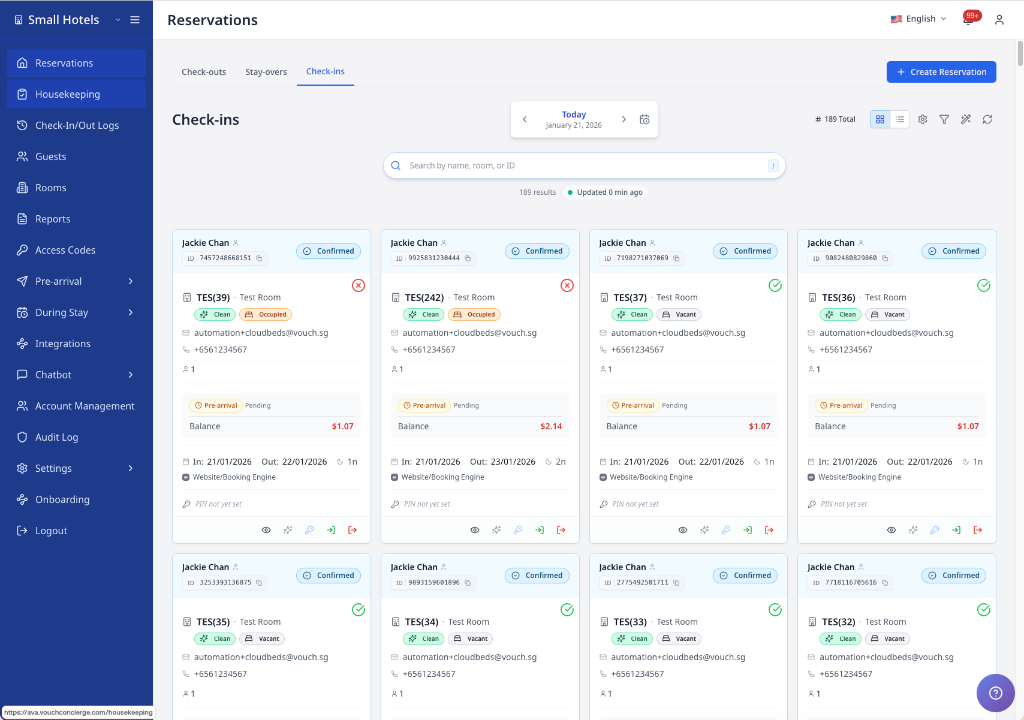
ទិដ្ឋភាពកាតបង្ហាញ reservation cards ដែលមាន៖
- ឈ្មោះភ្ញៀវ និងស្ថានភាពបញ្ជាក់
- រូបតំណាងព័ត៌មាននៅជាប់ស្ថានភាព (បង្ហាញមូលហេតុដែល check-ins ខ្លះមកពីម្សិលមិញ)
- លេខបន្ទប់ និងប្រភេទ
- badge ចាក់សោ Do Not Move នៅពេល reservation មិនអាចផ្លាស់ទី
- រូបតំណាងភាពរួចរាល់បន្ទប់ ជាមួយ tooltip ពេល hover ប្រសិនបើការត្រួតពិនិត្យ readiness បើក
- កាលបរិច្ឆេទ check-in/out និងចំនួនយប់
- សមតុល្យការទូទាត់ និងស្ថានភាពមុនមកដល់
- ព័ត៌មានទំនាក់ទំនងភ្ញៀវ
- ប្រភពការកក់ ឬឈ្មោះ PMS source
Balance Due លើកាតគឺជាចំនួនបច្ចុប្បន្នដែលនៅសល់ត្រូវបង់។ AVA ដកការទូទាត់ដែលបានប្រមូលពីសរុប PMS រួមទាំង extras ដែលមានសិទ្ធិ។ ការកក់ដែលបានបង់ពេញលេញបង្ហាញសមតុល្យសូន្យជាពណ៌ប្រផេះ។
PMS connectors មួយចំនួនឥឡូវបង្ហាញឈ្មោះ property ឬក្រុមហ៊ុន ជំនួស label ប្រភពការកក់ទូទៅ។ បើ reservation source ខ្វះឈ្មោះ AVA អាច fallback ទៅ metadata ប្រភព PMS ដែលបានភ្ជាប់។
Hover រូបតំណាងភាពរួចរាល់បន្ទប់ ដើម្បីមើលថាបន្ទប់រួចរាល់ឬនៅ។ reservation card នីមួយៗប្រើ tooltip ផ្ទាល់ខ្លួន។
Table View
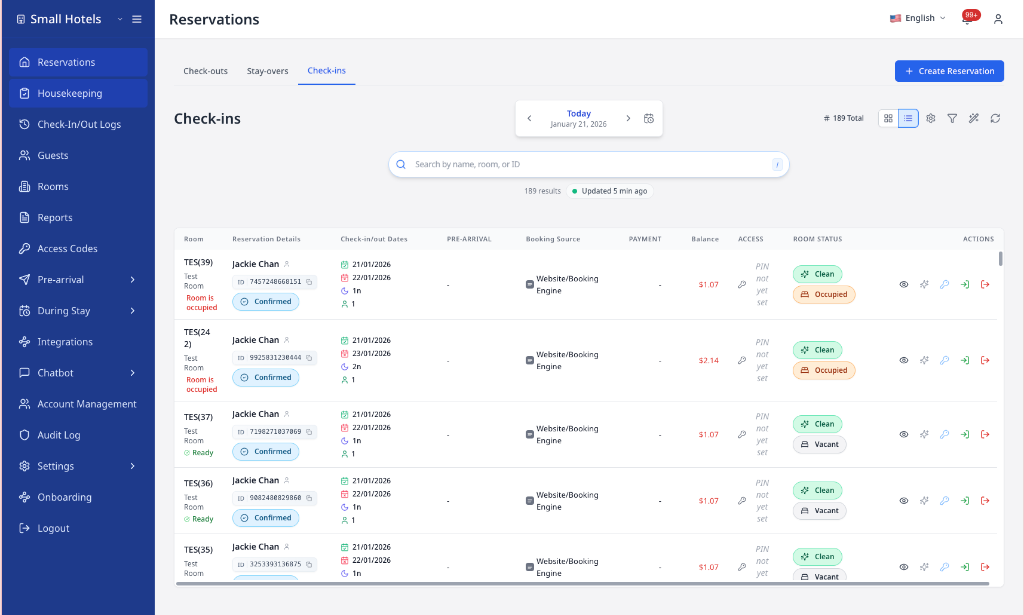
ទិដ្ឋភាពតារាងផ្តល់បញ្ជីសង្ខេបដែលអាចតម្រៀបបាន ជាមួយជួរឈរ៖
- លេខបន្ទប់ និងព័ត៌មាន reservation
- កាលបរិច្ឆេទ check-in/out
- ស្ថានភាពមុនមកដល់
- badge ចាក់សោ Do Not Move នៅពេល reservation មិនអាចផ្លាស់ទី
- ACI device-flow badge សម្រាប់ការកក់ Assisted Check-In
- ប្រភពការកក់ ឬឈ្មោះ PMS source
- ព័ត៌មានការទូទាត់
- សមតុល្យ និងស្ថានភាពបន្ទប់
- ប៊ូតុងសកម្មភាពរហ័ស
ជួរដេកនឹងរំលេចពេលអ្នក hover លើវា។ វាធ្វើឱ្យតាមដាន reservation មួយតាមជួរឈរកាន់តែងាយ។
ពណ៌រំលេចស្របនឹង tab៖
- Check-ins: ពណ៌ខៀវ
- Stay-overs: ពណ៌បៃតង
- Check-outs: ពណ៌ទឹកក្រូច
បើគ្មាន reservation ណាត្រូវលក្ខខណ្ឌ តារាងនឹងបង្ហាញរូបតំណាងស្ថានភាពទទេ និងសារ។ បើខ្វះការរៀបចំ PMS អ្នកក៏អាចឃើញប៊ូតុង Settings និង Retry ជំនួស loop refresh ផងដែរ។
យល់អំពីចំនួនទឹកប្រាក់ការកក់
បញ្ជីការកក់ និងព័ត៌មានលម្អិតការកក់បង្ហាញតម្លៃទូទាត់ខុសៗគ្នា។
| តម្លៃ | អត្ថន័យ | កន្លែងពិនិត្យ |
|---|---|---|
| Balance Due | ចំនួនទឹកប្រាក់ដែលភ្ញៀវនៅតែជំពាក់ | ព័ត៌មានលម្អិតការកក់ និងសង្ខេបទូទាត់ |
| Stay Total | សរុបវិក្កយបត្រ PMS ពេញលេញ រួមទាំងពន្ធ | ព័ត៌មានលម្អិតការកក់ បន្ទាប់ពីទិន្នន័យវិក្កយបត្រផ្ទុករួច |
| Unavailable total | បញ្ជីមិនទាន់ផ្ទុកសរុបវិក្កយបត្រពេញលេញ | បើក View Details |
សម្រាប់ Cloudbeds ការកក់ដែលបានបង់ជាមុនអាចមាន Balance Due សូន្យ ប៉ុន្តែ Stay Total មិនមែនសូន្យទេ។ កុំចាត់ទុកសរុបដែលបាត់ពីបញ្ជីថាជាការស្នាក់នៅឥតគិតថ្លៃ។ បើក View Details មុនពេលពិនិត្យចំណូល ឬពន្យល់ថ្លៃជូនភ្ញៀវ។
សម្រាប់ eZee កាតការកក់ប្រើតម្លៃដែលបានបង់ និងសមតុល្យដូចគ្នានឹង folio លម្អិត។ បើក View Details នៅពេលអ្នកត្រូវពិនិត្យជួរទូទាត់ និងថ្លៃ។
បញ្ជីការកក់ Cloudbeds អាចបង្ហាញសរុបការស្នាក់នៅ បន្ទាប់ពីទិន្នន័យវិក្កយបត្រផ្ទុករួច។ ព័ត៌មានលម្អិតការកក់ប្រើសរុបវិក្កយបត្រ PMS រួមទាំងពន្ធ។ តម្លៃ Balance Due នៅតែជាចំនួនដែលត្រូវបង់។
អានស្លាក ACI device-flow
ស្លាក ACI device-flow បង្ហាញលើជួរដេកតារាងការកក់ក្នុង Check-ins។ វាជួយឱ្យអ្នករៀបចំឧបករណ៍ត្រឹមត្រូវ មុនភ្ញៀវមកដល់។
| ស្លាក | អត្ថន័យ | ត្រូវរៀបចំ |
|---|---|---|
| ACI · 1 device | ជំហានរបស់បុគ្គលិក និងភ្ញៀវប្រើឧបករណ៍តែមួយ | រៀបចំឧបករណ៍បុគ្គលិកដែលបានផ្ទៀងផ្ទាត់ |
| ACI · 2 devices | ជំហានរបស់បុគ្គលិក និងភ្ញៀវប្រើឧបករណ៍ផ្សេងគ្នា | រៀបចំឧបករណ៍បុគ្គលិកដែលបានផ្ទៀងផ្ទាត់ និង tablet ដែលបានភ្ជាប់ |
ស្លាកនេះឆ្លុះបញ្ចាំងលំហូរ Assisted Check-In ដែលបានកត់ត្រាសម្រាប់ reservation នោះ។ វាមិនបង្ហាញក្នុង Stay-overs ឬ Check-outs ទេ ហើយក៏មិនបង្ហាញសម្រាប់ self-service, pre-arrival ឬទិន្នន័យ flow ដែលមិនមានដែរ។
ស្លាកនេះមិនបង្ហាញលើកាតការកក់ក្នុង Check-ins ទេ។ វាក៏មិនបង្ហាញសម្រាប់ self-service, pre-arrival ឬទិន្នន័យ flow ដែលមិនមានផងដែរ។
អានស្លាក kiosk និងបុគ្គលិក
ជួរដេកតារាង ACI អាចបង្ហាញស្លាកបន្ថែមនៅក្បែរស្លាក device-flow។
| ស្លាក | អត្ថន័យ |
|---|---|
| Kiosk: Front Desk A | បង្ហាញ alias របស់ kiosk ដែលបានកត់ត្រាសម្រាប់ assisted check-in |
| Performed by Ain Rohan | បង្ហាញសមាជិកបុគ្គលិកដែលបានអនុវត្តសកម្មភាព ACI ដែលបានកំណត់អ្នកអនុវត្ត |
AVA បង្ហាញស្លាកមួយសម្រាប់ alias របស់ kiosk និងគណនីបុគ្គលិកនីមួយៗដែលត្រូវគ្នាដោយឡែកពីគ្នា។ សម្រាប់ការកក់ច្រើនបន្ទប់ ជួរដេកបន្ទប់នីមួយៗបង្ហាញ alias របស់ kiosk ទាំងអស់ដែលការកក់នោះបានប្រើ។ ជួរដេកនីមួយៗនៅតែរក្សាព័ត៌មាន room និង check-in ដែលត្រូវគ្នារបស់ខ្លួន។ វារក្សាជួរដេកបន្ទប់ដែលពាក់ព័ន្ធឱ្យនៅជាមួយគ្នា ដោយមិនលាយជាមួយការកក់ផ្សេងទៀត។
ឧទាហរណ៍ ជួរដេកដែលប្រើ Counter 1 និង Counter 2 នឹងបង្ហាញស្លាក kiosk ទាំងពីរ។ alias kiosk ស្ទួននឹងបង្ហាញតែម្តងក្នុងជួរដេកនីមួយៗ។
Hover លើ Performed by ដើម្បីមើល account ID ក្នុង tooltip។ Tooltip របស់ kiosk បង្ហាញ alias kiosk ពេញលេញ នៅពេលអត្ថបទស្លាកត្រូវបានកាត់ឱ្យខ្លី។
ស្លាក kiosk ឬបុគ្គលិកបាត់
អ្វីដែលអ្នកឃើញ: ស្លាក ACI បង្ហាញ ប៉ុន្តែស្លាក kiosk ឬបុគ្គលិកមិនបង្ហាញ។
ដំណោះស្រាយ:
- បញ្ជាក់ថាជួរដេកស្ថិតក្នុង tab Check-ins។
- Refresh បញ្ជីការកក់។
- ពិនិត្យកំណត់ត្រា assisted check-in ដែលត្រូវគ្នា ដើម្បីរក alias kiosk ឬសកម្មភាពបុគ្គលិកដែលបានកំណត់អ្នកអនុវត្ត។
ស្លាកនឹងមិនបង្ហាញទេ នៅពេលកំណត់ត្រាដែលត្រូវគ្នាមិនមាន alias ឬការកំណត់អ្នកអនុវត្តបុគ្គលិក។
ស្លាក ACI device-flow បាត់ ឬមិនត្រឹមត្រូវ
អ្វីដែលអ្នកឃើញ: Reservation check-in មិនមានស្លាក ACI ឬចំនួនឧបករណ៍មើលទៅខុស។
ដំណោះស្រាយ:
- បញ្ជាក់ថា reservation ប្រើ Assisted Check-In។
- Refresh បញ្ជី Check-ins។
- ប្រៀបធៀបស្លាកជាមួយការរៀបចំឧបករណ៍ ACI បច្ចុប្បន្ន។
- រៀបចំឧបករណ៍តាម flow ដែលបង្ហាញក្រោយបញ្ជី refresh។
បើស្លាកនៅតែមិនត្រឹមត្រូវ សូមទាក់ទង support ដោយផ្ដល់ reservation ID និងរូបថតអេក្រង់។
បើអ្នកឃើញ Display Preferences (រូប gear)
អ្នកអាចប្ដូរចន្លោះជួរដេកក្នុងតារាងបាន។
-
នៅក្នុង toolbar ចុច Display Preferences។
-
ជ្រើស Comfortable, Cozy, ឬ Compact។
✓ ជួរដេកនឹងធ្វើបច្ចុប្បន្នភាពភ្លាមៗ។
ស្វែងរកតាមកាលបរិច្ឆេទផ្សេងៗ
ប្រើ All dates ពេលភ្ញៀវមិននៅក្នុងបញ្ជី tab បច្ចុប្បន្ន។
ការវាយបញ្ចូលតែមួយមុខ មិនបើក dropdown សម្រាប់ស្វែងរកកាលបរិច្ឆេទផ្សេងក្នុង tabs reservation ទេ។
- បើក Operations View។
- ជ្រើស Check-outs, Stay-overs, ឬ Check-ins។
- វាយយ៉ាងហោចណាស់បីតួអក្សរក្នុង search box។
- ចុច All dates ក្នុង search box។
- ជ្រើស reservation ពីបញ្ជី dropdown។
✓ អ្នកអាចបើក reservation ដែលជារបស់កាលបរិច្ឆេទផ្សេងបាន។ ✓ លំហូរស្វែងរកដូចគ្នាដំណើរការលើ tab ទាំងបី។ ✓ អ្នកអាចស្វែងរកតាមលេខ OTA ឬលេខកក់របស់ភាគីទីបី។
យល់អំពីលំដាប់លទ្ធផល
AVA រៀបចំលទ្ធផល All dates ជុំវិញកាលបរិច្ឆេទអាជីវកម្មរបស់សណ្ឋាគារដែលបានជ្រើស។ វាជួយឱ្យអ្នករកឃើញភ្ញៀវមកដល់ថ្ងៃនេះ ភ្ញៀវដែលកំពុងស្នាក់នៅ និងភ្ញៀវចាកចេញមុនគេ។
| លំដាប់ | ការកក់ដែលបង្ហាញ |
|---|---|
| 1 | ការស្នាក់នៅដែលគ្របដណ្តប់កាលបរិច្ឆេទអាជីវកម្មដែលបានជ្រើស ដោយការមកដល់ចុងក្រោយបំផុតនៅមុនគេ |
| 2 | ការស្នាក់នៅនាពេលខាងមុខ ដោយការមកដល់ដែលជិតបំផុតនៅមុនគេ |
| 3 | ការស្នាក់នៅកន្លងមក ដោយការចាកចេញចុងក្រោយបំផុតនៅមុនគេ |
| 4 | ការកក់ដែលគ្មានកាលបរិច្ឆេទមកដល់ ឬចាកចេញ |
ការរៀបចំលំដាប់ប្ដូរតែការរៀបលំដាប់ក្នុង dropdown ប៉ុណ្ណោះ។ វាមិនប្ដូរការកក់ណាដែលត្រូវនឹងការស្វែងរករបស់អ្នកទេ។ បើ AVA មិនអាចប្រើកាលបរិច្ឆេទអាជីវកម្មដែលបានជ្រើស វានឹងប្រើលំដាប់កាលបរិច្ឆេទ check-in ជំនួស។
Dropdown ដាក់លទ្ធផលជាក្រុមក្រោម Selected date និង Other dates។ លើអេក្រង់តូច All dates បង្ហាញជារូបតំណាងស្វែងរកប្រតិទិន។ ក្នុង Calendar dropdown នឹងបើកដោយស្វ័យប្រវត្តិបន្ទាប់ពីវាយបីតួអក្សរ។ ការស្វែងរកក្នុង Calendar ប្រើ dropdown ព្រោះទីនោះមិនបង្ហាញបញ្ជី reservation ទេ។
បញ្ជីកាលបរិច្ឆេទដែលបានជ្រើសអាចអាប់ដេតមុនការស្វែងរក All dates។ បើការប្ដូរការកក់ថ្មីៗមិនទាន់បង្ហាញ សូមរង់ចាំបន្តិច ហើយស្វែងរកម្ដងទៀត។
ប៊ូតុងសកម្មភាព
reservation នីមួយៗបង្ហាញប៊ូតុងសកម្មភាពដោយផ្អែកលើ tab និងស្ថានភាពបច្ចុប្បន្ន។ ប៊ូតុងបង្ហាញទាំងក្នុង Card View (ខាងក្រោម card) និង Table View (ជួរឈរខាងស្តាំបំផុត)។
សកម្មភាពទូទៅ (គ្រប់ tab)
មើលព័ត៌មានលម្អិត
- Icon: Eye
- វាធ្វើអ្វី: បើក modal ព័ត៌មានលម្អិត reservation ដែលមានបញ្ជីភ្ញៀវពេញលេញ សង្ខេបទូទាត់ ព័ត៌មាន folio និងចំណាំ
- ពេលបង្ហាញ: មានជានិច្ច
- ពេលបិទ: មិនធ្លាប់បិទទេ
ចុចដើម្បីចូលប្រើ៖
- ព័ត៌មានទំនាក់ទំនងភ្ញៀវ (មាន copy-to-clipboard)
- ព័ត៌មានលម្អិត reservation និងស្ថានភាពពេញលេញ
- ការចាត់តាំងបន្ទប់ និងស្ថានភាព housekeeping
- ឧបករណ៍គ្រប់គ្រងការចាប់យកការទូទាត់
- ជម្រើសប្ដូរបន្ទប់ (Cloudbeds និង Opera)
- កែព័ត៌មាន reservation (AVA PMS ឬ Mews)
- អាប់ដេតស្ថានភាព reservation (AVA PMS ប៉ុណ្ណោះ ពី Edit Reservation Details)
ចម្លងតំណ Pre-arrival
ប្រើ modal ការកក់ ដើម្បីចែករំលែកតំណ Pre-arrival ផ្ទាល់របស់ភ្ញៀវក្រៅអ៊ីមែល។ តំណនេះបើកដំណើរការ Pre-arrival ដូចគ្នាដែលបានផ្ញើតាមអ៊ីមែលស្វ័យប្រវត្តិ។
ប៊ូតុងនេះមានសម្រាប់ការកក់ដែលមានស្ថានភាព Reserved, Unconfirmed, និង Due in។ គម្រោងសណ្ឋាគាររបស់អ្នកត្រូវមានសិទ្ធិប្រើការកក់ និងស្វ័យប្រវត្តិកម្មអ៊ីមែល។ ប៊ូតុងនឹងលាក់ ខណៈពេលព័ត៌មាន billing កំពុងផ្ទុក។ អ្នកមិនចាំបាច់កំណត់អ៊ីមែលស្វ័យប្រវត្តិ មុនពេលចម្លងតំណទេ។
- បើកការកក់ Reserved, Unconfirmed, ឬ Due in មួយ។
- ចុច View Details។
- ចុច Pre-arrival link នៅជាប់លេខបញ្ជាក់។
- បិទភ្ជាប់តំណដែលបានចម្លងទៅក្នុង WhatsApp, SMS ឬ channel ភ្ញៀវផ្សេងទៀតដែលបានអនុម័ត។
✓ តំណនេះរួមបញ្ចូលលេខបញ្ជាក់របស់ការកក់។ ✓ ភ្ញៀវអាចបើកតំណ ហើយចាប់ផ្ដើម Pre-arrival ដោយមិនចាំបាច់វាយលេខ។
AVA បង្កើតតំណផ្ទាល់ នៅពេលអ្នកចុច Pre-arrival link។ ចាត់ទុកតំណដែលបានចម្លងជាព័ត៌មានឯកជន ព្រោះវាផ្តល់សិទ្ធិចូលដំណើរការរបស់ភ្ញៀវសម្រាប់ការកក់នោះ។ AVA មិនស្នើសុំតំណនេះទេ នៅពេលអ្នកបើក modal។
ផ្ញើអ៊ីមែល Pre-arrival ដែលបានពិនិត្យ
ប្រើ modal ព័ត៌មានលម្អិតការកក់ ដើម្បីផ្ញើអ៊ីមែល Pre-arrival ដែលបានពិនិត្យ សម្រាប់ការកក់មួយ។ ផ្លូវកាត់នេះជ្រើសការកក់ជាមុន មុនពេលអ្នកជ្រើសភ្ញៀវ និងអ្នកទទួល។
- បើកការកក់ Reserved, Unconfirmed, ឬ Due in មួយ។
- ចុច View Details។
- ចុច Send pre-arrival email នៅជាប់លេខបញ្ជាក់។
- ជ្រើសភ្ញៀវ និង Saved guest email ឬ Alternate address។
- ជ្រើស template ដែលបានកំណត់រួច បន្ទាប់មកចុច Preview email។
- ពិនិត្យអ្នកទទួល ប្រធានបទ កាលបរិច្ឆេទស្នាក់នៅ និងសារដែលបានបង្ហាញ។
- ចុច Send email តែបន្ទាប់ពី preview ត្រូវនឹងសំណើរបស់អ្នកប៉ុណ្ណោះ។
✓ ការផ្ញើនឹងបង្ហាញក្នុង Recent sends និងប្រវត្តិអ៊ីមែលដែលផ្ញើដោយដៃ។ ✓ ទំនាក់ទំនងភ្ញៀវដែលបានរក្សាទុក និងអ្នកទទួលដែលបានកំណត់ពេល នៅតែមិនផ្លាស់ប្តូរ។
តំណ Pre-arrival ផ្តល់សិទ្ធិចូលប្រើការកក់។ សូមពិនិត្យអាសយដ្ឋានជំនួសដោយប្រុងប្រយ័ត្ន មុនពេលផ្ញើ។
សម្អាតបន្ទប់
- Icon: Sparkles
- វាធ្វើអ្វី: សម្គាល់បន្ទប់ថាស្អាតក្នុងប្រព័ន្ធ PMS របស់អ្នក
- ពេលបង្ហាញ:
- Check-ins: ពេលបន្ទប់ត្រូវបានចាត់តាំង
- Check-outs: ពេលបន្ទប់ត្រូវបានចាត់តាំង ហើយភ្ញៀវមិនទាន់ checked out
- Stay-overs: ពេលបន្ទប់ត្រូវបានចាត់តាំង និងសម្គាល់ថាកខ្វក់
- ពេលបិទ: បន្ទប់ត្រូវបានសម្គាល់ថាស្អាតរួចហើយ
- ព័ត៌មានជំនួយពេលបិទ: "Room already clean"
បន្ទាប់ពីការអាប់ដេតជោគជ័យ AVA នឹង refresh ស្ថានភាព housekeeping របស់ reservation នៅផ្ទៃក្រោយ។ បើបន្ទប់ដែលបានផ្លាស់ប្តូរគឺជាបន្ទប់ដែលអ្នកកំពុងមើល modal ដែលបើកនឹងអាប់ដេតភ្លាមៗ។ អ្នកនៅតែគួរមើលឃើញស្ថានភាពថ្មី ពេលអ្នកបើក reservation ម្តងទៀត។
បើ reservation របស់បន្ទប់ត្រូវចេញនៅថ្ងៃនេះ AVA អាចបង្ហាញសារ checkout ថ្ងៃតែមួយដូចដែលប្រើដោយ Housekeeping។ ជ្រើស Check out reservation ដើម្បី checkout ជាមុន ឬ Update status without checkout ដើម្បីប្ដូរតែស្ថានភាពបន្ទប់។ ការបិទសារនឹងបោះបង់ការអាប់ដេតស្ថានភាព។
សកម្មភាពក្នុង tab Check-ins
គ្រប់គ្រង PIN / Encode Keycard
- Icon: Key
- វាធ្វើអ្វី:
- Smart Locks: បង្កើត និងចាត់តាំង door PIN code
- Keycard (Automatic): អ៊ិនកូដ keycard រូបវន្ត
- Keycard (PMS): បញ្ជា PMS ឱ្យអ៊ិនកូដ keycard
- Locker Codes: បង្កើត locker access code
- Variant: Primary (ប៊ូតុងពណ៌ខៀវ)
- ពេលបង្ហាញ: បង្ហាញជានិច្ច
- ពេលបិទ:
- មិនមានបន្ទប់ចាត់តាំង
- Smart lock មិនបានភ្ជាប់ជាមួយបន្ទប់
- PMS keycard encoder មិនបានកំណត់
- Loading state: ប៊ូតុងនៅតែបង្ហាញ និងបិទ ខណៈ AVA កំពុងរៀបចំ ឬបង្កើត room access
សម្រាប់បន្ទប់ដែលមាន keycards ដោយដៃកំពុងសកម្ម AVA នឹងសួរថាតើកាតថ្មីគួរដំណើរការយ៉ាងដូចម្តេច៖
- ជ្រើស Encode DUPLICATE keycards ដើម្បីរក្សាកាតដែលមានស្រាប់ឱ្យនៅសកម្ម។
- ជ្រើស Encode NEW keycards ដើម្បីជំនួសសំណុំកាតសកម្ម។
AVA ប្រើបន្ទប់ដែលបានជ្រើស និងសំណុំ keycard សកម្ម នៅពេលបង្កើតកាត។ បើ AVA មិនអាចកំណត់សំណុំបាន សូមប្រើ Try again ឬ Access Codes ដើម្បីជ្រើសសំណុំ។ ជ្រើស Start a new set តែនៅពេលមានបំណងជំនួសកាតចាស់ប៉ុណ្ណោះ។
បើជួរដេក reservation មិនមានតម្លៃបន្ទប់ដែលអាចប្រើបាន AVA នឹងបញ្ជាក់បន្ទប់តាម PMS របស់អ្នក មុនពេល encode។ លេខសម្គាល់បន្ទប់ PMS ដែលវែង ឬមើលទៅជាលេខខាងក្នុងដែលត្រឹមត្រូវ នៅតែអាចប្រើបាន។ អ្នកមិនចាំបាច់កែ ឬកាត់អត្តសញ្ញាណបន្ទប់ទេ។
អាកប្បកិរិយាប៊ូតុងផ្លាស់ប្តូរតាមការកំណត់ Settings → Room Access របស់អ្នក។
ចុះឈ្មោះភ្ញៀវចូល
- Icon: Log In
- វាធ្វើអ្វី: សម្គាល់ភ្ញៀវថា checked in ហើយអាប់ដេតស្ថានភាពក្នុង PMS
- Variant: Success (ប៊ូតុងពណ៌បៃតង)
- ពេលបង្ហាញ: មុនពេលភ្ញៀវ checked in ប៉ុណ្ណោះ
- ពេលបិទ:
- ភ្ញៀវ checked in រួចហើយ
- មិនមានបន្ទប់ចាត់តាំង
- ព័ត៌មានជំនួយពេលបិទ:
- Already checked in: "Already checked in"
- No room: "Room must be assigned"
ភ្ញៀវត្រូវមានបន្ទប់បានចាត់តាំង មុននឹងចុះឈ្មោះចូល។ សូមចាត់តាំងបន្ទប់ក្នុង PMS របស់អ្នកជាមុន។
ចេញភ្ញៀវមុន
- Icon: Log Out (Red)
- វាធ្វើអ្វី: ធ្វើ check out reservation របស់ភ្ញៀវសកម្មដែលនៅកាន់កាប់បន្ទប់
- Variant: Danger (ប៊ូតុងពណ៌ក្រហម)
- ពេលបង្ហាញ: បន្ទប់ត្រូវបានចាត់តាំង ហើយ reservation បច្ចុប្បន្នមិនទាន់ checked in
- ពេលបិទ: ភ្ញៀវបច្ចុប្បន្ន checked in រួចហើយ
ប្រើវាពេល reservation ដែលមកដល់ត្រូវបានរារាំង ដោយសារបន្ទប់នៅតែកាន់កាប់។ AVA នឹងធ្វើ check out reservation ដែលកំពុងស្នាក់នៅដែលភ្ជាប់នឹងបន្ទប់នោះ។
បន្ទាប់ពី check out ជោគជ័យ Streamliner នឹង refresh reservation ម្តងទៀត។ បើបន្ទប់នៅតែមើលទៅ occupied សូមចុច Refresh ម្តងទៀត។ ស្ថានភាពបន្ទប់ដែលបានអាប់ដេតគួរតែបង្ហាញ បន្ទាប់ពី PMS បញ្ជាក់ការ check out។
សកម្មភាពក្នុង tab Check-outs
ចេញ
- Icon: Log Out
- វាធ្វើអ្វី: ដំណើរការ checkout របស់ភ្ញៀវ និងអាប់ដេតស្ថានភាពក្នុង PMS របស់អ្នក
- Variant: Primary (ប៊ូតុងពណ៌ខៀវ)
- ពេលបង្ហាញ: បង្ហាញជានិច្ចក្នុង tab Check-outs
- ពេលបិទ:
- ភ្ញៀវ checked out រួចហើយ
- មិនមានបន្ទប់ចាត់តាំង
ប្រើវាសម្រាប់ជួរដេក reservation ដែលអ្នកបានជ្រើសក្នុង Check-outs។ វារក្សាឥរិយាបថ check out ដោយផ្ទាល់សម្រាប់ភ្ញៀវដែលចាកចេញ។
បើជួរដេកចាស់ AVA នឹងផ្ទៀងផ្ទាត់ស្ថានភាព reservation មុនពេលផ្ញើការចេញ។ សម្រាប់ reservation Cloudbeds នឹងបង្ហាញ "The reservation is already checked out." នៅពេលការចេញមួយទៀតបានបញ្ចប់រួច។ ចុច Refresh មុនបន្តទៅភ្ញៀវចាកចេញបន្ទាប់។
សកម្មភាពក្នុង tab Stay-overs
Stay-overs រួមមានប៊ូតុង View Details, Clean Room (ពេលបន្ទប់កខ្វក់) និង Manage Pin / Encode Keycard។
ប៊ូតុង Manage Pin / Encode Keycard ក្នុង tab នេះដំណើរការដូចកំណែ Check-Ins។ ជ្រើសកាតស្ទួនសម្រាប់កូនសោបន្ថែមក្នុងអំឡុងពេលភ្ញៀវស្នាក់នៅ។ ជ្រើសកាតថ្មីតែនៅពេលកាតចាស់ត្រូវឈប់ដំណើរការប៉ុណ្ណោះ។
ព័ត៌មានលម្អិត Reservation
| Section | Information Shown |
|---|---|
| Guest Information | ចំនួនភ្ញៀវ, ភ្ញៀវចម្បងមុនគេ, guest badges, ឈ្មោះ, email, phone, date of birth, ភ្ញៀវបន្ថែម |
| Reservation Details | កាលបរិច្ឆេទ check-in/out, nights, status, confirmation number, OTA number (ពេលមាន) |
| Room Information | លេខបន្ទប់, ប្រភេទ, housekeeping status |
| Payments | Balance due, deposit និង room payment details, folio summary, capture status |
| Notes | សំណើរបស់ភ្ញៀវ, ចំណាំផ្ទៃក្នុងរបស់បុគ្គលិក, ចំណាំ PMS |
| Activity | ការផ្លាស់ប្តូរ reservation ដាក់តាមកាលបរិច្ឆេទ ជាមួយតម្លៃមុន/ក្រោយ រួមទាំង room locks, coverage messaging, refresh states, និង room-access generation |
ភ្ញៀវទាំងអស់ក្នុង reservation ឥឡូវនេះបង្ហាញក្នុង modal។ ភ្ញៀវចម្បងបង្ហាញមុនគេ។ badges ជួយកំណត់ភ្ញៀវចម្បង និងភ្ញៀវបន្ថែម។ មានតែជួរដេករបស់ភ្ញៀវចម្បងប៉ុណ្ណោះដែលបង្ហាញថ្ងៃខែឆ្នាំកំណើតក្នុងផ្នែកនេះ។ បើឈ្មោះភ្ញៀវបាត់ Streamliner នឹងបំពេញពី guest profile ពេលមាន។
AVA បង្ហាញចំនួនមនុស្សពេញវ័យ និងកុមារកម្រិតការកក់ ដាច់ពីចំនួនកម្រិតបន្ទប់។ សម្រាប់ការកក់ច្រើនបន្ទប់ បន្ទប់នីមួយៗប្រើចំនួនពី PMS របស់ខ្លួនពេលមាន។ AVA មិនចម្លងចំនួនសរុបនៃការកក់ទៅគ្រប់បន្ទប់ទេ នៅពេលចំនួនកម្រិតបន្ទប់បាត់។ សម្រាប់ការកក់បន្ទប់តែមួយដែលខ្វះចំនួនកម្រិតបន្ទប់ AVA ប្រើចំនួនសរុបនៃការកក់។
រក្សាសកម្មភាពលើបន្ទប់ដែលបានជ្រើស
នៅពេលការកក់មានច្រើនបន្ទប់ សូមបើកជួរដេក ឬកាតបន្ទប់ដែលអ្នកចង់ដំណើរការ។ Modal reservation នឹងរក្សាបន្ទប់នោះជាបន្ទប់ដែលបានជ្រើស ទោះបីព័ត៌មានលម្អិតការកក់ថ្មីត្រូវបានផ្ទុកក៏ដោយ។
-
ស្វែងរកការកក់ដែលមានច្រើនបន្ទប់ក្នុង Operations View។
-
បើកជួរដេក ឬកាតរបស់បន្ទប់ដែលអ្នកត្រូវការ។
-
បញ្ជាក់ថា modal បង្ហាញលេខបន្ទប់ដែលបានជ្រើស។
-
ប្រើ Edit, Check Out, ឬ Manage Pin / Encode Keycard។
✓ AVA ផ្ញើសកម្មភាពសម្រាប់តែបន្ទប់ដែលបានជ្រើសប៉ុណ្ណោះ។ ✓ ភ្ញៀវដែលបានភ្ជាប់ជាក់លាក់ទៅបន្ទប់ផ្សេង នឹងនៅក្រៅសកម្មភាពនេះ។ ✓ លេខបញ្ជាក់ និងអត្តសញ្ញាណការកក់រួមរបស់ការកក់ នៅតែមិនផ្លាស់ប្តូរ។
AVA រក្សាជម្រើសបន្ទប់បច្ចុប្បន្ន ជំនួសឱ្យប្ដូរទៅបន្ទប់ផ្សេងដោយស្ងាត់ៗ។ សូមធ្វើ refresh ការកក់ បន្ទាប់មកជ្រើសបន្ទប់ដែលអាចប្រើបាន មុនបន្ត។
ការស្នាក់នៅច្រើនបន្ទប់ក្នុង Furama បង្ហាញបន្ទប់នីមួយៗជាមួយលេខបន្ទប់ និងព័ត៌មាន reservation របស់ខ្លួន។ បើកជួរដេក ឬកាតរបស់បន្ទប់ មុនពេលប្ដូរបន្ទប់ ចុះឈ្មោះចូល ចេញ ឬអាប់ដេតភ្ញៀវ។ AVA អនុវត្តសកម្មភាពលើបន្ទប់ដែលបានជ្រើស។
ពេលអ្នកបន្ថែមភ្ញៀវម្នាក់ទៀតក្នុង eZee Streamliner ទាមទារ Email និង Document Number។ សូមមើល Add Additional Guests in eZee។
badge ចាក់សោមានន័យថា reservation គួរតែនៅក្នុងបន្ទប់បច្ចុប្បន្នរបស់វា។ អ្នកនឹងឃើញ badge ដូចគ្នានៅក្នុង Card View, Table View, និង modal reservation។ សម្រាប់ Cloudbeds badge អាចមកពី room lock ដែលបានកំណត់ក្នុង Cloudbeds។ lock នោះរារាំង AVA មិនឱ្យចាត់តាំងបន្ទប់ឡើងវិញដោយស្វ័យប្រវត្តិ។ ដោះ lock ក្នុង Cloudbeds មុនពេលបុគ្គលិកអនុម័តការប្ដូរបន្ទប់ដោយដៃ។
សម្រាប់ reservation Cloudbeds Streamliner រក្សាភ្ញៀវចម្បងពិតនៅមុនគេ។ ទោះបី Cloudbeds បង្ហាញភ្ញៀវផ្សេងនៅលើ room record ក៏ដោយ។ វាធ្វើឱ្យតារាង និង modal ស្របគ្នាជាមួយម្ចាស់ការកក់។
អ៊ីមែល លេខទូរស័ព្ទ និងថ្ងៃខែឆ្នាំកំណើត ឥឡូវប្រើ stacked labels ក្នុង modal។ វាធ្វើឱ្យព័ត៌មានទំនាក់ទំនងវែងៗអាចអានបានក្នុងកាតតូច។
ពិនិត្យសកម្មភាព reservation
ប្រើ Activity ដើម្បីមើលការផ្លាស់ប្តូរ reservation ដែលជោគជ័យថ្មីបំផុតនៅក្នុង modal រួមទាំងព្រឹត្តិការណ៍ room-access។
- បើក modal ព័ត៌មានលម្អិត reservation។
- រំកិលទៅ Activity។
- ពិនិត្យ entries ដែលបានដាក់តាមកាលបរិច្ឆេទ។
- ពង្រីក entry មួយ ដើម្បីប្រៀបធៀបតម្លៃមុន និងក្រោយ។
- ចុច Refresh បើអ្នករំពឹងថាមានការផ្លាស់ប្តូរថ្មីជាងនេះ។
✓ អ្នកអាចពិនិត្យ reservation, room assignment, room lock, note, guest, status, payment, និង room-access changes នៅកន្លែងតែមួយ។
AVA បង្ហាញ timestamp ទាំងអស់របស់ Activity តាម timezone ដែលបានកំណត់សម្រាប់សណ្ឋាគាររបស់អ្នក។ វាក៏ដាក់ entries និងក្បាលកាលបរិច្ឆេទជាក្រុម ដោយប្រើ timezone ដូចគ្នានោះដែរ។ មូលដ្ឋានតំបន់របស់ browser នៅតែគ្រប់គ្រងទម្រង់កាលបរិច្ឆេទ និងពេលវេលា។ វាធ្វើឱ្យកាលបរិច្ឆេទ Activity ស្របគ្នា នៅពេលបុគ្គលិកធ្វើការពី timezone ផ្សេង។
PIN សម្រាប់ smart lock, ការអ៊ិនកូដ keycard, និងបច្ចុប្បន្នភាព locker code ក៏បង្ហាញនៅទីនេះដែរ។ អ្នកនឹងឃើញវិធីចូលប្រើ, room ឬ lock, validity window, និង key count។ តម្លៃ PIN ឬ locker code មិនត្រូវបង្ហាញទេ។
កំណត់អត្តសញ្ញាណសកម្មភាពចេញ keycard
សកម្មភាព keycard ដែលបានបញ្ចប់ដោយជោគជ័យ ឥឡូវពន្យល់ថាកាតត្រូវបានចេញដោយមូលហេតុអ្វី និងតាមវិធីណា។
| ព័ត៌មានលម្អិតសកម្មភាព | អ្វីដែលអ្នកឃើញ |
|---|---|
| Initial issuance | សេចក្ដីសង្ខេបការអ៊ិនកូដ keycard ធម្មតា |
| Replacement issuance | សេចក្ដីសង្ខេបជាក់លាក់សម្រាប់ការជំនួស |
| Guest self-service | អ្នកអនុវត្ត Guest និងប្រភព Guest self-service |
| Staff encoding | ប្រភពបុគ្គលិក និងបុគ្គលិក នៅពេលមាន |
ប្រើព័ត៌មានលម្អិតទាំងនេះ ដើម្បីបែងចែកការចេញកាតលើកដំបូងពីការជំនួស keycard ដែលបាត់។ សកម្មភាពចាស់ៗដែលមិនមានព័ត៌មានលម្អិតអំពីការចេញកាត នឹងរក្សាសេចក្ដីសង្ខេបទូទៅដដែល។
អានឈ្មោះបុគ្គលិកក្នុង Activity
ការផ្លាស់ប្តូរថ្មីៗដែលធ្វើដោយបុគ្គលិក អាចបង្ហាញឈ្មោះប្រវត្តិរូបរបស់បុគ្គលិកដែលបានចូលគណនីក្នុង Activity។ វារួមមានការផ្លាស់ប្តូរការកក់ សកម្មភាពលើបន្ទប់ កំណត់ចំណាំ និងសកម្មភាពចូលប្រើដែលបានគាំទ្រ។ AVA មិនដែលបង្ហាញអាសយដ្ឋានអ៊ីមែលជាឈ្មោះបុគ្គលិកទេ។
សកម្មភាពចាស់ៗនៅតែមិនផ្លាស់ប្តូរ ហើយមិនត្រូវបានបំពេញបន្ថែមย้อนหลังទេ។ បើ AVA មិនអាចអានប្រវត្តិរូបបាន ធាតុនោះអាចបង្ហាញស្លាកបុគ្គលិកទូទៅ។
ផ្ទាំង activity ប្រាប់អ្នកថាប្រភេទការផ្លាស់ប្តូរណាខ្លះត្រូវបានគ្របដណ្តប់។ បើ PMS របស់អ្នកគាំទ្រ native activity Streamliner នឹងបញ្ចូល entries ទាំងនោះទៅក្នុងទិដ្ឋភាពតែមួយ។
សម្រាប់ Opera AVA រួមបញ្ចូលសកម្មភាពការកក់ដើមកំណើតពី 90 ថ្ងៃចុងក្រោយ។ ចន្លោះពេលបញ្ចប់នៅថ្ងៃស្អែកតាម UTC ដូច្នេះសកម្មភាពថ្មីៗនៅតែអាចមើលឃើញឆ្លងកាត់តំបន់ពេលវេលា។ សកម្មភាព Opera មានតែផ្នែកខ្លះ ហើយអាស្រ័យលើអ្វីដែល Opera បានកត់ត្រា។ វាមិនមែនជាប្រវត្តិពេញលេញនៃការផ្លាស់ប្តូរ AVA ឬ PMS ទាំងអស់ទេ។ Timestamp របស់ Opera ដែលគ្មាន offset ប្រើ timezone ដែលបានកំណត់សម្រាប់អចលនទ្រព្យរបស់អ្នក។ AVA បម្លែងវាទៅជា instant ត្រឹមត្រូវ មុនពេលដាក់ជាក្រុម និងបង្ហាញក្នុងផ្ទាំង Activity។ Timestamp ដែលមាន offset រួចហើយ នៅតែរក្សាអត្ថន័យរបស់ offset នោះ។
បើមិនទាន់មានការផ្លាស់ប្តូរដែលបានតាមដាន អ្នកនឹងឃើញ empty state។ បើការផ្ទុកបរាជ័យ សូម refresh modal ហើយបើក reservation ម្តងទៀត។
ចម្លងព័ត៌មានទំនាក់ទំនងភ្ញៀវ
- បើកព័ត៌មានលម្អិត reservation
- Hover លើអ៊ីមែល ឬលេខទូរស័ព្ទ
- ចុចរូបតំណាង copy
- សារបញ្ជាក់នឹងបង្ហាញ ពេលចម្លងបាន
តម្លៃ email និង phone នៅតែអាចអានបាន ជំនួសឱ្យការធ្វើឱ្យកាតពន្លាយចេញ។ អ្នកនៅតែអាចចម្លងអាសយដ្ឋានពេញលេញបាន។
លើ reservation cards សូមចុចលេខទូរស័ព្ទដោយផ្ទាល់ ដើម្បីចម្លងវា។
កែព័ត៌មាន Reservation (AVA PMS, Mews ឬ Furama)
ប្រើវាដើម្បីអាប់ដេតកាលបរិច្ឆេទ ចំនួនភ្ញៀវ ឬលេខ OTA។
- បើក modal ព័ត៌មានលម្អិត reservation។
- ក្នុង Reservation Details ចុចរូបខ្មៅដៃ។
- អាប់ដេត Check-in, Check-out, Adults, Children, ឬ OTA Number។
- ចុច Save។
✓ reservation នឹងអាប់ដេត modal នឹងបិទ ហើយ status chips នឹងនៅស្របគ្នា។
Furama គាំទ្រការប្ដូរកាលបរិច្ឆេទស្នាក់នៅ ចំនួនមនុស្សពេញវ័យ កុមារ ប្រភេទបន្ទប់ និងលេខបន្ទប់។ Furama មិនអនុវត្តលេខ OTA ឬ custom fields ទេ។ ការឆ្លើយតបពេលកែប្រែនឹងបញ្ជាក់ fields ដែលមិនបានអនុវត្ត។
ការកែ reservation គាំទ្រ AVA PMS, Mews និង Furama នៅពេល reservation មានលេខបញ្ជាក់។
បោះបង់ ឬស្ដារការកក់ (AVA PMS ប៉ុណ្ណោះ)
Streamliner បញ្ជូនការបោះបង់តាមសមត្ថភាព PMS ដែលបានភ្ជាប់។ នៅពេល PMS គាំទ្រការបោះបង់ native PMS របស់អ្នកអនុវត្តការបោះបង់ជាក់លាក់តាម provider។ បើ PMS របស់អ្នកមិនគាំទ្រការបោះបង់ native Streamliner នឹងអាប់ដេតស្ថានភាព reservation ជំនួស។ ភាពអាចប្រើបានអាស្រ័យលើការគាំទ្រការបោះបង់ដែល PMS របស់អ្នកបានរាយការណ៍។ ការស្ដារនៅតែមានសម្រាប់ AVA PMS ប៉ុណ្ណោះ។
- បើក modal ព័ត៌មានលម្អិត reservation។
- ក្នុង Reservation Details ចុចរូបខ្មៅដៃ (Edit Reservation Details)។
- ក្នុង Status ជ្រើស៖
- Cancelled (ដើម្បីបោះបង់), ឬ
- Reserved (ដើម្បីស្ដារ)
- No Show ពេល reservation របស់អ្នកប្រើស្ថានភាពនោះ
- ចុច Save។
✓ ស្ថានភាព reservation នឹងអាប់ដេតក្នុង AVA ហើយ status chips នឹងនៅទាន់សម័យ។
ការបោះបង់ reservation នឹងដកការចាត់តាំងបន្ទប់ចេញ។ ការស្ដារនឹងទុកបន្ទប់ឱ្យនៅ unassigned។
PMS របស់អ្នកអាចបដិសេធការបោះបង់សម្រាប់ stays ដែលបាន check-in, due-out ឬ checked-out។ AVA រក្សាមូលហេតុពី PMS ជំនួសឱ្យបង្ហាញ server error ទូទៅ។ សម្រាប់ stay ដែលកំពុងស្នាក់នៅ សូមបញ្ចប់ check-out ក្នុង PMS មុនបោះបង់។ សម្រាប់ stay ដែលបានបញ្ចប់ សូមអនុវត្តតាមដំណើរការ PMS រួច refresh AVA។ សូមមើល PMS refusal shows as a conflict។
សង្ខេបទូទាត់ និងព័ត៌មាន Folio
ពិនិត្យ deposit, room payments, និង PMS folio data ពី modal ព័ត៌មានលម្អិត reservation។ ពេលចូល folio បាន Balance Due នឹងប្រើសង្ខេប folio របស់ PMS។ គោលការណ៍ waive ដែលត្រូវគ្នានឹងលាក់ថ្លៃស្នាក់នៅ និងពន្ធដែលពាក់ព័ន្ធ។ គោលការណ៍ waive របស់ Mews v2 អាចសម្អាតជួរថ្លៃទាំងមូលក្នុង invoice។ គោលការណ៍ waive របស់ Opera បន្ថយថ្លៃ room-package និងធាតុ room-package ដែលបានកំណត់។ ថ្លៃបន្ទប់ Opera ដែលបានព្យាករណ៍មុនមកដល់ និងពន្ធ rate-info របស់វា នឹងត្រូវ waive ជាមួយគ្នា។ Extras របស់ Opera និងពន្ធរបស់វាដែលបាន post ដាច់ដោយឡែក អាចនៅតែត្រូវបង់។ ជួរបង់ប្រាក់ដែលបានព្យាករណ៍ ឬមិនពេញលេញ អាចប៉ះពាល់ដល់ចំនួនដែលបង្ហាញ។
Streamliner ប្រើ snapshot reservation ពេល live folio ទទេ។ វាក៏រក្សា snapshot ដែលបានស្តុកទុក ពេល AVA មិនអាចផ្ទៀងផ្ទាត់ PMS policy response បាន។ វារួមទាំង snapshot ដែលបាន waived ពីមុន។ លទ្ធផល policy ដែលបានផ្ទៀងផ្ទាត់ អាចជំនួស snapshot ចាស់បាន។ បើសមតុល្យ live ខុសពី folio របស់ PMS សូមប្រៀបធៀបជួរវិក្កយបត្រ មុនប្រមូលការទូទាត់។ សូម refresh បន្ទាប់ពី provider បញ្ចប់ការធ្វើសមកាលកម្ម។
បើ Cloudbeds v3 សម្គាល់ reservation ប្រភេទ channel-collect ថា waived Streamliner នឹងបង្ហាញ PMS invoice ថា waived។ សរុបទូទាត់បន្ទប់អាចធ្លាក់ទៅសូន្យសម្រាប់ការស្នាក់នៅនោះ។
សម្រាប់ការស្នាក់នៅ multi-room របស់ Cloudbeds Streamliner នឹងផ្ទុក billing សម្រាប់បន្ទប់នីមួយៗ ដោយប្រើ sub-reservation ផ្ទាល់របស់បន្ទប់នោះ។ វាអនុញ្ញាតឲ្យបន្ទប់ 2+ បើក folio details និង payment totals បានធម្មតា។
Furama រក្សាបន្ទប់នីមួយៗជាលំដាប់ PMS ដាច់ដោយឡែក។ AVA បញ្ចូលថ្លៃ និងការទូទាត់របស់គ្រប់បន្ទប់ ដើម្បីគណនាសមតុល្យសរុបនៃការស្នាក់នៅ។ ជ្រើសជួរដេក ឬកាតរបស់បន្ទប់ មុនពេល post ការទូទាត់ ឬថ្លៃ folio។ AVA នឹងបញ្ឈប់ប្រតិបត្តិការ ប្រសិនបើមិនអាចកំណត់បន្ទប់បាន។
មើលសង្ខេបទូទាត់
- បើក modal ព័ត៌មានលម្អិត reservation។
- រកផ្នែក Payments។
- ពិនិត្យព័ត៌មាន Balance Due, Deposit Payment, និង Room Payment។
✓ សមតុល្យកម្រិតលើគេនឹងអាប់ដេត ពេលសង្ខេប folio ផ្ទុករួច។
ℹ️ បើព័ត៌មាន folio មិនមាន Streamliner នឹងរក្សាសមតុល្យ snapshot។
ពេល Stripe ត្រូវបានភ្ជាប់ សូមជ្រើសរូបតំណាងតំណខាងក្រៅ View payment in Stripe។ រូបតំណាងនេះបង្ហាញនៅក្បែរចំនួនទឹកប្រាក់ ឬ Transaction ID ហើយបើកការទូទាត់ដែលត្រូវគ្នានៅក្នុងផ្ទាំង Stripe ថ្មី។ តំណប្រើបរិស្ថាន Stripe Live ឬ Test ដែលបានភ្ជាប់។ មិនមានតំណសម្រាប់ការទូទាត់ដែលមិនមែន Stripe មិនពេញលេញ ឬសង្ខេបមិនច្បាស់ទេ។
ពង្រីកព័ត៌មាន Folio
- ក្នុង Payments ពង្រីក Folio Details។
- ពិនិត្យសរុបផ្នែកសម្រាប់៖
- Room Charges
- Extras
- Taxes
- Deposits
- Payments
- ពិនិត្យ Fidelity badge, Last synced, និងវាល Source។
✓ បន្ទាត់ room charge ដែលស្ទួននឹងនៅដាច់ដោយឡែក ជាមួយ secondary labels។
ក្នុង billing លម្អិត ជួរដេកដែលលាក់នឹងបង្ហាញជា ✅, ប៉ុន្តែ Balance Due នៅតែជាលេខ។
អចលនទ្រព្យខ្លះប្រើ simplified billing summary view ជំនួស។
អ្នកនឹងឃើញជួរដេក room និង tax ដែលលាក់។
អ្នកក៏នឹងឃើញ separator Extras។
ធាតុបន្ថែមនឹងដាក់ជាក្រុមតាម code។
Room Charges, Tax, និង total នៅតែបង្ហាញ។
បើ PMS មិនគាំទ្រ folio details Streamliner នឹងបិទ folio toggle។ វាក៏បង្ហាញមូលហេតុពី provider ផងដែរ។
ធ្វើឱ្យទិន្នន័យ Folio ស្រស់
- ចុច Refresh ក្នុងផ្ទាំង folio។
- រង់ចាំឱ្យសង្ខេបដែលបានអាប់ដេតផ្ទុករួច។
- សាកម្តងទៀត បើផ្ទាំងនៅតែបង្ហាញ error។
✓ សង្ខេប folio អាប់ដេតដោយមិនបិទ reservation។
ចាប់យកការទូទាត់ប្រាក់កក់
- ក្នុង Deposit Payment ចុច Capture Payment
- ពិនិត្យសារបញ្ជាក់
- ចុច Capture Payment ដើម្បីបញ្ជាក់
✓ modal នឹងបង្ហាញ Payment captured ពេលការចាប់យកបញ្ចប់។
បើការចាប់យកនៅតែដំណើរការ ស្ថានភាពនឹងអាប់ដេតបន្ទាប់ពីរង់ចាំខ្លីមួយ។
ការផ្លាស់ប្តូរបន្ទប់ (Cloudbeds, Opera, Mews, AVA ឬ Furama)
សម្រាប់សណ្ឋាគារដែលប្រើ Cloudbeds, Opera, Mews, AVA ឬ Furama អ្នកអាចប្ដូរការចាត់តាំងបន្ទប់មុន checkout បាន៖ ការភ្ជាប់ PMS ដែលគាំទ្រក៏អាចផ្លាស់ទីភ្ញៀវដែលកំពុងស្នាក់នៅ បន្ទាប់ពី check-in បានដែរ។ បុគ្គលិកអាចស្វែងរកការស្នាក់នៅក្នុង PMS បាន ទោះដំណើរ CCI របស់ពួកគេមិនទាន់ពេញលេញ ឬបាត់ក៏ដោយ។
- បើកព័ត៌មានលម្អិត reservation
- ចុច Change room
- ស្វែងរក ឬតម្រង ដើម្បីរកបន្ទប់
- ប្រើ Move room ដើម្បីតម្រង៖
- Allow move room បង្ហាញបន្ទប់ដែលអាចផ្លាស់ទីបាន
- Do not move room បង្ហាញបន្ទប់ដែលគួរជៀសវាង
- All បង្ហាញបន្ទប់ទាំងអស់
- បើបន្ទប់មាន alerts សូម hover រូបត្រីកោណ Alert ដើម្បីអានព័ត៌មានលម្អិត
- ជ្រើសបន្ទប់ថ្មី
- ចុច Confirm room change
បេក្ខជនបន្ទប់របស់ Furama ប្រើស្ថានភាពបន្ទប់ និង reservation ក្នុង PMS បច្ចុប្បន្នដែលត្រួតគ្នានឹងការស្នាក់នៅ។ AVA ក៏ផ្ទៀងផ្ទាត់ប្រភេទបន្ទប់ដែលបានស្នើ មុនពេលផ្ញើការចាត់តាំងផងដែរ។
អានព័ត៌មានលម្អិតអំពីការប្ដូរបន្ទប់របស់ Opera
នៅពេលពិនិត្យការប្ដូរបន្ទប់ក្នុង Opera AVA បង្ហាញព័ត៌មានដែលប៉ះពាល់ដល់ការកក់ដែលបានរក្សាទុក។
| ព័ត៌មានលម្អិត | អត្ថន័យ | អ្វីដែលអ្នកគួរធ្វើ |
|---|---|---|
| RTC | Room Type to Charge ពីអត្រាប្រចាំយប់របស់ Opera | បញ្ជាក់ថាភ្ញៀវនៅតែរក្សាប្រភេទបន្ទប់ដែលបានកក់ និងបង់ប្រាក់ បន្ទាប់ពីការអាប់ក្រេដ |
| Assigned room type | ប្រភេទបន្ទប់រូបវន្តដែលកំពុងត្រូវបានរក្សាទុក | ប្រៀបធៀបជាមួយ RTC មុនបញ្ជាក់ការប្ដូរ |
| Do Not Move | អ្នកកាន់កាប់យ៉ាងហោចណាស់ម្នាក់មានការចាត់តាំងបន្ទប់ដែលបានចាក់សោ | កុំផ្លាស់ទីអ្នកកាន់កាប់នោះ លុះត្រាតែការចាក់សោត្រូវបានដោះនៅក្នុង Opera |
| Alert | អ្នកកាន់កាប់មានការជូនដំណឹងពី Opera | ដាក់ pointer លើរូបតំណាងការជូនដំណឹង ហើយពិនិត្យអត្ថបទជូនដំណឹង |
| Membership | កម្មវិធីសមាជិកភាព និងកម្រិតសមាជិកភាពចម្បងរបស់អ្នកកាន់កាប់ | ពិនិត្យ membership pill ហើយដាក់ pointer ដើម្បីមើលសមាជិកភាពទាំងអស់ |
ព័ត៌មានលម្អិតទាំងនេះមានសម្រាប់បង្ហាញប៉ុណ្ណោះ។ AVA មិនប្ដូរប្រភេទបន្ទប់ដែលបានបង់ប្រាក់ ឬបដិសេធការចាក់សោបន្ទប់របស់ Opera ទេ។
សម្រាប់បន្ទប់ដែលមានអ្នកកាន់កាប់ច្រើន AVA បង្ហាញ Do Not Move នៅពេលអ្នកកាន់កាប់ណាមួយត្រូវបានចាក់សោ។ វាអាចមិនបង្ហាញ RTC និងចំនួនការជូនដំណឹង នៅពេលបន្ទប់មានអ្នកកាន់កាប់ច្រើន។ សូមពិនិត្យការកក់នីមួយៗក្នុង Opera មុនអនុម័តការប្ដូរដែលស្មុគស្មាញ។ នៅពេល PMS ផ្តល់ទិន្នន័យភាពស្មោះត្រង់របស់ភ្ញៀវ កាតអ្នកកាន់កាប់នឹងបង្ហាញសមាជិកភាពចម្បងដែលមានសញ្ញាផ្កាយ។ ចំនួន +N និងអត្ថបទពេលដាក់ pointer បង្ហាញសមាជិកភាពបន្ថែម។ កាតនឹងបង្ហាញ No loyalty membership នៅពេលអ្នកកាន់កាប់មិនមានសមាជិកភាពឡើយ។
AVA ពិនិត្យសមត្ថភាព PMS របស់អ្នក មុនពេលដោះលែង ឬចាត់តាំងបន្ទប់។ វាអនុវត្តនៅពេលប្ដូរបន្ទប់ដែលបានចាត់តាំង ឬយកបន្ទប់គោលដៅដែលបានចាត់តាំង។ បើមិនគាំទ្រ AVA នឹងបង្ហាញមូលហេតុពី PMS ហើយមិនធ្វើការផ្លាស់ប្តូរបន្ទប់ទេ។
AVA ស្នើ PMS បញ្ជាក់បន្ទប់ និងប្រភេទបន្ទប់ មុនពេលបញ្ចប់ការផ្លាស់ទី។ បើ PMS បដិសេធ ព្រោះភាពទំនេរបានផ្លាស់ប្តូរ AVA នឹងរក្សាការចាត់តាំងបច្ចុប្បន្ន។
ប្រើជម្រើសបន្ទប់រួចរាល់របស់ AVA PMS
សម្រាប់ AVA PMS បញ្ជីបន្ទប់អាចស្វែងរកបន្ទប់ដែលរួចរាល់ ការប្ដូរបន្ទប់ប្រភេទដូចគ្នា និងប្រភេទបន្ទប់ខ្ពស់ជាង។ AVA ពិនិត្យរយៈពេលស្នាក់នៅទាំងមូល មុនពេលបង្ហាញជម្រើសបន្ទប់។ ការដំឡើងប្រភេទបន្ទប់នៅតែរក្សាអត្រាដែលបានកក់របស់ reservation។
នៅពេលបន្ទប់ដែលបានជ្រើសជារបស់ការកក់ផ្សេង AVA អាចរៀបចំការផ្លាស់ទីបន្ទប់ដែលត្រូវការទាំងអស់ជាមួយគ្នា។ AVA PMS អនុវត្តផែនការនោះជាប្រតិបត្តិការអាតូមិកតែមួយ។ បើការផ្លាស់ទីណាមួយដែលត្រូវការបរាជ័យ AVA នឹងរក្សាការកក់ដែលរងផលប៉ះពាល់នៅបន្ទប់ដើម។
បើអ្នកបញ្ចូលតែលេខបន្ទប់ AVA នឹងដោះស្រាយបន្ទប់នោះជាមុន តាមទិន្នន័យ PMS បច្ចុប្បន្ន។ វាជួយការពារលេខបន្ទប់ដែលចាស់ ឬមិនច្បាស់ មិនឱ្យប្ដូរការកក់ខុស។
បើ browser បិទ ឬលទ្ធផលមិនច្បាស់ សូមបើក reservation ម្ដងទៀត ហើយសាកប្រតិបត្តិការបន្ទប់ដែលនៅរង់ចាំ។ AVA ប្រើបង្កាន់ដៃប្រតិបត្តិការ ដើម្បីស្ដារការចាត់តាំងចុងក្រោយដែលបានបញ្ជាក់។
AVA ប្រើសកម្មភាពផ្លាស់ទីបន្ទប់ដែល PMS គាំទ្រ នៅពេល reservation បាន check-in រួច។ បន្ទប់ចាស់នឹងត្រូវបានដោះលែងជាផ្នែកនៃការផ្លាស់ទី ប្រសិនបើ PMS គាំទ្រលំហូរនេះ។ សម្រាប់ AVA PMS ការផ្លាស់ទីធម្មតានឹងជំនួសការចាត់តាំងបន្ទប់ក្នុងការអាប់ដេតតែមួយ។ បើ AVA PMS បដិសេធបន្ទប់គោលដៅ ព្រោះវាមិនទំនេរ AVA នឹងរក្សាភ្ញៀវនៅបន្ទប់បច្ចុប្បន្ន។ ភ្ញៀវនឹងមិនក្លាយជាអ្នកគ្មានបន្ទប់ចាត់តាំងទេ នៅពេលការផ្លាស់ទីនេះបរាជ័យ។ សម្រាប់ Mews reservation ដែលមានស្ថានភាព Started អាចផ្លាស់ទីបានតែទៅបន្ទប់ដែលមានស្ថានភាព Inspected ប៉ុណ្ណោះ។ សូមពិនិត្យស្ថានភាព housekeeping របស់បន្ទប់គោលដៅ មុនបញ្ជាក់ការផ្លាស់ទី។
បញ្ចប់ការផ្លាស់ប្តូរបន្ទប់ក្រោយ check-in
ប្រើលំហូរនេះ នៅពេលភ្ញៀវបាន check-in រួចហើយ។ ប្រើលំហូរស្ដារសម្រាប់បុគ្គលិកដោយឡែក នៅពេលភ្ញៀវបដិសេធបន្ទប់ដែលបានចាត់តាំង។
អ្នកអាចផ្លាស់ទីភ្ញៀវបាន ដោយមិនចាំបាច់ធ្វើ check-in ម្ដងទៀត។ រក្សាភ្ញៀវនៅបន្ទប់ដើម រហូតដល់ PMS បញ្ជាក់បន្ទប់គោលដៅ។
- បើកចំណុចចូល Room Change សម្រាប់បុគ្គលិក។
- ស្វែងរក reservation ដែលបានបញ្ចប់ និងកំពុងស្នាក់នៅ។
- ជ្រើសភ្ញៀវ ហើយពិនិត្យបន្ទប់បច្ចុប្បន្ន។
- ជ្រើសបន្ទប់គោលដៅដែលអាចប្រើបាន។
- ពិនិត្យលេខបន្ទប់ដើម និងបន្ទប់គោលដៅ។
- ចុច Confirm room change។
- រង់ចាំ AVA បញ្ជាក់បន្ទប់គោលដៅពី PMS។
AVA មិនរាយការណ៍ការផ្លាស់ទីក្នុងមូលដ្ឋានទេ រហូតដល់ PMS បញ្ជាក់។ room access របស់បន្ទប់ដើមនៅតែសកម្ម ខណៈការផ្លាស់ទីកំពុងរង់ចាំ។ បើ browser បិទ សូមបើក Room Change ម្ដងទៀត ដើម្បីស្ដារប្រតិបត្តិការដែលកំពុងរង់ចាំ។
Room Change អាចរកឃើញការស្នាក់នៅក្នុង PMS ដែលកំពុងស្នាក់នៅ ដោយមិនចាំបាច់មានដំណើរ CCI ក្នុងមូលដ្ឋានពេញលេញ។ AVA រក្សាកំណត់ត្រា CCI និងប្រវត្តិស្ដារដែលមានស្រាប់។ វាមិនបង្កើតដំណើរ CCI ដែលបានបញ្ចប់ទេ នៅពេលភ្ញៀវបាន check-in ដោយផ្ទាល់តាម PMS។
ការកក់ Due-in ប្រើលំហូរធម្មតាសម្រាប់ការចាត់តាំងបន្ទប់មុន check-in។ វាមិនទទួលការលើកលែងសម្រាប់ការស្ដារភ្ញៀវក្នុងបន្ទប់ទេ រហូតដល់បន្ទប់ដែលបានស្នើត្រូវបាន PMS បញ្ជាក់ថាកំពុងស្នាក់នៅ។ ការស្នាក់នៅដែលបានបោះបង់ ឬ checkout រួច នៅតែមិនអាចប្រើសម្រាប់ប្រតិបត្តិការក្រោយ check-in បានទេ។
បញ្ចប់សកម្មភាពស្ដារជាជម្រើស
បន្ទាប់ពី PMS បញ្ជាក់បន្ទប់គោលដៅ សូមពិនិត្យសកម្មភាពស្ដារជាជម្រើស។ អ្នកអាចបញ្ចប់ការស្ដារសម្រាប់បុគ្គលិក ដោយមិនចាំបាច់រង់ចាំសកម្មភាពជាជម្រើសទាំងអស់។
| សកម្មភាពជាជម្រើស | អ្វីដែលត្រូវធ្វើ |
|---|---|
| ឯកសារភ្ញៀវ | បញ្ចូលឯកសារម្ដងទៀតសម្រាប់ភ្ញៀវដែលបាន check-in នីមួយៗ ដោយប្រើលំហូរវឌ្ឍនភាពធម្មតា។ |
| ព័ត៌មានភ្ញៀវ | កែព័ត៌មានភ្ញៀវ បន្ទាប់មកឱ្យ AVA ធ្វើសមកាលកម្មការផ្លាស់ប្តូរទៅ PMS។ |
| Registration card | បង្កើត card ដែលមានស្រាប់ម្ដងទៀត ដោយប្រើបន្ទប់គោលដៅដែល PMS បានបញ្ជាក់។ |
| Keycard ជំនួស | ចាប់ផ្ដើមការអ៊ិនកូដជំនួស ហើយរង់ចាំ encoder បញ្ជាក់កាតរូបវន្ត។ |
ប្រើ Complete នៅពេលការផ្លាស់ទីបន្ទប់ត្រូវបានបញ្ជាក់ និងសកម្មភាពរបស់បុគ្គលិកបានបញ្ចប់។ សកម្មភាពជាជម្រើសដែលមិនទាន់បញ្ចប់ នឹងនៅតែបង្ហាញសម្រាប់តាមដានបន្ត។
បន្ទាប់មក អនុវត្តតាមការណែនាំ room-access ដែល AVA បង្ហាញ៖
- ចេញ keycard ថ្មី ឬ room access ដែលបានកំណត់សម្រាប់បន្ទប់ថ្មី។
- បិទដំណើរការ keycard ចាស់ ឬ room access ចាស់។
- ផ្តល់ access ថ្មីឱ្យភ្ញៀវ មុនពេលពួកគេចាកចេញពីតុ។
ការផ្លាស់ទីបន្ទប់មិនជំនួស physical access ដោយស្វ័យប្រវត្តិក្នុងការកំណត់គ្រប់ប្រភេទទេ។ បិទដំណើរការ access ចាស់ បន្ទាប់ពីចេញ access ថ្មី ដើម្បីការពារការចូលបន្ទប់ចាស់។
លទ្ធផលតាមដានក្រោយ check-in
AVA បង្ហាញការព្រមាន នៅពេលការផ្លាស់ទីក្នុង PMS ជោគជ័យ ប៉ុន្តែជំហានបន្តត្រូវការការយកចិត្តទុកដាក់។ ពិនិត្យកំណត់ត្រា check-in មុនពេលចេញកូនសោថ្មី។
| អ្វីដែលអ្នកឃើញ | អត្ថន័យ | អ្វីត្រូវធ្វើ |
|---|---|---|
| Room changed successfully | PMS និងជំហានបន្តបានបញ្ចប់ | ចេញ access ថ្មី ហើយបិទដំណើរការ access ចាស់ |
| Room changed, follow-up needs attention | ការផ្លាស់ទីក្នុង PMS ជោគជ័យ ប៉ុន្តែការធ្វើសមកាលកម្ម ឬការបង្កើត card ត្រូវការពិនិត្យ | បើកកំណត់ត្រា check-in ហើយដោះស្រាយការព្រមាន មុនចេញ access |
| Room change pending | AVA កំពុងរង់ចាំការបញ្ជាក់ពី PMS ឬ encoder | រក្សា access របស់បន្ទប់ដើមឱ្យសកម្ម ហើយបើកលំហូរស្ដារម្ដងទៀត បើចាំបាច់ |
| Room change failed | AVA មិនអាចបញ្ចប់ការផ្លាស់ទីក្នុង PMS | ទុកភ្ញៀវនៅបន្ទប់បច្ចុប្បន្ន ហើយសាកល្បងម្ដងទៀត បន្ទាប់ពីដោះស្រាយកំហុសដែលបង្ហាញ |
កុំចេញ access សម្រាប់បន្ទប់ថ្មី រហូតដល់ AVA បញ្ជាក់ការផ្លាស់ទី ឬប្រាប់ឱ្យអ្នកធ្វើសកម្មភាពដោយដៃ។
modal នឹងបង្ហាញ Moving... ហើយបិទ Confirm room change, Cancel, និងការជ្រើសបន្ទប់។ ការចុចស្ទួននឹងត្រូវមើលរំលង រហូតដល់ការផ្លាស់ទីបញ្ចប់។
រូបសោនៅជាប់លេខបន្ទប់ មានន័យថា "Do not move room." សូមពិនិត្យ lock ក្នុង PMS របស់អ្នក មុនផ្លាស់ទី ឬប្ដូរ reservation។ សម្រាប់ Cloudbeds lock ការពារការចាត់តាំងស្វ័យប្រវត្តិ។ ដោះ lock ក្នុង Cloudbeds នៅពេលបុគ្គលិកអនុម័តការប្ដូរបន្ទប់ដោយដៃ។
ការជ្រើសបន្ទប់ដែលមានអ្នកកាន់កាប់ នឹងប្ដូរភ្ញៀវទាំងពីរ លុះត្រាតែ PMS របស់អ្នកគាំទ្រការប្ដូរ reservation ដែលបានចាត់តាំង។ Furama គាំទ្រការផ្លាស់ទី reservation ទៅបន្ទប់ទំនេរ ប៉ុន្តែមិនគាំទ្រការប្ដូរ reservation ដែលបានចាត់តាំងពីរទេ។ វាក៏រារាំងការយកបន្ទប់គោលដៅដែលបានចាត់តាំង នៅពេល reservation ដើមមិនទាន់ចាត់តាំងបន្ទប់។ សូមពិនិត្យការព្រមាន មុនបញ្ជាក់។
ការបដិសេធភាពទំនេរពេលផ្លាស់ប្តូរបន្ទប់
អ្វីដែលអ្នកឃើញ: modal ផ្លាស់ប្តូរបន្ទប់បង្ហាញថាបន្ទប់ ឬប្រភេទបន្ទប់មិនទំនេរ។
មូលហេតុ: ការកក់ផ្សេង ប្លុកបន្ទប់ក្រៅសេវា ឬការកក់មួយទៀតអាចកំពុងប្រើបន្ទប់នោះ។ កាលបរិច្ឆេទដែលបានស្នើក៏អាចគ្មានបន្ទប់នៅសល់ក្នុងប្រភេទបន្ទប់នោះដែរ។
ដំណោះស្រាយ:
-
ពិនិត្យកាលបរិច្ឆេទការកក់ និងការចាត់តាំងបន្ទប់ក្នុង PMS របស់អ្នក។
-
ជ្រើសបន្ទប់ ឬប្រភេទបន្ទប់ផ្សេងដែលទំនេរ។
-
ចុច Confirm room change ម្តងទៀត។
-
ធ្វើ refresh Streamliner បន្ទាប់ពី PMS ទទួលយកការផ្លាស់ទី។
✓ ការផ្លាស់ទីដែលត្រូវបានបដិសេធ នឹងរក្សាភ្ញៀវនៅបន្ទប់ដើម។
នៅពេលប្ដូរការកក់ដែលបានចាត់តាំងពីរ AVA នឹងបញ្ច្រាសការប្ដូរទាំងមូលជាប្រតិបត្តិការតែមួយ ប្រសិនបើការផ្លាស់ទីទីពីរបរាជ័យ។ វាធានាថាការកក់គោលដៅមិនកាន់កាប់បន្ទប់ដើមតែឯងទេ។
ត្រីកោណពណ៌ amber មានន័យថា reservation ដែលបានចាត់តាំងមាន alerts។ Hover ដើម្បីមើល alert code, area, និងការពិពណ៌នា។ បើ alert code ត្រូវបានកំណត់ឱ្យរារាំងការប្ដូរបន្ទប់ AVA នឹងរក្សាអ្នកកាន់កាប់នោះនៅកន្លែងដដែល។
ពេលអ្នកផ្លាស់ទីភ្ញៀវទៅបន្ទប់ផ្សេង passport, selfie, signature, និង registration card ដែលបាន upload នឹងទៅជាមួយពួកគេ។ ប្រើព័ត៌មានលម្អិត reservation របស់បន្ទប់ថ្មី ដើម្បីពិនិត្យឯកសារទាំងនោះបន្ទាប់ពីការផ្លាស់ប្តូរ។
កែព័ត៌មាន reservation (AVA PMS, Mews ឬ Furama)
ប្រើវានៅពេលអ្នកត្រូវកែថ្ងៃ ឬចំនួនភ្ញៀវ សម្រាប់ reservation របស់ AVA, Mews ឬ Furama។ អ្នកក៏អាចប្រើ modal ដូចគ្នា ដើម្បីបើក ឬបិទ Do Not Move។
-
បើក modal ព័ត៌មានលម្អិត reservation។
-
ក្នុង Reservation Details ចុចរូបខ្មៅដៃ (Edit Reservation Details)។
-
អាប់ដេតវាល៖
- Check-in
- Check-out
- Adults និង Children
- OTA Number (ជាជម្រើស)
-
ចុច Save។
✓ ព័ត៌មានដែលបានអាប់ដេតបង្ហាញក្នុង modal។
បោះបង់ ឬស្ដារការកក់ (AVA PMS ប៉ុណ្ណោះ)
Streamliner បញ្ជូនការបោះបង់តាមសមត្ថភាព PMS ដែលបានភ្ជាប់។ នៅពេលមានការបោះបង់ native PMS របស់អ្នកអនុវត្តការបោះបង់តាម provider។ បើ PMS មិនគាំទ្រការបោះបង់ native Streamliner នឹងអាប់ដេតស្ថានភាព reservation ជំនួស។ ភាពអាចប្រើបានអាស្រ័យលើការគាំទ្រការបោះបង់ដែល PMS របស់អ្នករាយការណ៍។ ការស្ដារនៅតែមានសម្រាប់ AVA PMS ប៉ុណ្ណោះ។ ការបោះបង់ដកការចាត់តាំងបន្ទប់។ ការស្ដារនាំ reservation ត្រឡប់មកវិញ ដោយមិនចាត់តាំងបន្ទប់។
-
បើក modal ព័ត៌មានលម្អិត reservation។
-
ក្នុង Reservation Details ចុចរូបខ្មៅដៃ (Edit Reservation Details)។
-
ក្នុង Status ជ្រើស Cancelled (ដើម្បីបោះបង់) ឬ Reserved (ដើម្បីស្ដារ)។
-
ចុច Save។
✓ ស្ថានភាពអាប់ដេតក្នុង modal។
បើបន្ទប់បង្ហាញ Unassigned សូមចាត់តាំងបន្ទប់ក្នុង PMS របស់អ្នក ហើយបន្ទាប់មកចុច Refresh ក្នុង Streamliner។
PMS របស់អ្នកអាចបដិសេធការបោះបង់សម្រាប់ stays ដែលបាន check-in, due-out ឬ checked-out។ AVA រក្សាមូលហេតុពី PMS ជំនួសឱ្យបង្ហាញ server error ទូទៅ។ សម្រាប់ stay ដែលកំពុងស្នាក់នៅ សូមបញ្ចប់ check-out ក្នុង PMS មុនបោះបង់។ សម្រាប់ stay ដែលបានបញ្ចប់ សូមអនុវត្តតាមដំណើរការ PMS រួច refresh AVA។ សូមមើល PMS refusal shows as a conflict។
ព្រមានទិន្នន័យចាស់
បើទិន្នន័យចាស់ជាង 30 នាទី banner ពណ៌លឿងនឹងបង្ហាញ៖
"Data may be out of date. Last updated [time ago]."
ចុច Refresh ក្នុង toolbar ដើម្បីទាញ reservations ចុងក្រោយ។
បើ Cloudbeds ត្រឡប់ access error សូមរង់ចាំពីរបីវិនាទី មុនចុច Refresh ម្តងទៀត។ AVA ផ្អាកការព្យាយាមឡើងវិញជាបណ្ដោះអាសន្ន ដើម្បីកុំឲ្យ failure ដូចគ្នាបន្តកើតឡើង។ ទំព័រនឹងរក្សាបញ្ជីបច្ចុប្បន្នឲ្យមើលឃើញ ខណៈវាកំពុងរង់ចាំ។
បើអ្នកចុច Refresh ម្តងទៀតក្នុងរយៈពេល 5 វិនាទី Streamliner អាចបង្ហាញបញ្ជីមុនអស់ពីរបីវិនាទី។ សូមរង់ចាំ 5 វិនាទី រួចចុច Refresh ម្តងទៀត។
ការស្វែងរក ឬតម្រងដែលសកម្ម អាចបង្ហាញថាមិនមាន reservation ដោយត្រឹមត្រូវ។ AVA រក្សាលទ្ធផលទទេនោះ ដោយមិនបង្ខំឱ្យ refresh ទិន្នន័យទេ។ Tab ទទេដែលគ្មានតម្រងនៅតែអាច refresh នៅពេលចាំបាច់។
ដោះស្រាយបញ្ហា
ការកក់មិនបង្ហាញ
អ្វីដែលអ្នកឃើញ: ភ្ញៀវដែលរំពឹងទុកបាត់ពីបញ្ជី។
ដំណោះស្រាយ៖
- ពិនិត្យកាលបរិច្ឆេទអាជីវកម្ម និង tab ដែលបានជ្រើស។
- លុបអត្ថបទស្វែងរក និងតម្រងដែលសកម្ម។
- វាយយ៉ាងហោចណាស់បីតួអក្សរ រួចចុច All dates ដើម្បីស្វែងរកតាមកាលបរិច្ឆេទផ្សេង។
- រង់ចាំបន្តិចឱ្យ refresh ស្វ័យប្រវត្តិពេលផ្ទុកទំព័របញ្ចប់។
- ចុច Refresh បើបញ្ជីដែលគ្មានតម្រងនៅតែទទេ។
តំណ Pre-arrival បាត់
អ្វីដែលអ្នកឃើញ: អ្នករកមិនឃើញ Pre-arrival link នៅជាប់លេខបញ្ជាក់ទេ។
ដំណោះស្រាយ៖
- បញ្ជាក់ថាស្ថានភាពការកក់ជា Reserved, Unconfirmed, ឬ Due in។
- បញ្ជាក់ថាអ្នកកំពុងមើល modal ព័ត៌មានលម្អិតការកក់។
- រង់ចាំឱ្យព័ត៌មាន billing ផ្ទុករួច។
- ស្នើអ្នកគ្រប់គ្រងបញ្ជាក់ថាគម្រោងរបស់អ្នកមានសិទ្ធិប្រើការកក់ និងស្វ័យប្រវត្តិកម្មអ៊ីមែល។
- Refresh បញ្ជីការកក់ បន្ទាប់មកបើកការកក់ម្តងទៀត។
ការកំណត់អ៊ីមែល Pre-arrival ស្វ័យប្រវត្តិ មិនមែនជាតម្រូវការសម្រាប់ប៊ូតុងនេះទេ។
មិនអាចចម្លងតំណ Pre-arrival
អ្វីដែលអ្នកឃើញ: តំណមិនត្រូវបានចម្លង ឬ AVA បញ្ជាក់ថាវាមិនអាចប្រើបាន។
ដំណោះស្រាយ៖
- បញ្ជាក់ថាការកក់មានលេខបញ្ជាក់។
- បិទ ហើយបើក modal ព័ត៌មានលម្អិតការកក់ម្តងទៀត។
- ចុច Pre-arrival link ម្តងទៀត។
- ពិនិត្យការតភ្ជាប់អ៊ីនធឺណិត ហើយព្យាយាមម្តងទៀត។
បើបញ្ហានៅតែបន្ត សូមទាក់ទង support ដោយផ្ដល់លេខបញ្ជាក់ និងសារកំហុស។
Stay-overs បង្ហាញថ្ងៃផ្សេង
អ្វីដែលអ្នកឃើញ: Stay-overs បង្ហាញការកក់ដែលមើលទៅស្ថិតនៅថ្ងៃផ្សេងពីថ្ងៃដែលបានជ្រើស។
ហេតុអ្វីកើតឡើង: ថ្ងៃរបស់ property ដែលបានជ្រើសអាចខុសពីថ្ងៃ UTC បច្ចុប្បន្ន។
ដំណោះស្រាយ៖
- បញ្ជាក់ Timezone របស់សណ្ឋាគារក្នុង Settings → Essentials → Hotel Basic Details។
- ត្រឡប់ទៅ Operations View → Stay-overs។
- ជ្រើសកាលបរិច្ឆេទអាជីវកម្មដែលត្រូវការ។
- ចុច Refresh ហើយរង់ចាំការអាប់ដេតបញ្ចប់។
✓ បញ្ជីគួរតែបង្ហាញភ្ញៀវដែលកំពុងស្នាក់នៅ សម្រាប់ថ្ងៃរបស់ property ដែលបានជ្រើស។
ស្វែងរកបង្ហាញគ្មានជួរដេក
អ្វីដែលអ្នកឃើញ: ការស្វែងរក ឬតម្រងសកម្ម ប៉ុន្តែ tab ដែលបានជ្រើសគ្មានជួរដេក។
ដំណោះស្រាយ:
- បញ្ជាក់កាលបរិច្ឆេទអាជីវកម្មដែលបានជ្រើស។
- ពិនិត្យថាភ្ញៀវស្ថិតក្នុង tab សកម្ម។
- លុបអត្ថបទស្វែងរក ឬតម្រង ដើម្បីបង្ហាញបញ្ជីពេញតាមកាលបរិច្ឆេទ។
- ចុច All dates ដើម្បីបើក reservation ពីកាលបរិច្ឆេទផ្សេង។
ទិន្នន័យ Calendar មើលទៅចាស់
អ្វីដែលអ្នកឃើញ: Calendar នៅតែបង្ហាញបន្ទាត់ពេលវេលាបន្ទប់ចាស់បន្ទាប់ពីមានការផ្លាស់ប្តូរ PMS។
ហេតុអ្វីកើតឡើង: ទិន្នន័យ Calendar មកពី shared reservation cache។ ការអាប់ដេត PMS ថ្មីៗអាចត្រូវការពេលបន្តិចទើបបង្ហាញ។
ដំណោះស្រាយ៖
-
ចុច Refresh លើ calendar។
-
រង់ចាំមួយនាទី បើអ្នកទើបតែរក្សាទុកការផ្លាស់ប្តូរ PMS។
-
បើក Calendar ម្តងទៀតបន្ទាប់ពី refresh បញ្ចប់។
✓ timeline គួរតែផ្គូផ្គងនឹងទិន្នន័យ reservation ដែលបាន cache ចុងក្រោយបំផុត។
ការកក់បង្ហាញក្នុង Check-ins ប៉ុន្តែកាលបរិច្ឆេទ check-in គឺម្សិលមិញ
អ្វីដែលអ្នកឃើញ: reservation បង្ហាញក្នុង Check-ins ប៉ុន្តែកាលបរិច្ឆេទ check-in គឺម្សិលមិញ។
ហេតុអ្វីកើតឡើង: ភ្ញៀវអាចមកដល់បន្ទាប់ពីពាក់កណ្ដាលអធ្រាត្រ។ Streamliner រក្សា reservation នៅក្នុងបញ្ជីថ្ងៃនេះ។
ពិនិត្យ៖
- អ្នកឃើញរូបតំណាងព័ត៌មានពណ៌ខៀវនៅជាប់ badge ស្ថានភាព
ដំណោះស្រាយ៖
- Hover រូបតំណាងព័ត៌មាន ដើម្បីអានកំណត់ចំណាំ
- បន្ត check-in ជាធម្មតា ពេលភ្ញៀវមកដល់
- បើ reservation មើលទៅខុស សូមចុច Refresh ហើយបញ្ជាក់កាលបរិច្ឆេទក្នុង PMS របស់អ្នក
ស្វែងរកឈ្មោះពេញមិនត្រូវគ្នា
អ្វីដែលអ្នកឃើញ: ការស្វែងរកឈ្មោះពេញមិនរកលទ្ធផល។
ដំណោះស្រាយ៖
- វាយឈ្មោះជា
First Lastដោយមានចន្លោះ - ដកពាក្យបន្ថែមដូចជា middle names ឬ titles
- សាកល្បងឈ្មោះតែមួយ ដើម្បីផ្គូផ្គង first ឬ last name
ត្រូវការការរៀបចំ PMS
អ្វីដែលអ្នកឃើញ: ទំព័របង្ហាញប៊ូតុង Settings, ប៊ូតុង Retry, ឬសារ setup-required។ សម្រាប់អចលនទ្រព្យ Opera សារអាចនិយាយថា "Opera is not configured for this operation."
ហេតុអ្វីកើតឡើង: PMS ដែលអ្នកជ្រើសសកម្ម ប៉ុន្តែមិនទាន់មាន credentials ដែលអាចប្រើបាន។
ដំណោះស្រាយ៖
-
បើក Settings → Essentials → PMS Integration។
-
បញ្ជាក់ថា PMS ដែលបានជ្រើសត្រឹមត្រូវ។
-
បញ្ចូល credentials ដែលខ្វះ ឬធ្វើឱ្យ PMS សកម្មឡើងវិញ។
-
រក្សាទុកការផ្លាស់ប្តូររបស់អ្នក។
-
ត្រឡប់ទៅ Operations View ហើយចុច Retry ឬ Refresh។
✓ បញ្ជី reservation គួរផ្ទុកបានធម្មតា ពេលការរៀបចំ PMS បញ្ចប់។
Checkout និយាយថា reservation បាន checkout រួច
អ្វីដែលអ្នកឃើញ: អ្នកចុច Check Out ប៉ុន្តែ AVA បង្ហាញ “The reservation is already checked out.”
មូលហេតុ: Reservation អាចបានបញ្ចប់មុននេះ ឬជួរដេកទើបតែចាស់។
ដំណោះស្រាយ:
- កុំចុច Check Out ម្ដងទៀត។
- ចុច Refresh ក្នុង Operations View។
- បញ្ជាក់ស្ថានភាព reservation ក្នុង Cloudbeds ប្រសិនបើចាំបាច់។
- បន្តទៅការចាកចេញបន្ទាប់។
✓ AVA មិនផ្ញើសំណើ checkout លើកទីពីរទេ។
សកម្មភាពទទេ
អ្វីដែលអ្នកឃើញ: ផ្ទាំង Activity បង្ហាញគ្មាន entries ឬសារ coverage មានកំណត់។
ដំណោះស្រាយ៖
- Refresh modal ព័ត៌មានលម្អិត reservation។
- បញ្ជាក់ថា reservation មានការផ្លាស់ប្តូរដែលបានតាមដាន។
- រង់ចាំ PMS sync បើការផ្លាស់ប្តូរទើបកើតឡើងថ្មីៗ។
- ពិនិត្យថា PMS របស់អ្នកគាំទ្រ native activity សម្រាប់ reservation នោះឬអត់។
សកម្មភាពកំណត់ទៅបន្ទប់ខុស
អ្វីដែលអ្នកឃើញ: សកម្មភាពកែសម្រួល ចេញពីបន្ទប់ ឬចូលប្រើបន្ទប់ ហាក់ដូចជាកំណត់ទៅបន្ទប់ផ្សេង។
ដំណោះស្រាយ:
- បញ្ឈប់ មុនពេលរក្សាទុក បង់ប្រាក់ ឬ encode access។
- បិទ modal reservation។
- បើកជួរដេក ឬកាតរបស់បន្ទប់ជាក់លាក់ម្តងទៀត។
- បញ្ជាក់លេខបន្ទប់ក្នុង modal។
- សាកល្បងសកម្មភាពម្តងទៀតតែម្តង។
AVA រក្សាបន្ទប់ដែលបានជ្រើស នៅពេលព័ត៌មានលម្អិតការកក់ថ្មីមកដល់។ ទាក់ទង support ប្រសិនបើសកម្មភាពនៅតែកំណត់ទៅបន្ទប់ផ្សេង បន្ទាប់ពីអនុវត្តជំហានទាំងនេះ។
កាលបរិច្ឆេទ ឬពេលវេលា Activity មើលទៅខុស
អ្វីដែលអ្នកឃើញ: Entry ក្នុង Activity បង្ហាញក្រោមកាលបរិច្ឆេទខុស ឬលឿន/យឺតជាច្រើនម៉ោង។
ដំណោះស្រាយ៖
- ទៅកាន់ Settings → Essentials → Hotel Basic Details។
- បញ្ជាក់ថា Timezone ត្រូវនឹង timezone ក្នុងតំបន់របស់អចលនទ្រព្យ។
- រក្សាទុកការកំណត់ បើអ្នកបានប្ដូរវា។
- Refresh modal ព័ត៌មានលម្អិត reservation។
AVA ប្រើ timezone របស់សណ្ឋាគារសម្រាប់ timestamp និងក្រុមកាលបរិច្ឆេទរបស់ Activity។ Locale របស់ browser ផ្លាស់ប្តូរតែទម្រង់បង្ហាញ timestamp ប៉ុណ្ណោះ។ បន្ទាប់ពីរក្សាទុកការផ្លាស់ប្តូរ timezone សូម refresh modal reservation ដើម្បីប្រើ timezone ចុងក្រោយរបស់អចលនទ្រព្យ។ សម្រាប់ Opera timestamp ដែលគ្មាន offset ត្រូវបានអានជាពេលវេលាក្នុងតំបន់របស់អចលនទ្រព្យ។ បើពេលវេលានៅតែមើលទៅខុស សូមទាក់ទង support ដោយផ្តល់ confirmation number និងពេលវេលា audit របស់ Opera។
ប្រតិទិនមិនបង្ហាញនៅ sidebar
អ្វីដែលអ្នកឃើញ: ធាតុ Calendar បាត់។
ដំណោះស្រាយ៖
- បញ្ជាក់ថាគណនីរបស់អ្នកមានសិទ្ធិអាន reservation។
- Refresh ទំព័របន្ទាប់ពីមានការផ្លាស់ប្តូរតួនាទី។
- សូមឱ្យ admin របស់អ្នកផ្ទៀងផ្ទាត់សិទ្ធិ ប្រសិនបើវានៅតែលាក់។
បញ្ជី Agenda ត្រូវកាត់នៅលើ mobile
អ្វីដែលអ្នកឃើញ: ក្នុង Calendar → Agenda ធាតុខាងក្រោមមិនអាចទៅដល់បានលើ iOS ឬ Android។
ដំណោះស្រាយ៖
- ទាញចុះដើម្បី refresh ឬ reload ទំព័រម្តង។
- រំកិលនៅក្នុង card calendar ពណ៌ស មិនមែនទំព័រ browser ទាំងមូល។
- បើនៅតែមិនអាចទៅដល់បាត សូមបិទ Calendar ហើយបើកឡើងវិញ។
ប៊ូតុង Check In ត្រូវបានបិទ
អ្វីដែលអ្នកឃើញ: ប៊ូតុង Check In Guest មានពណ៌ប្រផេះ។
ពិនិត្យ៖
- ភ្ញៀវមានបន្ទប់ចាត់តាំង
- ភ្ញៀវមិនបាន check in រួច
- reservation បង្ហាញស្ថានភាពត្រឹមត្រូវ
ដំណោះស្រាយ៖
- ផ្ទៀងផ្ទាត់ការចាត់តាំងបន្ទប់ក្នុង PMS របស់អ្នក
- រង់ចាំ sync (ជាទូទៅ 2-5 នាទី)
- ចុច Refresh ក្នុង toolbar
ប៊ូតុង Manage Pin / Encode Keycard ត្រូវបានបិទ
អ្វីដែលអ្នកឃើញ: ប៊ូតុង key មានពណ៌ប្រផេះ ឬបង្ហាញ "Room must be assigned."
ដំណោះស្រាយ៖
- ផ្ទៀងផ្ទាត់ថាបន្ទប់ត្រូវបានចាត់តាំងក្នុង PMS
- សម្រាប់ Smart Locks: ផ្ទៀងផ្ទាត់ថា lock បានភ្ជាប់ក្នុង Settings → Room Access
- សម្រាប់ Keycard: ពិនិត្យថា encoder ត្រូវបានកំណត់ក្នុង Settings → Room Access
- ចុច Refresh ដើម្បី sync reservation និង room access data ថ្មីបំផុត
Reservation room មិនអាចកំណត់បាន
អ្វីដែលអ្នកឃើញ: AVA មិនអាចកំណត់បន្ទប់បាន នៅពេលអ្នកជ្រើស Manage Pin / Encode Keycard។
ដំណោះស្រាយ:
- ចុច Refresh ក្នុង Operations View។
- បញ្ជាក់ថាបន្ទប់ត្រូវបានចាត់តាំងក្នុង PMS។
- ជ្រើស Manage Pin / Encode Keycard ម្ដងទៀត។
- ទាក់ទង support ប្រសិនបើបន្ទប់នៅតែបានចាត់តាំង ប៉ុន្តែសារនៅតែបង្ហាញ។
AVA ទទួលយក room identifiers ពី PMS ដែលវែង ឬមានទម្រង់ខាងក្នុងត្រឹមត្រូវ។ កុំប្ដូរអត្តសញ្ញាណបន្ទប់ដោយដៃ។
គ្រប់គ្រង PIN / Encode Keycard កំពុងផ្ទុកយូរពេក
អ្វីដែលអ្នកឃើញ: ប៊ូតុង key នៅតែបង្ហាញ ប៉ុន្តែបិទជាមួយ loading spinner។
ដំណោះស្រាយ៖
- រង់ចាំពីរបីវិនាទី។ AVA អាចកំពុងរៀបចំសកម្មភាព room access។
- ចុច Refresh ក្នុង toolbar ដើម្បីទាញ snapshot room access ថ្មី។
- សាកល្បង Manage Pin / Encode Keycard ម្តងទៀតលើជួរដេក reservation ដដែល។
ប៊ូតុង Clean Room ត្រូវបានបិទ
អ្វីដែលអ្នកឃើញ: ប៊ូតុង sparkles មានពណ៌ប្រផេះ ឬ tooltip បង្ហាញ "Room already clean."
ដំណោះស្រាយ៖
- បន្ទប់ត្រូវបានសម្គាល់ស្អាតរួចហើយក្នុង PMS
- មិនចាំបាច់ធ្វើអ្វីឡើយ លុះត្រាតែស្ថានភាព PMS មិនត្រឹមត្រូវ
- អាប់ដេតស្ថានភាពបន្ទប់ក្នុង PMS បើចាំបាច់ បន្ទាប់មក Refresh
ប៊ូតុង Check Out Previous Guest មិនបង្ហាញ
អ្វីដែលអ្នកឃើញ: ប៊ូតុងក្រហម Check Out Previous ដែលរំពឹងទុកបាត់។
ពិនិត្យ៖
- អ្នកនៅក្នុង tab Check-ins
- ភ្ញៀវបច្ចុប្បន្ន មិនទាន់ checked in រួច
- បន្ទប់ត្រូវបានចាត់តាំង
ហេតុអ្វីវាលាក់៖ ប៊ូតុងនេះបង្ហាញតែនៅពេលភ្ញៀវមុននៅតែកាន់កាប់បន្ទប់ដែលត្រូវការសម្រាប់ការមកដល់ថ្មី។
លេខបន្ទប់មិនបង្ហាញ
អ្វីដែលអ្នកឃើញ: បន្ទប់បង្ហាញជា "Unassigned."
ដំណោះស្រាយ៖
- បន្ទប់មិនទាន់បានចាត់តាំងក្នុង PMS
- ចាត់តាំងបន្ទប់ក្នុង PMS របស់អ្នក ហើយរង់ចាំ sync
ប៊ូតុង Room change មិនអាចប្រើបាន
អ្វីដែលអ្នកឃើញ: "Room changes are not supported for your PMS."
ពិនិត្យ៖
- PMS របស់អ្នកគឺ Cloudbeds, Opera ឬ Furama
- ភ្ញៀវមិនបាន checked out រួច
- reservation មានបន្ទប់ចាត់តាំង
រកមិនឃើញ reservation ដែលកំពុងស្នាក់នៅក្នុង PMS សម្រាប់ Room Change
អ្វីដែលអ្នកឃើញ: Room Change បង្ហាញថា reservation មិនទាន់បញ្ចប់ការ check-in ទេ។
មូលហេតុ: AVA អាចបង្ហាញលទ្ធផលស្វែងរកចាស់ ឬ PMS មិនទាន់បញ្ជាក់ថាបន្ទប់ដែលបានស្នើកំពុងស្នាក់នៅ។
ដំណោះស្រាយ៖
-
បញ្ជាក់ថាបន្ទប់ដែលបានស្នើមានស្ថានភាព INHOUSE, CHECKED_IN, ឬ DUE_OUT ក្នុង PMS របស់អ្នក។
-
បើកចំណុចចូល Room Change សម្រាប់បុគ្គលិកម្តងទៀត។
-
ស្វែងរកតាមលេខ reservation ឬព័ត៌មានលម្អិតភ្ញៀវ។
-
បើ reservation មានច្រើនបន្ទប់ សូមជ្រើសបន្ទប់ជាក់លាក់ដែលកំពុងស្នាក់នៅ។
-
បញ្ជាក់បន្ទប់បច្ចុប្បន្ន និងបន្ទប់គោលដៅ មុនពេលបន្ត។
✓ អ្នកអាចបន្តបាន ដោយមិនចាំបាច់បញ្ចប់ដំណើរការ CCI ថ្មី។
បើការស្នាក់នៅមានស្ថានភាព Due In សូមប្រើលំហូរចុះឈ្មោះចូល និងចាត់តាំងបន្ទប់ធម្មតា។ បើការស្នាក់នៅត្រូវបានបោះបង់ ឬបាន check out រួច AVA នឹងមិនបើកការស្ដារក្រោយ check-in ទេ។
ប្លុក Do Not Move រារាំងការប្ដូរបន្ទប់
អ្វីដែលអ្នកឃើញ: បន្ទប់បង្ហាញ badge ចាក់សោ ឬសកម្មភាព move ត្រូវបានរារាំង។
ដំណោះស្រាយ៖
- បើក modal ព័ត៌មានលម្អិត reservation។
- បិទ Do Not Move បើភ្ញៀវអាចផ្លាស់ទីបាន។
- រក្សាទុកការផ្លាស់ប្តូរ ហើយ refresh ទំព័រ។
- បើ lock មកពី PMS របស់អ្នក សូមដោះវានៅទីនោះជាមុន។
ការផ្លាស់ទីបន្ទប់ក្រោយ check-in ត្រូវការតាមដានបន្ត
អ្វីដែលអ្នកឃើញ: AVA ប្រាប់ថាបន្ទប់បានផ្លាស់ប្តូរ ប៉ុន្តែជំហានបន្តត្រូវការការយកចិត្តទុកដាក់។
ដំណោះស្រាយ៖
- បើក reservation ក្នុង Operations View → Stay-overs។
- បើក View Details ហើយពិនិត្យកំណត់ត្រា check-in។
- បញ្ជាក់ថា PMS បង្ហាញបន្ទប់ថ្មី។
- បញ្ជាក់ថា registration card បង្ហាញបន្ទប់ថ្មី ប្រសិនបើមាន card។
- ចេញ room access ថ្មី តែបន្ទាប់ពីកំណត់ត្រាត្រឹមត្រូវ។
- បិទដំណើរការ keycard ចាស់ ឬ access method ចាស់។
ទាក់ទង support បើ PMS បង្ហាញបន្ទប់ថ្មី ប៉ុន្តែកំណត់ត្រា check-in ឬ registration card នៅតែមិនត្រឹមត្រូវ។
ការផ្លាស់ប្តូរបន្ទប់នៅតែរង់ចាំ
អ្វីដែលអ្នកឃើញ: ការផ្លាស់ទីបង្ហាញថាកំពុងរង់ចាំ ឬ room access របស់បន្ទប់ដើមនៅតែសកម្ម។
ដំណោះស្រាយ៖
- រង់ចាំ PMS បញ្ជាក់បន្ទប់គោលដៅ។
- កុំបិទដំណើរការ room access របស់បន្ទប់ដើមក្នុងអំឡុងពេលរង់ចាំនេះ។
- បើក Room Change ម្ដងទៀត ដើម្បីស្ដារប្រតិបត្តិការ។
- ពិនិត្យស្ថានភាព PMS និង encoder ប្រសិនបើមិនទទួលបានការបញ្ជាក់។
ទាក់ទង support បើ PMS បានបញ្ជាក់បន្ទប់គោលដៅ ប៉ុន្តែ AVA នៅតែបង្ហាញថាកំពុងរង់ចាំ បន្ទាប់ពី refresh។
បន្ទប់គោលដៅ AVA មិនទំនេរ
អ្វីដែលអ្នកឃើញ: AVA បដិសេធការផ្លាស់ប្តូរបន្ទប់ ព្រោះបន្ទប់គោលដៅដែលបានជ្រើសមិនទំនេរ។
ដំណោះស្រាយ៖
-
រក្សាភ្ញៀវនៅបន្ទប់បច្ចុប្បន្ន។
-
ពិនិត្យស្ថានភាព និងការកក់របស់បន្ទប់គោលដៅក្នុង AVA PMS។
-
ជ្រើសបន្ទប់ផ្សេងដែលទំនេរ ឬដោះស្រាយជម្លោះក្នុង AVA PMS។
-
ធ្វើ refresh Streamliner។
-
សាកល្បង Change room ម្តងទៀត។
✓ ការផ្លាស់ទីដែលបរាជ័យ មិនដោះលែងបន្ទប់បច្ចុប្បន្នរបស់ភ្ញៀវទេ។
Room access ថ្មីមិនទាន់រួចរាល់
អ្វីដែលអ្នកឃើញ: បន្ទប់បានផ្លាស់ប្តូរ ប៉ុន្តែ AVA មិនអាចចាប់ផ្តើមលំហូរ new-key បាន។
ដំណោះស្រាយ៖
- បញ្ជាក់ថាបន្ទប់ថ្មីបង្ហាញក្នុង PMS។
- Refresh Operations View។
- បើក reservation ពី Stay-overs។
- ចាប់ផ្តើម Manage Pin / Encode Keycard សម្រាប់បន្ទប់ថ្មី។
- ជ្រើស Encode NEW keycards នៅពេលជំនួសសំណុំ keycard សកម្ម។
- បិទដំណើរការ access ចាស់ បន្ទាប់ពី access ថ្មីជោគជ័យ។
កុំជ្រើសកាតស្ទួន នៅពេលភ្ញៀវបានផ្លាស់ប្តូរបន្ទប់។ កាតស្ទួននឹងរក្សាការចូលបន្ទប់ចាស់ឱ្យនៅសកម្ម។
បន្ទប់ Cloudbeds នៅតែត្រូវបានការពារពីការចាត់តាំងស្វ័យប្រវត្តិ
អ្វីដែលអ្នកឃើញ: AVA រក្សាបន្ទប់ Cloudbeds បច្ចុប្បន្ន ក្នុងពេលចាត់តាំងស្វ័យប្រវត្តិ។
ហេតុអ្វីកើតឡើង: Cloudbeds សម្គាល់បន្ទប់ថាត្រូវបានចាក់សោ។ AVA ចាត់ទុក lock របស់អ្នកផ្គត់ផ្គង់នេះជា Do Not Move។
ដំណោះស្រាយ:
-
បើក reservation ក្នុង Cloudbeds។
-
បញ្ជាក់ថាការចាត់តាំងបន្ទប់ និង lock មានចេតនាត្រឹមត្រូវ។
-
ដោះ room lock ក្នុង Cloudbeds បើបន្ទប់អាចផ្លាស់ទីបាន។
-
Refresh Streamliner។
-
សាកល្បងការចាត់តាំងស្វ័យប្រវត្តិម្តងទៀត។
✓ AVA អាចប្រើបន្ទប់បាន បន្ទាប់ពី Cloudbeds រាយការណ៍ថាបន្ទប់ត្រូវបានដោះសោ។
រូបតំណាង Alert មិនបង្ហាញ
អ្វីដែលអ្នកឃើញ: បន្ទប់គួរតែមានការជូនដំណឹង ប៉ុន្តែគ្មានត្រីកោណជូនដំណឹងបង្ហាញ។
ដំណោះស្រាយ៖
- ចុច Refresh ក្នុង toolbar។
- ផ្ទៀងផ្ទាត់ថា reservation មានការជូនដំណឹងក្នុង PMS របស់អ្នក។
- បើក Change room ឡើងវិញ ហើយពិនិត្យម្ដងទៀត។
កែព័ត៌មានលម្អិតការកក់ត្រូវបានបិទ (AVA PMS, Mews ឬ Furama)
អ្វីដែលអ្នកឃើញ: រូបខ្មៅដៃក្នុង Reservation Details មានពណ៌ប្រផេះ។
ពិនិត្យ៖
- PMS របស់អ្នកគឺ AVA, Mews ឬ Furama
- reservation មានលេខបញ្ជាក់
- reservation មានព័ត៌មានបន្ទប់
ដំណោះស្រាយ៖
- Refresh modal ព័ត៌មានលម្អិត reservation។
- បើរូបកែសម្រួលនៅតែបិទ សូមធ្វើការផ្លាស់ប្តូរក្នុង PMS របស់អ្នក ហើយ refresh ម្តងទៀត។
ម៉ឺនុយទម្លាក់ចុះស្ថានភាពបាត់ (AVA)
អ្វីដែលអ្នកឃើញ: អ្នកមិនឃើញ dropdown Status ក្នុង Edit Reservation Details។
ហេតុអ្វីកើតឡើង៖
- ការបោះបង់អាស្រ័យលើសមត្ថភាពដែល PMS ដែលបានភ្ជាប់រាយការណ៍។
- Streamliner ផ្ញើការបោះបង់ដែលគាំទ្រតាម PMS របស់អ្នក ហើយធ្វើបច្ចុប្បន្នភាពស្ថានភាព reservation ជំនួសនៅពេលមិនមានការគាំទ្រ។
- ការស្ដារ និងការប្ដូរស្ថានភាពផ្សេងទៀត នៅតែមានសម្រាប់ AVA PMS ប៉ុណ្ណោះ។
- ស្ថានភាពខ្លះមិនអនុញ្ញាតឱ្យផ្លាស់ប្តូរស្ថានភាពក្នុង app (ឧទាហរណ៍ Unconfirmed, Due In, ឬ Due Out)។
ដំណោះស្រាយ៖
- Refresh modal ព័ត៌មានលម្អិត reservation។
- បញ្ជាក់ថា reservation មានលេខបញ្ជាក់ និងព័ត៌មានបន្ទប់។
- សាកបោះបង់ម្តងទៀត ដោយប្រើជម្រើសស្ថានភាពដែលបង្ហាញសម្រាប់ reservation របស់អ្នក។
- បើការបោះបង់នៅតែមិនអាចប្រើបាន សូមបោះបង់ reservation ក្នុង PMS របស់អ្នក ហើយចុច Refresh ក្នុង Streamliner។
ប៊ូតុង Capture Payment បាត់
អ្វីដែលអ្នកឃើញ: មិនមានប៊ូតុង Capture Payment ក្នុង Deposit Payment។
ដំណោះស្រាយ៖
- បញ្ជាក់ថា reservation មាន deposit payment
- ពិនិត្យថាស្ថានភាព deposit មិនទាន់ captured រួច
- Refresh modal ព័ត៌មានលម្អិត reservation
បាត់ payment reference
អ្វីដែលអ្នកឃើញ: "Missing payment reference."
ដំណោះស្រាយ៖
- Refresh modal ព័ត៌មានលម្អិត reservation
- សូមឱ្យអ្នកគ្រប់គ្រងបញ្ជាក់ deposit នៅក្នុង payment gateway របស់អ្នក
- ទាក់ទង support បើ reference នៅតែបាត់
ចំនួនទឹកប្រាក់ទូទាត់បង្ហាញរូបិយប័ណ្ណមិនរំពឹង
អ្វីដែលអ្នកឃើញ: សរុបការទូទាត់បង្ហាញរូបិយប័ណ្ណបម្រុង។
ដំណោះស្រាយ៖
- បញ្ជាក់រូបិយប័ណ្ណកម្រិត reservation ពី PMS របស់អ្នក
- ពិនិត្យ Settings → Essentials → Hotel Basic Details → Property Currency
- ចុច Save ហើយ refresh Operations View
ព័ត៌មាន Folio មិនអាចប្រើបាន
អ្វីដែលអ្នកឃើញ: folio toggle ត្រូវបានបិទ ឬផ្ទាំង folio បង្ហាញកំហុស។
ដំណោះស្រាយ៖
- បញ្ជាក់ថា PMS របស់អ្នកគាំទ្រ folio details។
- ចុច Refresh ក្នុងផ្ទាំង folio។
- បន្តប្រើ snapshot balance បើ provider នៅតែបង្ហាញថាមិនគាំទ្រការចូលប្រើ។
- ទាក់ទង support បើមូលហេតុពី provider មើលទៅមិនត្រឹមត្រូវ។
ស្ថានភាព Capture មិនអាប់ដេត
អ្វីដែលអ្នកឃើញ: "Waiting for capture result..." នៅតែបង្ហាញលើអេក្រង់។
ដំណោះស្រាយ៖
- រង់ចាំ 1-2 នាទី ដើម្បីឱ្យ payment gateway ឆ្លើយតប
- បិទ modal ហើយបើក reservation ឡើងវិញ
- ទាក់ទង support បើស្ថានភាពមិនអាប់ដេតក្រោយ 5 នាទី
គន្លឹះសម្រាប់បរិមាណខ្ពស់
ប្រើ workflow ទាំងនេះ ដើម្បីដោះស្រាយក្រុម និងរយៈពេល check-in ដែលមមាញឹកឱ្យមានប្រសិទ្ធភាព។
លំហូរ Check-In មានប្រសិទ្ធភាព
- បើក Operations View → Check-ins ឱ្យបានមុន
- ប្ដូរទៅ Table View សម្រាប់ទិដ្ឋភាពសង្ខេប
- តម្រៀបតាមពេលមកដល់ ឬលេខបន្ទប់
- កត់សម្គាល់ភ្ញៀវ VIP និងសំណើពិសេស
គន្លឹះក្នុងការដំណើរការ៖
- ស្វែងរកមុន: វាយឈ្មោះភ្ញៀវ ឬលេខបន្ទប់ ជំនួសការរំកិល
- បន្ទប់ដែលបានចាត់តាំងជាមុន: ដោះស្រាយទាំងនេះមុន (លឿនជាង)
- បញ្ហាដាច់ដោយឡែក: ដាក់សញ្ញាលើបញ្ហា ហើយត្រឡប់មកដោះស្រាយបន្ទាប់ពីរយៈពេលរវល់
ការដោះស្រាយការកក់ជាក្រុម
មុនពេលក្រុមមកដល់៖
- រៀបចំប្លុកក្រុមក្នុង PMS របស់អ្នក
- ចាត់តាំងបន្ទប់ជាមុនក្នុង PMS
- បោះពុម្ព ឬទាញយកបញ្ជីបន្ទប់
- រង់ចាំឱ្យ sync ទៅ Streamliner
ក្នុងអំឡុងពេល check-in ជាក្រុម៖
- រៀបចំតំបន់ check-in ដាច់ដោយឡែក
- Check in មេក្រុមមុនគេ
- ដំណើរការបញ្ជីបន្ទប់ម្តងមួយបន្ទប់
- ផ្តល់កូនសោតាមលំដាប់
ការកក់ជាក្រុមត្រូវបានគ្រប់គ្រងក្នុង PMS របស់អ្នក។ ការផ្លាស់ប្តូរនឹង sync ទៅ Streamliner ដោយស្វ័យប្រវត្តិ។
ប្រើ Block group check-in
បើក Group Check-In ពី sidebar ចម្បង នៅពេលដំណើរការ PMS Block។ វាបង្ហាញនៅខាងក្រោម Command Center សម្រាប់សណ្ឋាគារសាកល្បងដែលមានសិទ្ធិ។ លំហូរនេះរួមបញ្ចូល reservations, passports, បន្ទប់, check-in និង keys នៅកន្លែងតែមួយ។
រៀបចំ PMS Block Code និងរូបភាព passport មុនភ្ញៀវមកដល់។ អាចដាក់រូបភាពបានរហូតដល់ 50 ក្នុងមួយ upload ហើយរូបភាពមួយមានទំហំអតិបរមា 10 MB។
មុនពេលចាប់ផ្ដើម
បញ្ជាក់ថា៖
- PMS ដែលបានភ្ជាប់គាំទ្រការស្វែងរក Block។
- អ្នកមានសិទ្ធិអាន reservation ដើម្បីបើក Block។
- អ្នកមានសិទ្ធិសរសេរ check-in សម្រាប់ passport និងសកម្មភាព check-in។
- អ្នកមានសិទ្ធិចាត់តាំងបន្ទប់។
- អ្នកមានសិទ្ធិ encode keycard ប្រសិនបើភ្ញៀវត្រូវការ keycard។
- Block មាន reservations និងភ្ញៀវដែលមកដល់ជាមួយគ្នា។
ធាតុ Group Check-In នឹងលាក់ ប្រសិនបើការត្រួតពិនិត្យ pilot, billing, សិទ្ធិ ឬសមត្ថភាព PMS បរាជ័យ។
បើក Block
-
បើក Group Check-In ពី sidebar ចម្បង ខាងក្រោម Command Center។
-
ជ្រើស Block ពីបញ្ជីណែនាំ ឬបញ្ចូល PMS Block Code។
-
បើមានតែ booking reference ជ្រើស Reservation ID ហើយបញ្ចូលវា។
-
ចុច Open Block។
✓ Streamliner បង្ហាញតែ reservations ដែលភ្ជាប់នឹង Block នោះ។
ពិនិត្យ snapshot ដែលអាចអានបានតែប៉ុណ្ណោះ មុនចាប់ផ្ដើមការងារ passport ឬបន្ទប់។ បើ Block គ្មាន reservations សកម្ម Streamliner នឹងបង្ហាញកំហុសរកមិនឃើញ។ នៅពេលប្រើ reservation ID Streamliner នឹងរក Block មេរបស់វាជាមុន។ បញ្ជីស្វែងរក Block បង្ហាញតែពេល PMS របស់អ្នកប្រកាសថាគាំទ្រការស្វែងរក Block។ Streamliner មិនបើក workspace Group Check-In ទទេឡើយ។
រៀបចំ និងចាត់តាំង passports
-
បើកជំហាន Passports។
-
ជ្រើសរូបភាព passport JPEG ឬ PNG ច្រើន ឬអូសចូលតំបន់ upload។
-
ពិនិត្យឈ្មោះ លេខឯកសារ និងថ្ងៃខែឆ្នាំកំណើតដែលបានស្រង់។
-
កែតម្លៃដែលស្រង់ខុស មុន submit។
-
ចាត់តាំង passport នីមួយៗទៅភ្ញៀវ Block តាម dropdown។
-
អូស passport ទៅលើភ្ញៀវ ដើម្បីប្ដូរការចាត់តាំង។
-
ចុច Assign unassigned by order សម្រាប់ធាតុដែលនៅសល់។
-
ចុច Submit details & passports។
✓ ជួរដេក passport ដែលបាន submit នឹងចាក់សោ និងបង្ហាញស្ថានភាព PMS។
លំដាប់ upload នឹងត្រូវរក្សាទុកសម្រាប់ការចាត់តាំងតាមលំដាប់។ Streamliner បដិសេធការចាត់តាំងស្ទួន ហើយមិនបញ្ជូនរូបភាព passport ដើមត្រឡប់ទេ។ Rooming lists មិនត្រូវបានប្រើសម្រាប់ផ្គូផ្គង passport ទេ។ អាប់ឡូតបញ្ជីបន្ទប់ XLSX ឬ CSV ពីសម័យ Group Check-In ដែលបានបើក ដើម្បីរៀបចំសំណើបន្ទប់ជាមុន។
Streamliner ពិនិត្យឯកសារនីមួយៗមុន upload៖
- មានតែទម្រង់ JPEG ឬ PNG
- មួយរូបភាពមានទំហំមិនលើស 10 MB
- មួយ batch មានទំហំមិនលើស 100 MB
- រហូតដល់ 50 រូបភាពក្នុងមួយ batch
- ឯកសារត្រូវមានទិន្នន័យ មិនមែនឯកសារទទេ
Streamliner អានឯកសារដែលបានជ្រើស មុនផ្ញើវា ដើម្បីការពារកំហុសនៅពេលឯកសារមូលដ្ឋានត្រូវបានផ្លាស់ប្តូរខណៈ upload។ ការការពារដូចគ្នានេះអនុវត្តចំពោះ Re-upload សម្រាប់ជួរដេក passport មួយ។
ដើម្បីដករូបភាពដែលកំពុងរៀបចំ សូមជ្រើស Remove នៅជួរដេករបស់វា ហើយបញ្ជាក់។ សកម្មភាពនេះមិនអាចត្រឡប់វិញបាន ហើយដកតែរូបភាពដែលកំពុងរៀបចំពី Group Check-In នេះប៉ុណ្ណោះ។ Remove នឹងបិទខណៈកំពុង submit ឬបន្ទាប់ពី PMS ទទួល passport។ សូមរង់ចាំឱ្យដំណើរការចប់ មុនសាកម្តងទៀត។
Streamliner អ៊ិនគ្រីប passport image drafts ហើយលុបវាបន្ទាប់ពី 24 ម៉ោង។ ក្នុង workspace បង្ហាញតែព័ត៌មានដែលបានស្រង់ និងស្ថានភាព។ បើ roster របស់ PMS មានជួរភ្ញៀវតិចជាងចំនួន pax Streamliner នឹងបន្ថែមជួរត្រួតពិនិត្យ និងបង្ហាញការព្រមាន Over capacity។ ជួរដែលបុគ្គលិកបន្ថែមនៅតែអាចពិនិត្យបាន ប៉ុន្តែមិនបញ្ចូលក្នុងការរក្សាទុក passport ទៅ PMS ទេ។ សូមអានលទ្ធផល submit សម្រាប់ជួរដែលរងផលប៉ះពាល់។
ចាត់តាំងបន្ទប់
-
បើកជំហាន Rooms។
-
ពិនិត្យបន្ទប់ដែលអាចប្រើបានសម្រាប់ reservation នីមួយៗ។
-
ជ្រើសបន្ទប់ដោយដៃ ឬចុច Auto-assign rooms។
-
បញ្ជាក់ថា picker ចាប់ផ្ដើមដោយប្រភេទបន្ទប់របស់ reservation។
-
ជ្រើស Prefer same floor នៅពេលចង់ឱ្យបន្ទប់នៅជិតគ្នា។
-
ជ្រើស Require one floor នៅពេលបន្ទប់ទាំងអស់ត្រូវនៅជាន់តែមួយ។
✓ ការចាត់តាំងបន្ទប់ដែលមានស្រាប់ក្នុង PMS នឹងចាក់សោ។
Streamliner ផ្ញើការចាត់តាំងដោយដៃ និងស្វ័យប្រវត្តិតាម PMS។ វាអនុវត្តគោលការណ៍ស្ថានភាពបន្ទប់រួម រក្សាតម្លៃបន្ទប់របស់ reservation ហើយសាកបន្ទប់ដែលមានសិទ្ធិផ្សេងទៀត ប្រសិនបើបេក្ខជនក្នុង PMS ចាស់។ បន្ទប់ដែលមិនអាចប្រើ ឬមានភ្ញៀវកាន់កាប់ មិនអាចជ្រើសបានទេ។
Check in បន្ទប់ និង encode keys
-
បើកជំហាន Check-in & keys។
-
ចុច Check in all assigned rooms ឬប្រើ Check in room លើជួរដេកមួយ។
-
ចុច Retry check-in សម្រាប់ជួរដេកដែលបរាជ័យ។
-
ក្រោយបន្ទប់ជោគជ័យ ចុច Encode keycard សម្រាប់បន្ទប់នោះ។
-
ជ្រើស encoder ហើយបញ្ចប់ប្រអប់ keycard។
✓ ការចូល check-in បន្ទប់ដែលជោគជ័យនឹងមិនធ្វើម្ដងទៀតក្នុងការសាកល្បងបន្ទាប់។
ការដាក់ keycard នៅតែធ្វើមួយបន្ទប់ម្ដង។ លំហូរនេះមិនគាំទ្រ bulk keycard encoding ទេ។
បញ្ហា Group Check-In
Group Check-In បាត់
អ្វីដែលអ្នកឃើញ: រក Group Check-In ខាងក្រោម Command Center មិនឃើញ។
ដំណោះស្រាយ:
- បញ្ជាក់ថាអ្នកបានចូលសណ្ឋាគារត្រឹមត្រូវ។
- បញ្ជាក់ថាសណ្ឋាគារស្ថិតក្នុង pilot និងមាន billing access។
- បញ្ជាក់ credentials PMS បច្ចុប្បន្នក្នុង Settings → Essentials → PMS Connection។
- ស្នើ admin បញ្ជាក់សិទ្ធិអាន reservation និងការគាំទ្រ Block lookup។
ធាតុ sidebar នឹងនៅតែលាក់ នៅពេលការត្រួតពិនិត្យ pilot, billing, សិទ្ធិ ឬសមត្ថភាពបរាជ័យ។
Upload ឬ submit passport បរាជ័យ
អ្វីដែលអ្នកឃើញ: រូបភាពត្រូវបានបដិសេធ ការស្រង់ព័ត៌មានបរាជ័យ ឬមានជួរដេក submit បរាជ័យ។
ដំណោះស្រាយ:
- ប្រើរូបភាព JPEG ឬ PNG ដែលច្បាស់។
- រក្សារូបភាពនីមួយៗឱ្យមានទំហំក្រោម 10 MB។
- រក្សាទំហំ upload សរុបឱ្យក្រោម 100 MB។
- ពិនិត្យ fields ដែលបានស្រង់ និងការចាត់តាំងភ្ញៀវ។
- កែជួរដេកដែលបរាជ័យ ហើយចុច Submit details & passports ម្តងទៀត។
បើ upload ត្រូវបានផ្អាក មុន Streamliner ទទួលការឆ្លើយតបពី server សូមជ្រើសឯកសារម្តងទៀត។ សាកល្បងម្តងទៀត បន្ទាប់ពីពិនិត្យថាឯកសារមិនត្រូវបានផ្លាស់ទី កែប្រែ ឬលុបទេ។ បើមានសារផ្ទៀងផ្ទាត់ពី server ឬ PMS សូមអនុវត្តតាមសារនោះ។
ប្រើ Re-upload នៅជួរដេក passport ដែលរងផលប៉ះពាល់ នៅពេលជំនួសរូបភាពមួយ។ Streamliner ផ្ទៀងផ្ទាត់ការជំនួសដោយប្រើការពិនិត្យប្រភេទឯកសារ ទំហំ និងការអានដូចគ្នា។
កុំចាត់តាំង passport ឡើងវិញ បន្ទាប់ពីការបញ្ជូនទៅ OPERA បានជោគជ័យ។
បើរូបភាពដែលកំពុងរៀបចំលែងត្រូវការ សូមដកវាចេញពីបញ្ជី Passport images មុនពេល submit។ រូបភាពដែលបាន submit នៅតែចាក់សោ ព្រោះវាត្រូវបានផ្ញើទៅ PMS រួចហើយ។
Check-in បន្ទប់បរាជ័យ
អ្វីដែលអ្នកឃើញ: បន្ទប់បង្ហាញ Check-in failed ឬ Needs room។
ដំណោះស្រាយ:
- ចាត់តាំងបន្ទប់ដែលអាចប្រើក្នុងជំហាន Rooms។
- បញ្ជាក់កាលបរិច្ឆេទ និងប្រភេទបន្ទប់របស់ reservation។
- ត្រឡប់ទៅ Check-in & keys។
- ចុច Retry check-in សម្រាប់បន្ទប់ដែលបរាជ័យ។
បន្ទប់ដែលជោគជ័យនៅតែបញ្ចប់ ខណៈអ្នកសាកល្បងបន្ទប់ដែលបរាជ័យ។
ស្ថានការណ៍ជាញឹកញាប់
| ស្ថានការណ៍ | វិធីដោះស្រាយ |
|---|---|
| សន្និសីទ (50+ ភ្ញៀវ) | ចាត់តាំងបន្ទប់ជាមុន បោះពុម្ពបញ្ជីបន្ទប់ ដំណើរការតាមអក្ខរក្រម |
| ពិធីរៀបការ (20 បន្ទប់) | ដាក់បន្ទប់ក្រុមជាមួយគ្នា ចាប់ check in អ្នករៀបចំមុនគេ |
| ឡានក្រុងទេសចរ (30 ភ្ញៀវ) | ទទួលបញ្ជីអ្នកដំណើរពីមេដឹកនាំដំណើរកម្សាន្ត រៀបចំ key cards ជាមុនតាមលេខបន្ទប់ |
អ្វីដែលប្រព័ន្ធមិនគាំទ្រ
- ❌ Group Check-In សម្រាប់ការភ្ជាប់ PMS ដែលមិនគាំទ្រ Block lookup
- ❌ ការចាត់តាំងបន្ទប់ នៅពេល PMS របស់អ្នកមិនគាំទ្រការចាត់តាំងបន្ទប់ដែលមិនទាន់បានកំណត់
- ❌ ការអ៊ិនកូដ keycard ជាបណ្តុំ
- ❌ ការផ្ញើសារជាបណ្តុំ
វិធីជំនួស: ប្រើលំហូរ reservation ស្តង់ដារ ហើយដំណើរការបន្ទប់នីមួយៗដោយឡែក។
នៅតែជាប់?
ទាក់ទង success@vouch-technologies.com បើ៖
- ❌ បញ្ហានៅតែបន្តក្រោយ refresh
- ❌ ទិន្នន័យបង្ហាញមិនត្រឹមត្រូវក្រោយ sync ច្រើនដង
- ❌ ការប្ដូរបន្ទប់បរាជ័យជាបន្តបន្ទាប់
- ❌ ការផ្លាស់ទីបន្ទប់នៅតែបង្ហាញការបដិសេធភាពទំនេរ បន្ទាប់ពី PMS បញ្ជាក់ថាបន្ទប់ទំនេរ
មានប្រយោជន៍បើបញ្ចូល៖
- រូបថតអេក្រង់នៃបញ្ហា
- ឈ្មោះភ្ញៀវ ឬលេខសម្គាល់ reservation
- ជំហានដែលអ្នកបានសាករួច