查看预订详情
使用搜索框,按带空格的全名、姓氏、房间号、预订号或 OTA 号码查找客人。
输入多个搜索条件时,请使用逗号、分号、制表符或换行分隔。
也可以使用全角分隔符 ,、; 和 、。
输入内容只筛选当前标签页。要搜索其他日期,请输入一个搜索条件,然后点击 All dates。
在 Calendar 中,输入时下拉菜单会打开。
在 Operations View 中查看预订详情、客人联系方式和房间分配。
前往: Operations View
预订弹窗使用与预订页面相同的状态标签。 这也包括编辑流程中的翻译标签,例如 No Show。
| 标签页 | 显示内容 | 使用时机 |
|---|---|---|
| Check-outs | 今日离店客人 | 早晨离店 |
| Stay-overs | 继续住店的客人 | 中午查房 |
| Check-ins | 今日到店客人 | 下午到店 |
| Calendar | 基于共享预订缓存显示跨日期的房间时间线 | 规划房间和检查入住率 |
| Fresh data window | 你操作期间复用当前数据,然后在正常刷新触发时刷新 | 让标签页切换感觉即时 |
| Payments | 应付余额、押金、房费和账单摘要 | 退房前查看费用 |
| Modal header | 有可用确认号时显示确认号徽章 | 快速核对预订 |
| Do Not Move lock | 已预订房间上的锁定徽章 | 避免移动必须留在原处的预订 |
| ACI device-flow badge | 显示 Assisted Check-In 使用一台还是两台设备 | 准备正确的员工和客人设备 |
| Mobile tabs | 手机和小型平板上的全宽标签行 | 保持 Check-outs、Stay-overs 和 Check-ins 可见 |
| Active-tab search | 一个或多个姓名、房间、预订或 OTA 搜索条件筛选所选营业日期 | 缩小当前列表范围 |
| Reservation dropdown | All dates 可跨日期搜索预订 | 从其他日期打开预订 |
如果所选 PMS 没有可用凭据,Streamliner 会显示恢复状态。 使用 Settings 完成 PMS 设置,然后重试页面。
当 Settings → Room Access 设置为 Keycard Encoding 时,Auto-assign Room/Lockers 魔棒会隐藏。 该功能只生成智能锁 PIN 和储物柜代码。
进入 Operations View
- 在主控制面板中点击 Operations View
- 选择标签页:Check-outs、Stay-overs 或 Check-ins
- 点击任意预订以打开完整详情
✓ 每个预订标签页首次打开时都会执行一次后台刷新。 这适用于 Check-ins、Stay-overs 和 Check-outs。 如果页面仍是最新状态,屏幕上会继续显示缓存的行。 如果数据已过期,Streamliner 会保持当前行可见,并在后台刷新。 更新完成前你仍可继续工作。
所选日期固定使用酒店的时区。 浏览器时区不会改变你正在查看的日期。 加载 Stay-overs 时,它会使用所选的酒店营业日期。 即使所选日期与 UTC 今天不同,这一规则仍然适用。
操作按钮会移到标签页上方的独立行中。 标签页保留完整标签,因此你仍可看到 Check-outs、Stay-overs 和 Check-ins。
在预订详情弹窗中,底部操作可能只显示 仅图标 以节省空间。 使用 X 图标关闭弹窗。
查看方式
使用工具栏在两种显示模式之间切换:
- Card View:通过客人照片和关键信息快速查看的可视化卡片
- Table View:带可排序列的紧凑列表,适合处理大量预订
查看退房总数
在 Check-outs 中,总数标记统计所有页面中的已占用房间卡片。 其中包括标记为 Checked In 和 Due Out 的客人。 在完成退房前,待退房客人仍算作在住。
一个多房间预订可能贡献多张房间卡片。 使用该总数了解所有待处理的离店,而不只是当前可见的卡片。 使用页面控件查看单个预订。
一个预订可能展开为多张房间卡片。 每张已占用的房间卡片都会计入待退房总数。 这样,在客人离店前,待退房房间仍可供办理退房。
打开 Calendar 视图
需要查看房间时间线而不是列表时,请使用 Calendar。
- 打开左侧边栏。
- 点击 Calendar。
- 按房间和日期查看入住记录。
✓ 对拥有预订读取权限的用户,生产环境中会显示 Calendar。 切换到上一时段或下一时段时,Streamliner 会保留房间滚动位置。
日历使用共享预订缓存。 它通常比直接查询 PMS 打开得更快。 如果刚在 PMS 中修改了预订,请稍等片刻后点击 Refresh。
如果日期范围已缓存,Refresh 会立即返回当前日历。 Streamliner 会在后台重建 PMS 数据和搜索索引。 在新快照准备就绪前,当前日历会保持可见。 如果日期范围不完整,刷新仍会等待缺失的日期。
Streamliner 会保持房间列、日期标题、行背景和滚动容器可见。 只有预订条和入住率单元格显示加载占位符。
当你持续使用同一个页面时,Streamliner 不会反复刷新预订数据。 它会在导航、窗口获得焦点、预订操作或点击 Refresh 后刷新。 如果你离开或设备休眠超过 30 分钟后返回,它也会刷新。
如果 Cloudbeds 正忙时点击 Refresh,Streamliner 会保持当前列表可见。 后台刷新完成后会显示最新数据。
在 Agenda 模式下,列表现在可以在卡片内完整滚动。如果无法触及最后几项,请刷新一次。
工具栏会在手机和小型平板上换行。 搜索框会单独占据一整行,因此会保持在日历卡片内。
筛选当前标签页
使用搜索框缩小所选标签页和日期中的预订范围。
- 打开 Operations View。
- 选择 Check-ins、Stay-overs 或 Check-outs。
- 选择所需的营业日期。
- 输入客人姓名、房间号、预订号或 OTA 号码。
搜索只筛选当前标签页。
输入多个搜索条件时,请使用逗号、分号、制表符或换行分隔。
也可以使用全角分隔符 ,、; 和 、。
每个搜索条件都会成为可移除的标签。
输入三个字符后,单个搜索条件会显示 All dates。
按原客人姓名搜索
如果 ACI 姓名不匹配覆盖操作更改了预订姓名,AVA 仍会保留被替换的姓名供搜索。
- 打开 Operations View。
- 选择 Check-ins、Stay-overs 或 Check-outs。
- 输入原预订姓名中至少三个字符。
- 如果预订不在所选日期,请点击 All dates。
✓ AVA 可以使用原客人姓名找到预订。
✓ 搜索会按词首前缀匹配原姓名,例如 suman 可匹配 Rajeev Suman 中的词首。
✓ 下拉菜单会用 Former guest name: [name] 标记匹配项。
✓ 预订详情仍保留当前 PMS 客人姓名。
ACI 覆盖操作更新 PMS 预订时会保存原姓名。 覆盖操作后,搜索可能需要短暂时间刷新。 如果姓名缺失,请刷新 Operations View 后重试。
搜索多个预订
需要同时查找多个预订时,请使用搜索标签。
-
点击搜索框。
-
输入预订号、客人姓名、房间号或 OTA 号码。
-
输入逗号、分号、制表符或换行。
-
添加另一项搜索,或从电子表格粘贴列表。
✓ AVA 会搜索所有匹配的条件。 ✓ 每个条件都会显示为可移除的标签。 ✓ 结果行会显示搜索条件的数量。
结果加载完成后,对于没有匹配预订的条件,AVA 会显示 Not found。 结果正在加载或尚不完整时,AVA 不会显示此消息。
按 Enter 可立即提交当前条件。
在空搜索框中按 Backspace 可移除最后一个标签。
选择标签上的 × 可只移除该条件。
按 Esc 或选择清除按钮可移除所有条件。
AVA 会去除多余空格,并且不区分字母大小写地删除重复条件。 最多可以添加 20 个不重复的条件。 达到上限后,AVA 会停止接受文本,并保留现有条件。
每个分隔符都会创建一个独立的搜索条件。
例如,101,102,103 会分别搜索三个预订号或房间值。
仅输入分隔符(例如 ,)会保留现有的字面搜索行为。
它不会移除当前筛选条件。
输入两个或更多条件时,会隐藏 All dates。 跨日期搜索时,请单独对一个搜索条件使用 All dates。
OTA 号码也称为第三方预订号码。 它们包括来自 Booking.com、Expedia 和 Agoda 等渠道的预订参考号。
✓ 卡片或行仅保留在所选营业日期内。 它们不会包含其他日期中的匹配预订。
要打开其他日期,请点击 All dates,然后从下拉菜单中选择结果。
刷新结果时保持行可见
加载新的搜索或筛选结果时,AVA 会保持当前行可见。 更改排序顺序或页面时同样如此。
- 更改搜索文本、筛选条件、排序顺序或页面。
- 留意预订摘要附近的 Refreshing 指示器。
- 等待新结果完成加载。
✓ 刷新期间,之前的行仍保持可见。 ✓ Refreshing 指示器表示这些行使用之前的搜索或筛选条件。 ✓ 刷新完成后,新的搜索、筛选条件、排序顺序或页面才会生效。
在刷新完成前,不要对更改前显示的行执行操作。
卡片视图
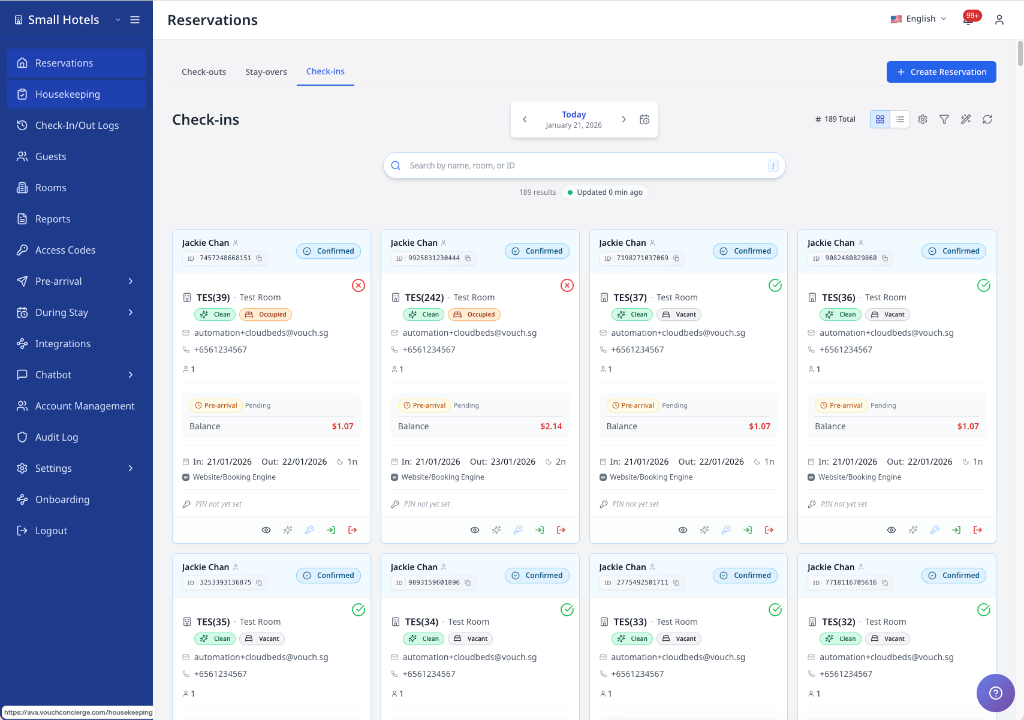
卡片视图显示包含以下内容的预订卡片:
- 客人姓名和确认状态
- 状态旁的信息图标(说明某些入住为何来自昨天)
- 房间号和类型
- 预订无法移动时显示 Do Not Move 锁定徽章
- 启用准备情况检查时显示带悬停提示的房间准备情况图标
- 入住/退房日期和住宿晚数
- 付款余额和提前到店状态
- 客人联系方式
- 预订来源或 PMS 来源名称
卡片上的 Balance Due 是当前仍需支付的金额。 AVA 会从 PMS 总额中扣除已收取的付款,包括符合条件的额外费用。 已全额付款的预订会显示为灰色的零余额。
某些 PMS 连接器现在显示物业或公司名称,而不是通用的预订来源标签。 如果预订来源缺少名称,AVA 可能会回退到关联的 PMS 来源元数据。
将鼠标悬停在房间准备情况图标上,查看房间是否准备就绪。 每张预订卡片都有自己的提示。
表格视图
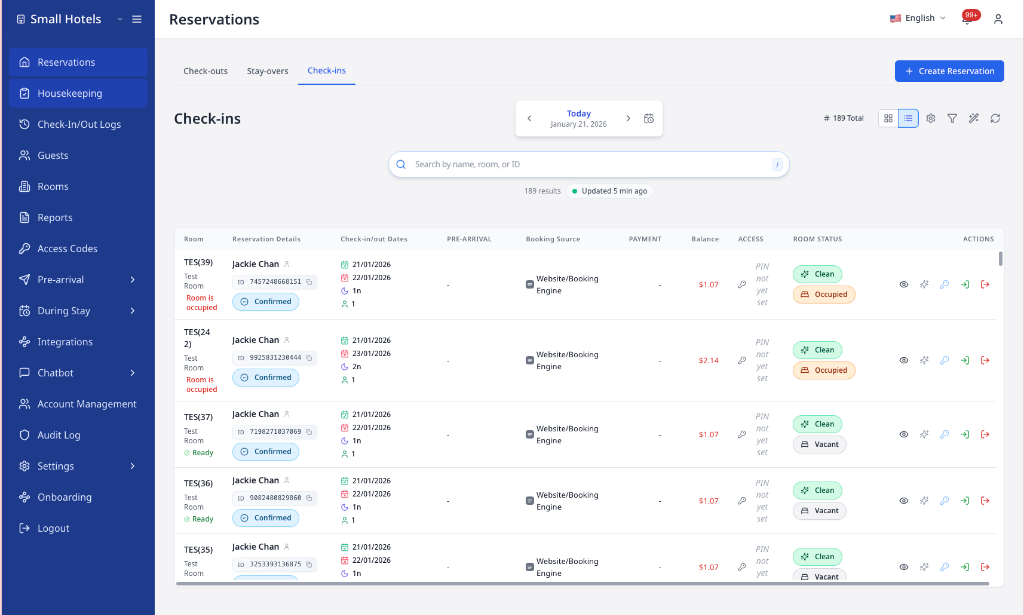
表格视图提供紧凑且可排序的列表,包含以下列:
- 房间号和预订详情
- 入住/退房日期
- 提前到店状态
- 预订无法移动时显示 Do Not Move 锁定徽章
- Assisted Check-In 预订的 ACI 设备流程徽章
- 预订来源或 PMS 来源名称
- 支付信息
- 余额和房态
- 快捷操作按钮
将鼠标悬停时行会高亮显示,方便你跨列查看同一预订。
高亮颜色与标签页对应:
- Check-ins:蓝色高亮
- Stay-overs:绿色高亮
- Check-outs:橙色高亮
如果没有匹配预订,表格会显示空状态图标和提示信息。 如果缺少 PMS 设置,你可能会看到 Settings 和 Retry 按钮,而不是持续刷新。
了解预订付款金额
预订列表和预订详情显示不同的付款数值。
| 数值 | 含义 | 查看位置 |
|---|---|---|
| Balance Due | 客人仍需支付的金额 | 预订详情和付款摘要 |
| Stay Total | PMS 发票总额(含税) | 发票数据加载后,在预订详情中查看 |
| Unavailable total | 列表尚未加载完整发票总额 | 打开 View Details |
对于 Cloudbeds,预付预订的 Balance Due 可能为零,但 Stay Total 不为零。 不要将列表中缺失的总额视为免费入住。 在查看收入或向客人解释费用前,请打开 View Details。
对于 eZee,预订卡使用与详细 folio 相同的已付款和余额数值。 需要查看付款和费用明细时,请打开 View Details。
Cloudbeds 预订列表可能会在发票数据加载后显示入住总额。 预订详情使用 PMS 发票总额(含税)。 Balance Due 仍表示尚未支付的金额。
读取 ACI 设备流程徽章
ACI 设备流程徽章会显示在 Check-ins 中的预订表格行上。 它们帮助你在客人到达前准备正确的设备。
| 徽章 | 含义 | 准备工作 |
|---|---|---|
| ACI · 1 device | 员工和客人的步骤使用同一台设备 | 准备好已验证的员工设备 |
| ACI · 2 devices | 员工步骤和客人步骤使用不同设备 | 准备好已验证的员工设备和配对平板 |
该徽章反映此预订记录的 Assisted Check-In 流程。 该徽章不会显示在 Check-ins 预订卡片上。 它不会显示在 Stay-overs 或 Check-outs 中。 自助、提前到店或流程数据不可用时也不会显示。
查看自助终端和员工标签
ACI 表格行中的设备流程徽章旁边可能会显示额外标签。
| 标签 | 含义 |
|---|---|
| Kiosk: Front Desk A | 显示辅助入住所记录的自助终端别名 |
| Performed by Ain Rohan | 显示执行了归属明确的 ACI 操作的员工 |
AVA 会为每个匹配的自助终端别名和员工账户分别显示一个标签。 对于多房间预订,每个房间行都会显示该预订使用过的所有自助终端别名。 每一行仍保留自身匹配的房间和入住元数据。 这样可以将相关房间行放在一起,同时不会混入其他预订。
例如,使用 Counter 1 和 Counter 2 的行会显示两个自助终端标签。 每一行中的重复自助终端别名只显示一次。
将鼠标悬停在 Performed by 上,可在提示中查看账户 ID。 当标签文字被缩短时,自助终端提示会显示完整的自助终端别名。
自助终端或员工标签缺失
你会看到: ACI 徽章出现,但缺少自助终端或员工标签。
处理方法:
- 确认该行位于 Check-ins 标签页。
- 刷新预订列表。
- 检查匹配的辅助入住记录中是否有自助终端别名或归属明确的员工操作。
当匹配记录没有别名或员工归属信息时,不会显示标签。
ACI 设备流程徽章缺失或异常
你会看到: 某个入住预订没有 ACI 徽章,或设备数量看起来不正确。
处理方法:
- 确认预订使用 Assisted Check-In。
- 刷新 Check-ins 列表。
- 将徽章与当前 ACI 设备配置进行比较。
- 列表刷新后,按照显示的流程准备设备。
如果徽章仍不正确,请携带预订 ID 和截图联系支持团队。
如果看到 Display Preferences(齿轮图标)
你可以更改表格中的行间距。
-
在工具栏中点击 Display Preferences。
-
选择 Comfortable、Cozy 或 Compact。
✓ 行会立即更新。
跨日期搜索
当客人不在当前标签页列表中时,使用 All dates。 只能对一个搜索条件使用该功能。 在预订标签页中,仅输入内容不会打开跨日期下拉菜单。
- 打开 Operations View。
- 选择 Check-outs、Stay-overs 或 Check-ins。
- 在搜索框中至少输入三个字符。
- 点击搜索框内的 All dates。
- 从下拉列表中选择预订。
✓ 你可以打开属于其他日期的预订。 ✓ 三个标签页均可使用相同的搜索流程。 ✓ 你可以按 OTA 或第三方预订号码搜索。
了解结果顺序
AVA 会围绕所选酒店营业日期排列 All dates 结果。 这样可以优先找到今天到店、在住和离店的客人。
| 顺序 | 显示的预订 |
|---|---|
| 1 | 覆盖所选营业日期的入住记录,按最晚入住日期优先 |
| 2 | 即将入住的记录,按最近入住日期优先 |
| 3 | 过去的入住记录,按最近退房日期优先 |
| 4 | 没有入住或退房日期的预订 |
排序只会改变下拉菜单中的顺序。 它不会改变搜索匹配的预订。 如果 AVA 无法使用所选营业日期,则改用入住日期排序。
下拉菜单会将匹配项归入 Selected date 和 Other dates。 在窄屏上,All dates 显示为日历搜索图标。 在 Calendar 中,输入三个字符后下拉菜单会自动打开。 日历搜索使用下拉菜单,因为日历中不显示预订列表。
所选日期列表可能会先于 All dates 搜索完成更新。 如果最近的预订更改未显示,请稍等片刻后再次搜索。
操作按钮
每个预订会根据标签页和当前状态显示操作按钮。按钮同时出现在 Card View(卡片底部)和 Table View(最右列)中。
常用操作(所有标签页)
查看详情
- 图标: Eye
- 功能: 打开预订详情弹窗,其中包含完整客人列表、付款摘要、账单详情和备注
- 显示时机: 始终可用
- 禁用时机: 从不禁用
点击以访问:
- 客人联系方式 (支持复制到剪贴板)
- 完整预订详情和状态
- 房间分配和客房清洁状态
- 付款收取控件
- 更换房间选项(Cloudbeds 和 Opera)
- 编辑预订详情(AVA PMS 或 Mews)
- 更新预订状态(仅限 AVA PMS,入口为 Edit Reservation Details)
复制预到店链接
使用预订弹窗,在电子邮件之外分享客人的实时预到店链接。 该链接会打开与自动邮件发送的相同预到店流程。
Reserved、Unconfirmed 和 Due in 状态的预订均可使用此按钮。 酒店方案必须包含预订和邮件自动化访问权限。 计费访问权限仍在加载时,该按钮会保持隐藏。 复制链接前无需配置自动邮件。
- 打开状态为 Reserved、Unconfirmed 或 Due in 的预订。
- 点击 View Details。
- 点击确认号旁的 Pre-arrival link。
- 将复制的链接粘贴到 WhatsApp、短信或其他获批准的客人沟通渠道中。
✓ 链接包含预订的确认号。 ✓ 客人可以打开链接并开始预到店流程,无需输入确认号。
点击 Pre-arrival link 时,AVA 会创建实时链接。 请将复制的链接视为私密信息,因为它可以访问该预订的客人流程。 打开弹窗时,AVA 不会请求该链接。
发送审核后的预到店邮件
使用预订详情弹窗,为单个预订发送审核后的预到店邮件。 此快捷方式会先选择预订,然后再选择客人和收件人。
- 打开状态为 Reserved、Unconfirmed 或 Due in 的预订。
- 点击 View Details。
- 点击确认号旁的 Send pre-arrival email。
- 选择客人,以及 Saved guest email 或 Alternate address。
- 选择已配置的模板,然后点击 Preview email。
- 检查收件人、主题、入住日期和渲染后的消息。
- 仅在预览符合要求后,点击 Send email。
✓ 发送记录会显示在 Recent sends 和手动邮件历史记录中。 ✓ 已存储的客人联系方式和计划收件人保持不变。
预到店链接可以访问该预订。 发送前请仔细检查备用地址。
清洁房间
- 图标: Sparkles
- 功能: 在 PMS 系统中将房间标记为干净
- 显示时机:
- Check-ins: 已分配房间时
- Check-outs: 已分配房间且客人尚未退房时
- Stay-overs: 已分配房间且房间标记为脏房时
- 禁用时机: 房间已标记为干净
- 禁用时提示: "房间已干净"
更新成功后,AVA 会在后台刷新预订的客房清洁状态。 如果更改的是你正在查看的房间,已打开的预订弹窗会立即更新。 重新打开预订时,仍应看到新的状态。
如果房间中的预订今天应退房,AVA 可能会显示 Housekeeping 使用的当日退房提示。 选择 Check out reservation 先办理退房,或选择 Update status without checkout 只更改房间状态。 关闭提示会取消状态更新。
Check-ins 标签页操作
管理 PIN / 编码钥匙卡
- 图标: Key
- 功能:
- Smart Locks: 生成并分配门锁 PIN 码
- Keycard (Automatic): 编码实体钥匙卡
- Keycard (PMS): 触发 PMS 钥匙卡编码
- Locker Codes: 生成储物柜访问码
- 样式: Primary (blue button)
- 显示时机: 始终显示
- 禁用时机:
- 未分配房间
- 智能锁未连接到房间
- 未配置 PMS 钥匙卡编码器
- 加载状态: AVA 准备或生成房间访问权限时,按钮保持可见且禁用。
对于使用中的手动钥匙卡房间,AVA 会询问新卡的使用方式:
- 选择 Encode DUPLICATE keycards 以保留现有卡片有效。
- 选择 Encode NEW keycards 替换当前有效的钥匙卡组。
AVA 创建钥匙卡时会使用所选房间和当前有效的钥匙卡组。 如果 AVA 无法识别钥匙卡组,请使用 Try again 或 Access Codes 进行选择。 只有确实要替换之前的卡片时,才选择 Start a new set。
标记为 Due Out 的客人在退房前仍算作在住。 AVA 会继续为符合条件的待退房房间提供此房间访问操作。 在预订标签页和活动视图中,同样适用“新卡/重复卡”的选择。
如果预订行没有可用的房间值,AVA 会在编码前通过 PMS 确认房间。 有效的长型或类似内部值的 PMS 房间标识仍然有效。 你无需编辑或缩短房间标识。
按钮行为会根据 Settings → Room Access 配置而变化。
为客人办理入住
- 图标: Log In
- 功能: 将客人标记为已入住,并更新 PMS 中的状态
- 样式: Success (green button)
- 显示时机: 仅在客人尚未入住前显示
- 禁用时机:
- 客人已办理入住
- 未分配房间
- 禁用时提示:
- 已办理入住:“Already checked in”
- 未分配房间:“必须分配房间”
客人必须先分配房间才能办理入住。请先在 PMS 中分配房间。
为上一位客人办理退房
- 图标: Log Out (Red)
- 功能: 为仍占用该房间的当前客人预订办理退房
- 样式: Danger (red button)
- 显示时机: 已分配房间且当前预订尚未入住
- 禁用时机: 当前客人已办理入住
当到店预订因房间仍被占用而受阻时使用此操作。 AVA 会为关联该房间的在住预订办理退房。
退房成功后,Streamliner 会再次刷新预订。 如果房间看起来仍被占用,请再次点击 Refresh。 PMS 确认退房后,应显示更新后的房间状态。
Check-outs 标签页操作
办理退房
- 图标: Log Out
- 功能: 为客人办理退房并更新 PMS 中的状态
- 样式: Primary (blue button)
- 显示时机: 始终显示在 Check-outs 标签页中
- 禁用时机:
- 客人已办理退房
- 未分配房间
对 Check-outs 中选定的预订行使用此操作。 它会继续为离店客人提供直接的预订退房流程。
如果行数据已过期,AVA 会在发送退房请求前验证预订状态。 当其他退房操作已经完成时,Cloudbeds 预订会显示“该预订已办理退房。” 继续处理下一位离店客人前,请点击 Refresh。
Stay-overs 标签页操作
Stay-overs 包含 View Details、Clean Room(房间脏时)和 Manage Pin / Encode Keycard 按钮。
此标签页中的 Manage Pin / Encode Keycard 按钮与 Check-ins 版本的工作方式相同。 客人入住期间需要额外钥匙时,选择重复钥匙卡。 仅当旧钥匙卡必须失效时,才选择新钥匙卡。
预订详情
| 部分 | 显示信息 |
|---|---|
| Guest Information | 客人数量、主要客人优先、客人徽章、姓名、电子邮件、电话、出生日期和其他客人 |
| Reservation Details | 入住/退房日期、住宿晚数、状态、确认号和 OTA 号码(如有) |
| Room Information | 房间号、类型、客房清洁状态 |
| Payments | 应付余额、押金和房费详情、folio 摘要、收款状态 |
| Notes | 客人请求、内部员工备注和 PMS 备注 |
| Activity | 按日期分组的预订更改及更改前后值,包括房间锁、覆盖范围提示、刷新状态和房间访问权限生成 |
预订中的所有客人现在都会显示在弹窗中。 主要客人显示在最前面。 徽章用于标识主要客人和其他客人。 此部分仅在主要客人行中显示出生日期。 如果客人姓名缺失,Streamliner 会在可用时从客人资料中补充。
AVA 会将预订级成人和儿童总数与房间级人数分开显示。 对于多房间预订,每个房间会在可用时使用自己的 PMS 人数。 如果房间级人数缺失,AVA 不会将完整预订总数复制到每个房间。 对于房间级人数缺失的单房间预订,AVA 会使用预订总数。
保持操作针对所选房间
当预订包含多个房间时,请打开要处理的房间行或卡片。 即使新的预订详情加载完成,预订弹窗仍会保持选中该房间。
-
在 Operations View 中找到多房间预订。
-
打开所需房间的行或卡片。
-
确认弹窗显示的是所选房间号。
-
使用 Edit、Check Out 或 Manage Pin / Encode Keycard。
✓ AVA 只会对所选房间执行操作。 ✓ 明确关联到其他房间的客人不会受到此操作影响。 ✓ 预订的确认号和共享预订身份保持不变。
AVA 会保留当前房间选择,而不会默默切换到其他房间。 请刷新预订,然后选择可用房间再继续。
Furama 多房间入住会为每个房间显示其房间号和预订详情。 更换房间、办理入住、办理退房或更新客人前,请打开该房间的行或卡片。 AVA 会将操作应用于所选房间。
在 eZee 中添加其他客人时,Streamliner 要求填写 Email 和 Document Number。 请参阅在 eZee 中添加其他客人。
锁定徽章表示预订应保留在当前房间。 你会在 Card View、Table View 和预订弹窗中看到相同的徽章。 对于 Cloudbeds,该徽章可能来自 Cloudbeds 中设置的房间锁定。 该锁定会阻止 AVA 自动重新分配房间。 员工批准手动更换房间前,请先在 Cloudbeds 中清除锁定。
对于 Cloudbeds 预订,Streamliner 会将实际的主要客人放在最前面, 即使 Cloudbeds 在房间记录中显示的是其他客人也是如此。 这样可以使表格和弹窗与预订所有者保持一致。
弹窗中的电子邮件、电话和出生日期现在使用堆叠标签。 这样可以让较长的联系方式在窄卡片中保持易读。
查看预订活动
使用 Activity 查看弹窗中的最新预订更改,包括房间访问事件。
- 打开预订详情弹窗。
- 滚动到 Activity。
- 查看按日期分组的条目。
- 展开条目以比较更改前后的值。
- 如果预计有更新的变更,请点击 Refresh。
✓ 你可以在一个位置查看预订、房间分配、房间锁、备注、客人、状态、付款和房间访问更改。
AVA 使用酒店配置的时区显示每个 Activity 时间戳。 它也使用同一时区对条目和日期标题进行分组。 浏览器区域设置仍控制日期和时间格式。 这样可以确保员工在其他时区工作时,Activity 日期保持一致。
智能锁 PIN、钥匙卡编码和储物柜代码更新也会显示在这里。 你可以看到访问方式、房间或锁、有效期和钥匙数量。 这里不会显示 PIN 或储物柜代码的具体值。
识别钥匙卡发放活动
成功的钥匙卡活动现在会说明发卡的原因和方式。
| 活动详情 | 显示内容 |
|---|---|
| 初次发放 | 常规钥匙卡编码摘要 |
| 补发 | 针对补发的摘要 |
| 客人自助服务 | Guest 操作者和 Guest self-service 来源 |
| 员工编码 | 员工来源信息,以及可用时显示员工姓名 |
使用这些详情可以区分首次发卡和遗失钥匙卡后的补发。 没有发放详情的旧活动会继续保留原有的通用摘要。
查看 Activity 中的员工姓名
新的员工变更可能会在 Activity 中显示已登录员工的个人资料姓名。 这包括预订变更、房间操作、备注和受支持的访问操作。 AVA 绝不会将电子邮件地址显示为员工姓名。
较早的活动记录保持不变,也不会补录姓名。 如果 AVA 无法读取个人资料,该条目可能会显示通用员工标签。
活动面板会说明支持哪些更改类型。 如果 PMS 支持原生活动记录,Streamliner 会将这些条目合并到同一视图中。
对于 Opera,AVA 会纳入最近 90 天的原生预订活动。 该时间窗口在 UTC 时间的明天结束,因此近期活动在不同时区仍保持可见。 Opera 活动记录是部分数据,取决于 Opera 实际记录的内容。 它不是所有 AVA 或 PMS 更改的完整历史记录。 没有偏移量的 Opera 时间戳使用物业配置的时区。 AVA 会在分组并显示到 Activity 面板前,将其转换为正确的时间点。 已经包含偏移量的时间戳会保留该偏移量的含义。
如果尚无已跟踪的更改,你会看到空状态。 如果加载失败,请刷新弹窗并重新打开预订。
复制客人联系方式
- 打开预订详情
- 将鼠标悬停在电子邮件或电话号码上
- 点击复制图标
- 复制成功后会显示确认信息
电子邮件和电话值会保持易读,不会撑开卡片。 你仍可复制完整地址。
在预订卡片上,直接点击电话号码即可复制。
编辑预订详情(AVA PMS、Mews 或 Furama)
使用此功能更新日期、客人数或 OTA 号码。
- 打开预订详情弹窗。
- 在 Reservation Details 中点击铅笔图标。
- 更新 Check-in、Check-out、Adults、Children 或 OTA Number。
- 点击 Save。
✓ 预订会更新,弹窗关闭,状态标记保持同步。
Furama 支持更改入住日期、成人数、儿童数、房间类型和房间号。 Furama 不应用 OTA 号码或自定义字段。 编辑响应会标识未应用的字段。
当预订具有确认号时,AVA PMS、Mews 和 Furama 支持编辑预订。
取消或恢复预订
Streamliner 会根据已连接 PMS 的能力处理取消。 支持原生取消时,由 PMS 执行提供商特定的取消操作。 如果 PMS 不支持原生取消,Streamliner 会改为更新预订状态。 可用性取决于已连接 PMS 报告的取消支持情况。 恢复预订仍仅适用于 AVA PMS。
- 打开预订详情弹窗。
- 在 Reservation Details 中点击铅笔图标(Edit Reservation Details)。
- 在 Status 中选择:
- Cancelled(取消)
- Reserved(恢复)
- 如果预订使用该状态,则选择 No Show
- 点击 Save。
✓ 预订状态会在 AVA 中更新,状态标记保持最新。
取消预订会移除房间分配。恢复预订后房间仍保持未分配状态。
对于已入住、应退房或已退房的入住记录,PMS 可能拒绝取消。 AVA 会保留 PMS 返回的原因,而不是显示通用服务器错误。 对于在住记录,请先在 PMS 中办理退房,再执行取消。 对于已完成的入住,请遵循 PMS 流程,然后刷新 AVA。 请参阅 PMS 拒绝操作时显示冲突。
支付摘要和 folio 详情
从预订详情弹窗查看押金、房间付款和 PMS folio 数据。 当 folio 可用时,Balance Due 使用 PMS folio 摘要。 匹配的隐藏政策会遮盖住宿费及相关税费。 Mews v2 的豁免政策可以清除完整发票中的费用行。 Opera 的豁免政策会减少房间套餐费用及已识别的房间套餐组成项。 入住前预计的 Opera 房间费用及其费率信息税费会一并豁免。 单独入账的 Opera 额外费用及其税费仍可能需要支付。 预计或不完整的账单行可能影响显示的金额。
实时 folio 为空时,Streamliner 使用预订快照。 当 AVA 无法验证 PMS 政策响应时,它也会保留已存储的快照。 这包括之前已豁免的快照。 已验证的政策结果可以替换过期快照。 如果实时余额与 PMS folio 不同,请在收款前比较发票行。 提供方完成同步后再刷新。
如果 Cloudbeds v3 将渠道收款预订标记为已豁免,Streamliner 会将 PMS 发票显示为已豁免。 该次入住的应付房费总额可能降为零。
对于 Cloudbeds 多房间入住,Streamliner 使用每个房间自己的子预订加载该房间的账单。 这样,2 号及之后的房间也能正常打开 folio 详情和付款总额。
Furama 将每个房间存储为独立的 PMS 订单。 AVA 会合并所有房间的费用和付款,计算整次入住的余额。 记账付款或 folio 费用前,请选择该房间的行或卡片。 如果无法识别房间,AVA 会停止操作。
查看支付摘要
- 打开预订详情弹窗。
- 找到 Payments 部分。
- 查看 Balance Due、Deposit Payment 和 Room Payment 详情。
✓ folio 摘要加载完成后,顶层余额会更新。
ℹ️ 如果 folio 详情不可用,Streamliner 会保留快照余额。
连接 Stripe 后,选择 View payment in Stripe 外部链接图标。 该图标显示在付款金额或 Transaction ID 旁边。 它会在新的 Stripe 标签页中打开匹配的付款记录。 链接使用已连接 Stripe 的 Live 或 Test 环境。 对于非 Stripe、不完整或不明确的付款摘要,不会显示链接。
展开 folio 详情
- 在 Payments 中展开 Folio Details。
- 查看以下部分的总额:
- 房费
- Extras
- Taxes
- Deposits
- Payments
- 检查 Fidelity 徽章、Last synced 和 Source 字段。
✓ 重复的房费行会通过辅助标签保持区分。
在详细账单中,隐藏行显示为 ✅,但 Balance Due 仍显示数值。
某些物业改用简化的账单摘要视图。
此时你会看到隐藏的房间和税费行。
你还会看到 Extras 分隔线。
额外项目按代码分组。
房费、Tax 和总额仍保持可见。
如果 PMS 不支持 folio 详情,Streamliner 会禁用 folio 切换开关。 同时显示提供商返回的原因。
刷新 folio 数据
- 点击 folio 面板中的 Refresh。
- 等待更新后的摘要加载。
- 如果面板仍显示错误,请重试。
✓ folio 摘要会更新,且不会关闭预订。
收取押金付款
- 在 Deposit Payment 中点击 Capture Payment
- 查看确认消息
- 点击 Capture Payment 进行确认
✓ 收款完成后,弹窗会显示 Payment captured。
如果收款仍在处理中,请稍等片刻,状态会更新。
更换房间(Cloudbeds、Opera、Mews、AVA 或 Furama)
对于使用 Cloudbeds、Opera、Mews、AVA 或 Furama 的酒店,你可以在退房前更换房间分配。 支持的 PMS 集成也可以在客人入住后移动在住客人。 即使员工的 CCI 流程未完成或缺失,也可以找到 PMS 中的在住客人。
- 打开预订详情
- 点击 Change room
- 搜索或筛选以查找房间
- 使用 Move room 进行筛选:
- Allow move room 显示可以移动的房间
- Do not move room 显示应避免的房间
- All 显示所有房间
- 如果房间有提醒,将鼠标悬停在 Alert 三角图标上查看详情
- 选择新房间
- 点击 Confirm room change
Furama 房间候选项使用当前 PMS 房间状态以及与入住时间重叠的预订。 AVA 还会在发送分配请求前验证所请求的房间类型。
查看 Opera 换房详情
查看 Opera 换房时,AVA 会显示影响当前预订的相关信息。
| 详情 | 含义 | 应采取的操作 |
|---|---|---|
| RTC | Opera 夜间房价中的 Room Type to Charge | 升级后确认客人仍保留已预订的付费房型 |
| Assigned room type | 当前占用的实际房型 | 确认换房前将其与 RTC 对比 |
| Do Not Move | 至少一位占用者的房间分配已锁定 | 除非在 Opera 中解除锁定,否则不要移动该占用者 |
| Alert | 该占用者存在 Opera 提醒 | 将鼠标悬停在提醒图标上查看提醒文本 |
| Membership | 该占用者的主要忠诚度计划和等级 | 查看会员标签,并将鼠标悬停以查看所有会员资格 |
这些详情仅用于显示。 AVA 不会更改付费房型,也不会覆盖 Opera 的房间锁定。
对于有多位占用者的房间,只要任何一位占用者被锁定,AVA 就会显示 Do Not Move。 房间有多位占用者时,RTC 和提醒数量可能不会显示。 批准复杂换房前,请在 Opera 中查看每笔预订。 当 PMS 提供忠诚度数据时,占用者卡片会显示带星号的主要会员资格。 +N 数量和悬停文本会显示其他会员资格。 没有会员资格时,卡片会显示 No loyalty membership。
AVA 会在释放或分配房间前检查 PMS 的能力。 更换已分配房间或占用已分配的目标房间时同样适用。 如果不支持,AVA 会显示 PMS 返回的原因,并且不会更改房间。
AVA 会要求 PMS 在完成移动前确认房间和房型。 如果 PMS 因可用性发生变化而拒绝,AVA 会保留当前分配。
当预订已办理入住时,AVA 会使用 PMS 支持的更换房间操作。 如果 PMS 支持该流程,旧房间会在移动过程中释放。 对于 Mews,状态为 Started 的预订只能移入状态为 Inspected 的房间。 确认移动前,请检查目标房间的客房清洁状态。
使用 AVA PMS 的可入住客房选项
对于 AVA PMS,房间列表可以查找已准备好的房间、同房型换房和更高房型。 AVA 会在显示房间选项前检查整个住宿期间。 升级房型时,预订的房价保持不变。
如果选定的房间属于另一笔预订,AVA 可以一起规划所需的房间移动。 AVA PMS 会将该计划作为一个原子操作执行。 如果任何必要的移动失败,AVA 会将受影响的预订保留在原房间。
如果只输入房间号,AVA 会先根据当前 PMS 数据解析该房间。 这样可以避免过期或含义不明确的房间号更改错误的预订。
如果浏览器关闭或结果不明确,请重新打开预订并重试待处理的房间操作。 AVA 会使用操作回执恢复最近一次已确认的分配。
如果预订已经办理入住,AVA 会使用 PMS 支持的换房操作。 当 PMS 支持该流程时,旧房间会作为换房的一部分释放。 对于 AVA PMS,普通换房会通过一次更新替换房间分配。 如果 AVA PMS 因目标房间不可用而拒绝,AVA 会让客人留在当前房间。 换房失败时,客人不会变成未分配房间的状态。 对于 Mews,状态为 Started 的预订只能移入状态为 Inspected 的房间。 确认换房前,请检查目标房间的客房清洁状态。
完成入住后的更换房间
客人已经办理入住时,请使用此流程。 当客人拒绝分配的房间时,请使用专用的员工恢复流程。
无需重新办理入住即可移动客人。 在 PMS 确认目标房间前,让客人留在原房间。
- 从 Operations View → Stay-overs 打开预订。
- 搜索已完成入住且当前仍在住的预订。
- 选择客人并查看当前房间。
- 选择可用的目标房间。
- 查看源房间号和目标房间号。
- 点击 Confirm room change。
- 等待 AVA 从 PMS 确认目标房间。
AVA 只有在 PMS 确认后才会在本地报告房间已移动。 移动等待期间,原房间的访问权限仍保持有效。 如果浏览器关闭,请重新打开 Room Change 以恢复待处理的操作。
Room Change 可以找到未完成本地 CCI 流程的 PMS 在住客人。 AVA 会保留已有的 CCI 记录和恢复历史。 如果客人直接通过 PMS 办理入住,AVA 不会创建已完成的 CCI 流程。
待入住预订使用正常的入住前房间重新分配流程。 只有在请求的房间被 PMS 确认为在住状态后,才适用在住恢复例外规则。 已取消和已退房的住店记录仍无法进行入住后操作。
完成可选的恢复操作
PMS 确认目标房间后,请查看可选的恢复操作。 无需等待每项可选操作完成,也可以完成员工恢复流程。
| 可选操作 | 操作方法 |
|---|---|
| 客人文件 | 按照常规进度流程,为每位已入住客人重新上传文件。 |
| 客人信息 | 更正客人详情,然后让 AVA 将更改同步到 PMS。 |
| 登记卡 | 使用 PMS 确认的目标房间重新生成现有登记卡。 |
| 替换钥匙卡 | 开始替换编码,等待编码器确认实体卡。 |
房间移动得到确认且员工操作完成后,请使用 Complete。 未完成的可选操作会继续显示,供后续处理。
然后按照 AVA 显示的房间访问说明操作:
- 为新房间发放新的钥匙卡或配置的房间访问权限。
- 使旧钥匙卡或房间访问权限失效。
- 在客人离开前台前,将新访问权限交给客人。
在每种设置中,更换房间都不会自动替换实体访问权限。 发放新访问权限后,请使旧访问权限失效,避免客人继续进入原房间。
入住后更换房间的后续结果
当 PMS 更换成功但后续步骤需要处理时,AVA 会显示警告。 发放新钥匙前,请检查入住记录。
| 你会看到 | 含义 | 处理方法 |
|---|---|---|
| 房间更换成功 | PMS 和后续步骤均已完成 | 发放新访问权限并使旧访问权限失效 |
| 房间已更换,后续步骤需要处理 | PMS 已完成更换,但同步或登记卡生成需要检查 | 打开入住记录,解决警告后再发放访问权限 |
| 房间更换待处理 | AVA 正在等待 PMS 或编码器确认 | 保持原房间访问权限有效;如有需要,重新打开恢复流程 |
| 房间更换失败 | AVA 无法完成 PMS 更换 | 让客人留在当前房间,解决显示的错误后重试 |
在 AVA 确认更换成功或要求你手动处理前,不要为新房间发放访问权限。
弹窗会显示 Moving...,并禁用 Confirm room change、Cancel 和房间选择。 移动完成前,重复点击会被忽略。
房间号旁的锁图标表示“Do not move room”。 请在移动或交换预订前检查 PMS 中的锁定。 对于 Cloudbeds,该锁定会保护自动重新分配。 员工批准手动更换房间时,请在 Cloudbeds 中清除锁定。
仅当 PMS 支持已分配预订交换时,选择已占用的房间才会交换两位客人。 Furama 支持将预订移动到空房间,但不支持交换两个已分配预订。 当源预订未分配房间时,也不能占用已分配的目标房间。 确认前请查看警告。
更换房间时被拒绝分配
你会看到: 更换房间弹窗显示房间或房型不可用。
原因: 其他预订、停用房间时段或另一笔预订可能正在使用该房间。 所请求的日期在该房型中也可能已没有可用房间。
处理方法:
-
在 PMS 中检查预订日期和房间分配。
-
选择其他可用房间或房型。
-
再次点击 Confirm room change。
-
PMS 接受更换后,刷新 Streamliner。
✓ 被拒绝的更换会让客人保留在原房间。
互换两个已分配的预订时,如果第二次移动失败,AVA 会将整个互换操作回滚。 这样可以防止目标预订单独占用源房间。
琥珀色三角形表示已分配的预订存在提醒。 将鼠标悬停即可查看提醒代码、区域和说明。 如果提醒代码配置为阻止换房,AVA 会让该占用者保持原位。
将客人移至其他房间时,其上传的护照、自拍照、签名和登记卡会随客人保留。 更换后使用新房间的预订详情查看这些文件。
编辑预订详情(AVA PMS、Mews 或 Furama)
需要更正 AVA、Mews 或 Furama 预订的日期或客人数时,请使用此功能。 你也可以在同一弹窗中打开或关闭 Do Not Move。
-
打开预订详情弹窗。
-
在 Reservation Details 中点击铅笔图标(Edit Reservation Details)。
-
更新以下字段:
- Check-in
- Check-out
- Adults 和 Children
- OTA Number(可选)
-
点击 Save。
✓ 更新后的详情会显示在弹窗中。
取消或恢复预订
Streamliner 通过已连接的 PMS 的能力处理取消。 支持原生取消时,由 PMS 执行提供商特定的取消操作。 如果 PMS 不支持原生取消,Streamliner 会改为更新预订状态。 可用性取决于已连接 PMS 报告的取消支持情况。 恢复预订仍仅适用于 AVA PMS。 取消会移除房间分配。恢复会重新启用预订,但不会分配房间。
-
打开预订详情弹窗。
-
在 Reservation Details 中点击铅笔图标(Edit Reservation Details)。
-
在 Status 中选择 Cancelled(取消)或 Reserved(恢复)。
-
点击 Save。
✓ 状态会在弹窗中更新。
如果房间显示 Unassigned,请在 PMS 中分配房间,然后在 Streamliner 中点击 Refresh。
对于已入住、应退房或已退房的入住记录,PMS 可能拒绝取消。 AVA 会保留 PMS 给出的原因,而不是显示通用服务器错误。 对于在住记录,请先在 PMS 中办理退房,再执行取消。 对于已完成的入住,请遵循 PMS 流程,然后刷新 AVA。 请参阅 PMS 拒绝操作时显示冲突。
数据过期警告
如果数据超过 30 分钟,页面会显示黄色横幅:
“数据可能已过期。上次更新于 [time ago]。”
点击工具栏中的 Refresh 获取最新预订。
如果 Cloudbeds 返回访问错误,请等待几秒后再点击 Refresh。 AVA 会短暂暂停重复重试,避免同一故障不断发生。 等待期间,页面会保持当前列表可见。
如果在 5 秒内再次点击 Refresh,Streamliner 可能会暂时显示之前的列表。 等待 5 秒后,再次点击 Refresh。
启用搜索或筛选条件时,结果为空可能是正常情况。 AVA 会保留该空结果,不会强制刷新数据。 未筛选的空标签页仍会在需要时刷新。
故障排查
未显示预订
你会看到: 预期的客人未显示在列表中。
处理方法:
- 检查所选营业日期和标签页。
- 清除搜索标签和当前筛选条件。
- 输入一个搜索条件,然后点击 All dates 查找其他日期的匹配项。
- 稍等片刻,等待页面自动加载刷新完成。
- 如果未筛选的列表仍为空,请点击 Refresh。
缺少预到店链接
你会看到: 确认号旁找不到 Pre-arrival link。
处理方法:
- 确认预订状态为 Reserved、Unconfirmed 或 Due in。
- 确认当前正在查看预订详情弹窗。
- 等待计费信息完成加载。
- 请管理员确认酒店方案包含预订和邮件自动化访问权限。
- 刷新预订列表,然后重新打开预订。
此按钮不要求配置自动预到店邮件。
无法复制预到店链接
你会看到: 链接无法复制,或 AVA 表示链接不可用。
处理方法:
- 确认预订包含确认号。
- 关闭并重新打开预订详情弹窗。
- 再次点击 Pre-arrival link。
- 检查互联网连接,然后重试。
如果问题仍然存在,请向支持团队提供确认号和错误消息。
Stay-overs 显示了不同日期
你会看到: Stay-overs 显示了错误日期的预订。
原因: 所选酒店营业日期可能与 UTC 今天不同。
处理方法:
- 在 Settings → Essentials → Hotel Basic Details 中确认酒店的 Timezone。
- 返回 Operations View → Stay-overs。
- 选择所需的营业日期。
- 点击 Refresh,等待更新完成。
✓ 列表应显示所选酒店营业日期的在住客人。
搜索未显示任何行
你会看到: 搜索或筛选条件已启用,但所选标签页没有行。
处理方法:
- 确认所选营业日期。
- 检查客人是否属于当前标签页。
- 清除搜索标签或筛选条件,以显示完整日期范围内的列表。
- 使用一个搜索条件,然后点击 All dates 从其他日期打开预订。
Calendar 数据似乎已过期
你会看到: PMS 更改后,日历仍显示较旧的房间时间线。
原因: Calendar 数据来自共享预订缓存。 PMS 的最新更新可能需要片刻才会显示。
处理方法:
-
点击日历中的 Refresh。
-
如果刚保存了 PMS 更改,请等待一分钟。
-
刷新完成后重新打开 Calendar。
✓ 时间线应与最新缓存的预订数据一致。
预订显示在入住列表中,但入住日期是昨天
你会看到: 某个预订显示在 Check-ins 中,但其入住日期是昨天。
原因: 客人可能会在午夜后到达。Streamliner 会将预订保留在今天的列表中。
检查:
- 状态徽章旁显示蓝色信息图标
处理方法:
- 将鼠标悬停在信息图标上查看备注
- 客人到达后正常办理入住
- 如果预订看起来不正确,请点击 Refresh 并在 PMS 中确认日期。
全名搜索无匹配结果
你会看到: 按全名搜索没有返回结果。
处理方法:
- 以带空格的
First Last格式输入姓名 - 删除中间名或称谓等多余词语
- 尝试只输入一个姓名,以匹配名字或姓氏
- 如果 ACI 覆盖操作替换了预订姓名,请改为搜索原姓名
- 当预订不在所选营业日期内时,使用 All dates
需要设置 PMS
你会看到: 页面显示 Settings 按钮、Retry 按钮或需要完成设置的提示。 对于 Opera 酒店,该消息可能显示为“Opera 未配置此操作。”
原因: 所选 PMS 已启用,但尚无可用凭据。
处理方法:
-
打开 Settings → Essentials → PMS Integration。
-
确认所选 PMS 正确。
-
添加缺失的凭据,或重新启用 PMS。
-
保存更改。
-
返回 Operations View,然后点击 Retry 或 Refresh。
✓ PMS 设置完成后,预订列表应正常加载。
结账提示预订已退房
你会看到: 你点击 Check Out,但 AVA 显示“该预订已办理退房。”
原因: 该预订已提前完成退房,或该行曾短暂过期。
处理方法:
-
不要再次点击 Check Out。
-
在 Operations View 中点击 Refresh。
-
如有需要,在 Cloudbeds 中确认预订状态。
-
继续处理下一位离店客人。
✓ AVA 不会发送第二个退房请求。
活动记录为空
你会看到: Activity 面板没有条目,或显示覆盖范围有限的提示。
处理方法:
- 刷新预订详情弹窗。
- 确认预订存在已跟踪的更改。
- 如果更改刚刚发生,请等待 PMS 同步。
- 检查你的 PMS 是否支持该预订的原生活动记录。
操作针对错误房间
你会看到: 编辑、退房或房间访问操作似乎针对另一个房间。
处理方法:
- 在保存、付款或编码访问权限前停止操作。
- 关闭预订弹窗。
- 重新打开准确的房间行或卡片。
- 确认弹窗中的房间号。
- 再次执行操作。
AVA 会在新的预订详情到达时保留所选房间。 如果完成这些步骤后操作仍针对其他房间,请联系支持团队。
活动日期或时间看起来不正确
你会看到: Activity 条目显示在错误日期,或提前或延后数小时。
处理方法:
- 前往 Settings → Essentials → Hotel Basic Details。
- 确认 Timezone 与物业当地时区一致。
- 如果更改了设置,请保存。
- 刷新预订详情弹窗。
AVA 使用酒店时区显示 Activity 时间戳并分组日期。 浏览器区域设置只会改变时间戳的格式。 保存时区更改后,请刷新预订弹窗,以使用最新的物业时区。 对于 Opera,没有偏移量的时间戳会按物业当地时间读取。 如果时间仍不正确,请携带确认号和 Opera 审计时间联系支持团队。
侧边栏中未显示 Calendar
你会看到: Calendar 项缺失。
处理方法:
- 确认你的账户拥有预订读取权限。
- 更新角色后刷新页面。
- 如果仍然隐藏,请管理员核实访问权限。
移动端 Agenda 列表被截断
你会看到: 在 Calendar → Agenda 中,iOS 或 Android 上无法触及列表底部项目。
处理方法:
- 下拉刷新,或重新加载页面一次。
- 在白色日历卡片内滚动,而不是滚动整个浏览器页面。
- 如果仍无法触及底部,请关闭并重新打开 Calendar。
Check In Guest 按钮被禁用
你会看到: Check In Guest 按钮呈灰色。
检查:
- 客人已分配房间
- 客人尚未办理入住
- 预订显示正确状态
处理方法:
- 在 PMS 中确认房间分配
- 等待同步(通常需要 2–5 分钟)
- 点击工具栏中的 Refresh
Manage Pin / Encode Keycard 按钮被禁用
你会看到: 钥匙按钮呈灰色,或显示“必须分配房间”。
处理方法:
- 确认房间已在 PMS 中分配。
- **对于 Smart Locks:**确认锁已在 Settings → Room Access 中配置。
- **对于 Keycard:**确认编码器已在 Settings → Room Access 中配置。
- 点击 Refresh 以同步最新预订和房间访问数据
无法确定预订房间
你会看到: 选择 Manage Pin / Encode Keycard。
处理方法:
- 在 Operations View 中点击 Refresh。
- 确认房间已在 PMS 中分配。
- 再次选择 Manage Pin / Encode Keycard。
- 如果房间仍已分配但消息再次出现,请联系支持团队。
AVA 接受有效的长型或类似内部值的 PMS 房间标识。 不要手动更改房间标识。
Manage Pin / Encode Keycard 长时间显示加载状态
你会看到: 钥匙按钮保持可见但处于禁用状态,并显示加载指示器。
处理方法:
- 等待几秒。AVA 可能正在准备房间访问操作。
- 点击工具栏中的 Refresh,获取最新的房间访问快照。
- 在同一预订行上重试 Manage Pin / Encode Keycard。
清洁房间按钮被禁用
你会看到: Sparkles 按钮呈灰色或提示显示 "房间已干净."
处理方法:
- 房间已在 PMS 中标记为干净
- 除非 PMS 状态不正确,否则无需操作
- 如有需要,在 PMS 中更新房间状态,然后点击 Refresh。
未显示 Check Out Previous Guest 按钮
你会看到: 预期的红色 Check Out Previous 按钮未显示。
检查:
- 你位于 Check-ins 标签页
- 当前客人尚未办理入住
- 房间已分配
隐藏原因: 只有当前一位客人仍占用新客人需要的房间时,才会显示此按钮。
未显示房间号
你会看到: 房间显示为 “Unassigned”。
处理方法:
- PMS 中尚未分配房间
- 在 PMS 中分配房间并等待同步
更换房间按钮不可用
你会看到: “你的 PMS 不支持更换房间。”
检查:
- 你的 PMS 是 Cloudbeds、Opera 或 Furama
- 客人尚未办理退房
- 预订已分配房间
Room Change 找不到 PMS 在住预订
你会看到: Room Change 提示预订尚未完成入住。
原因: AVA 可能显示旧的查找结果,或者 PMS 尚未确认请求的房间处于在住状态。
处理方法:
-
确认 PMS 中请求的房间状态为 INHOUSE、CHECKED_IN 或 DUE_OUT。
-
再次打开员工的 Room Change 入口。
-
使用预订号或客人详情搜索。
-
如果预订包含多个房间,请选择准确的在住房间。
-
继续前确认当前房间和目标房间。
✓ 无需完成新的 CCI 流程即可继续。
如果住店记录为 Due In,请使用正常的入住和房间分配流程。 如果住店记录已取消或已退房,AVA 不会启用入住后恢复功能。
Do Not Move 阻止更换房间
你会看到: 房间显示锁定徽章,或移动操作被阻止。
处理方法:
- 打开预订详情弹窗。
- 如果客人可以移动,请关闭 Do Not Move。
- 保存更改并刷新页面。
- 如果锁定来自 PMS,请先在 PMS 中清除。
入住后更换房间需要后续处理
你会看到: AVA 提示房间已更换,但后续步骤需要处理。
处理方法:
- 从 Operations View → Stay-overs 打开预订。
- 打开 View Details 并检查入住记录。
- 确认 PMS 显示新房间。
- 如果已有登记卡,确认登记卡显示新房间。
- 只有记录正确后,才发放新房间访问权限。
- 使旧钥匙卡或访问方式失效。
如果 PMS 显示新房间,但入住记录或登记卡仍不正确,请联系支持团队。
更换房间仍处于待处理状态
你会看到: 更换房间显示为待处理,或原房间的访问权限仍保持有效。
处理方法:
- 等待 PMS 确认目标房间。
- 等待期间不要使原房间的访问权限失效。
- 重新打开 Room Change 以恢复该操作。
- 如果未收到确认,请检查 PMS 和编码器状态。
如果 PMS 已确认目标房间,但 AVA 刷新后仍显示待处理,请联系支持团队。
AVA 目标房间不可用
你会看到: 由于所选目标房间不可用,AVA 拒绝更换房间。
处理方法:
-
让客人留在当前房间。
-
在 AVA PMS 中检查目标房间的状态和预订。
-
选择其他可用房间,或在 AVA PMS 中解决冲突。
-
刷新 Streamliner。
-
再次尝试 Change room。
✓ 更换失败不会释放客人当前的房间。
新房间访问权限尚未准备好
你会看到: 房间已更换,但 AVA 无法开始新钥匙流程。
处理方法:
- 确认新房间显示在 PMS 中。
- 刷新 Operations View。
- 从 Stay-overs 打开预订。
- 为新房间开始 Manage Pin / Encode Keycard。
- 替换有效钥匙卡组时,选择 Encode NEW keycards。
- 新访问权限成功后,使旧访问权限失效。
客人更换房间后,不要选择重复钥匙卡。 重复钥匙卡会继续保留对旧房间的访问权限。
Cloudbeds 房间仍受自动重新分配保护
你会看到: 自动分配期间,AVA 保留当前的 Cloudbeds 房间。
原因: Cloudbeds 将该房间标记为已锁定。 AVA 将该供应商锁定视为 Do Not Move。
处理方法:
-
在 Cloudbeds 中打开该预订。
-
确认房间分配和锁定是有意设置的。
-
如果房间可以移动,请在 Cloudbeds 中清除房间锁定。
-
刷新 Streamliner。
-
再次尝试自动分配。
✓ Cloudbeds 报告房间已解锁后,AVA 即可使用该房间。
未显示 Alert 图标
你会看到: 房间应有提醒,但没有显示提醒三角图标。
处理方法:
- 点击工具栏中的 Refresh。
- 确认 PMS 中的预订存在提醒。
- 重新打开 Change room 并再次检查。
Edit Reservation Details 被禁用(AVA PMS、Mews 或 Furama)
你会看到: Reservation Details 中的铅笔图标呈灰色。
检查:
- 你的 PMS 是 AVA、Mews 或 Furama
- 预订具有确认号
- 预订具有房间信息
处理方法:
- 刷新预订详情弹窗。
- 如果编辑图标仍被禁用,请在 PMS 中进行更改,然后再次刷新。
Status 下拉菜单缺失或无法取消
你会看到: 在 Edit Reservation Details 中看不到 Status 下拉菜单。
原因:
- 取消功能取决于已连接 PMS 报告的能力。
- Streamliner 通过 PMS 发送受支持的取消请求;否则会直接更新预订状态。
- 恢复预订和其他状态更改仍仅适用于 AVA PMS。
- 某些状态不允许在应用内更改(例如 Unconfirmed、Due In 或 Due Out)。
处理方法:
- 刷新预订详情弹窗。
- 确认预订有确认号和房间信息。
- 使用预订显示的状态选项重试取消。
- 如果仍无法取消,请在 PMS 中取消预订,然后在 Streamliner 中点击 Refresh。
缺少 Capture Payment 按钮
你会看到: Deposit Payment 中没有 Capture Payment 按钮
处理方法:
- 确认预订有押金付款
- 检查押金状态尚未收取
- 刷新 预订详情弹窗
缺少付款参考号
你会看到: “Missing payment reference”。
处理方法:
- 刷新 预订详情弹窗
- 请经理在付款网关中确认押金
- 如果参考号仍然缺失,请联系支持团队。
付款金额显示意外的货币
你会看到: 付款总额显示为备用货币。
处理方法:
- 在 PMS 中确认预订级货币。
- 检查 Settings → Essentials → Hotel Basic Details → Property Currency
- 点击 Save,然后刷新 Operations View
Folio 详情不可用
你会看到: Folio 切换开关被禁用,或 folio 面板显示错误。
处理方法:
- 确认你的 PMS 支持 folio 详情。
- 点击 folio 面板中的 Refresh。
- 如果提供商仍报告不支持访问,请继续使用快照余额。
- 如果提供商返回的原因看起来不正确,请联系支持团队。
收款状态未更新
你会看到: “等待收款结果……”一直显示在屏幕上。
处理方法:
- 等待 1–2 分钟,让付款网关响应
- 关闭弹窗并重新打开预订
- 如果状态在 5 分钟后仍未更新,请联系支持团队。
高峰期操作提示
使用以下流程高效处理团队和繁忙的入住时段。
高效入住流程
- 提前打开 Operations View → Check-ins。
- 切换到 Table View 以获得紧凑概览。
- 按到店时间或房间号排序。
- 记下 VIP 客人和特殊要求。
处理提示:
- 先搜索:输入客人姓名或房间号,不要一直滚动查找。
- 已预分配房间:优先处理这些房间(速度更快)。
- 单独处理问题:标记问题,在高峰期后再回来处理。
处理团队预订
团队到达前:
- 在 PMS 中设置团队 Block。
- 在 PMS 中预分配房间。
- 打印或下载房间列表。
- 等待同步到 Streamliner。
团队入住期间:
- 设置专用入住区域。
- 先为团队负责人办理入住。
- 按房间逐一处理房间列表。
- 按顺序发放钥匙。
团队预订在 PMS 中管理。变更会自动同步到 Streamliner。
使用 Block 团队入住
处理 PMS Block 时,从主侧边栏打开 Group Check-In。 对于符合条件的试点酒店,它会直接显示在 Command Center 下方。 此流程将预订、护照、房间、入住和钥匙集中在一起。
客人到达前准备好 PMS Block Code 和护照图片。 每次上传最多可暂存 50 张图片,每张图片上限为 10 MB。
开始前
确认以下要求:
- 已连接的 PMS 声明支持 Block 查找。
- 你拥有预订读取权限,可以打开 Block。
- 你拥有护照处理和入住操作所需的入住写入权限。
- 你拥有分配房间所需的房间分配权限。
- 如果客人需要实体钥匙卡,你拥有钥匙卡编码权限。
- Block 包含一起到达的预订和客人。
当试点、计费、权限或 PMS 能力检查失败时,Group Check-In 侧边栏项会保持隐藏。
打开 Block
-
从主侧边栏打开 Group Check-In,它位于 Command Center 正下方。
-
从建议列表中选择 Block,或输入 PMS Block Code。
-
如果只有预订参考号,请选择 Reservation ID 并输入参考号。
-
点击 Open Block。
✓ Streamliner 只显示与该 Block 关联的预订。
使用预订 ID 时,Streamliner 会先确定其所属 Block。 只有 PMS 声明支持 Block 搜索时,才会显示 Block 搜索列表。
开始护照或房间操作前,请查看只读快照。
如果 Block 没有有效预订,Streamliner 会显示未找到错误。 它不会打开空的 Group Check-In 工作区。
暂存并分配护照
-
打开 Passports 步骤。
-
选择多张 JPEG 或 PNG 护照图片,或将其拖入上传区域。
-
查看提取出的姓名、证件号码和出生日期。
-
提交前更正提取出的值。
-
使用下拉菜单将每本护照分配给 Block 中的客人。
-
将护照拖到客人上以交换分配。
-
对剩余项目点击 Assign unassigned by order。
-
点击 Submit details & passports。
✓ 已提交的护照行会锁定,并显示其 PMS 状态。
上传顺序会保留,用于按顺序分配。 Streamliner 会拒绝重复分配,且不会返回原始护照图片。 房间列表不用于匹配护照。 你可以在打开的 Group Check-In 会话中上传 XLSX 或 CSV 房间列表,以暂存房间建议。
Streamliner 会在上传前检查每个文件:
- 仅限 JPEG 或 PNG 格式
- 每张图片不超过 10 MB
- 每批不超过 100 MB
- 每批最多 50 张图片
- 仅限非空文件
Streamliner 会在发送前读取所选文件。 这样可避免本地文件在上传期间发生变化而导致失败。 对单个护照行使用 Re-upload 时也会采用同样的保护。
要移除仍在暂存的图片,请在其行中选择 Remove 并确认。 该操作无法撤销,且只会从此次 Group Check-In 中移除暂存图片。 提交处理期间或 PMS 接受护照后,Remove 会保持禁用。 等待处理完成后再试。
Streamliner 会加密护照图片草稿,并在 24 小时后删除。 工作区中只会显示提取出的详情和状态。
如果 PMS 名册中的客人行数少于 pax 数量,Streamliner 会添加审核行并显示 Over capacity 警告。 员工添加的行仍可供审核,但不会提交到 PMS 的护照记录中。 请查看受影响行的提交结果。
分配房间
-
打开 Rooms 步骤。
-
查看每个预订的可用房间候选项。
-
手动选择房间,或点击 Auto-assign rooms。
-
确认选择器以预订的房间类型开始。
-
附近房间有助于团队安排时,选择 Prefer same floor。
-
所有房间必须位于同一楼层时,选择 Require one floor。
✓ 现有的 PMS 房间分配会保持锁定。
Streamliner 会通过 PMS 发送手动和自动房间分配。 它遵循共享的房间状况政策,保留预订的房价;当 PMS 房间候选项过期时,会重试其他符合条件的房间。 不可用或已占用的房间无法选择。
为房间办理入住并编码钥匙
-
打开 入住与钥匙 步骤。
-
点击 Check in all assigned rooms,或在一行中使用 Check in room。
-
对失败的行点击 Retry check-in。
-
房间成功后,点击该房间的 Encode keycard。
-
选择编码器,然后完成钥匙卡对话框。
✓ 后续重试时不会重复为已成功的房间办理入住。
钥匙卡编码仍需一次处理一个房间。 批量编码钥匙卡不属于此流程。
Group Check-In 问题
缺少 Group Check-In
你会看到: 在 Command Center 下方找不到 Group Check-In。
处理方法:
- 确认你登录的是正确的酒店。
- 确认酒店属于试点范围并拥有计费访问权限。
- 确认 Settings → Essentials → PMS Connection 中的 PMS 凭据是最新的。
- 请管理员确认预订读取权限和 Block 查找支持。
当试点、计费、权限或能力检查失败时,侧边栏项目会保持隐藏。
护照上传或提交失败
你会看到: 图片被拒绝、信息提取失败,或提交后显示失败行。
处理方法:
- 使用清晰的 JPEG 或 PNG 图片。
- 每张图片保持在 10 MB 以下。
- 所有上传文件合计不超过 100 MB。
- 查看提取字段和客人分配。
- 修正失败行后,再次点击 Submit details & passports。
如果 Streamliner 收到服务器响应前上传中断,请重新选择文件。 确认文件未被移动、编辑或删除后重试。 如果出现服务器或 PMS 验证消息,请按照消息处理。
替换单张图片时,请在受影响的护照行中使用 Re-upload。 Streamliner 会对替换文件执行相同的格式、大小和可读性检查。
护照提交到 OPERA 成功后,不要重新分配该护照。
如果不再需要某张暂存图片,请在提交前从 Passport images 列表中移除。 已提交的图片会保持锁定,因为它们已经发送到 PMS。
房间入住失败
你会看到: 房间显示 Check-in failed 或 Needs room。
处理方法:
- 在 Rooms 步骤中分配可用房间。
- 确认预订日期和房间类型。
- 返回 入住与钥匙。
- 对失败的房间点击 Retry check-in。
成功的房间会保持完成状态,你可以只重试失败的房间。
常见场景
| 场景 | 处理方式 |
|---|---|
| 会议(50 多位客人) | 预先分配房间,打印房间列表,按字母顺序处理 |
| 婚礼团队(20 间房) | 将房间安排在一起,先为组织者办理入住 |
| 旅游巴士(30 位客人) | 从领队获取名单,按房间号预先准备钥匙卡 |
系统不支持的功能
- ❌ 不支持 Block 查找的 PMS 连接使用 Group Check-In
- ❌ PMS 不支持未分配房间分配时进行房间分配
- ❌ 批量编码钥匙卡
- ❌ 批量发送消息
替代方法: 使用标准预订流程,逐个处理房间。
仍然无法解决?
在以下情况下联系 success@vouch-technologies.com:
- ❌ 刷新后问题仍存在
- ❌ 多次同步后数据仍显示不正确
- ❌ 更换房间反复失败
- ❌ PMS 确认房间可用后,更换房间仍显示可用性拒绝
建议提供:
- 问题截图
- 客人姓名或预订 ID
- 已尝试的步骤