รายงานตรวจคนเข้าเมืองของไทย
โรงแรมส่วนใหญ่ตั้งค่าเสร็จภายในประมาณ 10 นาที ให้เริ่มจาก Schedule Time, Email Recipients และ Guest Source Mode ก่อน
คู่มือนี้ช่วยคุณตั้งค่ารายงาน TM30 และ RR4 และจัดการการเช็กอินที่เกิดใกล้เที่ยงคืน
AVA ใช้การตั้งค่า Country ของโรงแรมเพื่อระบุเวิร์กโฟลว์การรายงานของประเทศไทย ระเบียน country ที่เป็นตัวพิมพ์เล็กอยู่แล้วจะยังใช้งานร่วมกับการรีเฟรชกำหนดการ TM30 ได้
ไปที่: Government Compliance → Thailand
ลิงก์ Reports → Thailand Immigration Reports แบบเก่าจะเปลี่ยนเส้นทางมาที่นี่
สิทธิ์การใช้งานแพ็กเกจ
- รายงานตรวจคนเข้าเมืองของไทยต้องใช้แพ็กเกจแบบชำระเงิน
- บัญชีระดับฟรีจะแสดงข้อความให้อัปเกรดแทนหน้ารายงาน
หากต้องการอัปเกรด ให้ไปที่ Settings → Billing & Subscription
อ้างอิงด่วน
| การตั้งค่า | ควบคุมอะไร | ค่าเริ่มต้นที่แนะนำ |
|---|---|---|
| Enable Automatic Daily Reports | ส่งรายงานที่เปิดใช้งานแต่ละรายการทุกวัน | เปิด |
| Schedule Time | เวลาที่สร้างรายงานรายวัน (ตามเวลาท้องถิ่นของโรงแรม) | 05:00 |
| Use separate email recipients | จะส่ง TM30 และ RR4 ไปยังกล่องจดหมายคนละชุดหรือไม่ | ปิด (เปิดเมื่อทีมต่างกัน) |
| TM30 Guest Source Mode | กำหนดว่ารายงาน TM30 จะรวมผู้เข้าพักใด | รวมผู้เข้าพักที่ไม่ได้เช็กอินผ่าน AVA |
| RR4 Guest Source Mode | กำหนดว่ารายงาน RR4 จะรวมผู้เข้าพักใด | รวมผู้เข้าพักที่ไม่ได้เช็กอินผ่าน AVA |
| RR4 Thai Hotel Name | ชื่อโรงแรมภาษาไทยที่พิมพ์ใน RR4 | กรอกข้อความภาษาไทย |
| Include Stayover Guests (RR4) | รวมผู้เข้าพักที่พักค้าง ไม่ใช่เฉพาะผู้เช็กอินใหม่ | ปิด (เปิดเฉพาะเมื่อจำเป็น) |
| RR4 Stayover Remark | หมายเหตุเพิ่มเติมที่เขียนในแถว stayover ของ RR4 | เว้นว่างไว้ เว้นแต่ขั้นตอนการยื่นของคุณต้องใช้ |
| Required Guest Information | สถานะความครบถ้วนของฟิลด์บังคับใน RR4 | ตั้งค่าครบทั้งหมด |
| Manual report actions | แสดงการดำเนินการสำหรับรายงานที่เปิดใช้งานแต่ละรายการ | เปิดใช้งานรายงานก่อนสร้างรายงาน |
รายงาน TM30/RR4 ใช้การประมวลผลเบื้องหลังก่อนที่ AVA จะส่งอีเมลให้คุณ ใช้กับทั้งกำหนดการอัตโนมัติและคำขอรายงานด้วยตนเอง หากคำขอด้วยตนเองไม่สามารถเข้าสู่คิวได้ AVA จะแสดงข้อผิดพลาดแทน
ระบบ PMS ที่รองรับ
รายงาน TM30 และ RR4 รองรับ AVA PMS, Cloudbeds, Opera Cloud, Mews และ eZee AVA จะตรวจสอบความสามารถของ PMS ที่เชื่อมต่อก่อนเริ่มรายงาน ขณะนี้ยังไม่รองรับ Furama PMS สำหรับรายงานเหล่านี้
AVA อ่านข้อมูลจาก PMS แต่ละระบบตามกฎของการจองและข้อมูลผู้เข้าพักของระบบนั้น รายงานใช้วันที่ตามเวลาท้องถิ่นของโรงแรม และรวมการเข้าพักที่มาถึงหรือพักค้างซึ่งเข้าเกณฑ์
ข้อมูลรายงาน Opera
รายงาน Opera อาจมีสัญชาติ วันเกิด เพศ ที่อยู่ และรายละเอียดเอกสารยืนยันตัวตน ขอให้ผู้ดูแล Opera อนุญาตให้ AVA เข้าถึง Sensitive Data Access
หากไม่มีสิทธิ์นี้ Opera จะปกปิดค่าตัวตนบางส่วน AVA จะไม่นำหมายเลขหนังสือเดินทางที่ถูกปกปิดและวันเกิดตัวอย่างมาใส่ในรายงาน ระเบียน CCI อาจให้ค่าทดแทนได้เมื่อมีข้อมูล
ข้อมูลหนังสือเดินทางของ Mews
รายงาน Mews จะอ่านเอกสารยืนยันตัวตนแทนเลขประจำตัวผู้เสียภาษีของลูกค้า AVA จะเลือกใช้หนังสือเดินทางก่อน จากนั้นจึงใช้บัตรประจำตัวประชาชน และใบขับขี่
ตั้งค่ารายงานอัตโนมัติ
- ไปที่ Government Compliance → Thailand
- เปิด Enable Automatic Daily Reports
- ตั้งค่า Schedule Time (ตามเวลาท้องถิ่นของโรงแรม)
- เพิ่ม Email Recipients หรือเปิด Use separate email recipients
- คลิก Save Configuration
✓ หลังบันทึกควรมีข้อความยืนยันสำเร็จ ✓ AVA จะเปิดใช้หรืออัปเดตกำหนดการรายงานประจำวัน
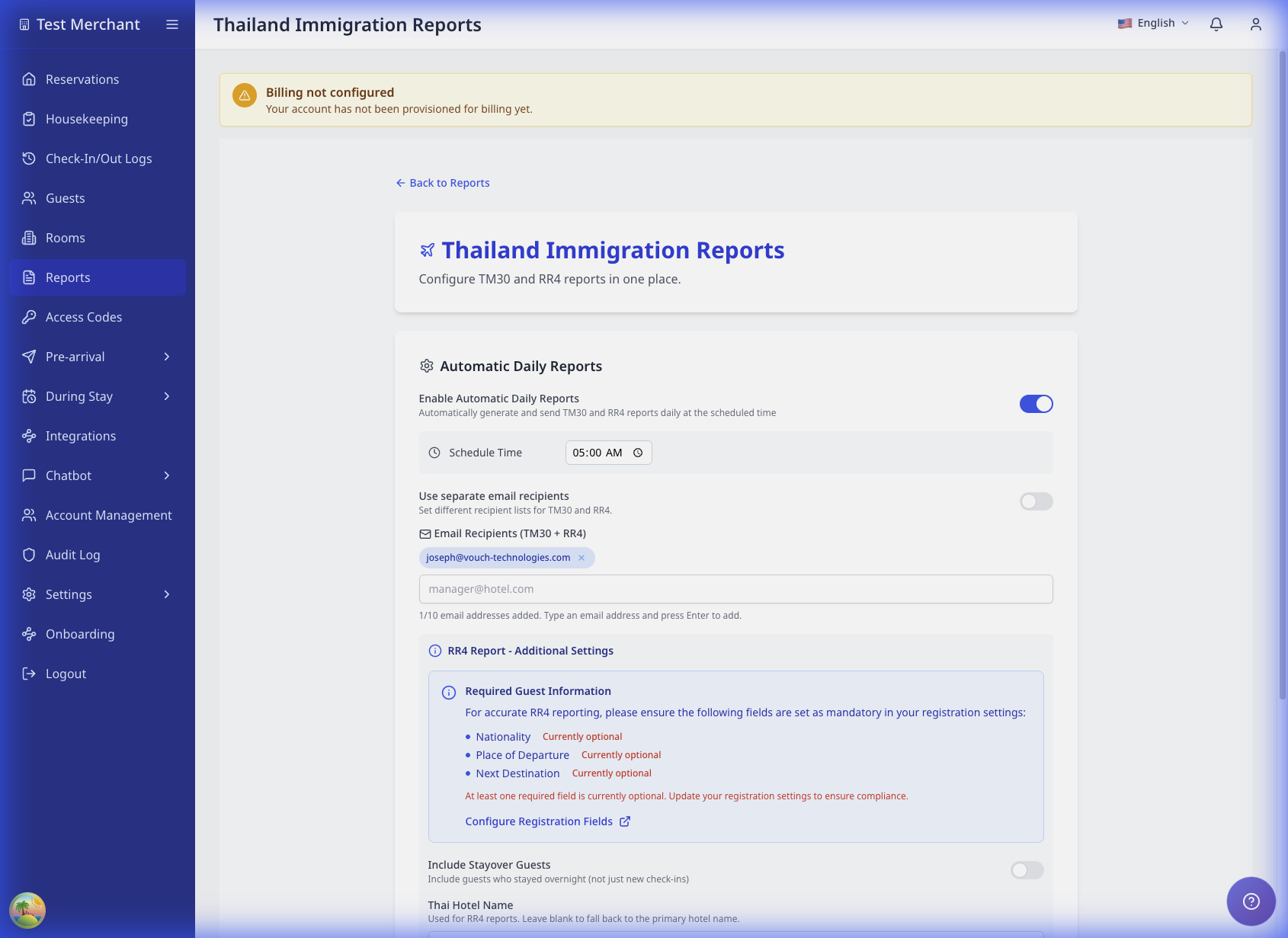 TODO: แทนที่ด้วยเลย์เอาต์ที่อัปเดตแล้วซึ่งแสดงการ์ด Automatic Daily Reports
ใช้รายชื่ออีเมลแบบรวมหรือแยก
| ตัวเลือก | ใช้เมื่อ |
|---|---|
| Combined recipients | TM30 และ RR4 ส่งไปยังทีมเดียวกัน |
| Separate recipients | TM30 และ RR4 ส่งไปยังคนละทีม |
หากต้องการใช้รายชื่อแยก:
- เปิด Use separate email recipients
- เพิ่ม TM30 Email Recipients
- เพิ่ม RR4 Email Recipients
เลือกโหมดแหล่งที่มาของผู้เข้าพัก (TM30 และ RR4)
เลือกวิธีที่ AVA ใช้รวมผู้เข้าพักในแต่ละรายงาน
TM30 Guest Source Mode
| ตัวเลือก | AVA ทำอะไร | เหมาะกับ |
|---|---|---|
| Include guests who didn't check in through AVA | หากมีเวลาเช็กอินของ AVA ระบบจะใช้เวลานั้น หากไม่มี ระบบจะรวมผู้เข้าพักก็ต่อเมื่อ PMS แสดงว่าการจองเป็น checked in แล้ว | โรงแรมที่มีการเช็กอินนอก AVA เป็นบางครั้ง |
| Don't include guests who didn't check in through AVA | AVA จะรวมเฉพาะผู้เข้าพักที่มีเวลาเช็กอินของ AVA ที่ถูกต้อง | โรงแรมที่ต้องการหลักฐานการเช็กอินจาก AVA เท่านั้น |
RR4 Guest Source Mode
ใช้ตัวเลือกเดียวกับ TM30 การตั้งค่านี้แยกต่างหาก จึงต้องยืนยันว่าเข้ากับเวิร์กโฟลว์ RR4 ของคุณ
วิธีรวมรายชื่อผู้เข้าพักแบบไฮบริด
ในโหมด Include guests who didn't check in through AVA AVA จะรวมผู้เข้าพักจาก CCI และ PMS ที่เข้าเกณฑ์เข้าด้วยกัน วิธีนี้ช่วยป้องกันไม่ให้ผู้เข้าพักจาก Cloudbeds หายไปเมื่อผู้เข้าพักอีกรายเช็กอินผ่าน AVA
| ข้อมูลการจอง | สิ่งที่ปรากฏในรายงาน |
|---|---|
| มีผู้เข้าพักหลักหนึ่งรายอยู่ทั้งใน CCI และ PMS และมีผู้เข้าพักใน PMS อีกหนึ่งราย | แถวผู้เข้าพักสองแถว |
| มีผู้เข้าพักหลักเฉพาะใน CCI หนึ่งราย และผู้เข้าพักใน PMS ที่แตกต่างกันสองราย | แถวผู้เข้าพักสามแถว |
| ผู้เข้าพักใน CCI ตรงกับผู้เข้าพักใน PMS | หนึ่งแถวที่ใช้รายละเอียดตัวตนจาก CCI และเวลาเช็กอินจริงจาก CCI |
AVA จะแยกแถวไว้เมื่อหลักฐานยืนยันตัวตนยังคลุมเครือ ตัวสร้างรายงานจะไม่สร้างหรืออัปเดตระเบียนผู้เข้าพักใน CCI หรือ PMS
การจองหลายห้องของ Cloudbeds
สำหรับรายงาน TM30 ของ Cloudbeds AVA จะตรวจสอบทุกห้องในการจอง ซึ่งรวมทั้งผู้เข้าพักที่ได้รับการจัดสรรห้องแล้วและผู้เข้าพักที่ยังรอการจัดสรรห้อง
| สถานการณ์การจอง | ผลลัพธ์ใน TM30 |
|---|---|
| การจอง Cloudbeds หนึ่งรายการมีผู้เข้าพักอยู่หลายห้อง | ผู้เข้าพักที่เข้าเกณฑ์แต่ละรายจะแสดงพร้อมรายละเอียดตัวตนของตนเอง |
| ผู้เข้าพักหลายรายใช้ห้องเดียวกัน | ผู้เข้าพักที่เข้าเกณฑ์แต่ละรายยังคงเป็นคนละแถว |
| ห้องต่าง ๆ มีวันที่มาถึงต่างกัน | ผู้เข้าพักแต่ละรายจะใช้วันที่มาถึงของห้องของตน |
| ห้องของเด็กถูกยกเลิกหรือยังไม่มาถึง | ผู้เข้าพักในห้องนั้นจะยังคงไม่ถูกรวม |
| ผู้เข้าพักเช็กเอาต์แล้ว | ผู้เข้าพักยังเข้าเกณฑ์เมื่อมีหลักฐานการมาถึงที่ถูกต้อง |
การตั้งค่านี้มีผลเฉพาะการค้นหาข้อมูลสำหรับรายงาน TM30 ไม่เปลี่ยนมุมมองการจองทั่วไปหรือแหล่งที่มาของผู้เข้าพักใน RR4
ผู้เข้าพักที่เช็กเอาต์แล้วในรายงาน TM30
TM30 สามารถคงผู้เข้าพักที่เข้าเกณฑ์ไว้หลังเช็กเอาต์เมื่อคุณสร้างรายงานใหม่ วิธีนี้มีประโยชน์เมื่อ PMS ยังคงให้ข้อมูลการมาถึงของผู้เข้าพักหลังเช็กเอาต์
| สถานการณ์ | ผลลัพธ์ใน TM30 |
|---|---|
| ผู้เข้าพักที่เข้าเกณฑ์เช็กเอาต์หลังจากมาถึง | ผู้เข้าพักยังคงอยู่ในรายงาน TM30 ที่ตรงกัน |
| ผู้เข้าพักไม่มีวันที่มาถึงที่ถูกต้องหรือข้อมูลตัวตนที่จำเป็น | ผู้เข้าพักยังคงไม่ถูกรวม |
| การจองใน PMS มีเฉพาะการออกจากที่พักและไม่มีหลักฐานการมาถึง | ผู้เข้าพักยังคงไม่ถูกรวม |
TM30 ยังคงใช้วันที่ของรายงานตามเขตเวลาของโรงแรม การเปลี่ยนแปลงนี้ไม่ได้เพิ่มตัวเลือกเลือกวันที่ย้อนหลัง RR4 และรายงานอื่น ๆ ยังคงใช้กฎสถานะผู้เข้าพักเดิม
- หากมีเวลาเช็กอินของ AVA ระบบจะใช้ timestamp นั้นเพื่อตัดสินวันที่ของรายงาน
- หากไม่มีเวลาเช็กอินของ AVA โหมด Include จะใช้ PMS fallback เฉพาะเมื่อ PMS แสดงว่าการจองเป็น checked in แล้ว
- หากอ่านเวลาเช็กอินของ AVA ไม่ได้ ระบบจะไม่นำรายการนั้นมารวม
- ในโหมด Don't include ระบบจะรวมเฉพาะผู้เข้าพักที่มี timestamp การเช็กอินของ AVA ที่ถูกต้อง
ตัวอย่างช่วงเที่ยงคืน (โหมด Include)
การจอง: Feb 9-13 เวลาสร้างรายงาน: 00:10 on Feb 10
| สถานการณ์ขณะสร้างรายงาน | ผลลัพธ์ |
|---|---|
| เวลาเช็กอินของ AVA คือ 00:01 on Feb 10 | ผู้เข้าพักจะไม่ถูกรวมในรายงาน Feb 9 และจะไปอยู่ในรายงาน Feb 10 |
| ยังไม่มีเวลาเช็กอินของ AVA และสถานะ PMS เป็น checked in แล้ว | ผู้เข้าพักถูกรวมในรายงาน Feb 9 โดยใช้ PMS fallback |
| ยังไม่มีเวลาเช็กอินของ AVA และสถานะ PMS ยังไม่เป็น checked in | ยังไม่ถูกรวม |
การตั้งค่ารายงาน RR4
RR4 Guest Source Mode
ในการ์ด RR4 Settings ฟิลด์ RR4 Guest Source Mode จะอยู่ด้านบน ตั้งค่านี้ก่อน Thai Hotel Name และ Include Stayover Guests
ใช้ตัวเลือกเดียวกับ TM30:
- Include guests who didn't check in through AVA
- Don't include guests who didn't check in through AVA
Required Guest Information
เพื่อให้รายงาน RR4 ถูกต้อง ให้ตั้งฟิลด์ต่อไปนี้เป็นฟิลด์บังคับ:
- Nationality
- Place of Departure
- Next Destination
หากฟิลด์ใดเป็นตัวเลือก คุณจะเห็น Action required ในการ์ด Required Guest Information คลิก Configure Registration Fields หรือไปที่ Settings → Check-In
ชื่อโรงแรมภาษาไทย
กรอกชื่อโรงแรมเป็นอักษรไทย เช่น โรงแรมว้าว รีสอร์ต
RR4 จะใช้ค่านี้ในหัวรายงาน เว้นว่างไว้หากต้องการใช้ชื่อโรงแรมหลักของคุณ
รวมผู้เข้าพักที่พักค้าง
เปิดตัวเลือกนี้เพื่อรวมผู้เข้าพักที่พักค้าง ไม่ใช่เฉพาะผู้เช็กอินใหม่
ตัวอย่าง:
- ปิด: ผู้เข้าพักเช็กอิน Oct 20 และเช็กเอาต์ Oct 25 จะอยู่ในรายงาน Oct 20 เท่านั้น
- เปิด: ผู้เข้าพักคนเดิมจะอยู่ในรายงาน Oct 20, 21, 22, 23 และ 24
ตั้งค่า RR4 Stayover Remark
ใช้ RR4 Stayover Remark เพื่อเพิ่มหมายเหตุสั้น ๆ สำหรับแถว stayover
ตัวอย่าง: ไม่มีการเปลี่ยนแปลง
เว้นฟิลด์นี้ว่างไว้หากคุณไม่ต้องการหมายเหตุสำหรับ stayover
ฟิลด์นี้จะใช้งานได้ก็ต่อเมื่อเปิด Include Stayover Guests หากปิดการรายงาน stayover AVA จะปิดฟิลด์หมายเหตุนี้
TM30 และ RR4 อาจแสดง timestamp ต่างกันสำหรับผู้เข้าพักคนเดียวกัน เป็นเรื่องที่คาดไว้ เพราะแต่ละรายงานมีกฎเรื่องเวลาของตัวเอง
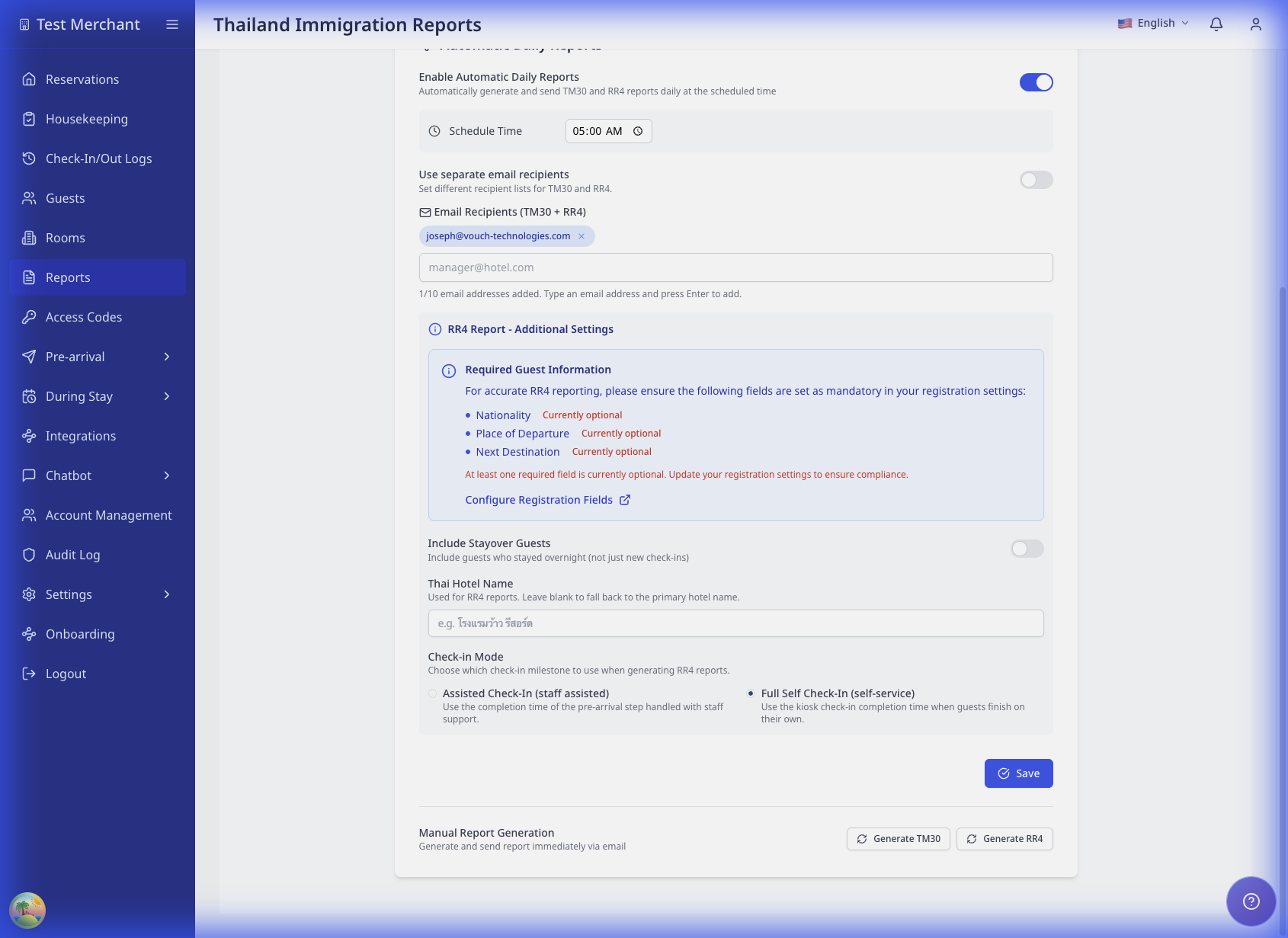 TODO: แทนที่ด้วยการ์ด RR4 Settings ที่อัปเดตแล้วซึ่งแสดง Guest Source Mode ไว้เหนือ Thai Hotel Name
คลังบัตรลงทะเบียน
ตอนนี้ AVA เรียก export นี้ว่า Registration Card Archive หน้าจอรุ่นเก่าอาจยังแสดง RR3 ในส่วนที่รองรับความเข้ากันได้ย้อนหลัง
คลังนี้ไม่ใช่รายงานที่ทำงานตามกำหนดเวลา สำหรับโฟลว์ sync, async และ resume แบบเต็ม ดูที่ ดาวน์โหลดคลังบัตรลงทะเบียน AVA เตรียม export เหล่านี้ไว้ในที่เก็บชั่วคราว เมื่อไฟล์พร้อม พนักงานจะเห็นข้อความว่าไฟล์นี้ยังเปิดให้ใช้งานอีก 7 วัน ดาวน์โหลดก่อนหมดอายุ หรือสร้างคลังใหม่ในภายหลัง
เมื่อใดจะรวมบัตรลงทะเบียน
- Self check-in: ทันทีหลังผู้เข้าพักส่งลายเซ็นที่คีออสก์
- Assisted check-in: เมื่อพนักงานส่งลายเซ็นของผู้เข้าพัก
สิ่งที่พนักงานควรตรวจสอบ
- ฟิลด์ที่จำเป็นซึ่งมีป้าย RR3 Required ถูกกรอกครบ
- ข้อมูลประจำตัวผู้เข้าพักและรายละเอียดการจองถูกต้องก่อนส่งลายเซ็น
สร้างรายงานด้วยตนเอง
รายงาน TM30 และ RR4 ที่สร้างด้วยตนเองใช้เขตเวลาที่บันทึกไว้สำหรับที่พักของคุณ หากไม่ได้บันทึกเขตเวลาของที่พัก AVA อาจใช้เขตเวลาจากคำขอของคุณ ตั้งค่าเขตเวลาของที่พักเพื่อหลีกเลี่ยงความแตกต่างจากเขตเวลาของอุปกรณ์หรือเบราว์เซอร์
ตั้งค่าเขตเวลาที่ถูกต้องใน Hotel Basic Details การดำเนินการนี้ทำให้วันที่รายงานตรงกับปฏิทินท้องถิ่นของที่พัก
- ยืนยันว่าการตั้งค่ารายงานไทยถูกบันทึกแล้ว
- เลื่อนไปที่ Manual Report Generation
- คลิก Generate TM30 หรือ Generate RR4 สำหรับรายงานที่เปิดใช้งานและต้องการ
- รอการยืนยัน
AVA จะแสดงการดำเนินการด้วยตนเองแต่ละรายการเฉพาะเมื่อเปิดใช้งานรายงานที่ตรงกัน ตัวอย่างเช่น อาจแสดง Generate RR4 ขณะที่ซ่อน Generate TM30
ทำความเข้าใจข้อความสำเร็จ
AVA จะแสดงข้อความสำเร็จที่แปลเป็นภาษาท้องถิ่นรายการใดรายการหนึ่งต่อไปนี้:
| ข้อความ | ความหมาย | สิ่งที่ควรทำ |
|---|---|---|
| Report queued successfully | AVA รับคำขอเพื่อประมวลผลเบื้องหลังแล้ว | รออีเมลรายงาน อย่าสร้างรายงานซ้ำทันที |
| "TM30 report could not be queued. Please try again later." หรือ "RR4 report could not be queued. Please try again later." | AVA ไม่สามารถรับคำขอได้ | รอสักครู่แล้วลองอีกครั้ง ติดต่อฝ่ายสนับสนุนหากเกิดซ้ำ |
การสร้างรายงานด้วยตนเองใช้การประมวลผลเบื้องหลังเสมอ ข้อความเข้าคิวยืนยันว่ารับคำขอแล้ว ไม่ได้ยืนยันว่าจะส่งอีเมลทันที หาก AVA ไม่สามารถจัดคำขอเข้าคิวได้ ระบบจะหยุดและแสดงข้อผิดพลาด ระบบจะไม่สร้างรายงานทันที
การแก้ปัญหา
ผู้เข้าพักหายไปจากรายงานของวันก่อน
สิ่งที่คุณเห็น: ผู้เข้าพักเช็กอินประมาณเที่ยงคืน แต่ไม่อยู่ในรายงานของเมื่อวาน
วิธีแก้:
- เปิดบันทึกการเช็กอินของผู้เข้าพัก
- ตรวจสอบ timestamp การเช็กอินของ AVA
- หาก timestamp อยู่หลังเที่ยงคืน ให้ใช้รายงานของวันนี้สำหรับผู้เข้าพักคนนั้น
ผู้เข้าพักไปอยู่ในรายงานของเมื่อวานหลังเข้าพักหลังเที่ยงคืน
สิ่งที่คุณเห็น: ผู้เข้าพักมาถึงหลังเที่ยงคืน แต่ยังไปอยู่ในรายงานของเมื่อวาน
วิธีแก้:
- ตรวจ Guest Source Mode
- ในโหมด Include หากไม่มี timestamp ของ AVA ระบบจะใช้ PMS fallback เฉพาะเมื่อ PMS แสดงว่าการจองเป็น checked in แล้ว
- หากต้องการใช้เฉพาะ timestamp ของ AVA ให้เปลี่ยนเป็น Don't include guests who didn't check in through AVA
ผู้เข้าพักไม่ถูกรวมในโหมด Include เมื่อเช็กอินนอก AVA
สิ่งที่คุณเห็น: ผู้เข้าพักเช็กอินด้วยตนเอง แต่ยังไม่ถูกรวม
วิธีแก้:
- ตรวจสถานะการจองใน PMS
- ยืนยันว่า PMS แสดงสถานะ checked in แล้ว
- สร้างรายงานใหม่หลังอัปเดตสถานะ
ผู้เข้าพักจาก PMS ปรากฏเป็นแถวเพิ่มเติมในรายงาน
สิ่งที่คุณเห็น: ผู้เข้าพักจาก Cloudbeds ปรากฏข้างผู้เข้าพักจาก CCI สำหรับการจองเดียวกัน
วิธีแก้:
- ยืนยันว่า Guest Source Mode รวมผู้เข้าพักที่ไม่ได้เช็กอินผ่าน AVA
- เปรียบเทียบชื่อและรายละเอียดตัวตนของผู้เข้าพักใน CCI และ Cloudbeds
- คงแถวเพิ่มเติมไว้หากเป็นผู้เข้าพักคนละราย
- แก้ไขรายละเอียดตัวตนที่ซ้ำหรือขัดแย้งกันใน PMS ก่อนสร้างรายงานถัดไป
AVA จะคงผู้เข้าพักจาก PMS ที่เข้าเกณฑ์และไม่ตรงกับรายอื่นไว้ในรายงานไฮบริด ระบบอาจแยกแถวไว้เมื่อหลักฐานตัวตนไม่เพียงพอที่จะยืนยันการจับคู่ได้อย่างปลอดภัย
ผู้เข้าพักหายไปหลังเช็กเอาต์
สิ่งที่คุณเห็น: ผู้เข้าพักเคยปรากฏก่อนเช็กเอาต์ แต่หายไปเมื่อคุณสร้าง TM30 ใหม่
วิธีแก้:
- ยืนยันว่าคุณกำลังสร้าง TM30 ไม่ใช่ RR4
- ยืนยันว่าผู้เข้าพักมีวันที่มาถึงและรายละเอียดตัวตนที่จำเป็นถูกต้อง
- ตรวจสอบว่ารายงานครอบคลุมวันท้องถิ่นก่อนหน้าของโรงแรม
- สร้าง TM30 ใหม่หลังระเบียน PMS อัปเดตเสร็จ
การเข้าพักที่เสร็จสมบูรณ์และเข้าเกณฑ์ยังคงอยู่ใน TM30 หลังเช็กเอาต์ การจองที่มีเฉพาะการออกจากที่พักและผู้เข้าพักที่ไม่มีหลักฐานการมาถึงที่ถูกต้องยังคงไม่ถูกรวม
ผู้เข้าพักจากห้อง Cloudbeds หลายห้องหายไป
สิ่งที่คุณเห็น: รายงาน TM30 จาก Cloudbeds มีผู้เข้าพักน้อยกว่าจำนวนในรายการจอง
วิธีแก้:
- ยืนยันว่ารายงานใช้ TM30 Guest Source Mode ที่รวมผู้เข้าพักจาก PMS
- ตรวจสอบวันที่มาถึงและรายละเอียดตัวตนของผู้เข้าพักใน Cloudbeds
- ยืนยันว่าห้องของผู้เข้าพักอยู่ในการจองหรือการจองย่อยเดียวกัน
- ไม่นับห้องที่ยกเลิกหรือยังไม่มาถึงรวมในจำนวนที่คาดไว้
- สร้าง TM30 อีกครั้งหลัง Cloudbeds อัปเดตการจองเสร็จ
AVA จะคงผู้เข้าพักที่เข้าเกณฑ์จากทั้งห้องที่จัดสรรแล้วและห้องที่ยังไม่ได้จัดสรรไว้ ระบบจะไม่นำผู้เข้าพักที่ไม่มีหลักฐานการมาถึงหรือรายละเอียดตัวตนที่จำเป็นถูกต้องมารวม
รายงานด้วยตนเองใช้วันที่ไม่ถูกต้อง
สิ่งที่คุณเห็น: รายงานด้วยตนเองครอบคลุมวันที่ก่อนหน้าหรือถัดจากวันที่ท้องถิ่นของที่พัก
วิธีแก้:
- เปิด Settings → Essentials → Hotel Basic Details
- ยืนยันว่า Timezone ตรงกับเขตเวลาท้องถิ่นของที่พัก
- คลิก Save หากคุณเปลี่ยนการตั้งค่า
- สร้างรายงานอีกครั้งจาก Government Compliance → Thailand
รายงานด้วยตนเองใช้เขตเวลาของที่พักที่บันทึกไว้ แม้พนักงานจะเริ่มสร้างรายงานจากเขตเวลาอื่น
TM30 และ RR4 แสดงเวลาไม่ตรงกัน
สิ่งที่คุณเห็น: ผู้เข้าพักคนเดียวกันมี timestamp ต่างกันใน TM30 กับ RR4
วิธีแก้:
- ยืนยันว่าความแตกต่างนี้ไม่ขัดขวางขั้นตอนการยื่นรายงานของคุณ
- ตรวจสอบข้อมูลผู้เข้าพักและรายละเอียดการเช็กอินให้เสร็จสมบูรณ์
- หากความไม่ตรงกันกระทบการยื่นรายงาน ให้ติดต่อฝ่ายสนับสนุน
หมายเหตุ stayover หายไป
สิ่งที่คุณเห็น: แถว stayover ของ RR4 ไม่แสดงหมายเหตุที่คุณตั้งไว้
วิธีแก้:
- ยืนยันว่า Include Stayover Guests เปิดอยู่
- ตรวจว่า RR4 Stayover Remark ไม่ว่าง
- บันทึกการตั้งค่าอีกครั้ง
- สร้าง RR4 ใหม่สำหรับวันที่ได้รับผลกระทบ
กำหนดการ TM30 หายไปหลังเปลี่ยน PMS
สิ่งที่คุณเห็น: กำหนดการ TM30 ของโรงแรมในไทยหายไปหลังจากเปลี่ยน PMS
วิธีแก้:
- เปิด Settings → Essentials → Hotel Basic Details
- ยืนยันว่า Country ตั้งเป็น Thailand
- เปิด Government Compliance → Thailand
- ยืนยันว่าเปิดใช้ Enable Automatic Daily Reports และการตั้งค่า TM30 แล้ว
- ติดต่อฝ่ายสนับสนุนหากกำหนดการยังหายอยู่
ระเบียน country ที่เป็นตัวพิมพ์เล็กอยู่แล้วควรรีเฟรชได้อย่างถูกต้องหลังเปลี่ยน PMS
การบันทึกการตั้งค่าภาครัฐหมดเวลา
สิ่งที่คุณเห็น: เมื่อบันทึกการตั้งค่า Thailand แสดง Service timeout: TM30ProxyService - PUT exceeded 7000ms
สาเหตุ: การบันทึกอาจเสร็จก่อนที่ AVA จะอัปเดตกำหนดการรายงานเสร็จ ข้อผิดพลาด timeout อาจบดบังการบันทึกที่สำเร็จ
วิธีแก้:
-
อย่าคลิก Save Configuration ซ้ำหลายครั้ง
-
รีเฟรช Government Compliance → Thailand
-
ยืนยันว่าอีเมล กำหนดการ และการตั้งค่ารายงานยังอยู่ครบ
-
หากค่ายังอยู่ ไม่ต้องดำเนินการใดเพิ่มเติม
-
หากค่าหายไป ให้บันทึกอีกครั้งหนึ่งครั้ง
-
ติดต่อฝ่ายสนับสนุนหาก timeout กลับมาอีก
✓ การบันทึกที่สำเร็จควรแสดงผลโดยไม่มี timeout 7 วินาที
ไม่ได้รับอีเมลรายงาน
สิ่งที่คุณเห็น: ไม่มีอีเมลรายงานในเวลาที่กำหนด
วิธีแก้:
- ยืนยันว่ารายงานเปิดใช้งานอยู่
- ยืนยันว่าอีเมลผู้รับถูกต้อง
- ตรวจโฟลเดอร์สแปมหรือจังก์
- หากเห็น Report queued successfully ให้รอการประมวลผลเบื้องหลัง
- อย่าส่งคำขอด้วยตนเองอีกจนกว่าคำขอแรกจะเสร็จสิ้น
รายงานหยุดทำงานเนื่องจากไม่มีการตั้งค่า
สิ่งที่คุณเห็น: รายงาน TM30 หรือ RR4 ตามกำหนดเวลาไม่มาถึง ฝ่ายสนับสนุนหรือบันทึกรายงานระบุว่าต้องแก้ไขการตั้งค่าก่อนจึงจะดำเนินการต่อได้
สาเหตุ: AVA จะหยุดลองซ้ำสำหรับข้อผิดพลาดที่ไม่สามารถสำเร็จได้หากไม่เปลี่ยนการตั้งค่า สาเหตุทั่วไป ได้แก่:
| สาเหตุ | วิธีแก้ |
|---|---|
| แอป Cloudbeds ถูกตัดการเชื่อมต่อ | เชื่อมต่อแอป Vouch ใน Cloudbeds อีกครั้ง |
| ไม่มีการตั้งค่า PMS | ขอให้ผู้ดูแล PMS กู้คืนการตั้งค่าที่พัก |
| ไม่มีข้อมูลรับรอง PMS | กู้คืนข้อมูลรับรองที่จำเป็น แล้วเรียกใช้รายงานอีกครั้ง |
| PMS คือ Furama | ติดต่อฝ่ายสนับสนุนเพื่อสอบถามขั้นตอนทางเลือกสำหรับรายงานการปฏิบัติตามข้อกำหนด |
| PMS ไม่อยู่ในรายการข้างต้น | ยืนยันการเชื่อมต่อ PMS แล้วติดต่อฝ่ายสนับสนุน |
วิธีแก้:
- เปิด Settings → Essentials → PMS Integration
- ยืนยันว่าการเชื่อมต่อ PMS และข้อมูลรับรองเป็นข้อมูลปัจจุบัน
- สำหรับ Cloudbeds ให้เชื่อมต่อแอป Vouch อีกครั้งหากถูกตัดการเชื่อมต่อ
- กลับไปที่ Government Compliance → Thailand
- สร้างรายงานด้วยตนเองหลังแก้ไขการตั้งค่าแล้ว
- ปิด Enable Automatic Daily Reports หากไม่ต้องการใช้กำหนดการนี้แล้ว
AVA จะไม่ลองสร้างรายงานซ้ำต่อเมื่อการตั้งค่า PMS ไม่สามารถทำให้รายงานสำเร็จได้ ข้อผิดพลาดของบริการชั่วคราวจะดำเนินการตามขั้นตอนการลองซ้ำปกติ
รายงานแจ้งว่าไม่รองรับผู้ให้บริการ PMS
สิ่งที่คุณเห็น: รายงาน TM30 หรือ RR4 หยุดทำงานพร้อมข้อความว่าไม่รองรับผู้ให้บริการ PMS
วิธีแก้:
- เปิด Settings → Essentials → PMS Integration
- ยืนยันว่า PMS ที่ถูกต้องเชื่อมต่อกับโรงแรมนี้
- หากใช้ AVA PMS ให้ยืนยันว่าตั้งค่า AVA PMS ของโรงแรมเสร็จแล้ว
- กลับไปที่ Government Compliance → Thailand
- สร้างรายงานอีกครั้งหลังการเชื่อมต่อ PMS กลับมาใช้งาน
หาก PMS อยู่ใน ระบบ PMS ที่รองรับ ให้ติดต่อฝ่ายสนับสนุน โปรดระบุประเภทรายงาน ชื่อโรงแรม และเวลาที่ลองดำเนินการแล้วล้มเหลว
อีเมลรายงานไม่มีผู้เข้าพัก
สิ่งที่คุณเห็น: ได้รับอีเมล TM30 หรือ RR4 แต่รายงานไม่มีผู้เข้าพัก
วิธีแก้:
- ยืนยันวันที่ของรายงานให้ตรงกับวันที่ท้องถิ่นของโรงแรม
- ตรวจสอบว่าผู้เข้าพักที่คาดไว้มีข้อมูลการมาถึงหรือพักค้างที่ถูกต้องใน PMS
- ยืนยันว่าฟิลด์ข้อมูลตัวตนที่จำเป็นของผู้เข้าพักกรอกครบ
- สร้างรายงานอีกครั้งหลัง PMS อัปเดตเสร็จ
อย่ายื่นรายงานเปล่าหากควรมีผู้เข้าพักรวมอยู่ ติดต่อฝ่ายสนับสนุนหากรายงานยังว่างอีกครั้งทั้งที่มีผู้เข้าพักซึ่งเข้าเกณฑ์ โปรดระบุประเภทรายงาน วันที่รายงาน PMS และจำนวนผู้เข้าพักที่คาดไว้
ค่ารายงาน Opera หายไป
สิ่งที่คุณเห็น: หมายเลขหนังสือเดินทางหรือวันเกิดหายไปจากรายงาน Opera
วิธีแก้:
- ขอให้ผู้ดูแล Opera เปิดใช้ Module Level Access Control
- ขอให้ผู้ดูแลมอบ Sensitive Data Access ให้ไคลเอ็นต์ AVA OHIP
- ยืนยันว่าสิทธิ์นี้ใช้กับโรงแรม Opera ที่ถูกต้อง
- สร้างรายงานอีกครั้งหลังอัปเดตสิทธิ์ใน Opera
ค่าหนังสือเดินทางที่ถูกปกปิดและวันเกิด 1800-01-01 จะถูกตัดออกโดยตั้งใจ
รายงานยังคงอยู่ในคิว
สิ่งที่คุณเห็น: การยืนยันรายงานแสดง Report queued successfully แต่ไม่มีอีเมลมาถึง
วิธีแก้:
- ยืนยันที่อยู่อีเมลผู้รับที่ตั้งค่าไว้
- ตรวจโฟลเดอร์สแปมหรือจังก์
- รอให้คิวเสร็จสิ้นก่อนลองอีกครั้ง
- ติดต่อฝ่ายสนับสนุนหากยังไม่พบรายงานหลังพ้นช่วงเวลาประมวลผลปกติ
ไม่สามารถจัดรายงานด้วยตนเองเข้าคิวได้
สิ่งที่คุณเห็น: "TM30 report could not be queued. Please try again later." หรือเวอร์ชัน RR4
วิธีแก้:
- รอสักครู่ก่อนลองอีกครั้ง
- ส่งรายงานหนึ่งครั้ง
- ติดต่อฝ่ายสนับสนุนหากคำขอล้มเหลวอีกครั้ง
ระบุประเภทรายงานและเวลาที่ลองดำเนินการ
บริการรายงานไม่พร้อมใช้งาน
สิ่งที่คุณเห็น: "Report generation is temporarily unavailable because the report service rejected its credential. Please contact support."
วิธีแก้:
- อย่าออกจากระบบหรือรีเซ็ตรหัสผ่าน
- ข้อผิดพลาดนี้เกี่ยวข้องกับการประมวลผลรายงาน ไม่ใช่เซสชัน AVA ของคุณ
- ติดต่อ success@vouch-technologies.com พร้อมระบุประเภทรายงานและเวลาที่ลองดำเนินการ
คำเตือนบอกว่าการตั้งค่า TM30 และ RR4 ไม่สอดคล้องกัน
สิ่งที่คุณเห็น: แถบสีเหลืองแจ้งว่าการตั้งค่า TM30 และ RR4 ต่างกัน
วิธีแก้:
- ตรวจสอบ Schedule Time และการตั้งค่าผู้รับ
- หากต้องการใช้รายชื่อแยก ให้เปิด Use separate email recipients
- คลิก Save Configuration เพื่อซิงก์การตั้งค่า
มีข้อความแจ้งว่าเปิด separate recipients อยู่
สิ่งที่คุณเห็น: แถบสีน้ำเงินแจ้งว่าเปิดโหมดผู้รับแยกแล้ว
วิธีแก้:
- ตรวจสอบ TM30 Email Recipients และ RR4 Email Recipients
- ปิด Use separate email recipients หากต้องการใช้รายชื่อเดียว
- คลิก Save Configuration
Required Guest Information แสดง "Action required"
สิ่งที่คุณเห็น: การ์ด Required Guest Information แสดง Action required
วิธีแก้:
- คลิก Configure Registration Fields
- ตั้ง Nationality, Place of Departure และ Next Destination เป็นฟิลด์บังคับ
- กลับไปที่หน้ารายงานแล้วรีเฟรช
ปุ่มรายงานด้วยตนเองหายไป
สิ่งที่คุณเห็น: ไม่เห็นปุ่มรายงานด้วยตนเองหนึ่งปุ่มหรือทั้งสองปุ่ม
วิธีแก้:
- ตรวจสอบว่าปุ่มรายงานใดหายไป
- เปิดใช้งานรายงานนั้นในการตั้งค่ารายงาน Thailand
- บันทึกการตั้งค่า
- รีเฟรชหน้า
AVA จะซ่อนปุ่มแต่ละปุ่มเมื่อปิดใช้งานรายงานที่ตรงกัน
ปุ่ม Registration Card Archive หายไป
สิ่งที่คุณเห็น: คุณไม่เห็น Download Registration Card Archive
วิธีแก้:
- ขอผู้ดูแลมอบสิทธิ์ report:export
- รีเฟรชหน้าหลังจากอัปเดตสิทธิ์แล้ว
ไม่พบบัตรลงทะเบียน
สิ่งที่คุณเห็น: AVA แจ้งว่าไม่พบบัตรลงทะเบียนสำหรับช่วงวันที่ที่เลือก
วิธีแก้:
- ขยายช่วงวันที่
- ยืนยันว่ามีการส่งลายเซ็นบัตรลงทะเบียนสำหรับช่วงเวลานั้นแล้ว
- ลอง export อีกครั้ง
ยังติดอยู่?
ติดต่อ success@vouch-technologies.com หาก:
- ❌ ผู้เข้าพักหายไปจากวันที่ควรอยู่ในรายงานซ้ำ ๆ
- ❌ timestamp ของรายงานทำให้ส่งรายงานตามข้อกำหนดไม่ได้
- ❌ รายงานอัตโนมัติล้มเหลวมากกว่าหนึ่งรอบ
- ❌ ข้อผิดพลาดด้านการตั้งค่ายังคงอยู่หลังจากเชื่อมต่อใหม่หรือกู้คืนการตั้งค่า PMS
ข้อมูลที่ควรแนบ:
- ชื่อที่พัก
- ชื่อผู้เข้าพักและหมายเลขการจอง
- วันที่รายงานที่คาดไว้และผลลัพธ์จริง
- ภาพหน้าจอการตั้งค่ารายงานและรายละเอียดการเช็กอินของผู้เข้าพัก
- ข้อผิดพลาดด้านการตั้งค่าที่ยังคงอยู่หลังจากเชื่อมต่อใหม่หรือกู้คืนการตั้งค่า PMS