วิธีทำเช็กอินให้เสร็จสิ้น
เช็กอินส่วนใหญ่ใช้เวลา 3-5 นาทีเมื่อเอกสารพร้อม คู่มือนี้อธิบายประสบการณ์เช็กอินของผู้เข้าพักบนคีออสก์แบบบริการตนเองของ AVA หรืออุปกรณ์เช็กอินแบบมีเจ้าหน้าที่ช่วย
คู่มือนี้ช่วยให้คุณเข้าใจและสนับสนุนกระบวนการเช็กอินของผู้เข้าพัก ตั้งแต่การค้นหาการจองจนถึงการเข้าห้อง ผู้เข้าพักทำเช็กอินผ่านคีออสก์เช็กอินของ AVA (เข้าถึงได้ด้วย QR code หรือ URL) ได้ 3 โหมด: บริการตนเอง (CCI), ให้เจ้าหน้าที่ช่วย (ACI) หรือก่อนเดินทางมาถึง
วิธีที่ผู้เข้าพักเข้าถึงเช็กอิน:
- สแกน QR code ที่แสดงอยู่ในที่พักของคุณ
- ไปที่ URL เช็กอินที่คุณให้ไว้
- เจ้าหน้าที่สามารถช่วยได้โดยใช้หน้าจอเช็กอินแบบมีเจ้าหน้าที่ช่วย (ACI)
หากต้องการจัดการการจองและการจัดห้องจากแดชบอร์ดของเจ้าหน้าที่ ให้ไปที่หน้า Reservations (หน้าหลัก) คู่มือนี้เน้นประสบการณ์เช็กอินที่ผู้เข้าพักใช้งานเอง
วิดีโอสั้นนี้แสดงเส้นทางเช็กอินหลายห้องทั้งหมดจากมุมมองของผู้เข้าพัก
ข้อมูลอ้างอิงด่วน
| ขั้นตอน | ใครเป็นผู้ทำ | แสดงที่ใด |
|---|---|---|
| Reservation Lookup | ผู้เข้าพักหรือเจ้าหน้าที่ | Check In, Reservation Lookup หรือ Staff Access |
| Document Upload | ผู้เข้าพักหรือเจ้าหน้าที่ | Guest Verification บนการ์ดห้องแต่ละใบ |
| Bulk Upload | เจ้าหน้าที่ (สำหรับกรุ๊ป) | ปุ่ม Upload All Documents เหนือการ์ดห้อง |
| Guest Information | ผู้เข้าพักหรือเจ้าหน้าที่ | Guest Information → Fill หรือ Edit |
| Signature | ผู้เข้าพัก (บางครั้งทุกคน) | Signature → Sign |
| Facial Verification | ผู้เข้าพัก (CCI หรือ ACI เมื่อเปิดใช้) | Facial Verification → Verify หรือแท็บเล็ตผู้เข้าพักที่จับคู่ไว้ |
| Group Facial Verification | เจ้าหน้าที่ (เมื่อเปิดใช้) | Room List → Verify group photo |
| Deposit / Payment | ผู้เข้าพัก (เฉพาะเช็กอินแบบบริการตนเอง เมื่อเปิดใช้) | Reservation Requirements |
| Check-In / Pre-Arrival | ผู้เข้าพักหรือเจ้าหน้าที่ | Proceed to Check-In หรือ Complete Pre-Arrival |
| Room Access | ต้องทำเมื่อมีการตั้งค่าเครื่องเข้ารหัสคีย์การ์ดของ AVA | Room Information |
โหมดเช็กอิน
| โหมด | เหมาะสำหรับ | สิ่งที่เปลี่ยนไป |
|---|---|---|
| Pre-Arrival | ผู้เข้าพักก่อนเดินทางมาถึง | อาจมีการยืนยันใบหน้าแบบกลุ่มเมื่อเปิดใช้ ใช้ Complete Pre-Arrival หลังยืนยันผู้เข้าพักที่จำเป็นครบแล้ว AVA จะส่งเวลาโดยประมาณที่จะมาถึงของผู้เข้าพักคนแรกไปยัง PMS ที่รองรับ และจะออกสิทธิ์เข้าห้องเมื่อมาถึง |
| Self Check-In (CCI) | ผู้เข้าพักบนคีออสก์ | อาจมีการยืนยันใบหน้า การวางมัดจำหรือการชำระเงินอาจบล็อก Proceed to Check-In |
| Assisted Check-In (ACI) | เช็กอินโดยเจ้าหน้าที่ | ACI แบบอุปกรณ์เดียวทำงานบนอุปกรณ์เจ้าหน้าที่ ส่วน ACI แบบสองอุปกรณ์ส่งขั้นตอนของผู้เข้าพักไปยังแท็บเล็ตที่จับคู่ไว้ ทั้งสองแบบแสดงความพร้อมของอุปกรณ์เจ้าหน้าที่ |
วิดีโอสั้นนี้แสดงขั้นตอนเช็กอินแบบมีเจ้าหน้าที่ช่วย (ACI) ทั้งหมดจากมุมมองของเจ้าหน้าที่
ทำงานกับการจองเดียวจากหลายเคาน์เตอร์
เคาน์เตอร์ Check-in Connect ที่ยืนยันแล้วหลายเครื่องสามารถเปิดการจองเดียวกันพร้อมกันได้ ฟีเจอร์นี้ช่วยให้เจ้าหน้าที่แบ่งกลุ่มหลายห้องและเช็กอินห้องต่าง ๆ ไปพร้อมกัน
เปิดการจองเดียวกันบนอุปกรณ์เจ้าหน้าที่ที่ยืนยันแล้วแต่ละเครื่อง แล้วตกลงกันว่าใครจะดูแลห้องใด AVA จะอัปเดตการเปลี่ยนแปลงห้องของแต่ละเคาน์เตอร์ให้เคาน์เตอร์อื่นเห็นแบบเรียลไทม์
ดูว่าใครกำลังทำงานกับการจอง
AVA จะแสดงเคาน์เตอร์อื่นที่กำลังดูการจองไว้ใกล้รายการห้อง การ์ดห้องจะแสดงเคาน์เตอร์ที่กำลังถือห้องหรือดำเนินการห้องนั้นอยู่ คุณอาจเห็นป้ายอย่าง Front Desk 2 · at the desk หรือ Checked in by Front Desk 2
การเปลี่ยนแปลงจากเคาน์เตอร์อื่นจะแสดงโดยอัตโนมัติ โดยปกติภายในประมาณหนึ่งวินาที AVA จะไฮไลต์ห้องที่เปลี่ยนแปลงชั่วครู่และแสดงการแจ้งเตือน คุณไม่จำเป็นต้องโหลดการจองใหม่หลังการเปลี่ยนแปลงทุกครั้ง
| สิ่งที่เห็น | ความหมาย | สิ่งที่ต้องทำ |
|---|---|---|
| Desk · at the desk | เคาน์เตอร์นั้นกำลังทำงานกับห้อง | ประสานงานก่อนเริ่มทำงานกับห้องนั้น |
| Checked in by desk | เคาน์เตอร์นั้นเช็กอินห้องเสร็จแล้ว | ดำเนินการกับห้องอื่นต่อ หากจำเป็น |
| การแจ้งเตือนการเปลี่ยนแปลง | เคาน์เตอร์อื่นเปลี่ยนแปลงการจอง | ตรวจสอบการ์ดห้องที่อัปเดตแล้ว |
ทำงานกับห้องอย่างปลอดภัย
การค้นหาหรือดูการจองไม่ได้เป็นการถือสิทธิ์ห้อง การดำเนินการที่เปลี่ยนแปลงข้อมูลจะถือสิทธิ์ห้องก่อนทำการเปลี่ยนแปลงที่ย้อนกลับไม่ได้ ซึ่งรวมถึงขั้นตอนของผู้เข้าพัก การเช็กอิน การดำเนินการเกี่ยวกับห้อง เอกสาร การชำระเงิน การยกเว้น และคีย์การ์ด AVA จะส่งการดำเนินการ ACI แต่ละรายการโดยใช้ข้อมูลรับรองที่ยืนยันแล้วของเคาน์เตอร์ที่กำลังใช้งาน หากเคาน์เตอร์นั้นต้องยืนยันตัวตน AVA จะขอให้ยืนยันก่อนดำเนินการที่มีการป้องกันต่อ
หากเคาน์เตอร์อื่นที่อยู่ในขณะนั้นถือสิทธิ์ห้องอยู่ AVA จะหยุดการดำเนินการก่อนเปลี่ยนข้อมูล ข้อความจะแจ้งชื่อเคาน์เตอร์และห้อง AVA ถือว่าเคาน์เตอร์กำลังทำงานเมื่อห้องมีกิจกรรมภายในห้านาทีที่ผ่านมา แท็บเล็ตผู้เข้าพักของเคาน์เตอร์ที่ถือสิทธิ์ก็จะปกป้องห้องไว้ขณะให้บริการห้องนั้นเช่นกัน เคาน์เตอร์ที่เปิดอยู่แต่ไม่มีการใช้งานนานกว่านั้นจะไม่บล็อกเคาน์เตอร์อื่น
- ยืนยันว่าเคาน์เตอร์อื่นยังทำงานกับห้องอยู่
- เลือก Leave it with the named desk เพื่อหยุดการดำเนินการของคุณ
- เลือก Take over room หลังจากประสานงานกับเคาน์เตอร์นั้นแล้วเท่านั้น
- ดำเนินการต่อเมื่อ AVA ลองดำเนินการอีกครั้งหลังการรับช่วงห้อง
การรับช่วงห้องจะหยุดแท็บเล็ตผู้เข้าพักของเคาน์เตอร์อื่นสำหรับห้องนั้น ความคืบหน้าที่บันทึกไว้จะยังคงอยู่ คุณจึงดำเนินการต่อจากอุปกรณ์นี้ได้
หากเคาน์เตอร์ที่ถือสิทธิ์ห้องไม่อยู่แล้ว AVA จะรับห้องมาให้คุณโดยอัตโนมัติ กรณีนี้คุณจะไม่เห็นข้อความขอรับช่วง หากแท็บเล็ตผู้เข้าพักของผู้ถือสิทธิ์ยังให้บริการห้องอยู่ AVA จะยังปกป้องห้องไว้ แบบฟอร์มยาวของผู้เข้าพักจึงยังเปิดค้างได้โดยไม่เสียสิทธิ์ห้อง เคาน์เตอร์อื่นยังไม่สามารถย้ายห้องได้ขณะที่ผู้เข้าพักคนก่อนกำลังส่งขั้นตอน เคาน์เตอร์ Assisted Check-In แบบอุปกรณ์เดียวและสองอุปกรณ์ใช้กฎห้องเดียวกัน
แบ่งกลุ่มหลายห้องระหว่างเคาน์เตอร์
- ให้เคาน์เตอร์ที่ยืนยันแล้วแต่ละเครื่องเปิดการจองเดียวกัน
- ตกลงกันว่าแต่ละเคาน์เตอร์จะดูแลห้องใด
- ให้แต่ละเคาน์เตอร์ดำเนินการเฉพาะห้องที่ได้รับมอบหมาย
- ดูการ์ดห้องเพื่อรับการอัปเดตแบบเรียลไทม์จากเคาน์เตอร์อื่น
- ประสานงานก่อนรับช่วงห้องที่เคาน์เตอร์อื่นถือสิทธิ์อยู่
✓ แต่ละเคาน์เตอร์สามารถเช็กอินห้องที่ได้รับมอบหมายจนเสร็จ โดยไม่เขียนทับงานของเคาน์เตอร์อื่น
ก่อนเริ่ม
ยืนยันรายการต่อไปนี้:
- การจองยังใช้งานอยู่ (ไม่ถูกยกเลิกหรือ no-show)
- ผู้เข้าพักพร้อมพาสปอร์ตหรือบัตรประจำตัว
- ห้องพร้อมใช้งานหรือสามารถจัดสรรได้
- เครื่องเข้ารหัสคีย์การ์ดหรือระบบสมาร์ตล็อกออนไลน์อยู่
หาก ACI แสดง Staff verification recommended ให้เลือก Verify Device แล้วสแกน QR ของคีออสก์แบบใช้ครั้งเดียวล่าสุด การค้นหาของเจ้าหน้าที่และรายการการจองที่ใช้งานอยู่จะยังใช้ไม่ได้จนกว่าการยืนยันจะเสร็จสิ้น การดำเนินการ ACI ที่เปลี่ยนสถานะ รวมถึงการเช็กอิน ต้องใช้อุปกรณ์เจ้าหน้าที่ที่ยืนยันแล้ว โหมดสาธิตยังใช้งานได้โดยไม่ต้องยืนยันอุปกรณ์
เช็กอินแบบทีละขั้น
ถ้าเปิด Guest Step Auto-Advance อยู่ AVA จะเปิดขั้นตอนผู้เข้าพักที่ต้องทำถัดไปอัตโนมัติหลังจากคุณบันทึก ถ้าปิดอยู่ คุณต้องเลือกขั้นตอนถัดไปด้วยตนเอง
เมื่อมีการตั้งค่าการออกสิทธิ์ที่จัดการโดย AVA ต้องทำ Room Access ให้สำเร็จก่อนจึงจะเช็กอินเสร็จ ซึ่งรวมถึงสมาร์ตล็อก ล็อกเกอร์ และการออกคีย์การ์ดแบบไม่ใช้ขั้นตอนด้วยตนเองที่กำหนดค่าไว้ ผลลัพธ์ Pending หรือ Failed จะทำให้เช็กอินยังไม่เสร็จจนกว่าการเข้าห้องจะสำเร็จ การตั้งค่าการเข้าห้องแบบด้วยตนเองหรือที่ไม่พร้อมใช้งานจะไม่เพิ่มขั้นตอนบังคับนี้ หาก AVA โหลดการตั้งค่าการเข้าห้องไม่ได้ หลักฐานการเข้าถึงเดิมจะยังแสดงไว้เพื่ออ้างอิง หลักฐานดังกล่าวจะยังไม่กลายเป็นขั้นตอนบังคับจนกว่าจะมีการตั้งค่าใช้งาน
AVA จะคงสถานะเช็กอินที่เสร็จแล้วไว้เมื่อการอ่านจำนวนผู้เข้าพักจาก PMS ในภายหลังล้มเหลว จำนวนผู้เข้าพักที่บันทึกไว้จะไม่เปลี่ยนจนกว่า AVA จะได้รับค่าที่ได้รับการยืนยันใหม่ AVA จะไม่ออกสิทธิ์เข้าห้องจนกว่าจะยืนยันจำนวนผู้เข้าพักของห้องได้ รีเฟรชการจอง ยืนยันการมาถึงและห้องใน PMS แล้วลองออกสิทธิ์เข้าห้องอีกครั้ง
1. ค้นหาการจอง
-
บนหน้าจอ Check In ให้สแกนพาสปอร์ตหรือบัตรประจำตัวของผู้เข้าพัก
-
หากสแกนไม่ได้ ให้เลือก Use Confirmation Number Instead
-
ป้อนหมายเลขยืนยัน แล้วเลือก Continue
✓ คุณควรเห็นการ์ดห้องของการจอง
เมื่อค้นหาซ้ำ AVA จะรีเฟรชเซสชัน ACI แบบอุปกรณ์เดียวปัจจุบัน ประวัติการค้นหาเดิมยังคงอยู่ และคุณทำงานต่อบนอุปกรณ์เจ้าหน้าที่เครื่องเดิมได้
ยืนยันอุปกรณ์เจ้าหน้าที่ก่อนโหลดหรือรีเฟรชรายการการจองที่ใช้งานอยู่ หลังยืนยัน AVA จะโหลดรายการใหม่สำหรับเบราว์เซอร์และโรงแรมปัจจุบัน หากข้อมูลรับรองถูกเพิกถอนหรือใช้งานไม่ได้ AVA จะล้างรายการและขอให้ยืนยันอีกครั้ง
หากค่าของผู้เข้าพักเป็นข้อมูลอ้างอิงการจองจาก OTA หรือภายนอก ให้ป้อนในช่องเดิม AVA จะตรวจหมายเลขยืนยันก่อน แล้วใช้ข้อมูลอ้างอิงภายนอกเป็นทางเลือกสำรอง สำหรับการจอง Opera AVA จะตรวจระเบียนเต็มก่อนเลือกผลลัพธ์ หากค้นหาข้อมูลอ้างอิงแบบตรงตัวไม่พบผลลัพธ์ AVA จะลองอีกครั้งโดยใช้ตัวพิมพ์ใหญ่ AVA เปรียบเทียบข้อมูลอ้างอิงโดยไม่คำนึงถึงตัวพิมพ์เล็กใหญ่ในระเบียนการจองเต็ม พฤติกรรมการค้นหาด้วยหมายเลขยืนยันยังเหมือนเดิม ระบบตรวจข้อมูลอ้างอิงภายนอกและวันที่มาถึง เพื่อไม่ให้ข้อมูลสรุปเก่าทำให้เลือกการจองผิด หากรายละเอียดไม่ตรงกันหรือ Opera ส่งผลลัพธ์ที่คลุมเครือ AVA จะไม่เลือกการจอง
การค้นหาจากการสแกนจะจับคู่เฉพาะการมาถึงของเมื่อวานและวันนี้ ใช้หมายเลขยืนยันสำหรับการมาถึงก่อนเวลา หรือการมาถึงในอนาคต
ถ้าคุณใช้ Cloudbeds การค้นหาการจองจะรอได้นานถึง 20 วินาที ถ้า Cloudbeds ค้าง AVA จะแสดงข้อผิดพลาดว่าบริการไม่พร้อมใช้งานแทนที่จะค้างรอ ลองค้นหาอีกครั้งหลังรอสักครู่
ถ้าการสแกนไปเจอการจองที่ยกเลิกหรือเช็กเอาต์แล้ว AVA จะรีเฟรชการค้นหาจากชื่อและลองจับคู่ที่ยังใช้งานอยู่ใหม่อีกครั้ง ถ้าผลลัพธ์ที่รีเฟรชแล้วยังคลุมเครือ AVA จะแสดงโฟลว์ Multiple reservations found ตามปกติ
คุณอาจเห็น Verify Your Booking หลังการค้นหาด้วยการสแกน การค้นหาด้วยหมายเลขยืนยัน หรือการลองอัปโหลดเอกสารจาก Room List ซ้ำ ฟีเจอร์นี้ใช้โฟลว์ยืนยันชื่อการจองแบบเดียวกัน หากมีการยืนยันการจองไปแล้ว AVA จะเก็บผลลัพธ์นั้นไว้เมื่อคุณลองอีกครั้ง ใน ACI เจ้าหน้าที่สามารถยืนยันการแทนที่แทนการส่ง OTP ให้ผู้เข้าพักได้เมื่อที่พักเปิดใช้งาน ดู การยกเว้นของเจ้าหน้าที่ ACI สำหรับชื่อไม่ตรงกัน
หากการค้นหาสำเร็จแต่การยืนยันเส้นทางล้มเหลว AVA จะยังคงเก็บการจองที่ได้รับกลับมาไว้ให้ใช้งาน ข้อมูลรับรองที่ล้มเหลวจะไม่ถือเป็นหลักฐานการลงทะเบียนที่เชื่อถือได้ ยังต้องปฏิบัติตามนโยบายการลงทะเบียนและอุปกรณ์ที่เหลือก่อนดำเนินการต่อ หาก AVA ขอให้ยืนยันอุปกรณ์ ให้ยืนยันอุปกรณ์ปัจจุบันก่อนลองดำเนินการที่ถูกบล็อกอีกครั้ง
ผลิตภัณฑ์ของ Mews ที่รวมอยู่ในราคาซึ่งยืนยันแล้วอาจใช้การยกเว้นแพ็กเกจห้องที่ตรงกัน ค่าบริการที่สัมพันธ์กับห้องก็ใช้การยกเว้นนั้น แม้ Mews จะรายงาน Once แต่ลงรายการเป็นรายคืน หาก AVA พิสูจน์ประเภทไม่ได้ ระบบจะกันยอดไว้ให้เจ้าหน้าที่ตรวจสอบ เมื่อเปิดใช้การเก็บเงินค่าห้อง AVA จะบล็อกการค้นหาการจองและนำผู้เข้าพักไปที่แผนกต้อนรับ ระบบจะไม่ใช้ยอดคงเหลือที่บันทึกไว้หรือเก็บยอดที่ยังไม่ยืนยัน เปรียบเทียบยอดที่ไม่คาดคิดกับบิล Mews แบบสดก่อนเก็บเงิน ดู ต้องตรวจสอบการเรียกเก็บเงินก่อนเช็กอิน
หากคุณกำลังใช้ Assisted Check-In (ACI)
การจัดกลุ่มด้วยตนเองใช้ได้ใน ACI เมื่อคีออสก์มีข้อมูลรับรองเจ้าหน้าที่ที่ยืนยันแล้ว ACI แบบอุปกรณ์เดียวใช้ข้อมูลรับรองเดิมโดยไม่เริ่มรันไทม์แบบสองอุปกรณ์ เซสชัน CCI และ AVA ปกติไม่สามารถอนุมัติการจัดกลุ่มด้วยตนเองได้
- บนหน้าจอต้อนรับ ให้เลือก Check In
- เปิด Staff Access
- ค้นหาด้วยชื่อผู้เข้าพัก รหัสการจอง รหัสการจองภายนอก หรือหมายเลขยืนยันของห้องใดก็ได้
- เลือกการจองที่ถูกต้อง
✓ คุณจะเห็นรายการห้อง
AVA จะเก็บห้องที่จัดกลุ่มไว้ในผลลัพธ์การจองเดียวกัน
คุณสามารถค้นหาด้วยหมายเลขยืนยันของห้องใดก็ได้ในผลลัพธ์นั้น
เมื่อห้องใช้หมายเลขยืนยันต่างกัน ชิปของห้องจะแสดง Res#: <confirmation>
ใช้ป้ายนี้เพื่อยืนยันว่าคุณเลือกห้องที่ต้องการก่อนดำเนินการต่อ
เมื่อค้นหาด้วยหมายเลขยืนยันของห้องนั้น AVA จะค้นหาห้องที่ระบุ
วิธีนี้ป้องกันไม่ให้เปิดอีกห้องหนึ่งในผลลัพธ์ที่จัดกลุ่มเดียวกันโดยไม่ตั้งใจ
ห้องที่ใช้เฉพาะข้อมูลอ้างอิงการจองภายนอกร่วมกันจะยังคงแยกกัน
AVA จะเก็บห้อง Opera ที่เชื่อมโยงกันไว้ด้วยกัน แม้ Opera จะส่งครอบครัวกลับมาอยู่คนละหน้ารายการผู้มาถึง
หากคุณใช้ OPERA AVA จะตรวจการจองที่ใช้งานอยู่โดยใช้ชื่อเต็มของผู้เข้าพัก วิธีนี้ช่วยให้เจ้าหน้าที่พบการจองที่ตรงกันเมื่อผู้เข้าพักหลายคนมีชื่อเดียวกัน นอกจากนี้ยังรองรับชื่อจริงหลายส่วนและนามสกุลแบบผสม หลังเลือกการจอง ให้ตรวจสอบ Other reservations with the same guest name เลือกเฉพาะการจองที่เป็นการมาถึงเดียวกัน
หากการจองที่เลือกอยู่ในกลุ่มการจองของ PMS อยู่แล้ว AVA จะใช้กลุ่มนั้นซ้ำ ระบบจะไม่สร้างกลุ่มด้วยตนเองกลุ่มที่สองสำหรับการจองเดียวกัน AVA จะเปิดกลุ่มภายใต้หมายเลขยืนยันหลัก และเก็บขอบเขตการเช็กอินและการยืนยันใบหน้าที่เกี่ยวข้องไว้ การจองพี่น้องที่จัดกลุ่มไว้แล้วจะไม่แสดงในรายการชื่อเดียวกันที่เป็นตัวเลือก หากคุณค้นหาด้วยหมายเลขยืนยันระดับห้อง AVA จะใช้ห้องนั้นในการค้นหา ผลลัพธ์ที่จัดกลุ่มยังคงรักษาบริบทห้องร่วมของกลุ่ม PMS ไว้
เมื่อการมาถึงใน Opera มีการจองที่เลือกไว้ AVA จะเช็กอินเฉพาะการจองเหล่านั้น ระบบจะไม่เพิ่มการจองของผู้เข้าพักร่วมที่ไม่อยู่โดยอัตโนมัติ หากผู้เข้าพักร่วมมาถึงก่อน AVA จะคงการจองหลักที่อยู่ในสถานะ due in ไว้ให้พร้อมสำหรับการมาถึง การไม่เลือกอะไรจะไม่ขยายเป็นการเช็กอินการจองโดยอัตโนมัติ
ตรวจสอบขอบเขตผู้ที่มาถึงก่อนเช็กอิน
เมื่อ PMS ที่ใช้งานอยู่รองรับการตัดสินใจเรื่องการมาถึงอย่างชัดเจน AVA จะคำนวณขอบเขตผู้ที่มาถึงจากผู้เข้าพักที่ยืนยันแล้ว การคำนวณนี้เกิดขึ้นก่อนการจัดห้องหรือการซิงก์ผู้เข้าพัก ระบบจะแยกการมาถึงจริงออกจากการเช็กอินการจองใน PMS
ไม่จำเป็นต้องมีรายการเปิดใช้งานของโรงแรม ความสามารถของ PMS สิทธิ์ของ Streamliner และนโยบายการมาถึงของ CCI ที่บันทึกไว้จะควบคุมการใช้งาน อะแดปเตอร์ PMS ที่ไม่รองรับจะยังใช้ขั้นตอนการมาถึงเดิม
ใน ACI การแสดงตัวอย่างนี้จะไม่จัดห้อง ไม่ซิงก์ผู้เข้าพัก และไม่เช็กอินการจอง คุณสามารถตรวจสอบขอบเขตที่คำนวณได้ก่อนดำเนินการต่อ
สำหรับ Self Check-In AVA จะใช้ Self Check-In arrival reservation policy ที่บันทึกไว้ ระบบจะรวมผู้เข้าพักที่ยืนยันแล้วแต่ยังไม่มาถึงโดยอัตโนมัติ นโยบายนี้จะเช็กอินการจองของผู้เข้าพักเหล่านั้นหรือรวมการจองหลักไว้ CCI จะไม่แสดงกล่องโต้ตอบสำหรับเลือกผู้ที่มาถึง
สำหรับ Assisted Check-In AVA จะใช้ขอบเขตผู้เข้าพักที่ยืนยันแล้วชุดเดียวกัน ระบบจะถามเจตนาของผู้เข้าพักหลักเมื่อเปิดการแจ้งเตือนและการจองหลักยังอยู่ในสถานะ due in ซึ่งรวมถึงการมาถึงของผู้ที่มาด้วยกันและการมาถึงแบบผสม ผู้เข้าพักที่ยังไม่ยืนยันจะคงสถานะรอดำเนินการ ความจุของห้องจะไม่สร้างผู้เข้าพักหรือขยายขอบเขตผู้ที่มาถึง
เมื่อ ACI ถามเกี่ยวกับผู้เข้าพักหลัก ให้เลือก Yes, arriving later หรือ No, not staying คำถามนี้จะแสดงเมื่อผู้เข้าพักที่มาถึงไม่ใช่ผู้เข้าพักหลัก และสถานะสดใน PMS ยังไม่ใช่เช็กอินแล้ว หากการจองหลักเป็น INHOUSE, CHECKED_IN หรือ DUE_OUT AVA จะข้ามคำถามนี้ CCI จะไม่แสดงคำถามนี้ระหว่างการเลือกผู้ที่มาถึงโดยอัตโนมัติ
หากโรงแรมเปิดการแจ้งเตือนผู้เข้าพักที่มาถึงภายหลังของ Opera การเลือก Yes, arriving later จะเพิ่มการแจ้งเตือนที่กำหนดค่าไว้ในการจองหลัก Self Check-In จะใช้การแจ้งเตือนโดยอัตโนมัติเมื่อผู้เข้าพักเพิ่มเติมเช็กอินก่อน การแจ้งเตือนใช้รหัส พื้นที่ และตัวเลือกข้อความที่บันทึกไว้ของโรงแรม การส่งการแจ้งเตือนเป็นแบบพยายามส่งให้สำเร็จ ดังนั้นเช็กอินยังเสร็จได้แม้ Opera ปฏิเสธการแจ้งเตือน
เมื่อปิดการแจ้งเตือน AVA จะไม่แสดงคำถามเรื่องเจตนานี้ สำหรับ Self Check-In AVA จะถือว่าผู้เข้าพักหลักที่ไม่อยู่มาถึงภายหลังเป็นค่าเริ่มต้น ตัวเลือกของเจ้าหน้าที่ที่บันทึกไว้อย่างชัดเจนเป็น No, not staying จะลบล้างค่าเริ่มต้นนี้
| สถานการณ์การมาถึง | พฤติกรรมของ CCI | พฤติกรรมของ ACI |
|---|---|---|
| ผู้เข้าพักร่วมที่จองแยกกันมาถึงก่อน | ใช้นโยบายที่บันทึกไว้โดยอัตโนมัติ | ถามเจตนาของผู้เข้าพักหลักเมื่อผู้เข้าพักหลักไม่อยู่ |
| ผู้จองไม่ได้เข้าพัก | รวมการจองหลักเมื่อเป็นไปตามนโยบายที่บันทึกไว้ | เลือก No, not staying เมื่อระบบถาม |
| ผู้เข้าพักที่มาด้วยกันมาถึงก่อน | รวมการจองหลักที่ใช้ร่วมกัน | รวมการจองหลักที่ใช้ร่วมกันและถามเจตนาของผู้เข้าพักหลักเมื่อเปิดการแจ้งเตือน |
| การจองหลักเป็น INHOUSE, CHECKED_IN หรือ DUE_OUT | ใช้นโยบายที่บันทึกไว้โดยอัตโนมัติ | ข้ามคำถามเกี่ยวกับผู้เข้าพักหลัก |
| ผู้เข้าพักหลักมาถึงภายหลัง | ตรวจสอบสถานะปัจจุบันใน PMS | ตรวจสอบสถานะปัจจุบันใน PMS |
สำหรับ Self Check-In ผู้เข้าพักร่วมที่จองแยกกันจะเป็นไปตามนโยบายการจองที่บันทึกไว้ ผู้เข้าพักที่มาด้วยกันใช้การจองหลักร่วมกัน ดังนั้นการจองนั้นจะถูกรวมเมื่อผู้เข้าพักที่มาด้วยกันมาถึงก่อน AVA ถือว่าผู้เข้าพักหลักที่ไม่อยู่มาถึงภายหลัง เว้นแต่เจ้าหน้าที่จะบันทึก No, not staying ไว้
หาก ACI แสดงคำถามเกี่ยวกับผู้เข้าพักหลัก:
- ตรวจสอบผู้เข้าพักและการจองที่ยืนยันแล้วในหน้าตัวอย่างการมาถึง
- ตอบ Yes, arriving later หรือ No, not staying
- ตรวจสอบผลที่จะเกิดขึ้นซึ่งแสดงก่อนดำเนินการต่อ
- เลือก Continue
หากสมาชิกการจอง ความพร้อม นโยบาย หรือข้อมูลการจองเปลี่ยนแปลงก่อนเช็กอิน AVA จะคำนวณขอบเขตผู้ที่มาถึงใหม่ เมื่อจำเป็น ระบบจะขอให้คุณยืนยันตัวเลือกของผู้เข้าพักหลักอีกครั้ง ผู้เข้าพักใหม่อาจแสดงขึ้นก่อนที่ระบบจะระบุความสัมพันธ์ได้อย่างสมบูรณ์ AVA จะหยุดก่อนเช็กอินหากไม่สามารถระบุผู้เข้าพักเป้าหมายในรายการจองสุดท้ายได้อย่างปลอดภัย
AVA จะตรวจสอบสถานะปัจจุบันของการจองหลักอีกครั้งก่อนดำเนินการตัดสินใจขั้นสุดท้าย หากสถานะการเช็กอินใน PMS ถูกย้อนกลับหลังการแสดงตัวอย่าง AVA จะขอให้ตัดสินใจเกี่ยวกับผู้เข้าพักหลักอีกครั้ง
เมื่อเปิด Mandatory Guest Registration ผู้เข้าพักที่คาดว่าจะมาทุกคนต้องพร้อม การทำเอกสารก่อนเดินทางมาถึงให้เสร็จไม่ได้อนุญาตให้มาถึงเพียงบางส่วน การตั้งค่านี้จะลบล้างนโยบายการจองสำหรับการมาถึงของ Self Check-In ด้วย
ใน ACI AVA จะบันทึกการตัดสินใจที่ตรวจสอบแล้วเกี่ยวกับผู้เข้าพักหลักแยกจากการแสดงห้อง หากลองใหม่ AVA จะเก็บการตัดสินใจนั้นไว้ตราบใดที่ขอบเขตการจองและเงื่อนไขการเช็กอินยังไม่เปลี่ยนแปลง เมื่อคุณลองใหม่ CCI จะคำนวณขอบเขตจากรายชื่อผู้เข้าพักที่ยืนยันแล้วในปัจจุบันอีกครั้ง
ดำเนินการเมื่อผู้เข้าพักหลักมาถึงภายหลัง
เมื่อผู้เข้าพักหลักมาถึงภายหลัง อย่าอาศัยเพียงประวัติการมาถึงก่อนหน้านี้
-
ค้นหาการจองอีกครั้งและอ่านสถานะปัจจุบันใน PMS
-
หากเป็น Due In ให้เช็กอินผู้เข้าพักหลักให้เสร็จ
-
หากสถานะเป็น In House อยู่แล้ว ให้เปิดขั้นตอนสำหรับผู้เข้าพักร่วม
-
ลงทะเบียนข้อมูลส่วนตัวและการยืนยันที่จำเป็นของผู้เข้าพักหลักให้เสร็จ
-
รีเฟรชการเข้าห้องก่อนออกหรือกู้คืนข้อมูลรับรอง
✓ AVA ใช้ข้อมูลผู้เข้าพักปัจจุบันก่อนกู้คืนการเข้าห้อง
ประวัติการมาถึงไม่อนุญาตให้ออกข้อมูลรับรองการเข้าห้องใหม่
การแจ้งเตือนผู้เข้าพักที่มาถึงภายหลังเป็นการเตือนสำหรับเจ้าหน้าที่แผนกต้อนรับ การแจ้งเตือนนี้ไม่แทนที่การเช็กอินของผู้เข้าพักหลัก การแจ้งเตือนนี้ไม่ออกสิทธิ์เข้าห้องหรือเปลี่ยนสถานะผู้เข้าพักของการจอง
เมื่อผู้เข้าพักใช้ห้อง Opera ร่วมกัน AVA จะซิงก์การมาถึงที่ยืนยันแล้วของแต่ละคนไปยังระเบียนผู้เข้าพักคนอื่นในห้องนั้น วิธีนี้ป้องกันไม่ให้ห้องร่วมแสดงผู้เข้าพักคนหนึ่งว่ายังรอดำเนินการหลังจากอีกคนมาถึงแล้ว AVA ไม่ถือว่าการใช้ห้องร่วมกันเป็นครอบครัวหลายห้อง การใช้ห้องร่วมกันจะไม่เปลี่ยนกฎการเช็กอินหลายห้อง การชำระเงิน การรีเซ็ต บัตรลงทะเบียน หรือการเข้าห้อง
การจองบางรายการใน Mews ใช้ ID การจองภายนอกเดียวกัน แม้ Mews จะนำ ID ครอบครัวกลับมาใช้ซ้ำ AVA จะเก็บแต่ละการเข้าพักแยกกัน ผู้เข้าพัก ห้อง วันที่ สถานะ และยอดรวมจะอยู่ในการจองนั้น
จัดกลุ่มการจองชื่อเดียวกันที่จองแยกกันใน ACI
ใช้ตัวเลือกนี้เมื่อผู้เข้าพักคนเดียวมีการจอง OPERA แยกกันสำหรับการเข้าพักเดียวกัน ตัวเลือกนี้รวมหลายห้องไว้ในเส้นทาง ACI นี้โดยไม่เปลี่ยนตระกูลการจองใน OPERA คุณไม่จำเป็นต้องป้อนหมายเลขยืนยันอื่นด้วยตนเอง
ใช้ขั้นตอนนี้เฉพาะกับการจองที่แยกกันเท่านั้น หาก AVA ระบุว่าการจองเป็นส่วนหนึ่งของกลุ่ม PMS อยู่แล้ว ให้ดำเนินการต่อด้วยกลุ่มที่กู้คืนมา อย่าเลือกการจองย่อยที่จัดกลุ่มไว้แล้วอีกครั้ง
การจัดกลุ่มด้วยตนเองต้องใช้ข้อมูลรับรองเจ้าหน้าที่ของคีออสก์ที่ยืนยันแล้ว การดำเนินการนี้ใช้ได้กับ ACI แบบอุปกรณ์เดียวและสองอุปกรณ์ ACI แบบอุปกรณ์เดียวใช้ข้อมูลรับรองเดิมโดยไม่เริ่มรันไทม์แบบสองอุปกรณ์ หากจำเป็น ให้เลือก Verify Device ในแผงความพร้อมของ ACI ใช้ Settings → Kiosk → Re-verify staff device เมื่อสแกนเนอร์ใช้งานไม่ได้ หากการยืนยันล้มเหลวระหว่างจัดกลุ่ม AVA จะแสดงคำแนะนำอุปกรณ์เจ้าหน้าที่ไว้ในหน้า ระบบจะไม่ถือว่าความล้มเหลวเป็นการไม่พบการจองหรือใช้ข้อมูลรับรองที่ยังไม่ยืนยัน
-
เลือกการจองหลักใน Staff Access
-
ตรวจสอบ Other reservations with the same guest name (optional)
-
เลือกการจองเพิ่มเติมแต่ละรายการที่เป็นการมาถึงเดียวกัน
-
ตรวจหมายเลขและวันที่เข้าพักของการจองที่เลือกแต่ละรายการ
-
เลือก Proceed
✓ AVA เปิดห้องที่รวมแล้วในขั้นตอนเช็กอินแบบมีเจ้าหน้าที่ช่วยรายการเดียว
ใช้เฉพาะการจองที่มีผู้เข้าพักหลักคนเดียวกันและวันที่เข้าพักทับซ้อนกัน อย่าเลือกการจองที่ยกเลิก ไม่มาเข้าพัก เช็กเอาต์แล้ว หรือเช็กอินแล้ว
| การจอง | สิ่งที่ AVA ทำ |
|---|---|
| Primary | คงผู้เข้าพักหลักของรายการไว้เป็นผู้เข้าพักหลักของการเช็กอิน |
| Additional | ยกเว้นเฉพาะการลงทะเบียนผู้เข้าพักหลักของการจองนั้น |
| Additional guest updates | เพิ่มผู้เข้าพักที่เข้าพักจริงโดยไม่เขียนทับผู้เข้าพักหลัก |
เมื่อยกเว้นผู้จองของห้องเพิ่มเติม ผู้เข้าพักทดแทนที่เซ็นชื่อแล้วสามารถเป็นตัวแทนของห้องนั้นได้ กรณีนี้ใช้ได้แม้จะปิดการลงทะเบียนแบบผู้เข้าพักเพิ่มเติมก่อนสำหรับโหมด ACI AVA จะขอให้ผู้เข้าพักทดแทนเซ็นชื่อจนกว่าจะมีคนหนึ่งเป็นตัวแทนของห้องได้ ผู้จองที่ได้รับการยกเว้นจะยังถูกระบุว่าไม่เข้าพัก ขณะที่ผู้เข้าพักคนอื่นยังต้องลงทะเบียน
การ์ดลงทะเบียนในกลุ่ม ACI ที่จัดกลุ่มด้วยตนเอง
เมื่อเปิด Upload main guest's registration card to all rooms AVA จะคัดลอกการ์ดไปยังทุกห้องในกลุ่ม ACI ที่จัดกลุ่มด้วยตนเองด้วย การจองหลักจะเป็นตัวกำหนดผู้เข้าพักหลักและผู้ลงนาม ฟีเจอร์นี้ใช้ได้แม้การจอง PMS แยกกันจะใช้รหัสโปรไฟล์ต่างกัน
สำเนาแต่ละใบใช้หมายเลขยืนยันและรายละเอียดการจองของห้องปลายทาง ตัวแทนของห้องเพิ่มเติมยังคงมีการ์ดที่ลงนามของตนเอง และการ์ดนั้นจะไม่ยับยั้งการคัดลอกการ์ดของผู้เข้าพักหลัก
AVA จะตรวจสอบการส่งมอบเมื่อสร้างกลุ่ม และระหว่างการซิงก์ผู้เข้าพัก การเช็กอิน หรือการสร้างใหม่ในภายหลัง หากส่งมอบไม่สำเร็จ ยังดำเนินการกลุ่มและการเข้าห้องต่อได้ ให้ลองใหม่จากสถานะไฟล์แนบ หรือทำการจัดกลุ่มซ้ำหลังแก้ไขปัญหา PMS
วิธีที่ AVA นับผู้เข้าพักในห้องที่จัดกลุ่ม
ในห้องเพิ่มเติมแต่ละห้อง AVA จะซ่อนผู้เข้าพักหลักที่คัดลอกจากการจองเพิ่มเติม โปรไฟล์ที่คัดลอกนี้ไม่ใช้ช่องผู้เข้าพักและไม่เพิ่มจำนวนผู้เข้าพักใน PMS คุณลงทะเบียนผู้เข้าพักจริงที่จองห้องนั้นได้
ตัวอย่างเช่น ห้องที่จองไว้สำหรับผู้เข้าพักสองคนรับการลงทะเบียนได้สองรายการ จำนวนผู้เข้าพักใน PMS ยังคงเป็นสองหลังเช็กอิน ACI ที่จัดกลุ่มแล้ว
พฤติกรรมนี้ใช้เฉพาะกับการจองที่เลือกสำหรับการจัดกลุ่ม ACI ด้วยตนเอง การจัดกลุ่ม ACI ทั่วไปและตัวตนซ้ำที่ไม่เกี่ยวข้องยังคงใช้พฤติกรรมเดิม
เลือกการจองเฉพาะเมื่อเป็นผู้เข้าพักและการมาถึงเดียวกัน ลิงก์การจัดกลุ่มด้วยตนเองใช้เฉพาะกับเส้นทาง ACI ปัจจุบัน
Staff Access จะแสดงเฉพาะการมาถึงของ เมื่อวานและวันนี้ เท่านั้น หากต้องการหาอีกวันที่ ให้ค้นหาด้วยหมายเลขยืนยัน
หาก Opera หรือ PMS อื่นส่ง business date ที่เป็นอดีต ACI ยังสามารถเช็กอินต่อได้ AVA จะเก็บวันที่ที่คำนวณไว้สำหรับการวิเคราะห์ และจะแสดงคำแนะนำเข้าห้องแบบด้วยตนเอง ข้อยกเว้นนี้ไม่ใช้กับ Smart Locks, Keycards หรือ Lockers
หากผู้เข้าพักทำ pre-arrival เสร็จแล้ว
ค้นหาการจองด้วยหมายเลขยืนยัน แล้วดำเนินการต่อด้วย Proceed to Check-In เมื่อมาถึง
2. ตรวจสอบห้องและผู้เข้าพัก
ยืนยันว่าแต่ละห้องมีผู้เข้าพักถูกต้อง เครื่องหมาย ★ ระบุผู้เข้าพักหลัก
สำหรับการจองหลายห้อง AVA จะถามก่อนว่าคุณกำลังเช็กอินห้องใด โดยจะแสดงบนโทรศัพท์และแท็บเล็ตขนาดเล็กในแนวตั้งเมื่อยังมีห้องเปิดอยู่ตั้งแต่สองห้องขึ้นไป
- ตรวจสอบไทล์ของแต่ละห้อง
- ตรวจหมายเลขห้อง ประเภทห้อง หมายเลขยืนยัน และชื่อผู้เข้าพักที่จองไว้
- เลือกไทล์ห้องที่ต้องการ
✓ AVA จะเปิดห้องนั้นใน Room List
ตัวเลือกห้องจะแสดงก่อนเริ่มลงทะเบียนผู้เข้าพัก หลังเริ่มลงทะเบียนแล้ว ให้ใช้บริบทห้องหรือ Change Room เพื่อแก้ห้องของผู้เข้าพัก
หากการจองมีหลายห้อง
- เลือก Set Your Rooms
- ย้ายผู้เข้าพักไปยังห้องที่ถูกต้อง
- ใช้ Change Room เพื่อย้ายผู้เข้าพักในภายหลัง
- เลือก I'm Done เมื่อจัดผู้เข้าพักครบแล้ว
ส่วนเพิ่มผู้เข้าพักจะแสดงห้องที่จะรับผู้เข้าพัก เช่น Adding to Room 2 of 2 · Twin Deluxe
- ยืนยันหมายเลขและประเภทห้องก่อนเลือก Add Guest
- เลือก Wrong room? หากห้องที่แสดงไม่ถูกต้อง
- เลือกห้องที่ถูกต้องจากตัวเลือกห้อง
เมื่อทำห้องหนึ่งเสร็จ AVA จะแจ้งห้องถัดไปแทนการเปลี่ยนห้องโดยไม่แจ้ง ตรวจข้อความ Room 1 is complete หรือ Now showing Room 2 of 2 ก่อนดำเนินการต่อ
ตอนนี้ Change Room จะคงผู้เข้าพักที่คุณเลือกไว้ แม้ผู้เข้าพักคนนั้นจะยังไม่ได้อัปโหลดเอกสาร วิธีนี้ช่วยป้องกันไม่ให้ AVA ย้ายคนผิดในกรณีการจองหลายห้อง
เมื่อผู้เข้าพักถูกทำเครื่องหมายว่า Verified แล้ว AVA จะซ่อน Change Room ให้ย้ายผู้เข้าพักก่อนถึงขั้นตอนยืนยันสุดท้าย
หากคุณเปิด Change Room อีกครั้งก่อนเช็กอินเสร็จ AVA จะแสดง Room 1, Room 2 และต่อ ๆ ไป คุณจะยังเห็นประเภทห้องอยู่ใต้ป้ายแต่ละอัน
หากคุณใช้ Opera OHIP AVA จะเก็บห้องที่คุณค้นหาไว้เป็นการ์ดห้องหลักหลังค้นหา
พฤติกรรมนี้ยังคงเหมือนเดิมแม้ Opera จะ normalize family ไปที่ confirmation หลัก
ถ้า Opera ส่ง nameId เดิมซ้ำในอีกห้องหนึ่ง AVA จะเว้นช่องผู้เข้าพักของห้องที่มาทีหลังนั้นไว้ให้เจ้าหน้าที่กรอก
วิธีนี้ช่วยได้แม้ OPERA จะเก็บข้อมูลผู้เข้าพักด้วย internal ID ที่ต่างกัน
สำหรับครอบครัวหลายห้องของ SiteMinder ที่ระบุชัดเจน AVA จะปรับรูปแบบโปรไฟล์ผู้เข้าพักร่วมที่ซ้ำกันด้วย
ระบบจะแสดงเฉพาะช่องผู้เข้าพักที่รองรับตามจำนวนผู้ใหญ่ที่ระบุไว้ในทั้งครอบครัว หาก AVA ยืนยันความปลอดภัยของครอบครัวหรือจำนวนผู้เข้าพักไม่ได้ จะคงรายชื่อผู้เข้าพักเดิมไว้
หากคุณใช้ Cloudbeds AVA จะซิงก์การจองหลักให้ตรงอยู่เสมอหลังจัดสรรห้อง วิธีนี้ช่วยให้การ์ดห้องถูกต้องเมื่อ Cloudbeds แยกการจองหนึ่งรายการออกเป็น sub-reservation
Furama iPMS v2 เก็บแต่ละห้องในการเข้าพักหลายห้องเป็นรายการห้องแยกกัน เลือกการ์ดห้องก่อนจัดสรรห้อง เช็กอิน หรือเพิ่มผู้เข้าพัก AVA จะส่งการดำเนินการไปยังห้องนั้น ไม่ใช่ห้องแรกของการเข้าพัก ดำเนินการกับห้องที่เหลือแยกกัน
เมื่อเช็กอินเริ่มต้น AVA จะตรวจทุกห้องที่กำหนดอีกครั้ง ถ้าห้องหนึ่งยังไม่พร้อม ทั้งครอบครัวจะยังถูกบล็อก สำหรับ Opera AVA จะยอมรับเฉพาะห้องที่กำหนดไว้กับ reservation นั้นแล้วเท่านั้น ถ้า Opera ส่งห้องว่างอื่นกลับมาสำหรับห้องที่ preassign เป็น Dirty AVA จะยังคงบล็อกห้องเดิมไว้ หาก Opera แสดงห้องสวีตพร้อมห้ององค์ประกอบ AVA จะตรวจสมาชิกที่เชื่อมโยงทุกห้องด้วย สมาชิกที่มีผู้เข้าพักอยู่จะคงเหตุผล occupied เป็นสถานะสำคัญ หากยืนยันห้องสวีตองค์ประกอบที่เลือกอัตโนมัติไม่ได้ ระบบจะบล็อกการจัดสรร
ดำเนินการต่อในห้องภายหลังหลังผู้เข้าพักหลักเช็กอินแล้ว
สำหรับการจองหลายห้อง คุณสามารถดำเนินการในห้องภายหลังได้หลังผู้จองเช็กอินในห้องอื่นแล้ว การทำเช่นนี้ใช้ได้เมื่อเปิด Allow empty subsequent room check-in
-
ลงทะเบียนข้อมูลและลายเซ็นของผู้เข้าพักหลักในห้องแรกให้เสร็จ
-
เช็กอินห้องนั้นให้เสร็จ
-
เปิดห้องภายหลังและยืนยันผู้เข้าพักที่มาถึง
-
เลือก Proceed to Check-In
✓ AVA ใช้ผู้จองที่เช็กอินแล้วเป็นตัวแทนของห้องภายหลัง
ห้องภายหลังไม่จำเป็นต้องลงทะเบียนผู้เข้าพักหลักอีกครั้ง ผู้เข้าพักที่มาถึงยังต้องผ่านการยืนยัน และห้องต้องผ่านการตรวจสอบความพร้อม หากห้องภายหลังระบุผู้เข้าพักหลักคนอื่น ผู้เข้าพักคนนั้นต้องลงทะเบียนในห้องดังกล่าว
Opera อาจส่งคืนห้องภายหลังโดยไม่มีผู้เข้าพักหลักของการจองห้องนั้นเอง เมื่อการจองตรงกัน AVA จะใช้ผู้เข้าพักหลักจากห้องหลักของการจอง ระบบจะไม่ใช้กฎตัวแทนนี้กับการจองที่ไม่เกี่ยวข้องกัน
ถ้าห้องหนึ่งใน booking หลายห้องถูกยกเลิกหรือเช็กเอาต์แล้ว AVA จะข้ามห้องนั้น คุณจะเห็นเฉพาะการ์ดห้องที่ยังใช้งานอยู่หลังค้นหา
คุณสามารถย้ายผู้เข้าพักหลักของการจองไปยังห้องอื่นระหว่างเช็กอินได้ หลังย้ายแล้ว ผู้เข้าพักคนนั้นสามารถเป็นตัวแทนของห้องเดิมที่ออกมาได้ ผู้เข้าพักต้องลงทะเบียนและเซ็นชื่อในห้องปลายทางก่อน จากนั้น AVA จะใช้ผู้เข้าพักคนนั้นเป็นตัวแทนของห้องที่ย้ายออกมา รวมถึงห้องหลักด้วย หากทุกห้องเช็กอินพร้อมกัน AVA จะใช้ตัวแทนนี้ในเช็กอินครั้งเดียวกัน
หากผู้เข้าพักยังไม่ได้ลงทะเบียนและเซ็นชื่อในห้องปลายทาง AVA จะพักห้องเดิมไว้ วิธีนี้ป้องกันไม่ให้ห้องของผู้มาด้วยกันเช็กอินโดยไม่มีตัวแทนที่จำเป็น
หลังการเช็กอินห้องปลายทางเสร็จสิ้น AVA จะล้างเฉพาะเครื่องหมายของผู้เข้าพักที่ย้ายมา การอัปเดตห้องและคีย์การ์ดที่ใหม่กว่าบนห้องต้นทางจะยังคงอยู่
หากเจ้าหน้าที่อัปเดตห้องใน PMS ของคุณ AVA จะรีเฟรชห้องปัจจุบันก่อนเปิดหน้าจอจัดห้อง คุณจะเห็นหมายเลขห้องและ room ID ล่าสุด ไม่ใช่บันทึกเช็กอินเก่า หาก PMS ตอนนี้แสดงว่าไม่มีห้อง AVA จะล้างห้องในเครื่องที่ค้างอยู่ แล้วลองใหม่ด้วย auto-assign แบบไม่มีห้องเมื่อเปิดการตั้งค่านั้นอยู่
หาก PMS ย้ายผู้เข้าพักหลังจากออกคีย์การ์ดแล้ว ให้รีเฟรชการจองก่อนเข้ารหัสอีกครั้ง AVA จะตรวจการกำหนดห้องปัจจุบันใน PMS ก่อนติดต่อเครื่องเข้ารหัส การ์ดใบแรกสำหรับห้องใหม่จะใช้การเข้ารหัสแบบ NEW ใช้ DUPLICATE สำหรับการ์ดเพิ่มเติมของห้องเดียวกัน AVA จะเก็บผลการยืนยันผู้เข้าพักและประวัติคีย์การ์ดก่อนหน้าไว้ แต่จะไม่ใช้ผลการทำเสร็จจากห้องเดิมซ้ำ
หากคุณใช้ Opera OHIP AVA จะคง charged room type เดิมไว้เมื่อจัดห้องจริงใหม่ สิ่งนี้ช่วยให้ folio room type คงที่ระหว่างการเปลี่ยนห้อง
ตรวจสอบโปรไฟล์ผู้เข้าพักที่มีอยู่ใน ACI แบบสองอุปกรณ์
หากที่พักเปิดใช้ Match and merge guest profiles AVA จะตรวจสอบผู้เข้าพักที่กลับมาใช้บริการอีกครั้งหลังยืนยันตัวตน ตัวเลือกนี้ใช้กับที่พักที่ใช้ Opera และช่วยลดการสร้างโปรไฟล์ผู้เข้าพักซ้ำ
AVA จะบันทึกการตัดสินใจจับคู่ก่อนเริ่มลงทะเบียน จากนั้นการลงทะเบียนจะใช้การตัดสินใจนั้นโดยไม่ค้นหาโปรไฟล์แบบมีค่าใช้จ่ายซ้ำ
| ผลลัพธ์ผู้เข้าพัก | การดำเนินการของเจ้าหน้าที่ | ผลลัพธ์เริ่มต้น |
|---|---|---|
| พบรายการที่ยืนยันแล้วหนึ่งรายการ | ไม่บังคับ: เลือก Review profile | ใช้โปรไฟล์เดิมซ้ำ |
| พบตัวเลือกหลายรายการ | เลือก Review N profiles หรือ Choose profile | รอการเลือกของคุณ |
| ไม่พบรายการที่เข้าเกณฑ์ | ไม่มีการแสดงการดำเนินการตรวจสอบ | สร้างโปรไฟล์ใหม่ |
| การค้นหาล้มเหลว | เลือก Retry | การลงทะเบียนยังถูกบล็อกจนกว่าจะสำเร็จ |
แก้ไขตัวเลือกโปรไฟล์ผู้เข้าพักที่รอดำเนินการ
เมื่อพบโปรไฟล์ Opera ที่ตรงกันหลายรายการ AVA จะพักการเช็กอินไว้จนกว่าเจ้าหน้าที่จะเลือกโปรไฟล์
แถวผู้เข้าพักที่ได้รับผลกระทบจะแสดงป้ายสีเหลืองอำพัน Profile choice needed ป้าย Action needed และปุ่มตรวจสอบสีเหลืองอำพันช่วยให้เห็นงานนี้ชัดเจน การ์ดห้องจะแสดงแบนเนอร์สีเหลืองอำพันพร้อม Choose profile ด้วย
-
เลือก Choose profile ที่แถวผู้เข้าพักหรือแบนเนอร์ห้อง
-
เปรียบเทียบตัวตนที่ยืนยันแล้วกับผู้สมัครแต่ละราย
-
เลือกโปรไฟล์เดิม หรือเลือก Create new
-
ยืนยันตัวเลือก
-
ดำเนินการเช็กอินต่อหลังการพักดำเนินการถูกยกเลิก
✓ Proceed to Check-In อาจพร้อมใช้งานหลังแก้ไขตัวเลือกที่รอดำเนินการครบทุกรายการ
ผู้เข้าพักสามารถเซ็นชื่อได้หนึ่งครั้งก่อนที่คุณจะเลือกโปรไฟล์ ลายเซ็นจะยังถูกบันทึกไว้ และผู้เข้าพักจะเห็น Thank you ผู้เข้าพักไม่จำเป็นต้องเซ็นชื่ออีกครั้งหลังเจ้าหน้าที่ตรวจสอบ
หากการตรวจสอบโปรไฟล์ยังรอดำเนินการ ให้เลือกโปรไฟล์บนอุปกรณ์เจ้าหน้าที่ ต้องขอความช่วยเหลือเพิ่มเติมเฉพาะเมื่อการค้นหาล้มเหลวหรือการตัดสินใจเกี่ยวกับโปรไฟล์ถูกบล็อก
เลือกโปรไฟล์หรือสร้างโปรไฟล์ใหม่
-
เปิดเส้นทางผู้เข้าพักที่ใช้งานอยู่บนอุปกรณ์เจ้าหน้าที่
-
หาแถวผู้เข้าพักที่มี Review profile หรือ Review N profiles
-
เลือกการดำเนินการเพื่อเปิดหน้าต่างเปรียบเทียบ
-
เปรียบเทียบตัวตนที่ยืนยันแล้วกับปีเกิด สัญชาติ ข้อมูลติดต่อแบบปกปิดบางส่วน และ profile ID ของผู้สมัครแต่ละราย
-
เลือกโปรไฟล์เดิม หรือเลือก Create new อย่างชัดเจน
-
ยืนยันตัวเลือกของคุณ
✓ แถวผู้เข้าพักจะแสดงตัวเลือกของคุณและการดำเนินการ Change
AVA จะไม่เลือกผู้สมัครล่วงหน้าให้คุณ เครื่องหมายถูกสีเขียวเป็นเพียงคำแนะนำสำหรับผู้สมัครที่มีชื่อและข้อมูลวันเกิดตรงกันเพียงรายเดียว ข้อมูลที่หายไปจะไม่ถูกใช้ตัดสิน และกรณีที่คะแนนเท่ากันจะไม่มีคำแนะนำ คุณสามารถเปลี่ยนหรือยกเลิกตัวเลือกได้จนกว่าจะเริ่มลงทะเบียน
การปิดการตรวจสอบที่ตรงกันเพียงรายการเดียวจะคงการใช้โปรไฟล์ซ้ำโดยอัตโนมัติ การปิดการตรวจสอบที่มีหลายตัวเลือกจะปล่อยให้รายการอยู่ในสถานะรอดำเนินการ แถวผู้เข้าพักอื่นจะคงการตัดสินใจของตนเองไว้
การจับคู่โปรไฟล์ไม่ได้ทำให้การลงทะเบียนเสร็จสิ้น
สิ่งที่เห็น: การลงทะเบียนถูกบล็อก หรือแถวผู้เข้าพักแสดงว่าการค้นหาโปรไฟล์ล้มเหลว
วิธีแก้:
- ยืนยันว่าเปิดใช้ Match and merge guest profiles ใน Settings → Check-In → Check-In Policy → Guest registration
- เลือก Retry บนแถวผู้เข้าพักที่ได้รับผลกระทบ
- รอผลลัพธ์ใหม่ แล้วตรวจสอบหรือยืนยันตัวเลือกที่บันทึกไว้
- เริ่มการลงทะเบียนอีกครั้ง
หากการค้นหาล้มเหลว AVA จะเก็บเอกสารที่อัปโหลดและระเบียนผู้เข้าพักในเครื่องไว้ ระบบจะไม่ส่งอีเมลผลการลงทะเบียนสำหรับสถานะที่ยังไม่เสร็จนี้
หากการค้นหายังรอดำเนินการ AVA จะเก็บขั้นตอนผู้เข้าพักที่เซ็นชื่อแล้วและพักการเช็กอินไว้ ใช้ Choose profile จากแบนเนอร์ห้องหรือแถวผู้เข้าพักเมื่อพร้อมให้ตรวจสอบ
หลังเริ่มลงทะเบียน เจ้าหน้าที่จะเปลี่ยนการตัดสินใจเกี่ยวกับโปรไฟล์ไม่ได้ การลองลงทะเบียนซ้ำจะใช้ตัวเลือกที่ล็อกไว้ และจะไม่เลือกโปรไฟล์อื่นโดยอัตโนมัติ
รวมโปรไฟล์ Opera ที่ซ้ำกันที่เลือก
เมื่อเปิด Match and merge guest profiles เจ้าหน้าที่สามารถรวมโปรไฟล์ที่ยืนยันแล้วและซ้ำกัน 2 ถึง 5 โปรไฟล์ระหว่างการตรวจสอบ ACI ได้ ใช้ได้กับผู้เข้าพักหลัก ผู้เข้าพักร่วม และผู้เข้าพักที่ใช้ห้องร่วมกันที่เข้าเกณฑ์
การตั้งค่านี้เป็นการควบคุมเดียวสำหรับการจับคู่และรวมโปรไฟล์ Opera ไม่มีการตั้งค่าการรวมแยกต่างหาก
-
เปิดการตรวจสอบโปรไฟล์ของผู้เข้าพักบนอุปกรณ์เจ้าหน้าที่
-
เลือก Merge selected profiles
-
เลือกโปรไฟล์ซ้ำที่ยืนยันแล้ว 2 ถึง 5 รายการ
-
เลือกโปรไฟล์ที่จะเก็บไว้เป็น Survivor
-
ตรวจสอบตัวอย่างที่ปกปิดข้อมูลของ Opera
-
ยอมรับการรวมแบบถาวร แล้วเลือก Submit
✓ แถวผู้เข้าพักจะแสดง Profiles merged successfully หลัง Opera ยืนยันการรวม ✓ รหัสโปรไฟล์ที่ถูกรวมจะไม่สามารถเลือกใช้ภายหลัง
การรวมจะเปลี่ยนการเข้าพักและประวัติที่เชื่อมโยงกับผู้เข้าพักใน Opera และไม่สามารถยกเลิกจาก AVA ได้
ไม่พบตัวเลือกการรวม
สิ่งที่เห็น: ไม่พบ Merge selected profiles ระหว่างตรวจสอบโปรไฟล์
วิธีแก้:
-
ยืนยันว่าเปิด Match and merge guest profiles ที่ Settings → Check-In → Check-In Policy → Guest registration
-
ยืนยันว่า PMS ที่ใช้งานอยู่คือ Opera
-
บันทึกนโยบาย แล้วเริ่มหรือรีเฟรชการตรวจสอบโปรไฟล์ ACI
✓ Merge selected profiles จะแสดงเมื่อ AVA พบโปรไฟล์ซ้ำที่ยืนยันแล้วและเข้าเกณฑ์
ค่า merge ที่บันทึกไว้แบบเก่าจะไม่เปิดใช้ตัวเลือกนี้ด้วยตัวเอง AVA จะบล็อกผู้สมัครเมื่อรายละเอียดตัวตนต่างกันหรือตัวอย่างไม่สมบูรณ์ และตรวจสอบกลุ่มการจองกับการแก้ไขโปรไฟล์ล่าสุดก่อนส่ง
การรวมถูกบล็อกหรือผลลัพธ์ไม่แน่ชัด
สิ่งที่เห็น: AVA บล็อกการรวมหรือแสดงผลลัพธ์ไม่แน่ชัดหลังส่งคำขอ
วิธีแก้:
-
อย่าส่งคำขอรวมซ้ำ
-
ตรวจสอบใน Opera ว่าโปรไฟล์ใดยังใช้งานอยู่
-
บันทึก Survivor, รหัสโปรไฟล์ที่ถูกรวม, หมายเลขการจอง และข้อความจาก AVA
-
ติดต่อฝ่ายสนับสนุน Vouch เพื่อกระทบยอด
✓ ฝ่ายสนับสนุนสามารถตรวจสอบการดำเนินการถาวรก่อนดำเนินการลงทะเบียนต่อ
ตรวจสอบและอัปเดตสถานะห้อง ACI
ใน Assisted Check-In (ACI) ที่ยืนยันอุปกรณ์แล้ว การ์ดแต่ละห้องจะแสดงข้อมูลห้องจาก PMS หลังค้นหาการจอง ACI แบบอุปกรณ์เดียวและสองอุปกรณ์ที่ยืนยันแล้วรองรับรายละเอียดและการดำเนินการเกี่ยวกับห้องเหล่านี้ การดำเนินการจะแสดงเฉพาะก่อนเช็กอินและก่อนออกสิทธิ์เข้าห้องเสร็จสิ้น
| ฟิลด์ | ความหมาย | สิ่งที่ควรทำ |
|---|---|---|
| Assigned room | ห้องที่กำหนดไว้ใน PMS | ยืนยันว่าตรงกับการจอง |
| Room status | สภาพห้องและรหัสสถานะจาก PMS | อัปเดตสภาพห้องเมื่อจำเป็น |
| Occupancy | PMS รายงานว่าห้อง Vacant หรือ Occupied | ยืนยันว่าห้องว่างก่อนเช็กอิน |
สภาพห้องมี Clean, Dirty, Inspected และ Out of service รหัสสั้นข้างสภาพห้องมาจาก PMS หาก PMS ยังไม่ได้กำหนดห้อง Assigned room จะแสดง Unassigned หากไม่มีข้อมูลแม่บ้าน Room status และ Occupancy จะแสดง Unavailable
หากห้องเป็น Dirty, Out of service หรือ Occupied AVA จะแสดงคำเตือนความพร้อม
เลือกการดำเนินการเมื่อมาถึงใน ACI
หลังการลงทะเบียนเสร็จสิ้น AVA จะแสดงการดำเนินการถัดไปที่ปลอดภัยที่สุดสำหรับห้องที่เลือก การดำเนินการขึ้นอยู่กับเวลามาถึง ความพร้อมของห้อง และการตั้งค่าคิวของโรงแรม
| สิ่งที่เห็น | ความหมาย | สิ่งที่ต้องทำ |
|---|---|---|
| Review early check-in | ห้องพร้อมแล้ว แต่ยังไม่ถึงเวลาเช็กอินที่อนุญาต | ตรวจสอบรายละเอียดการมาถึงก่อนเวลา แล้วอนุมัติการเช็กอินก่อนเวลาเมื่อได้รับอนุมัติ |
| Check in guest | ห้องพร้อมและถึงเวลาเช็กอินที่อนุญาตแล้ว | เลือก Check in guest |
| Queue room | ห้องยังไม่พร้อม และ PMS รองรับคิวห้องที่เปิดใช้ | ยืนยัน Queue room; การลงทะเบียนยังบันทึกไว้ แต่ผู้เข้าพักยังไม่เช็กอิน |
| Refresh availability | AVA ยืนยันไม่ได้ว่าห้องปลอดภัยหรือพร้อมใช้งาน | รีเฟรชสถานะห้อง แล้วตรวจสอบการดำเนินการที่ใช้ได้ |
| ตัวเลือกห้องที่มีอยู่ | ไม่พร้อมใช้ ปิดใช้ หรือไม่รองรับการเข้าคิว | ใช้ Find ready rooms หรือการดำเนินการเกี่ยวกับห้องอื่นที่มีอยู่ |
Queue room จะส่งห้องไปยังคิวของ PMS เท่านั้น การดำเนินการนี้ไม่เช็กอินผู้เข้าพักและไม่สร้างสิทธิ์เข้าห้อง เมื่อห้องพร้อม ให้เลือก Refresh แล้วเลือก Check in guest
ACI จะแสดง Queue room เมื่อ PMS รองรับวงจรคิวห้องพร้อมอย่างครบถ้วนเท่านั้น ปัจจุบัน Opera เป็น PMS ที่รองรับการดำเนินการนี้ การตั้งค่าคิวของที่พักยังเป็นตัวควบคุมว่าการเข้าคิวเปิดใช้งานหรือไม่
สำหรับคิวที่ยืนยันแล้วหรือรอดำเนินการ AVA จะป้องกันไม่ให้ส่ง Queue room ซ้ำ กลับไปที่การจองแล้วเลือก Refresh เพื่ออ่านสถานะห้องล่าสุด หากห้องที่เข้าคิวพร้อมแล้ว AVA จะแสดงการดำเนินการเช็กอินแยกต่างหาก
ตรวจสอบวันที่และเวลาที่อนุญาตให้มีผลจริงก่อนอนุมัติการเช็กอินก่อนเวลา การที่ห้องพร้อมไม่ได้ยกเลิกกฎเวลาเช็กอินของโรงแรม
เปลี่ยนสภาพห้องใน ACI
คุณสามารถอัปเดตสภาพห้องของ PMS ที่รองรับจากการ์ดห้องก่อนเช็กอิน สภาพห้องที่เลือกได้คือ Clean, Dirty และ Inspected
-
เลือก Change room status บนการ์ดห้องที่กำหนดไว้
-
เลือก Clean, Dirty หรือ Inspected
-
เลือก Confirm
✓ AVA อัปเดต PMS และรีเฟรชสภาพห้องกับจำนวนผู้เข้าพัก
AVA จะยืนยันการเปลี่ยนแปลงกับ PMS ก่อนแสดงว่าสำเร็จ หาก PMS ไม่ยืนยันการเปลี่ยนแปลง AVA จะคงสถานะห้องเดิมไว้ ใช้ Refresh ข้าง Assigned room ก่อนลองอีกครั้ง
เปลี่ยนสภาพห้องก่อนเช็กอินหรือก่อนออกสิทธิ์เข้าห้องเสร็จสิ้น หลังจากเหตุการณ์ใดเหตุการณ์หนึ่ง ให้เปลี่ยนห้องใน PMS ของคุณ
ค้นหาห้องที่พร้อมใน ACI
สำหรับการจองที่ยังไม่ได้จัดห้อง การ์ดห้องจะแสดง Find ready rooms การตรวจสอบ ACI ตามปกติยังคงมีผล
- เลือก Find ready rooms
- ตรวจห้องพร้อมที่แสดงเป็นไทล์ให้เลือก
- บนหน้าจอขนาดใหญ่ ห้องจะแสดงหลายคอลัมน์
- บนโทรศัพท์ ห้องจะแสดงแบบสองคอลัมน์
- ใช้ช่องค้นหาเพื่อจับคู่หมายเลขห้อง ประเภทห้อง รหัสสถานะ สภาพห้อง หรือสถานะการเข้าพัก
- เลือกไทล์ห้อง แล้วเลือก Confirm
✓ AVA อัปเดตการกำหนดใน PMS และรีเฟรชข้อมูลห้อง
สำหรับการจองที่ยังไม่ได้จัดห้อง AVA จะแสดงห้องที่ตรงกับประเภทห้องที่จองไว้ หลังยืนยัน AVA จะอ่านการจองอีกครั้งและคงห้องจริงที่ PMS ส่งกลับมา โหลดการจองใหม่เพื่อยืนยันว่าห้องที่เลือกยังได้รับการจัดสรรอยู่
AVA จับคู่ห้องพร้อมโดยใช้ตัวตนประเภทห้องจาก PMS สำหรับ Opera, Cloudbeds และ AVA PMS AVA จะตรวจว่าห้องว่างตลอดช่วงเวลาที่เหลือของการเข้าพัก ระบบจะเริ่มตรวจจากวันที่มาถึง วันที่ทำการของ PMS หรือวันที่ท้องถิ่นของโรงแรมที่อยู่หลังสุด ห้องที่เลือกต้องว่างจนถึงวันที่เช็กเอาต์ วิธีนี้ป้องกันไม่ให้เสนอห้องที่มีการจองอื่นใช้ระหว่างการเข้าพัก ความสามารถของ PMS เป็นตัวควบคุมการตรวจนี้ ไม่ใช่ชื่อผู้ให้บริการ การเชื่อมต่อ PMS อื่นยังคงใช้พฤติกรรมตรวจสอบห้องว่างเดิม
AVA จัดลำดับผลลัพธ์ที่รองรับเป็น Inspected แล้วจึงเป็น Clean ก่อนเช็กอินเท่านั้น ระบบยังแสดงห้อง Dirty ที่ว่างในกลุ่ม Needs cleaning ด้วย ใช้ห้องสกปรกเมื่อทีมของคุณทำความสะอาดได้ก่อนผู้เข้าพักเข้าห้อง การย้ายห้องของผู้เข้าพักที่เข้าพักอยู่จะไม่แสดงกลุ่ม Needs cleaning
วิธีนี้ทำให้ห้องที่ถูกต้องยังใช้งานได้เมื่อรหัส PMS แตกต่างจากชื่อประเภทห้องที่แสดง สำหรับที่พัก Mews AVA จะตรวจคลังห้องทั้งหมดของที่พักก่อนใช้ตัวกรองประเภทห้อง ซึ่งรวมถึงห้องที่ตรงกันซึ่งอยู่นอก 100 ห้องแรก การค้นหาจะเติมกริดห้องพร้อมในบรรทัด ไทล์ที่เลือกจะยังไฮไลต์อยู่จนกว่าคุณจะยืนยันการจัดสรร เลือกไทล์ที่ไฮไลต์อีกครั้งเพื่อล้างการเลือก คุณต้องเลือกห้องและยืนยันก่อนที่ AVA จะเปลี่ยนการกำหนด
แสดงประเภทห้องที่สูงกว่าใน ACI
เมื่อมีกฎการอัปเกรด โดยปกติ ACI จะแสดงการอัปเกรดเฉพาะเมื่อไม่มีห้องประเภทที่จองไว้พร้อมใช้งาน คุณสามารถขอให้ AVA แสดงประเภทห้องที่สูงกว่าซึ่งพร้อมใช้งานได้ แม้ห้องประเภทที่จองไว้จะยังพร้อมใช้งานอยู่
- เลือก Find ready rooms บนการ์ดห้องของผู้เข้าพัก
- เลือก Show upgrades เมื่อปรากฏขึ้น
- ตรวจสอบไทล์ห้องที่รีเฟรชแล้วซึ่งอยู่เหนือประเภทห้องที่จองไว้
- เลือกห้อง แล้วเลือก Confirm
ผู้เข้าพักยังคงใช้อัตราค่าห้องที่จองไว้สำหรับการอัปเกรดที่ขอ การอัปเกรดที่ขอจะไม่แสดงป้าย Recommended การอัปเกรดนี้จะไม่ย้ายการจองอื่นหรือใช้แผนรับห้องกลับด้วยความเอื้อเฟื้อ ช่องทำเครื่องหมายจะไม่ปรากฏสำหรับผู้เข้าพักที่เช็กอินแล้ว
หากไม่มีห้องประเภทที่สูงกว่าพร้อมใช้งานตลอดระยะเวลาที่เข้าพัก AVA จะแสดงข้อความว่าไม่พบผลลัพธ์ ตรวจสอบความพร้อมของห้องและวันที่เข้าพักใน PMS แล้วค้นหาอีกครั้งภายหลัง
ไทล์ในกลุ่ม Needs cleaning จะแสดงคำแนะนำเรื่องการทำความสะอาด เมื่อคุณยืนยันห้องหนึ่ง AVA จะส่งสภาพห้องเป็น Clean, Inspected และ Dirty PMS ต้องยืนยันการจัดสรรก่อนที่ AVA จะแจ้งว่าสำเร็จ
ไทล์บางรายการจะแสดง Awaiting PMS confirmation หมายความว่า AVA กำลังรอ PMS ยืนยันความพร้อมของห้องนั้น ตรวจสอบสถานะก่อนยืนยันการจัดสรรใหม่
หากไม่มีห้องว่างและพร้อมที่ตรงกัน AVA จะแสดงข้อความแจ้งข้อมูล Find ready rooms จะไม่จัดสรรการจองใหม่โดยอัตโนมัติ ตรวจ Housekeeping และ PMS แล้วลองใหม่เมื่อมีห้องที่ตรงกันพร้อมใช้งาน
หากข้อมูลรับรองเจ้าหน้าที่ ACI ที่ยืนยันแล้วหายไป AVA จะแสดงคำแนะนำการยืนยันอุปกรณ์มาตรฐาน เลือก Verify Device สแกน QR คีออสก์ล่าสุด แล้วลอง Find ready rooms อีกครั้ง
AVA จะตรวจห้องที่เลือกอีกครั้งก่อนจัดสรร หากห้องไม่พร้อมแล้ว ให้รีเฟรชรายการห้องพร้อมและเลือกห้องอื่น
สลับไปใช้ห้องที่การจองอื่นถืออยู่
ACI ที่ยืนยันแล้วอาจเสนอห้องสะอาดที่กำหนดให้กับการจองอื่น ตัวเลือกนี้จะแสดงเฉพาะเมื่อโรงแรมเปิดใช้การสลับห้องของ ACI และ PMS รองรับการวางแผนดังกล่าว ขณะนี้ Opera รองรับโฟลว์นี้
ตรวจสอบรายละเอียดเหล่านี้ก่อนเลือกห้องที่ถูกถือไว้:
เมื่อ AVA อ่านรายการการแจ้งเตือนทั้งหมดของผู้ถือห้อง การ์ดห้องจะแสดงรหัสการแจ้งเตือนทุกตัวเป็นป้าย การแจ้งเตือนทั่วโลกใช้ป้ายแบบมีพื้นหลัง และมีหมายเหตุ On every stay of this guest ป้ายการแจ้งเตือนอยู่นอกส่วนเลือกห้อง ดังนั้นการเปิดป้ายจะไม่เลือกห้อง
เลือกป้ายการแจ้งเตือนเพื่ออ่านรหัส พื้นที่ และคำอธิบายเต็มของการแจ้งเตือนแต่ละรายการบนการ์ดนั้น ใช้ Show alert details เหนือกลุ่มการสลับเพื่อเปิดข้อความการแจ้งเตือนบนการ์ดทั้งหมดพร้อมกัน สวิตช์จะแสดงเฉพาะเมื่ออ่านรายการการแจ้งเตือนของผู้ถือห้องอย่างน้อยหนึ่งรายแล้ว
หาก PMS ให้มาเฉพาะจำนวนการแจ้งเตือน AVA จะแสดงจำนวนนั้นโดยไม่มีรายละเอียด หากการอ่านไม่พบการแจ้งเตือน การ์ดของผู้ถือห้องจะแสดง No alerts ผู้ถือห้องที่ยังไม่ได้อ่านจะคงจำนวนจาก PMS เช่น 2 alerts ไว้ โดยไม่แสดง No alerts คุณยังตรวจสอบรายละเอียดการแจ้งเตือนที่มีอยู่ในแผนการสลับก่อนยืนยันได้
| รายละเอียด | สิ่งที่บอกคุณ |
|---|---|
| Room type | ประเภทห้องที่จัดสรรให้การจองอยู่ในปัจจุบัน |
| Room type charged (RTC) | ประเภทห้องที่การจองชำระเงิน |
| Do Not Move or blocking alert | การจองไม่สามารถย้ายระหว่างการสลับนี้ได้ |
| Alerts | หมายเหตุสำคัญจาก PMS เกี่ยวกับการจอง |
| Membership | โปรแกรมและระดับสมาชิกหลักของผู้ถือห้อง โดยมีสมาชิกเพิ่มเติมให้ดูเมื่อวางเมาส์ |
AVA แสดง RTC ของผู้ถือห้อง แม้จะตรงกับประเภทห้องที่จัดสรร เมื่อ PMS ให้ข้อมูลสมาชิก การ์ดห้องของผู้ถือห้องจะแสดงสมาชิกหลักพร้อมดาว หากมีสมาชิกเพิ่มเติม การ์ดจะแสดงจำนวน +N วางเมาส์เหนือป้ายสมาชิกเพื่อดูสมาชิกทั้งหมด โปรแกรมอ่านหน้าจอสามารถอ่านรายชื่อสมาชิกทั้งหมดได้ หากผู้ถือห้องไม่มีสมาชิก การ์ดจะแสดง No loyalty membership หาก PMS ไม่ให้ข้อมูลสมาชิก AVA จะเว้นรายละเอียดนี้ว่างไว้ ผู้ถือห้องที่มี Do Not Move ยังคงมองเห็นได้ แต่เลือกไม่ได้ ผู้ถือห้อง Opera ที่มีการแจ้งเตือนบล็อกซึ่งโรงแรมกำหนดไว้จะทำงานในลักษณะเดียวกัน ไทล์ห้องจะแสดง Blocked by alert คุณยังเปิดและอ่านการแจ้งเตือนของผู้ถือห้องได้ แม้จะเลือกห้องนั้นไม่ได้ ไทล์ห้องจะแสดงประเภทห้องไว้ใต้หมายเลขห้อง หลังการอัปเกรดด้วยความเอื้อเฟื้อ ไทล์จะแสดง RTC เด่นอยู่ข้างประเภทห้อง
การ์ดห้องของผู้เข้าพักจะแสดง Room type charged (RTC) เมื่อประเภทที่เรียกเก็บเงินแตกต่างกัน แผนการสลับจะแสดง Assigned และ RTC สำหรับการจองทุกแห่งที่ถูกย้าย นอกจากนี้ยังแสดงข้อความแจ้งเตือนของการจองเมื่อมีการแจ้งเตือน ใน Opera การแจ้งเตือน Strictly DO NOT RELEASE. Room Committed for Kiosk Guest จะบล็อกไม่ให้ย้ายการจองนั้น รหัสการแจ้งเตือนที่โรงแรมกำหนดไว้จะบล็อกไม่ให้ผู้ถือห้องย้ายเช่นกัน การแจ้งเตือนอื่นของผู้ถือห้องจะไม่บล็อกการย้าย แต่แผนที่ย้ายผู้ถือห้องเหล่านั้นจะมีลำดับต่ำกว่าแผนที่ไม่มีการจองซึ่งมีการแจ้งเตือน
- เลือก Find ready rooms บนการ์ดห้องของผู้เข้าพัก
- เปิด Assigned to another booking
- ตรวจสอบชื่อผู้ถือห้อง ประเภทห้อง RTC วันที่เข้าพัก ชั้น และการแจ้งเตือน
- เลือกห้องสะอาดที่ต้องการใช้
- ตรวจสอบแผน Recommended และแผน Alternative ที่มี
- หากแผนย้ายการจองที่มีการแจ้งเตือน ให้อ่านการแจ้งเตือนที่แสดงในแผน
- เลือก I've read the alerts for the holder's name and still want to swap
- เลือก Swap rooms เพื่อยืนยันแผน
ปุ่ม Swap rooms จะยังปิดใช้งานจนกว่าคุณจะรับทราบการแจ้งเตือนทุกรายการในแผน การรับทราบจะถูกรีเซ็ตเมื่อคุณเลือกแผนอื่น การรับทราบจะยังคงถูกเลือกไว้หากคุณลองใหม่หลังรับช่วงการสลับ
หากแผนที่เลือกยังมีผู้ถือห้องที่ถูกบล็อกอยู่ AVA จะปฏิเสธการย้ายนั้น ข้อความจะแจ้งว่าการแจ้งเตือนจาก PMS หยุดไม่ให้ย้ายการจอง ผู้ถือห้องจะยังอยู่ในห้องปัจจุบัน
แผนที่แนะนำจะย้ายการจองอื่นไปยังห้องที่เข้าเกณฑ์อีกห้องหนึ่ง แผนอาจย้ายการจองนั้นไปยังห้องที่ผู้เข้าพักปล่อยว่าง การจองที่มีห้องอื่นจะอยู่บนชั้นเดิมเมื่อทำได้ แผนสามารถย้ายการจองอื่นได้สูงสุดสองรายการ AVA อ่านการจองปัจจุบันของผู้ถือห้องจากหน้าต่าง ๆ ของ Opera ก่อนสร้างแผน ซึ่งรวมถึงการจองล่าสุดที่สร้างในเซสชัน AVA อื่น AVA จะตรวจสอบแผนอีกครั้งก่อนเขียนการเปลี่ยนแปลงลง PMS
รอให้ AVA ยืนยันห้องที่ได้รับผลกระทบทุกห้องก่อน จากนั้นจึงออกสิทธิ์เฉพาะสำหรับการกำหนดห้องสุดท้ายที่ PMS ยืนยันแล้ว
AVA จะไม่เสนอการจองที่มีสิทธิ์เข้าห้องที่ใช้งานอยู่หรือเพิ่งใช้งานเพื่อย้าย ซึ่งรวมถึง PIN รหัสล็อกเกอร์ กุญแจประตู และคีย์การ์ดที่เข้ารหัสแล้ว ระบบยังบล็อกการจองที่มีงานเช็กอินที่กำลังดำเนินการ คิวห้อง การเปลี่ยนห้องที่รอดำเนินการ หรือการ์ดลงทะเบียน หากห้องปัจจุบันของผู้เข้าพักยังมีสิทธิ์เข้าห้องที่ใช้ได้ AVA จะไม่เสนอการสลับ
รายละเอียดการสลับห้องหายไป
สิ่งที่เห็น: ไม่มีรายละเอียดประเภทห้อง, RTC, Do Not Move หรือการแจ้งเตือน
สาเหตุ: AVA ยังไม่ได้รับฟิลด์การจองล่าสุดจาก PMS ของคุณ การเชื่อมต่อ PMS บางแบบไม่มีข้อมูลประเภทห้องที่เรียกเก็บเงินหรือการแจ้งเตือนของผู้ถือห้อง
วิธีแก้:
- รีเฟรชการจองใน AVA
- เลือก Find ready rooms อีกครั้ง
- ยืนยันประเภทห้องที่จัดสรรและประเภทห้องที่เรียกเก็บเงินใน PMS
- อย่าเลือกห้องที่ถูกถือไว้จนกว่ารายละเอียดการสลับจะครบถ้วน
- ติดต่อฝ่ายสนับสนุนหากฟิลด์ยังหายไปหลัง PMS รีเฟรชข้อมูลแล้ว
AVA จะบันทึกประเภทห้องที่เรียกเก็บเงินเมื่ออ่านหรือรีเฟรชการจองครั้งถัดไป การจองเก่าจะไม่ได้รับค่านี้โดยอัตโนมัติ
ผลลัพธ์และการกู้คืนการสลับห้อง
| สิ่งที่เห็น | ความหมาย | สิ่งที่ต้องทำ |
|---|---|---|
| Rooms swapped | PMS ยืนยันการย้ายผู้เข้าพักและการจองอื่นแล้ว | รีเฟรชการจองที่ได้รับผลกระทบแต่ละรายการ แล้วออกสิทธิ์สุดท้าย |
| Bookings changed since this swap was planned | แผนล้าสมัยแล้ว | เลือกห้องที่มีการจองถืออยู่อีกครั้ง แล้วตรวจสอบแผนใหม่ |
| This swap moves a booking with PMS alerts | ยังไม่ได้รับทราบการแจ้งเตือนสำหรับแผนที่เลือก | อ่านการแจ้งเตือนแต่ละรายการ เลือกการรับทราบ แล้วลองใหม่ |
| A PMS alert stops a booking from moving | ผู้ถือห้องมี Do Not Move ตัวบล็อกใน PMS หรือรหัสการแจ้งเตือนที่โรงแรมบล็อกไว้ | ให้ผู้ถือห้องอยู่ที่เดิม แล้วเลือกแผนหรือปลายทางอื่น |
| No rooms changed | PMS ปฏิเสธบางส่วนของแผน และ AVA กู้คืนห้องเดิมแล้ว | ยืนยันห้องใน PMS แล้วลองใหม่ภายหลัง |
| The swap stopped part-way | PMS ไม่สามารถดำเนินการหรือย้อนคืนการย้ายทุกครั้งได้ | ตรวจสอบการจองที่ระบุใน PMS ก่อนออกสิทธิ์เข้าห้อง |
| Refresh the rooms before handing over keys | PMS ย้ายการจองแล้ว แต่ AVA อ่านห้องใหม่ไม่ได้ | รีเฟรชการจองที่ระบุและตรวจสอบห้องใน PMS |
Cloudbeds อาจรายงานผลการจัดสรรที่ไม่ทราบแน่ชัดหลังการเขียนข้อมูล AVA จะล้างห้องและสถานะการเข้าถึงที่บันทึกไว้ของการจองที่ได้รับผลกระทบ ระบบจะหยุดการอ่านห้องเบื้องหลังจนกว่าคุณจะตรวจสอบผลลัพธ์ด้วยการรีเฟรชโดยเฉพาะ อย่าลองสลับห้องอีกจนกว่าจะตรวจสอบการจองและอัตราของห้องที่ได้รับผลกระทบทุกรายการใน Cloudbeds
หากคำขอหมดเวลาหรือการเชื่อมต่อขาดหาย ให้ตรวจสอบ Cloudbeds ก่อน จากนั้นใช้การรีเฟรชห้องโดยเฉพาะใน AVA อย่าส่งมอบกุญแจจนกว่า AVA จะแสดงห้องที่ PMS ยืนยันแล้ว
การดำเนินการเกี่ยวกับห้องยังรอดำเนินการ
สิ่งที่เห็น: AVA แจ้งว่า "A room operation is pending. Refresh the room assignment to recover its result before continuing."
สาเหตุ: AVA ไม่สามารถยืนยันได้ว่า PMS ดำเนินการย้ายไปห้องพร้อมหรือการสลับห้องเสร็จแล้วหรือไม่ ระบบจะปกป้องการดำเนินการไว้จนกว่าจะตรวจสอบผลลัพธ์จาก PMS การเช็กอินและการออกสิทธิ์เข้าห้องจะยังถูกบล็อกระหว่างการกู้คืน
วิธีแก้:
-
อย่าส่งการย้ายหรือการสลับห้องเดิมซ้ำ
-
ตรวจสอบการจองที่ได้รับผลกระทบทุกรายการใน PMS
-
ยืนยันห้องปัจจุบัน ประเภทห้อง และวันที่เข้าพัก
-
เลือก refresh icon ข้าง Assigned room ใน AVA
-
รอให้ห้องที่ PMS ยืนยันปรากฏขึ้น
-
รีเฟรชการจองที่ได้รับผลกระทบทุกรายการก่อนออกสิทธิ์เข้าห้อง
✓ AVA จะยกเลิกการปกป้องหลังการดำเนินการเกี่ยวกับห้องได้รับการกระทบยอดแล้ว
หากข้อความยังอยู่หลังยืนยันสถานะใน PMS และรีเฟรชแล้ว ให้ติดต่อฝ่ายสนับสนุน ระบุหมายเลขการจอง ผู้ให้บริการ PMS และข้อความทั้งหมด
AVA รีเฟรชผู้ถือห้องขณะกำลังวางแผนการสลับ หากเจ้าหน้าที่คนอื่นเปลี่ยนการจองในภายหลัง AVA จะขอให้คุณตรวจสอบแผนใหม่
การจัดสรรห้องใหม่ของ ACI ปกป้องการจองที่ล็อกไว้
หาก PMS ทำเครื่องหมายการจองเป็น Do Not Move AVA จะปฏิเสธการจัดสรรห้องใหม่ที่จำเป็น สำหรับ Cloudbeds และ AVA PMS AVA จะแสดงข้อความว่าการกำหนดถูกล็อก แทนการเลือกห้องทดแทน ลบ Do Not Move ใน PMS ก่อนเลือกห้องอื่น AVA จะไม่รายงานว่าสำเร็จจนกว่า PMS จะยืนยันห้องที่เลือก
การค้นหาห้องพร้อมล้มเหลว
สิ่งที่เห็น: AVA แสดงข้อผิดพลาดหลังจากคุณเลือก Find ready rooms
สาเหตุ: AVA ไม่สามารถตรวจสอบความพร้อมตลอดช่วงเวลาที่เข้าพักได้ครบถ้วน ระบบจะยกเลิกการตรวจเพื่อป้องกันไม่ให้เสนอห้องจากผลลัพธ์ที่ไม่สมบูรณ์
วิธีแก้:
-
ตรวจสอบวันที่จองและประเภทห้องใน PMS
-
ยืนยันว่า PMS พร้อมใช้งาน
-
รีเฟรชการจอง ACI
-
เลือก Find ready rooms อีกครั้ง
✓ AVA จะแสดงห้องหลังจาก PMS ยืนยันช่วงเวลาที่เข้าพักครบถ้วนแล้วเท่านั้น
อย่าใช้ห้องจากรายการเดิมหลังเกิดข้อผิดพลาดนี้
เลือกไอคอน refresh icon ข้าง Assigned room หลัง PMS เปลี่ยนห้อง AVA จะบันทึกการกำหนดใหม่ต่อเมื่อ PMS ส่งห้องที่ตรงกันกลับมาเพียงห้องเดียว หาก PMS ไม่ส่งห้องหรือส่งผลลัพธ์หลายห้องที่คลุมเครือ AVA จะคงการกำหนดที่บันทึกไว้ ฟิลด์สถานะจะแสดง Unavailable จนกว่า PMS จะส่งผลลัพธ์ที่ชัดเจน สำหรับ Opera การตอบกลับห้องว่างที่อยู่นอกบริการอย่างถูกต้องหมายความว่าไม่มีห้องถูกบล็อกด้วยเงื่อนไขนั้น การตอบกลับที่หายไปหรือมีรูปแบบไม่ถูกต้องยังคงเป็น Unavailable และต้องตรวจสอบใน PMS
จัดสรรห้องใหม่ก่อนเช็กอินและก่อนออกสิทธิ์เข้าห้อง หลังจากนั้นให้เจ้าหน้าที่อัปเดตการกำหนดใน PMS
อ่านสรุปการมาถึง
ใน Assisted Check-In (ACI) แบบสองอุปกรณ์ แถบด้านข้างของเจ้าหน้าที่อาจแสดงสรุปการมาถึง สรุปนี้จะแสดงหลังจาก AVA ดึงข้อมูลการจองที่เข้าเกณฑ์อย่างน้อยหนึ่งรายการสำเร็จ เมื่อมีการจองที่เข้าเกณฑ์หนึ่งรายการ AVA จะคงมุมมองสรุปการมาถึงโดยตรงแบบเดิมไว้ คุณอาจเห็นโครงร่างกำลังโหลดชั่วครู่ขณะที่ระบบโหลดโค้ดและข้อมูลการจอง โครงร่างนี้จะคงรูปแบบรายละเอียดการจองไว้ระหว่างที่ AVA เตรียมสรุป ไม่จำเป็นต้องอัปโหลดพาสปอร์ต เจ้าหน้าที่สามารถเปิดการจองอีกครั้งในเซสชันเบราว์เซอร์ Check-in Connect ใหม่ สรุปแบบอ่านอย่างเดียวไม่ต้องใช้แท็บเล็ตผู้เข้าพักที่จับคู่ไว้ และไม่เข้าควบคุมเส้นทางของผู้เข้าพัก ก่อนจับคู่แท็บเล็ต สรุปจะติดตามผู้เข้าพักหลักของการจองที่แสดงอยู่ หากไม่มีผู้เข้าพักหลัก ระบบจะใช้ผู้เข้าพักคนแรก หลังจับคู่แล้ว สรุปจะอยู่กับผู้เข้าพักที่จับคู่ไว้ และจะซ่อนหากเป้าหมายนั้นล้าสมัย การดำเนินการบนแท็บเล็ตผู้เข้าพักยังต้องใช้เส้นทางที่ใช้งานอยู่และแท็บเล็ตที่จับคู่ไว้ แท็บเล็ตผู้เข้าพักจะไม่แสดงสรุปนี้
บนหน้าจอเดสก์ท็อปและ iPad แนวนอน แถบด้านข้างแบบติดหนึบจะแสดงสรุปการมาถึงและเครื่องมือแท็บเล็ตไว้ข้างแบบฟอร์มลงทะเบียน บนโทรศัพท์และแท็บเล็ตแนวตั้ง ทั้งสองส่วนจะเรียงซ้อนกันเพื่อให้แบบฟอร์มลงทะเบียนอ่านได้ง่าย
ตรวจสอบสรุปสำหรับการจองหลายรายการ
เมื่อ ACI ส่งคืนการจองที่เข้าเกณฑ์หลายรายการ แถบเจ้าหน้าที่จะแสดงป้ายกำกับของแต่ละการจอง AVA จะคงผู้เข้าพักที่จับคู่กับแท็บเล็ตไว้ขณะที่คุณตรวจสอบสรุปการจอง ตัวเลือกการจองจะตรึงอยู่ด้านบนของแผงเจ้าหน้าที่ การจองที่ใช้งานอยู่จะแสดงสถานะที่มีคอนทราสต์สูงและพื้นที่กดที่ใหญ่ขึ้น การ์ดห้องและรายการตัวเลือกของการจองหลายรายการจะแสดงตัวระบุ Room · confirmation เดียวกัน ใช้ตัวระบุนี้เพื่อจับคู่สรุปกับการ์ดลงทะเบียนที่ถูกต้อง
เมื่อการจองที่เกี่ยวข้องใช้ขั้นตอนการมาถึงที่ใช้งานอยู่ร่วมกัน AVA จะยังคงอนุญาตเส้นทางหลายห้อง คุณสามารถสลับการจองและรีเฟรชสรุปที่เลือกต่อได้
แถบจะแสดงรายการการจองแบบกะทัดรัดแทนการวางสรุปซ้อนกัน AVA จะคงความเชื่อมโยงผู้เข้าพัก PMS ของการจองแต่ละรายการไว้สำหรับตัวเลือกนี้ ซึ่งรวมถึงการจองที่ใช้ผู้เข้าพัก PMS เดียวกันในรายการจองหลายห้อง โฟลว์การ์ดห้องอาจซ่อนผู้เข้าพักที่ซ้ำกัน แต่การจองที่ถูกต้องยังเลือกได้ การจองที่ยังไม่มีผู้เข้าพักที่จัดสรรไว้จะแสดงอยู่แต่ปิดใช้งาน รายการเหล่านั้นจะแสดง No guests assigned และไม่สามารถเริ่มคำขอสรุปการมาถึงได้
- ตรวจสอบป้ายกำกับการจองในแถบเจ้าหน้าที่
- เลือกการจองที่เปิดใช้งานเพื่อดูสรุปการมาถึง
- เลือกการจองที่เปิดใช้งานรายการอื่นเมื่อต้องการดูสรุปของรายการนั้น
- ใช้ป้ายกำกับการจองเพื่อยืนยันว่าแต่ละสรุปตรงกับผู้เข้าพักที่คุณกำลังช่วยเหลือ
AVA จะโหลดสรุปหลังจากคุณเลือกการจองนั้นเท่านั้น วิธีนี้ช่วยให้กิจกรรมการอ่านข้อมูลจาก PMS คงที่ระหว่างการมาถึงที่มีหลายการจอง หลังปิดสรุป ให้เลือกการจองเดิมเพื่อเปิดอีกครั้ง AVA จะคงสรุปที่เปิดไว้ในหน้าจอ ดังนั้นการเปิดอีกครั้งจะไม่ส่งคำขอสรุปการมาถึงใหม่ การค้นหาหลายการจองจะไม่ส่งคำขอสรุปการมาถึงไปยัง PMS จนกว่าคุณจะเลือกการจอง
หลังคีย์การ์ดสำเร็จ AVA จะรีเฟรชเฉพาะสรุปของการจองที่คีย์การ์ดเปลี่ยนแปลง สรุปของการจองอื่นจะไม่เปลี่ยนแปลง
หลังเข้ารหัสคีย์การ์ดสำเร็จ AVA จะคงสรุปไว้ในเซสชันเจ้าหน้าที่เดิม AVA จะรีเฟรชสรุปหลังการตอบกลับของคีย์การ์ดอัปเดตสถานะห้องแล้ว ตรวจสอบสรุปที่รีเฟรชเพื่อดูรายละเอียดการจองล่าสุด
หากขั้นตอนเอกสารทำให้เส้นทางล้มเหลว คุณยังเปิดสรุปการมาถึงได้ในเซสชันเจ้าหน้าที่เดิม AVA จะเก็บประวัติความล้มเหลวของเส้นทางไว้และไม่เปลี่ยนสถานะ เริ่มเซสชันใหม่เฉพาะเมื่อไม่พบเส้นทางปัจจุบันแล้ว
ผู้ดูแลระบบต้องเปิดใช้ Show reservation details for assisted check-in ค้นหาการตั้งค่านี้ที่ Settings → Check-In → Check-In Policy → Kiosk & payments ตัวควบคุมอยู่ท้ายการ์ด ถัดจาก Long Stay Restrictions การจองต้องถูกดึงข้อมูลสำเร็จก่อนจึงจะแสดงสรุป
คำแนะนำในสรุปการมาถึงช่วยให้คุณเตรียมตัวสำหรับการสนทนา คำแนะนำเหล่านี้ไม่เปลี่ยนการจองและไม่บล็อกแท็บเล็ตของผู้เข้าพัก ตรวจสอบรายละเอียดสำคัญใน PMS ก่อนดำเนินการตามคำแนะนำ
| รายละเอียดการจอง | สิ่งที่ตรวจสอบได้ |
|---|---|
| VIP level | ระดับ VIP ของผู้เข้าพัก |
| Membership | โปรแกรม ระดับ และหมายเลขบัตรของสมาชิกแต่ละราย |
| Rate code | รหัสราคาของการจอง |
| Alerts | การแจ้งเตือนการจองจาก PMS |
| Notes | หมายเหตุการจองจาก PMS |
| Deposit paid | จำนวนเงินมัดจำที่ชำระแล้ว |
| Balance | ยอดคงเหลือปัจจุบันของการจอง |
| Total stay cost | ค่าใช้จ่ายรวมของการเข้าพัก |
| Preferences | ความต้องการของผู้เข้าพักที่บันทึกไว้ |
| Packages | แพ็กเกจที่แนบกับการจอง |
สำหรับสมาชิกแต่ละราย สรุปจะแสดงโปรแกรมและระดับไว้ในบรรทัดเดียว หมายเลขบัตรสมาชิกจะแสดงด้านล่างเป็น No. … เมื่อมีข้อมูล หาก PMS ไม่ส่งระดับหรือหมายเลขบัตร AVA จะใช้ชื่อโปรแกรมที่มีอยู่
Alerts, Notes, Preferences และ Packages ที่มีข้อมูลจะเปิดไว้โดยค่าเริ่มต้น ค่าที่ไม่มีจะแสดงเป็น Not provided AVA อาจแสดงคำแนะนำที่มีหลักฐานรองรับได้สูงสุดหกข้อเพื่อให้เจ้าหน้าที่ตรวจสอบ เมื่อเปิดการจองหรือเปลี่ยนขอบเขต AVA อาจใช้ข้อมูลสรุปที่โหลดไว้ล่าสุดซ้ำ ใช้การรีเฟรชโดยเฉพาะเมื่อต้องการให้ AVA ขอข้อมูลใหม่
วิธีตรวจสอบคำแนะนำสำหรับเจ้าหน้าที่:
- เปิดเส้นทางของผู้เข้าพักที่ใช้งานอยู่ใน ACI แบบสองอุปกรณ์
- อ่านคำแนะนำแต่ละข้อที่มีหลักฐานรองรับในแถบด้านข้างของเจ้าหน้าที่
- เลือก Done เมื่อจัดการคำแนะนำแล้ว
- เลือก Dismiss เมื่อคำแนะนำไม่เกี่ยวข้อง
- เปิด Reviewed แล้วเลือก Reopen หากต้องการกลับมาตรวจสอบอีกครั้ง
✓ คำแนะนำที่ตรวจสอบแล้วจะย้ายออกจากรายการที่ใช้งานอยู่โดยไม่เปลี่ยนข้อมูลใน PMS
สำหรับ OPERA สรุปพื้นฐานใช้การอ่านจากระบบต้นทางสองครั้งสำหรับห้องที่จัดสรรแล้ว ส่วน Rate จะโหลดเมื่อคุณเปิดส่วนนี้เท่านั้น ค่าใช้จ่ายคงค้างโดยประมาณของการเข้าพักมาจากข้อมูลอัตราของ OPERA ค่านี้แยกจาก Balance ของหน้าต่างผู้เข้าพักปัจจุบันพื้นฐาน อย่านำค่าหนึ่งไปใช้แทนอีกค่าหนึ่ง การอ่าน Profile, Rate และ Folio จะถูกแคชแยกกันหลังจากเปิดดู การเปิดส่วนที่ติดตั้งอยู่แล้วอีกครั้งจะไม่ส่งคำขอไปยัง PMS เพิ่ม
พิมพ์ใบแจ้งหนี้ pro-forma เมื่อมาถึง
โรงแรมที่ใช้ Opera สามารถพิมพ์ใบแจ้งหนี้ pro-forma จากหน้าจอเจ้าหน้าที่ ACI แบบสองอุปกรณ์ได้ ใบแจ้งหนี้ใช้เทมเพลต folio ของ Opera ของที่พัก แสดงคืนที่เหลือโดยประมาณ และแสดงเงินมัดจำเป็นเครดิต
-
เปิดเส้นทางผู้เข้าพักที่ใช้งานอยู่ใน Assisted Check-In (ACI) แบบสองอุปกรณ์
-
ยืนยันว่าเลือกการจองที่ต้องการในแถบเจ้าหน้าที่
-
เลือก Print pro-forma ในสรุปการมาถึง
-
รอให้ PDF เปิดในแท็บเบราว์เซอร์ใหม่
-
พิมพ์ PDF ด้วยตัวควบคุมของโปรแกรมดู PDF
✓ PDF แสดง folio โดยประมาณของผู้เข้าพักสำหรับหน้าต่างที่ 1 ✓ การพิมพ์ไม่ลงรายการค่าใช้จ่ายหรือเปลี่ยน folio ที่ใช้งานอยู่
| อุปกรณ์หรือเบราว์เซอร์ | สิ่งที่เกิดขึ้น |
|---|---|
| เบราว์เซอร์เดสก์ท็อป, Safari, iPadOS หรือ Android | AVA เปิด PDF ในแท็บใหม่ |
หากเบราว์เซอร์บล็อกแท็บใหม่ AVA จะดาวน์โหลด PDF และแสดงการแจ้งเตือนว่าดาวน์โหลดแล้ว
การดำเนินการพิมพ์จะแสดงเมื่อการเชื่อมต่อ Opera รองรับใบแจ้งหนี้ pro-forma เท่านั้น ผู้ให้บริการ PMS รายอื่นอาจไม่แสดงการดำเนินการนี้
Opera จะเตรียมข้อมูล pro-forma สำหรับการอ่านรายงานหนึ่งครั้ง รอให้ PDF พร้อมก่อนเริ่มพิมพ์รายการเดิมอีกครั้ง
ตรวจสอบ folio ของเจ้าหน้าที่และแสดงให้ผู้เข้าพัก
ใช้การดำเนินการนี้เมื่อผู้เข้าพักต้องการตรวจสอบค่าใช้จ่ายห้องระหว่าง ACI แบบสองอุปกรณ์ การดู folio จะไม่เรียกเก็บเงินหรือทำให้การลงทะเบียนเสร็จสิ้น ฟีเจอร์นี้ทำงานแยกจากการตั้งค่าการเก็บเงินของโรงแรม
ตรวจสอบค่าใช้จ่ายรายคืน
folio ของเจ้าหน้าที่จะแสดงหนึ่งแถวต่อคืนที่เข้าพักเมื่อมีข้อมูลรองรับ
| คอลัมน์ | แสดงอะไร |
|---|---|
| Date | คืนที่เข้าพักในภาษาของเจ้าหน้าที่โรงแรม |
| Room | ค่าใช้จ่ายห้องของคืนนั้น |
| Tax | ภาษีห้องที่กำหนดให้คืนนั้น |
| Night total | ค่าใช้จ่ายห้องรวมภาษีห้องของคืนนั้น |
| Cumulative | ยอดสะสมจนถึงคืนนั้น |
บนหน้าจอแคบ แถวจะแสดงเป็นการ์ดซ้อนพร้อมค่าที่มีป้ายกำกับ เพื่อให้เห็นรายละเอียดครบโดยไม่ต้องเลื่อนด้านข้าง
สำหรับ Opera คืนอนาคตอาจแสดงเป็น Estimated ก่อน Opera ลงรายการ คืนโดยประมาณช่วยอธิบายค่าใช้จ่ายที่คาดไว้ แต่จะไม่เพิ่ม Balance Due หรือยอดที่ต้องชำระ ภาษีที่อยู่นอกขอบเขตห้องยังแสดงแยกใน Taxes
อธิบายยอดที่ซ่อนและ Payment Due
เจ้าหน้าที่สามารถเห็นยอดจริงที่กฎราคาของโรงแรมซ่อนไว้จากผู้เข้าพัก
แถวเหล่านี้จะแสดงป้าย Hidden from guest
แท็บเล็ตผู้เข้าพักยังแสดง ✅ แทนยอดที่ซ่อนไว้
เมื่อการประเมินยอดที่ต้องชำระของโรงแรมไม่รวมยอดที่ซ่อนไว้ AVA จะแสดงหมายเหตุนี้เหนือ Payment Due:
ยอดเหล่านี้ถูกซ่อนจาก folio ของผู้เข้าพักตามกฎราคาของโรงแรม และไม่รวมอยู่ใน Payment Due
ใช้ Payment Due สำหรับยอดที่ผู้เข้าพักต้องชำระในขณะนั้น ใช้แถวรายคืนและยอด Cumulative เพื่ออธิบายมูลค่าตลอดการเข้าพัก
หาก AVA คำนวณรายละเอียดรายคืนไม่ได้ หมายเหตุยอดที่ซ่อนจะไม่อ้างสิ่งใดเกี่ยวกับ Payment Due
สำหรับคืนที่คาดการณ์ไว้ก่อนเดินทางมาถึง AVA อาจแสดงป้าย Booked rate คืนเหล่านี้มาจากราคาที่จองไว้เพราะยังไม่มีรายการลงใน folio หมายเหตุ Booked rate ไม่ได้ยืนยันว่าคืนเหล่านั้นรวมอยู่ใน Payment Due หรือไม่
หากคำนวณรายละเอียดรายคืนไม่ได้ AVA จะแสดงรายการบรรทัดของ folio ที่มีแทน
รายละเอียดรายคืนใช้กับ modal View Folio ของเจ้าหน้าที่ สำหรับการจองที่ซ่อนราคา เจ้าหน้าที่จะเห็นยอดจริงของห้อง ภาษี และรายการคงเหลือ แท็บเล็ตผู้เข้าพักยังปิดบังยอดที่ซ่อนเป็น ✅ และไม่แสดงตารางนี้
แสดง folio บนแท็บเล็ตผู้เข้าพัก
ใช้การดำเนินการ folio บนแท็บเล็ตเมื่อผู้เข้าพักต้องการตรวจสอบค่าใช้จ่าย
-
เปิดเส้นทาง Assisted Check-In (ACI) แบบสองอุปกรณ์ที่ใช้งานอยู่
-
บนการ์ดห้อง TWO_DEVICE ที่ยืนยันแล้ว ให้เลือกการดำเนินการ folio ของห้อง
-
สำหรับห้องที่แสดงอยู่ใน Billing Summary แล้ว ให้ใช้การดำเนินการ folio ของห้องนั้น
✓ แท็บเล็ตผู้เข้าพักที่จับคู่ไว้จะแสดงค่าใช้จ่ายที่จัดกลุ่ม รายการเพิ่มเติม ภาษี เงินมัดจำ การชำระเงิน และยอดคงเหลือ
-
ขอให้ผู้เข้าพักตรวจสอบ folio
-
ขอให้ผู้เข้าพักเลือก Done เมื่อเสร็จสิ้น
-
เลือก Return tablet to idle เมื่อแท็บเล็ตผู้เข้าพักพร้อมให้ผู้เข้าพักรายถัดไปใช้งาน
AVA ใช้ข้อมูลการเรียกเก็บเงินแบบสดเมื่อพร้อมใช้งาน หากไม่มีข้อมูลการเรียกเก็บเงินแบบสด AVA อาจใช้ภาพรวมใบแจ้งหนี้ที่บันทึกไว้ของห้อง หน้าจอผู้เข้าพักจะซ่อนข้อมูลที่ไม่ปลอดภัยต่อการแชร์
คืน Opera ในอนาคตไม่แสดงใน folio เจ้าหน้าที่
สิ่งที่เห็น: folio เจ้าหน้าที่ของ Opera แสดงค่าใช้จ่ายที่ลงรายการแล้ว แต่ไม่แสดงคืนที่เข้าพักในอนาคตซึ่งยังไม่ได้ลงรายการ
วิธีแก้:
-
ยืนยันว่าการจองไม่ใช่ Checked Out, Cancelled หรือ No Show
-
ยืนยันว่าการจองไม่ได้ส่งต่อไปยังหน้าต่าง folio หรือการจองอื่นใน Opera
-
รีเฟรช folio เจ้าหน้าที่หลัง Opera มีข้อมูลอัตราแล้ว
-
ตรวจยอดคงเหลือปัจจุบันของผู้เข้าพักใน Opera ก่อนเก็บเงิน
✓ คืนโดยประมาณเป็นเพียงข้อมูลประกอบการแสดงผล ไม่ได้หมายความว่า Opera ลงรายการค่าใช้จ่ายแล้ว
การส่งต่อ folio ใช้งานไม่ได้
สิ่งที่เห็น: ไม่พบ View Folio หรือแท็บเล็ตผู้เข้าพักไม่สามารถเปิด folio ได้
วิธีแก้:
- ยืนยันว่าเส้นทางใช้ ACI แบบสองอุปกรณ์
- ยืนยันว่าอุปกรณ์เจ้าหน้าที่ได้รับการยืนยันแล้ว
- ยืนยันว่าผู้เข้าพักที่ต้องการถูกกำหนดให้กับห้องอยู่ในขณะนั้น
- ยืนยันว่าแท็บเล็ตผู้เข้าพักที่จับคู่ไว้ออนไลน์และแสดงเส้นทางปัจจุบัน
- รีเฟรชรายการห้อง แล้วเลือก View Folio อีกครั้ง
หากแท็บเล็ตผู้เข้าพักกำลังแสดง folio ให้ดำเนินการด้วย Done ก่อนส่งแท็บเล็ตกลับสู่สถานะว่าง อย่าใช้การส่งต่อ folio เป็นการยืนยันการชำระเงินหรือขั้นตอนการลงทะเบียนให้เสร็จสิ้น
สรุปการมาถึงค้างอยู่ที่การโหลด
สิ่งที่เห็น: แถบด้านข้างของเจ้าหน้าที่แสดงแถวตัวแทนสีเทาสำหรับสรุปการมาถึง
วิธีแก้:
- รอสักครู่เพื่อให้รายละเอียดการจองโหลด
- หลีกเลี่ยงการรีเฟรชซ้ำขณะที่โครงร่างกำลังโหลดแสดงอยู่
- รีเฟรชเส้นทางที่ใช้งานอยู่หนึ่งครั้ง หากโครงร่างไม่เสร็จสิ้น
- ดำเนินการเช็กอินของผู้เข้าพักต่อ หากสรุปไม่พร้อมใช้งาน
ไม่สามารถใช้งานสรุปการมาถึงได้
สิ่งที่เห็น: แถบด้านข้างของเจ้าหน้าที่ไม่แสดงสรุปการมาถึง
วิธีแก้:
- ยืนยันว่าคุณใช้ ACI แบบสองอุปกรณ์
- ยืนยันว่าอุปกรณ์เจ้าหน้าที่ได้รับการยืนยันแล้ว
- ยืนยันว่าดึงข้อมูลการจองสำเร็จแล้ว
- สอบถามผู้ดูแล AVA ว่าเปิดใช้ Show reservation details for assisted check-in หรือไม่
- รีเฟรชการจอง แล้วตรวจแถบด้านข้างอีกครั้ง
หากไม่พบผู้เข้าพัก AVA จะซ่อนสรุปแทนการแสดงข้อมูลของผู้เข้าพักรายอื่น
คีออสก์เจ้าหน้าที่เสมือนปฏิเสธเส้นทางที่ใช้งานอยู่
สิ่งที่เห็น: คีออสก์เจ้าหน้าที่เสมือนแสดงข้อความ "Request does not match the active assisted check-in journey." เหตุการณ์นี้อาจเกิดขึ้นขณะอนุมัติกรณีใบหน้าไม่ตรงกันหรือเปิดสรุปการมาถึง
วิธีแก้:
- เริ่มค้นหาการจองใหม่จากคีออสก์เจ้าหน้าที่เสมือนเครื่องเดิม
- ยืนยันว่าอุปกรณ์เจ้าหน้าที่แสดงผู้เข้าพักและโรงแรมที่ต้องการ
- ยืนยันว่าแท็บเล็ตผู้เข้าพักยังจับคู่อยู่ หากคุณใช้ ACI แบบสองอุปกรณ์
- ลองอนุมัติอีกครั้งหรือเปิดสรุปการมาถึงใหม่
สร้างสรุปการมาถึงไม่สำเร็จ
สิ่งที่เห็น: สรุปแสดงข้อผิดพลาดหรือยังไม่พร้อมใช้งานหลังโหลด
วิธีแก้:
- ดำเนินการเช็กอินของผู้เข้าพักต่อบนแท็บเล็ตที่จับคู่ไว้
- รีเฟรชเส้นทางที่ใช้งานอยู่หนึ่งครั้ง
- ตรวจสอบรายละเอียดการจองที่ PMS แสดง
- ติดต่อฝ่ายสนับสนุนหากข้อผิดพลาดเกิดซ้ำกับการมาถึงหลายรายการ
ความล้มเหลวในการสร้างสรุปการมาถึงไม่หยุดเส้นทางของผู้เข้าพัก
การพิมพ์ใบแจ้งหนี้ pro-forma ใช้งานไม่ได้
สิ่งที่เห็น: ไม่พบ Print pro-forma ในสรุปการมาถึง
วิธีแก้:
- ยืนยันว่า PMS ที่ใช้งานอยู่คือ Opera
- ยืนยันว่าโรงแรมใช้ ACI แบบสองอุปกรณ์
- ยืนยันว่าเปิดใช้สรุปการมาถึงที่ Settings → Check-In → Check-In Policy
- รีเฟรชการจองแล้วเปิดสรุปการมาถึงอีกครั้ง
- ติดต่อฝ่ายสนับสนุนหากยังไม่พบการดำเนินการ
การพิมพ์ใบแจ้งหนี้ pro-forma ล้มเหลว
สิ่งที่เห็น: PDF ไม่เปิดในแท็บใหม่ หรือ AVA แจ้งว่ายังเตรียม PDF อยู่
วิธีแก้:
- ตรวจสอบว่าเบราว์เซอร์บล็อกแท็บใหม่จาก AVA หรือไม่
- อนุญาตป๊อปอัปสำหรับไซต์ AVA แล้วกลับไปที่สรุปการมาถึง
- รอสักครู่หากเจ้าหน้าที่คนอื่นเริ่มพิมพ์ไปแล้ว
- อย่าส่งคำขอพิมพ์ซ้ำระหว่างรอ
- รีเฟรชสรุปการมาถึง
- เลือก Print pro-forma หนึ่งครั้ง
- เปิด folio โดยตรงใน Opera หากต้องการสำเนาทันที
- ติดต่อฝ่ายสนับสนุนหาก PDF ยังไม่เปิด
ความล้มเหลวของเอกสารซ่อนสรุปการมาถึง
สิ่งที่เห็น: ขั้นตอนเอกสารล้มเหลว และสรุปการมาถึงแสดงข้อผิดพลาดด้านการเข้าถึง
วิธีแก้:
- เปิดเซสชันเบราว์เซอร์ของเจ้าหน้าที่เดิมค้างไว้
- เปิดสรุปการมาถึงอีกครั้งสำหรับเส้นทางผู้เข้าพักที่ผูกไว้
- ใช้สรุปเพื่อตรวจสอบรายละเอียดการจองระหว่างที่เจ้าหน้าที่แก้ไขปัญหาเอกสาร
- เริ่มเส้นทางใหม่เฉพาะเมื่อเซสชันปัจจุบันหรือการผูกกับผู้เข้าพักหายไปแล้ว
✓ สรุปการมาถึงยังใช้งานได้สำหรับเส้นทางที่ผูกไว้แล้วแม้จะล้มเหลว ✓ สถานะล้มเหลวและประวัติความล้มเหลวยังคงเดิม
สรุปการมาถึงหายไปหลังเข้ารหัสคีย์การ์ด
สิ่งที่เห็น: สรุปการมาถึงไม่กลับมาแสดงหลังเข้ารหัสคีย์การ์ดเสร็จ
วิธีแก้:
- รอให้การ์ดห้องแสดงผลการเข้ารหัสคีย์การ์ดว่าสำเร็จ
- เปิดเซสชันเบราว์เซอร์ของเจ้าหน้าที่เดิมค้างไว้
- รีเฟรชเส้นทาง ACI ที่ใช้งานอยู่หนึ่งครั้ง
- ยืนยันว่าในสรุปแสดงรายละเอียดการจองที่อัปเดตแล้ว
หากสรุปยังไม่พร้อมใช้งาน ให้ดำเนินเส้นทางผู้เข้าพักต่อและตรวจสอบการจองใน PMS
ลายเซ็นของผู้เข้าพักเพิ่มเติมล้มเหลวบน Worker
สิ่งที่เห็น: ผู้เข้าพักเพิ่มเติมเซ็นชื่อบน Worker แล้ว AVA ปฏิเสธลายเซ็น
เวิร์กสเตชันเจ้าหน้าที่และแท็บเล็ต Worker ใช้เซสชันเบราว์เซอร์คนละรายการ AVA อนุญาตให้ Worker ทำงานผ่านเส้นทางที่เจ้าหน้าที่เป็นผู้เริ่มและดูแลอยู่
วิธีแก้:
- ยืนยันว่า Worker จับคู่กับเวิร์กสเตชันเจ้าหน้าที่ที่ถูกต้อง
- ยืนยันว่า Worker ยังคงแสดงเส้นทางผู้เข้าพักปัจจุบัน
- ให้ทั้งอุปกรณ์ของเจ้าหน้าที่และผู้เข้าพักเชื่อมต่ออยู่ขณะที่ผู้เข้าพักเซ็นใหม่
- ขอให้เจ้าหน้าที่ใช้เวิร์กสเตชันของเจ้าหน้าที่เมื่อจำเป็นต้องมีลายเซ็นเจ้าหน้าที่
✓ ลายเซ็นของผู้เข้าพักเพิ่มเติมควรถูกบันทึกบน Worker ที่กำหนดไว้
หากต้องเพิ่มผู้เข้าพักที่หายไป
- เลือก Add Guest สำหรับห้องนั้น
- อัปโหลดเอกสารของผู้เข้าพัก
- กรอกข้อมูลผู้เข้าพักให้เสร็จ
หากผู้เข้าพักใหม่จะทำให้เกินความจุห้องที่รายงาน AVA จะแสดงความจุปัจจุบันและยอดรวมที่เสนอ ตรวจสอบนโยบายจำนวนผู้เข้าพักของที่พักก่อนดำเนินการต่อ เลือก Continue เพื่อส่งความพยายามลงทะเบียนไปยัง PMS เลือก Cancel หรือปิดคำเตือนเพื่อคงการลงทะเบียนไว้เหมือนเดิม PMS ยังคงปฏิเสธผู้เข้าพักเพิ่มเติมได้
หากคุณใช้ Opera OHIP AVA จะอัปเดตรายชื่อผู้เข้าพักของห้องใน Opera ด้วยเมื่อคุณบันทึก วิธีนี้ทำให้ผู้เข้าพักที่เพิ่มใหม่ยังคงผูกกับห้องหลังเช็กอิน
สำหรับ Furama คุณสามารถเพิ่มผู้เข้าพักร่วมหลายคนในครั้งเดียวที่กดบันทึก กรอกรายละเอียดของผู้เข้าพักแต่ละคนแทนการเลือกโปรไฟล์ผู้เข้าพักที่มีอยู่ Furama ไม่มีไดเรกทอรีโปรไฟล์ผู้เข้าพัก จึงไม่สามารถเพิ่มผู้เข้าพักด้วย ID ได้
เมื่อ Opera ใช้โปรไฟล์ผู้เข้าพักร่วม AVA จะคงผู้เข้าพักหลักเดิมเป็นโปรไฟล์หลักของการจอง AVA จะรีเฟรชการจอง Opera ที่เป็นข้อมูลอ้างอิงหลักก่อนแนบโปรไฟล์ผู้เข้าพักร่วม หากยังไม่มีผู้เข้าพักหลัก หรือมีผู้เข้าพักหลักมากกว่าหนึ่งคน ให้แก้ไขการจองใน Opera จากนั้นรีเฟรชการจองและลองกำหนดผู้เข้าพักอีกครั้งเพียงครั้งเดียว อย่าสร้างโปรไฟล์ทดแทนด้วยตนเองใน Opera
หากผู้เข้าพักไม่อยู่
- เลือก Check In Later ใต้ชื่อผู้เข้าพักคนนั้น
- เมื่อเขามาถึง ให้เลือก Check In Now เพื่อดำเนินขั้นตอนต่อ
✓ ผู้เข้าพักคนนั้นจะถูกข้ามและไม่บล็อกผู้เข้าพักหลัก
3. อัปโหลดเอกสาร
-
ในส่วน Guest Verification ของผู้เข้าพัก ให้เลือก Document Upload → Upload
-
สแกนพาสปอร์ตหรือบัตรประจำตัวของผู้เข้าพัก
✓ สถานะเอกสารจะเปลี่ยนเป็น complete และหมายเลขเอกสารจะแสดงขึ้น
ใน ACI การบันทึกเอกสารจะไม่เปลี่ยนจำนวนผู้เข้าพักใน PMS AVA จะตรวจจำนวนผู้เข้าพักเมื่อสร้างหรือซิงก์ผู้เข้าพักร่วมที่รอดำเนินการระหว่าง Registration AVA จะตรวจจำนวนผู้เข้าพักอีกครั้งก่อน Proceed to Check-In ขั้นสุดท้าย หาก Cloudbeds ปฏิเสธความจุหรือราคา เอกสารที่อัปโหลดจะยังถูกบันทึกไว้ แก้จำนวนผู้เข้าพักหรือราคาใน Cloudbeds แล้วลองขั้นตอนที่ถูกบล็อกอีกครั้ง
เมื่อ AVA ส่งผู้เข้าพักที่ยืนยันแล้วไปยัง PMS ระบบจะยืนยันว่าผู้เข้าพักอยู่ในการจองที่ใช้งานอยู่ AVA ยังยืนยันขอบเขตของการจองและหมายเลขยืนยันก่อนล้างสถานะการลงทะเบียนที่รอดำเนินการ หาก PMS ยืนยันการจับคู่นี้ไม่ได้ AVA จะคงการลงทะเบียนไว้เป็นสถานะรอดำเนินการ วิธีนี้ป้องกันไม่ให้รายละเอียดผู้เข้าพักไปผูกกับการจองอื่น ลองใหม่หลัง PMS อัปเดตเสร็จ หรือขอให้แผนกต้อนรับตรวจสอบการจอง
คำแนะนำ: หากมีผู้เข้าพักหลายคนเช็กอิน ให้ใช้ Upload All Documents ที่ด้านบนของหน้า ดูรายละเอียดในหัวข้อด้านล่าง
ถ้าผู้เข้าพักสลับระหว่างกล้องหน้าและกล้องหลัง AVA จะอัปเดตคำแนะนำการสแกนโดยอัตโนมัติ วิธีนี้ทำให้คำแนะนำบนหน้าจอตรงกับกล้องที่ใช้อยู่
ต้องการยืนยันว่าอนุญาต ID ใดบ้างใช่ไหม ดู เอกสารการเดินทางที่ยอมรับ
การอนุมัติของเจ้าหน้าที่หลังการยืนยันเอกสารล้มเหลว
ใน two-device ACI AVA อาจให้เจ้าหน้าที่อนุมัติความล้มเหลวร้ายแรงของการยืนยันเอกสารบางประเภทได้ ความล้มเหลวยังคงแสดงอยู่ก่อนการอนุมัติ เพื่อให้คุณลองสแกนใหม่ก่อนได้
-
ตรวจสอบความล้มเหลวบนอุปกรณ์เจ้าหน้าที่
-
เลือก Retry upload เมื่อผู้เข้าพักสามารถจัดเตรียมเอกสารที่ชัดเจนกว่าได้
-
หากยังล้มเหลว ให้ตรวจสอบผู้เข้าพักและเอกสารด้วยตนเอง
-
เลือกการดำเนินการอนุมัติของเจ้าหน้าที่ แล้วป้อนเหตุผลที่จำเป็น
-
ยืนยันการอนุมัติ
✓ ผู้เข้าพักจะแสดงสถานะ Staff approved และสามารถดำเนินการเช็กอินต่อได้
ข้อมูลที่มาของการอนุมัติจะอยู่เฉพาะในเส้นทาง ACI และจะไม่ถูกส่งไปยัง PMS หลังการอนุมัติ Re-upload ยังคงใช้ได้เมื่อคุณต้องการเปลี่ยนเอกสาร
หากเซสชันเบราว์เซอร์เจ้าหน้าที่เดิมหายไป ให้เปิดการตรวจสอบที่ล้มเหลวจากผู้เข้าพักที่ได้รับผลกระทบใน Room List AVA จะแสดงเอกสารที่อัปโหลดและล้มเหลวไว้ข้างข้อผิดพลาด การกู้คืนจะทำได้เมื่อแท็บเล็ตผู้เข้าพักที่จับคู่ไว้อยู่ในสถานะว่างเท่านั้น AVA จะตรวจสอบคีออสก์ โฟลว์ ผู้เข้าพัก ข้อมูลรับรอง และเซสชันก่อนหน้าให้เป็นรายการเดียวกันก่อนกู้คืนการตรวจสอบ
หากแท็บเล็ตที่จับคู่กำลังใช้งานอยู่ ให้ดำเนินการหรือปิดเส้นทางที่กำลังทำงานก่อน จากนั้นเปิดการตรวจสอบเอกสารที่ล้มเหลวอีกครั้งและลองกู้คืน
การดำเนินการนี้จะแสดงเฉพาะความล้มเหลวที่เข้าเกณฑ์ใน ACI แบบสองอุปกรณ์ หากเอกสารไม่ชัดเจนหรือไม่ครบถ้วน ให้ใช้ Retry upload เมื่อเป็นไปได้
หากคุณเห็นคำเตือนเอกสารซ้ำ
คุณอาจเห็น "Passport Already Uploaded" หรือ "This passport is already registered to..."
- เลือก Scan Another Guest's Passport เพื่อสแกนต่อ
- เลือก Go to Existing Guest เพื่อดูผู้เข้าพักเดิม
หากผู้เข้าพักเพิ่งเปลี่ยนห้อง ให้รอจนการย้ายเสร็จ แล้วลองสแกนใหม่ AVA จะรักษาการอ้างสิทธิ์ให้สอดคล้องระหว่างการย้ายภายในครอบครัวการจองเดียวกัน การอ้างสิทธิ์เก่าที่ไม่ตรงกับผู้เข้าพักที่ใช้งานอยู่อาจถูกล้างโดยอัตโนมัติหลัง 15 นาที การอ้างสิทธิ์ใหม่หรือที่ตรวจสอบไม่ได้จะยังถูกบล็อกเพื่อความปลอดภัย
การใช้ Upload All Documents สำหรับผู้เข้าพักหลายคน
เมื่อเช็กอินแบบกรุ๊ป Upload All Documents ช่วยให้คุณสแกนพาสปอร์ตทั้งหมดในหนึ่งเซสชันก่อนบันทึก
สแกนผู้เข้าพักเกินจำนวนที่จองใน ACI
ใน Assisted Check-In (ACI) การอัปโหลดจำนวนมากสามารถใช้ความจุของห้องได้ รวมถึงเตียงเสริมของ Mews จึงสแกนผู้เข้าพักเพิ่มเติมที่ไม่ได้อยู่ในการจองเดิมได้ AVA จะแสดงผู้เข้าพักที่จองไว้ก่อนเป็นช่องบังคับ ช่องความจุสำรองที่ว่างจะเป็นตัวเลือกและไม่บล็อกการเสร็จสิ้น ทั้งยังไม่อยู่ในรายการตรวจสอบหรือจำนวน Scanned จนกว่าจะใช้งาน
หลังสแกนเอกสารของผู้เข้าพักที่จองไว้ครบ ให้เลือก Add extra guest หรือเลือก Add an extra guest's passport or ID ในขั้นตอนตรวจสอบ เครื่องสแกนจะติดป้ายช่องนี้ว่า Extra guest หากไม่ต้องใช้ช่องสำรอง ให้เลือก Proceed เพื่อข้าม
ความจุห้องต้องมากกว่าจำนวนผู้เข้าพักปัจจุบัน ส่วน CCI และ pre-arrival ยังคงจำกัดตามจำนวนผู้เข้าพักที่จองไว้
เมื่อ ACI แจ้งเตือนเรื่องความจุห้อง
การเชื่อมต่อ PMS บางแบบอนุญาตให้เจ้าหน้าที่ลองลงทะเบียนเกินความจุห้องที่รายงาน AVA จะแสดงคำเตือนแทนการบล็อกที่ขีดจำกัดดังกล่าว ตรวจสอบนโยบายจำนวนผู้เข้าพักของที่พักก่อนดำเนินการต่อ หากดำเนินการต่อ AVA จะส่งคำขอลงทะเบียนผู้เข้าพักไปยัง PMS และ PMS จะเป็นผู้ตัดสินใจว่าการลงทะเบียนสำเร็จหรือไม่
ความสามารถนี้ใช้ได้กับ AVA PMS, Mews v2, OPERA/OHIP v1 และ Furama iPMS v2 ส่วน Cloudbeds v3 และ eZee v1 ยังคงใช้ขีดจำกัดตามความจุที่รายงาน ความสามารถนี้อาจใช้ไม่ได้เมื่อ AVA ยืนยันการรองรับของ PMS ไม่ได้ ในกรณีนั้น AVA จะคงขีดจำกัดตามความจุที่รายงาน
สำหรับ Mews AVA จะคงผู้เข้าพักเพิ่มเติมที่ยอมรับไว้ในจำนวนผู้เข้าพักภายในระบบ Mews ไม่รองรับการแก้ไขจำนวนผู้เข้าพัก AVA จะอ่านความจุสูงสุดของหมวดห้องจากข้อมูลการค้นหาและข้อมูลห้องของ Mews ความจุสูงสุดนี้รวมความจุมาตรฐานกับเตียงเสริมที่กำหนดค่าไว้ ค่าดังกล่าวอาจเพิ่มขีดจำกัดผู้เข้าพักและช่องความจุสำรองที่เป็นตัวเลือกซึ่งแสดงระหว่างการอัปโหลดจำนวนมากของ ACI หาก Mews รายงานหมวดห้องที่ไม่รู้จักหรือความจุเป็นศูนย์ AVA จะไม่กำหนดค่าความจุ หลังย้ายห้องใน Mews ให้รีเฟรชการจองก่อนเพิ่มผู้เข้าพัก วิธีนี้จะโหลดขีดจำกัดของหมวดห้องใหม่ สำหรับ Opera AVA จะสร้างผู้เข้าพักเพิ่มเติมผ่านโปรไฟล์ผู้เข้าพักร่วม สำหรับ Furama AVA จะสร้างผู้เข้าพักเพิ่มเติมและอัปเดตจำนวนผู้เข้าพักใน Furama iPMS
สำหรับห้องของ eZee AVA ถือว่าค่าสูงสุดของผู้ใหญ่และเด็กเป็นขีดจำกัดของเตียงชุดเดียวกัน ใช้ค่าสูงสุดของหมวดที่มากกว่าโดยยังคงจำนวนผู้เข้าพักพื้นฐานที่ตั้งค่าไว้ และจะไม่บวกค่าสูงสุดของผู้ใหญ่กับเด็กเข้าด้วยกัน
ขั้นตอนที่ 1: สแกนพาสปอร์ตทั้งหมด
- เลือก Upload All Documents ที่ด้านบนของรายการห้อง
- สแกนพาสปอร์ตของผู้เข้าพักทีละเล่ม
- ตัวติดตามความคืบหน้าจะแสดงสถานะการอัปโหลดของแต่ละพาสปอร์ต
- หากการสแกนล้มเหลว ให้เลือก Rescan passport เพื่อลองใหม่
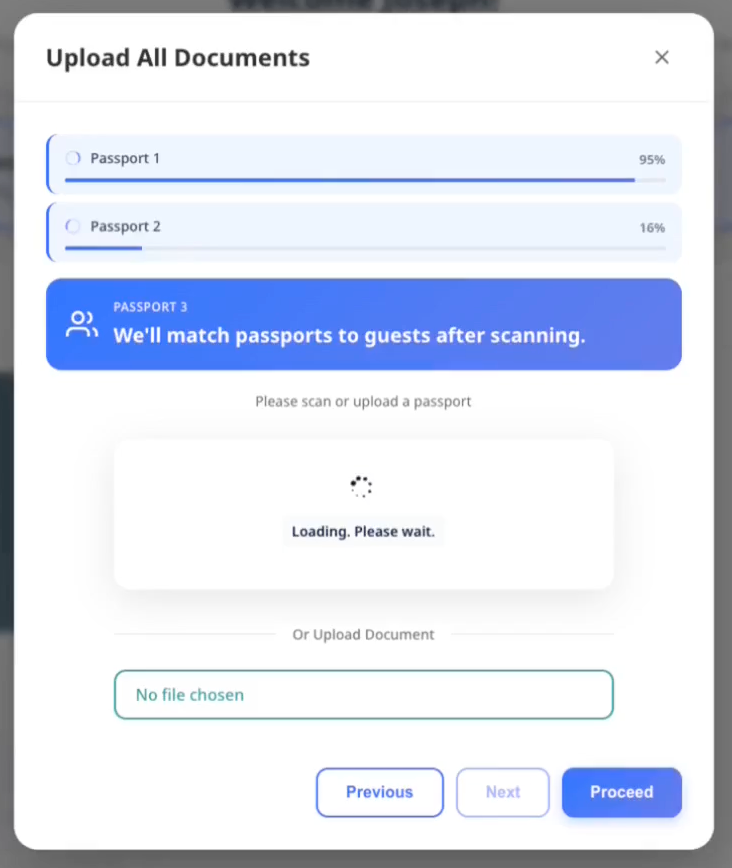
ขั้นตอนที่ 2: ตรวจสอบและจับคู่
หลังสแกนเสร็จ คุณจะเห็นรายการพาสปอร์ตทั้งหมดที่พร้อมจับคู่
- ACI จะแนะนำผู้เข้าพักที่จองไว้และเข้าเกณฑ์มากที่สุดเมื่อพาสปอร์ตไม่มีชื่อที่ตรงกันอย่างมั่นใจ
- ACI จะคงตัวเลือกของเจ้าหน้าที่และคำแนะนำที่ตรงกันอย่างมั่นใจไว้ไม่เปลี่ยนแปลงระหว่างที่คุณตรวจสอบ
- หากผู้เข้าพักที่จองไว้หลายคนอาจตรงกับพาสปอร์ตใบเดียวกัน ACI จะแสดง Choose guest และปิดใช้งาน Insert Guests จนกว่าคุณจะเลือก
- หากคำแนะนำถูกต้อง ไม่ต้องทำอะไรเพิ่มเติม
- หากต้องการกำหนดให้เป็นผู้เข้าพักคนอื่น ให้เลือกจากรายการ
- หากต้องการเพิ่มผู้เข้าพักใหม่ ให้เลือก Create new guest
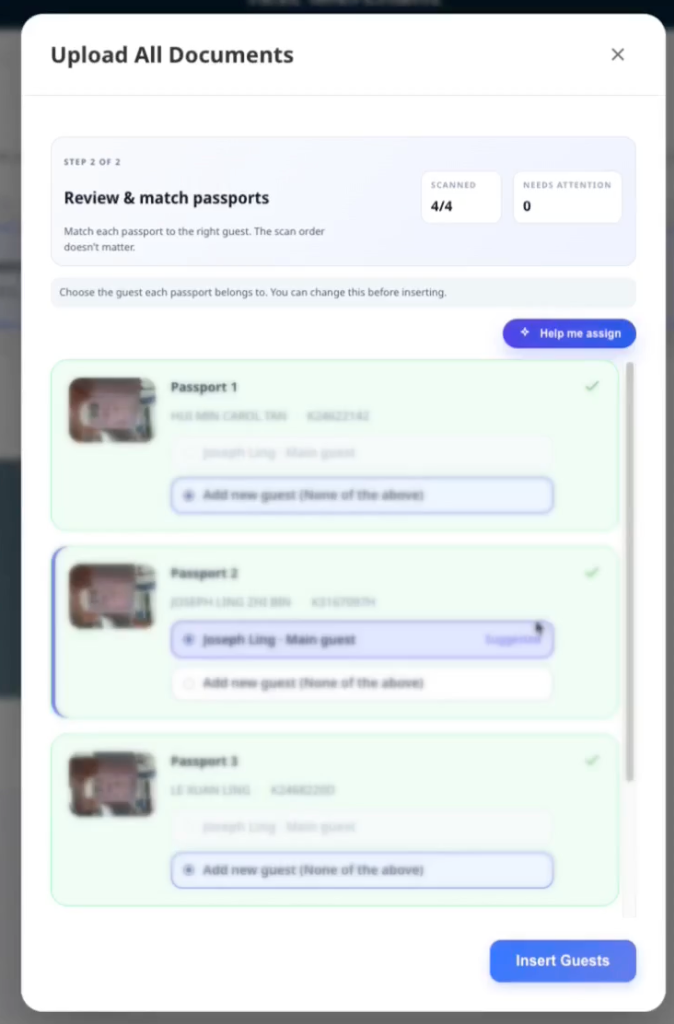
รูปแบบการแสดงการกำหนด:
- ผู้เข้าพัก 3 คนหรือน้อยกว่า: ปุ่มเลือกแบบการ์ด
- มากกว่า 3 คน: เมนูดรอปดาวน์เพื่อให้กะทัดรัด
เมื่อ ACI แนะนำผู้เข้าพักที่ใกล้เคียงที่สุด ให้เปรียบเทียบพาสปอร์ตกับผู้เข้าพักที่เลือกก่อนบันทึก คำแนะนำยังอาจเป็นชื่อที่ไม่ตรงกันได้ หากชื่อแตกต่างกัน Insert Guests จะเปิดคำขอตรวจสอบของเจ้าหน้าที่ก่อนบันทึก สำหรับผู้ที่ชื่อเหมือนกัน ให้เลือกผู้เข้าพักที่ถูกต้องด้วยตนเอง เพราะชื่อที่ตรงกันจะไม่ทำให้คำขอนี้ปรากฏ
ขั้นตอนที่ 3: บันทึกการกำหนด
- ตรวจสอบการกำหนดพาสปอร์ตกับผู้เข้าพักทั้งหมด
- เลือก Insert Guests เพื่อบันทึก
- หากมีข้อผิดพลาด จะแสดงอยู่ข้างพาสปอร์ตที่ได้รับผลกระทบ
- แก้ปัญหาแต่ละรายการและลองใหม่หากจำเป็น
หากชุดข้อมูลเพิ่มผู้เข้าพักเกินความจุที่รายงาน AVA จะขอให้ยืนยันแต่ละห้องที่ได้รับผลกระทบก่อนดำเนินการ เลือก Cancel เพื่อเก็บเอกสารที่เตรียมไว้โดยไม่ส่งชุดข้อมูล หลังยกเลิก คุณสามารถลบเอกสาร ปรับการกำหนด หรือส่งชุดข้อมูลภายหลังได้ ช่องผู้เข้าพักเพิ่มเติมที่เป็นตัวเลือกใช้ได้หนึ่งครั้งต่อห้องในหนึ่งเซสชัน bulk upload เริ่มเซสชัน bulk upload ใหม่เมื่อต้องการลงทะเบียนผู้เข้าพักเพิ่มเติมอีกคน
ข้อผิดพลาดที่พบบ่อย:
- "Document number not detected" → สแกนใหม่โดยจัดแสงให้ดีขึ้น
- "Already uploaded for [guest]" → กำหนดให้ผู้เข้าพักคนอื่น
- "Guest limit reached" → กำหนดให้ผู้เข้าพักที่มีอยู่แทนการสร้างใหม่
- "Payment method is not enabled for reservations" → เปิดวิธีชำระเงินให้ใช้กับการจองใน Opera แล้วลองใหม่
เมื่อ Opera ปฏิเสธผู้เข้าพักเพิ่มเติมเนื่องจากปิดใช้วิธีชำระเงิน AVA จะแสดงข้อความที่เหมาะกับผู้เข้าพัก เจ้าหน้าที่ยังดูรายละเอียดวิธีชำระเงินของ Opera ได้ในข้อมูลข้อผิดพลาด ดู การปฏิเสธผู้เข้าพักเพิ่มเติมเนื่องจากวิธีชำระเงินของ Opera
ขั้นตอนที่ 4: ยืนยันการจอง (เฉพาะกรณีที่ชื่อไม่ตรงกัน)
หากชื่อในเอกสารที่สแกนไม่ตรงกับการจอง AVA จะหยุดที่ Insert Guests และแสดงแผงตรวจสอบ
ใน ACI แผงจะแสดงพาสปอร์ตที่ไม่ตรงกันทุกใบและผู้เข้าพักที่เลือกไว้สำหรับห้องนั้น ตรวจสอบแต่ละคู่ก่อนยืนยัน การยืนยันจะครอบคลุมเฉพาะคู่ที่แสดงในคำขอนั้น หากพบชื่อไม่ตรงกันอีกครั้งภายหลัง ระบบจะเปิดคำขอตรวจสอบแยกต่างหาก
-
อ่านคู่ Reservation name และ Passport name แต่ละคู่
-
ยืนยันว่าพาสปอร์ตแต่ละใบเป็นของผู้เข้าพักที่เลือกไว้
-
ใน ACI ให้เลือกการแทนที่ของเจ้าหน้าที่เมื่อที่พักเปิดใช้งาน
-
ใน CCI ให้เปิดการยืนยันการจองของผู้เข้าพัก
-
ป้อนชื่อการจอง ไม่ใช่ชื่อในพาสปอร์ต แล้วเลือก Verify
-
หากคำตอบไม่ผ่าน ให้คงทุกส่วนของชื่อการจอง รวมทั้งคำนำหน้าหรือคำต่อท้ายไว้
✓ หลังอนุมัติ AVA จะบันทึกการกำหนดให้อัตโนมัติ คุณไม่ต้องเลือก Insert Guests อีกครั้ง
แผง Verify Your Booking จะปรากฏเมื่อ AVA ต้องการการยืนยันการจองเพิ่มเติม AVA จะไม่ส่งชื่อในการจองไปในคำตอบของการท้าทาย ดู การยืนยันชื่อการจองสำหรับการจับคู่บางส่วน และ OTP สำรองกรณีชื่อไม่ตรงกัน หากแสดง OTP สำรองหลังการยืนยันชื่อในการจองไม่ผ่าน ให้ใช้โค้ดล่าสุดจากอีเมลการจอง ใน ACI การยืนยันโดยเจ้าหน้าที่สามารถแทนที่การยืนยันของผู้เข้าพักได้เมื่อที่พักเปิดใช้งาน ดู การยกเว้นของเจ้าหน้าที่ ACI สำหรับชื่อไม่ตรงกัน
4. กรอกข้อมูลผู้เข้าพักให้ครบ
-
เลือก Guest Information → Fill
-
ยืนยันทุกฟิลด์ ฟิลด์ที่จำเป็นจะแสดง
* -
อัปเดต Document Number หากจำเป็น
-
เลือก Save
✓ ขั้นตอน Guest Information จะขึ้นว่าเสร็จสิ้น
สำหรับผู้เข้าพักเพิ่มเติม การ์ด Guest Information จะแสดง Same contact details as [main guest name] ที่ด้านบน เปิดใช้งานเพื่อคัดลอกค่าที่ใช้ร่วมกันและมองเห็นได้ในฟอร์มผู้เข้าพักปัจจุบัน สำหรับผู้เข้าพักเด็ก AVA จะคัดลอกเฉพาะฟิลด์ที่มองเห็นได้ เช่น ที่อยู่หรือข้อมูลการเดินทาง ฟิลด์ Email และ Phone ที่ซ่อนอยู่จะไม่ถูกเปลี่ยนสำหรับผู้เข้าพักเด็ก เมื่อมีข้อมูลที่อยู่หรือการเดินทาง AVA จะแจ้งว่าจะคัดลอกฟิลด์เหล่านั้น ฟิลด์ที่คัดลอกจะยังมองเห็นและแก้ไขได้ ปิดตัวเลือกเพื่อคืนค่าของผู้เข้าพักเด็กก่อนการคัดลอก หากผู้เข้าพักเด็กไม่มีข้อมูลที่อยู่หรือการเดินทางให้คัดลอก AVA จะปิดสวิตช์และแสดงคำแนะนำให้กรอกเอง สำหรับผู้เข้าพักเพิ่มเติมรายอื่น AVA จะปิดสวิตช์เมื่อผู้เข้าพักหลักไม่มีค่าที่ใช้ร่วมกันและมองเห็นได้
สำหรับการจอง ACI ที่จัดกลุ่มด้วยตนเอง AVA จะคงผู้เข้าพักหลักของการจองหลักไว้เหมือนเดิม สำหรับการจองเพิ่มเติมแต่ละรายการที่เลือก AVA จะข้ามเฉพาะการลงทะเบียนผู้เข้าพักหลักของการจองนั้น เพิ่มเอกสารและข้อมูลของผู้เข้าพักที่เข้าพักจริงให้กับห้องนั้น หากคุณแก้ไขชื่อของผู้เข้าพักที่ถูกข้าม AVA จะสร้างผู้เข้าพักเพิ่มเติมแทน การแก้ไขเฉพาะอีเมล โทรศัพท์ หรือที่อยู่จะยังคงอยู่ในระเบียนผู้เข้าพักคนนั้น วิธีนี้ป้องกันไม่ให้การแก้ไขเขียนทับผู้เข้าพักหลัก
หากผู้เข้าพักไม่มีหมายเลขโทรศัพท์ AVA จะใช้สัญชาติในพาสปอร์ตเป็นประเทศเริ่มต้นของรหัสโทร หมายเลขโทรศัพท์ที่มีอยู่แล้วจะคงรหัสประเทศเดิมไว้
เมื่อผู้เข้าพักพิมพ์ช่องที่อยู่หรือการเดินทาง AVA จะให้น้ำหนัก Google Places ไปทางสัญชาติของผู้เข้าพัก ถ้าไม่มีสัญชาติ AVA จะใช้ประเทศของโรงแรมเป็นค่าตกลง
หากคุณเห็นคำเตือนใต้ Document Number ให้ตรวจทาน ID อีกครั้ง คำเตือนไม่ได้บล็อกการเช็กอิน
หากบันทึกข้อมูลผู้เข้าพักไม่สำเร็จ
สิ่งที่เห็น: การ์ด Guest Information แสดงสถานะ error หลังจากคุณเลือก Save
วิธีแก้:
-
ตรวจสอบฟิลด์ที่จำเป็นและแก้ค่าที่ไม่ถูกต้อง
-
เปิด Guest Information → Fill อีกครั้ง
-
เลือก Save
-
หากยังขึ้น error ให้รีเฟรชหน้าแล้วลองอีกครั้ง
✓ การ์ดควรกลับสู่สถานะ saved หลังลองสำเร็จ
ใน ACI แบบสองอุปกรณ์ AVA จะบันทึกการแก้ไขข้อมูลผู้เข้าพักเป็นฉบับร่างเมื่อออกจากฟิลด์ อุปกรณ์เจ้าหน้าที่ที่จับคู่จะรีเฟรชฟอร์ม Guest Information ที่เปิดอยู่โดยอัตโนมัติหลังได้รับการอัปเดตที่ตรงกัน AVA จะรีเฟรชเฉพาะการจองและผู้เข้าพักที่ใช้งานอยู่ ฟอร์มอื่นที่เปิดไว้จะไม่เปลี่ยนแปลง การแก้ไขในเครื่องที่ยังไม่เสร็จจะยังอยู่ในฟอร์มระหว่างการรีเฟรช การบันทึกฉบับร่างไม่แทนที่การเลือก Save ขั้นสุดท้ายและไม่ทำให้ขั้นตอนเสร็จสิ้น หากคุณแก้ไขฟิลด์อีกครั้งก่อนคำขอนั้นเสร็จ ค่าล่าสุดจะยังแสดงอยู่ การตอบกลับจากการบันทึกครั้งเก่าจะไม่แทนที่การแก้ไขล่าสุด
การเปลี่ยนแปลงข้อมูลผู้เข้าพักไม่ปรากฏบนอุปกรณ์เจ้าหน้าที่
สิ่งที่เห็น: ผู้เข้าพักแก้ไขข้อมูล แต่อุปกรณ์เจ้าหน้าที่ยังแสดงค่าเดิม
วิธีแก้:
- ให้ผู้เข้าพักแก้ไขฟิลด์ปัจจุบันให้เสร็จ
- ให้ผู้เข้าพักแตะนอกฟิลด์
- รอสักครู่เพื่อให้การอัปเดตฉบับร่างเสร็จ
- เปิดฟอร์ม Guest Information ที่ตรงกันค้างไว้บนอุปกรณ์เจ้าหน้าที่
- ตรวจสอบค่าที่รีเฟรชแล้วเลือก Save
✓ อุปกรณ์เจ้าหน้าที่ควรแสดงข้อมูลผู้เข้าพักล่าสุดที่บันทึกแล้ว
หากฟอร์มไม่รีเฟรช ให้เปิด Guest Information → Fill อีกครั้งแล้วลองใหม่
แก้ไขข้อมูลผู้เข้าพักที่กรอกเสร็จแล้ว
ใช้ Edit เพื่อแก้ไขรายละเอียดผู้เข้าพักที่บันทึกไว้หลังขั้นตอน Guest Information เสร็จสิ้น
คุณสามารถแก้ไข Guest Information ที่กรอกเสร็จแล้วใน CCI, pre-arrival และ ACI ข้อกำหนดด้านเอกสารจะไม่ป้องกันไม่ให้เปิดฟอร์มที่เสร็จแล้วอีกครั้ง กฎการกำหนดผู้เข้าพักเดิมยังคงมีผลใน ACI
-
เปิดการ์ดห้องของผู้เข้าพักที่กรอกข้อมูลเสร็จแล้ว
-
เลือก Guest Information → Edit
-
แก้ไขรายละเอียดผู้เข้าพัก
-
เลือก Save
✓ AVA จะซิงก์รายละเอียดผู้เข้าพักที่เปลี่ยนแปลงไปยัง PMS แม้จะมีการซิงก์ก่อนหน้านี้แล้ว
AVA จะแทนที่บัตรลงทะเบียนเดิมเฉพาะเมื่อข้อมูล Guest Information ที่กรอกเสร็จแล้วเปลี่ยนแปลง หากบันทึกโดยไม่มีการเปลี่ยนแปลงที่มีความหมาย AVA จะไม่สร้างบัตรเพิ่ม AVA จะไม่สร้างบัตรลงทะเบียนก่อนเวลาในขณะที่ฟอร์มยังกรอกไม่เสร็จ
บันทึกข้อมูลผู้เข้าพักที่กรอกเสร็จแล้วไม่ได้
สิ่งที่เห็น: ฟอร์ม Edit แสดงข้อผิดพลาดหลังจากคุณเลือก Save
วิธีแก้:
- ตรวจสอบฟิลด์ที่จำเป็นและแก้ค่าที่ไม่ถูกต้อง
- รีเฟรชการจองหนึ่งครั้ง
- เปิด Guest Information → Edit อีกครั้ง
- บันทึกการแก้ไขอีกครั้ง
ตรวจสอบ PMS ก่อนลองบันทึกซ้ำ หากรายละเอียดผู้เข้าพักเปลี่ยนแปลงไปแล้ว
ข้อมูลผู้เข้าพักกำลังได้รับการอัปเดตอยู่
สิ่งที่เห็น: AVA แจ้งว่า "Guest information is already being updated."
วิธีแก้:
- รอให้การอัปเดตก่อนหน้าเสร็จสิ้น
- รีเฟรชการจอง
- ตรวจสอบว่ารายละเอียดผู้เข้าพักเปลี่ยนแปลงไปแล้วหรือไม่
- ลองใหม่เฉพาะเมื่อรายละเอียดที่บันทึกไว้ยังไม่ถูกต้อง
บัตรลงทะเบียนที่แทนที่อาจยังดำเนินการต่อหลังการอัปเดตข้อมูลผู้เข้าพักสำเร็จ
การควบคุมบนแท็บเล็ตผู้เข้าพักไม่ตอบสนองหลังปิดแป้นพิมพ์
สิ่งที่เห็น: iPad ที่จับคู่ไว้แสดงโมดัลได้ถูกต้อง แต่ตัวควบคุมด้านล่างไม่ตอบสนองหลังปิดแป้นพิมพ์
วิธีแก้:
- ให้ผู้เข้าพักแตะนอกฟิลด์ปัจจุบัน
- รอให้ Saving ปรากฏและดำเนินการเสร็จ
- เลือก Save อีกครั้งโดยไม่ซูมหน้าเว็บ
✓ แท็บเล็ตผู้เข้าพักที่จับคู่ไว้ควรรับการแตะได้หลังปิดแป้นพิมพ์
หากตัวควบคุมยังไม่ตอบสนอง ให้เปิด Guest Information → Fill อีกครั้งและติดต่อฝ่ายสนับสนุน
5. เก็บลายเซ็น (ถ้าจำเป็น)
-
เลือก Signature → Sign
-
เก็บลายเซ็นของผู้เข้าพัก
✓ ขั้นตอน Signature จะขึ้นว่าเสร็จสิ้น
ใน ACI แบบสองอุปกรณ์ ผู้เข้าพักเพิ่มเติมสามารถส่งลายเซ็นผ่าน Worker ที่กำหนดไว้ได้ ให้ Worker จับคู่กับเวิร์กสเตชันเจ้าหน้าที่และให้เส้นทางผู้เข้าพักยังใช้งานอยู่ ลายเซ็นที่เก็บผ่านเวิร์กสเตชันเจ้าหน้าที่ยังคงต้องใช้เซสชันอุปกรณ์เจ้าหน้าที่
เมื่อผู้เข้าพักเพิ่มเติมลงทะเบียนก่อน
ที่พักของคุณอาจอนุญาตให้ผู้เข้าพักเพิ่มเติมลงทะเบียนก่อนผู้เข้าพักหลัก ตัวเลือกนี้ตั้งค่าแยกกันสำหรับแต่ละโหมดเช็กอิน
เมื่อเปิดใช้ ผู้เข้าพักเพิ่มเติมคนแรกที่ลงนามจะกลายเป็นตัวแทนการลงทะเบียน AVA จะไม่แสดงตัวเลือกตัวแทนแยกต่างหาก ตัวแทนจะดำเนินการลงทะเบียนและยืนยันให้เสร็จก่อนที่ขั้นตอนจะดำเนินต่อ
ตัวตนของผู้เข้าพักหลักใน PMS ยังคงเดิม ใน Assisted Check-In เจ้าหน้าที่จะเห็นข้อความแจ้งว่าผู้เข้าพักหลักยังรอดำเนินการ ผู้เข้าพักหลักสามารถลงทะเบียนภายหลังผ่านโฟลว์คู่กันได้
เมื่อปิด Mandatory Guest Registration แต่ละโหมดเช็กอินจะมีการตั้งค่าให้ผู้เข้าพักเพิ่มเติมลงทะเบียนก่อนหนึ่งรายการ:
| การตั้งค่า | ตัวแทนที่มีสิทธิ์ |
|---|---|
| Off | ไม่มีผู้เข้าพักเพิ่มเติมคนใดเช็กอินห้องก่อนผู้เข้าพักหลักได้ |
| On | ผู้เข้าพักเพิ่มเติมที่อยู่ใน PMS หรือเพิ่มในเครื่องสามารถเป็นตัวแทนห้องก่อนได้ |
ผู้เข้าพักที่สร้างจากการอัปโหลดเอกสารหรือไม่มีการสแกน ID ยังคงเป็นผู้เข้าพักในเครื่อง การซิงก์กับ PMS ไม่ทำให้ผู้เข้าพักเหล่านั้นกลายเป็นผู้เข้าพักที่กำหนดไว้ล่วงหน้า
เมื่อเปิด Mandatory Guest Registration ผู้เข้าพักทุกคนใน PMS ต้องลงทะเบียนให้เสร็จก่อนเช็กอิน ปิดการตั้งค่านี้เพื่อให้ผู้เข้าพักหลักยังคงเป็นตัวแทนที่จำเป็น
สามารถทำพาสปอร์ตและการลงทะเบียนผู้เข้าพักให้เสร็จในลำดับใดก็ได้ การตั้งค่าลำดับเอกสารของผู้เข้าพักหลักที่เลิกใช้แล้วจะไม่บล็อกการสร้างหรือการอัปโหลดผู้เข้าพักอีกต่อไป ใช้การตั้งค่าให้ผู้เข้าพักเพิ่มเติมลงทะเบียนก่อนเพื่อควบคุมสิทธิ์ของตัวแทนและการเช็กอินห้องให้เสร็จ
เมื่อเปิดใช้การตั้งค่าให้ผู้เข้าพักเพิ่มเติมลงทะเบียนก่อน การสแกนผ่าน Add guest จะกำหนดเป้าหมายเป็นผู้เข้าพักเพิ่มเติมคนใหม่ AVA จะไม่ถือว่าผู้เข้าพักหลักเป็นเป้าหมายเพียงเพราะเอกสารของผู้เข้าพักหลักยังขาดอยู่ หากต้องการตรวจเอกสารของผู้เข้าพักหลัก ให้เริ่มอัปโหลดจากแถวของผู้เข้าพักหลัก การจับคู่ชื่อยังมีผลเมื่อคุณเลือกแถวของผู้เข้าพักที่เจาะจง
หากปิดการตั้งค่าให้ผู้เข้าพักเพิ่มเติมลงทะเบียนก่อน การเช็กอินห้องจะรอจนกว่าผู้เข้าพักหลักจะลงทะเบียน
Require predefined additional guests before check-in เป็นการตั้งค่าแยกต่างหาก การตั้งค่านี้ควบคุมจังหวะการดำเนินการของผู้เข้าพักเพิ่มเติมที่อยู่ใน PMS ระหว่างการเช็กอินห้องครั้งแรก การตั้งค่านี้ไม่ได้เพิ่มสิทธิ์ของตัวแทน และไม่ได้ทำให้ผู้เข้าพักในเครื่องกลายเป็นผู้เข้าพักที่กำหนดไว้ล่วงหน้า
ดำเนินการลงทะเบียนต่อหลังห้องเข้าพักแล้ว
ผู้เข้าพักสามารถลงทะเบียนให้เสร็จหลังจาก AVA ทำเครื่องหมายว่าห้องเข้าพักแล้ว
-
เปิดโฟลว์คู่กันของการจอง
-
เลือกผู้เข้าพักที่รอดำเนินการ
-
กรอก Guest Information, Document และขั้นตอนการยืนยันที่จำเป็นให้ครบ
-
บันทึกการลงทะเบียนผู้เข้าพัก
✓ ผู้เข้าพักจะลงทะเบียนเสร็จโดยไม่ต้องเช็กอินการจองหลักอีกครั้ง
การอัปโหลดพาสปอร์ตยังใช้งานได้หลังจากเช็กอินห้องแล้ว ข้อกำหนดเรื่องผู้เข้าพักที่ต้องลงทะเบียนและผู้เข้าพักที่กำหนดไว้ล่วงหน้าจะมีผลเฉพาะกับการเช็กอินห้องครั้งแรก
ผู้เข้าพักหลักยังรอดำเนินการ
สิ่งที่เห็น: ผู้เข้าพักเพิ่มเติมลงทะเบียนแล้ว แต่ผู้เข้าพักหลักยังดำเนินการไม่เสร็จ
วิธีแก้:
-
ใน Assisted Check-In แจ้งให้ผู้เข้าพักหลักกลับมาเมื่อเดินทางมาถึง
-
เปิดโฟลว์คู่กันของการจอง
-
ให้ผู้เข้าพักหลักดำเนินการลงทะเบียนและยืนยันให้เสร็จ
-
ดำเนินการเช็กอินต่อหลังผู้เข้าพักหลักเสร็จสิ้น
✓ PMS จะคงตัวตนของผู้เข้าพักหลักเดิมไว้
6. ตรวจยืนยันใบหน้าใน CCI หรือ ACI
หากเห็น Facial Verification:
-
เลือก Facial Verification → Verify
-
ทำตามคำแนะนำกล้องบนหน้าจอ
✓ ขั้นตอน Facial Verification จะขึ้นว่าเสร็จสิ้น
คำแนะนำ: การยืนยันใบหน้าแสดงใน Self Check-In (CCI) หรือ Assisted Check-In (ACI) เมื่อเปิดใช้สำหรับโหมดนั้น
หมายเหตุ: AVA จะเปรียบเทียบใบหน้าที่คมชัดที่สุดบนเอกสารก่อน วิธีนี้ช่วยไม่ให้ลายน้ำบนพาสปอร์ตที่จางรบกวนการตรวจ AVA จะบันทึกผลการยืนยันใบหน้าที่สำเร็จก่อนดำเนินการซิงก์กับระบบปลายทางให้เสร็จ หากบริการที่เชื่อมต่อทำงานช้า ให้ดำเนินการเช็กอินต่อระหว่างที่ AVA ทำการซิงก์นั้นให้เสร็จ
เมื่อการติดตามผลภาพกลุ่มล่าช้า
AVA จะบันทึกผลการจับคู่ภาพกลุ่มแต่ละรายการที่แสดง Verified ก่อนเริ่มการอัปเดตติดตามผล การอัปเดตเหล่านั้นจะดำเนินการเบื้องหลังหลังจากขั้นตอนยืนยันใบหน้าส่งผลกลับมา
หาก AVA เริ่มทำงานใหม่ ระบบจะกู้คืนงานติดตามผลที่ยังไม่เสร็จและปลอดภัยโดยอัตโนมัติ หากไม่สามารถยืนยันผลลัพธ์จากระบบปลายทางได้ AVA จะเก็บผลลัพธ์ไว้เพื่อให้เจ้าหน้าที่ตรวจสอบ
อย่าถ่ายภาพจับคู่ซ้ำสำหรับรายการที่แสดง Verified แล้ว ตรวจสอบระเบียนผู้เข้าพักและ PMS ก่อนติดต่อฝ่ายสนับสนุน
หากคุณกำลังใช้ ACI แบบสองอุปกรณ์
-
เจ้าหน้าที่ส่ง Facial Verification ไปยังแท็บเล็ตผู้เข้าพักที่จับคู่ไว้
-
เลือก Open tablet camera บนแผงของเจ้าหน้าที่
-
ขอให้ผู้เข้าพักทำตามคำแนะนำของกล้อง
-
หากการจับคู่ล้มเหลว ให้ส่งขั้นตอนยืนยันใบหน้าเดิมอีกครั้งจากแผงของเจ้าหน้าที่
✓ แท็บเล็ตผู้เข้าพักจะเปิดกล้องอีกครั้งและล้างสถานะการจับคู่ที่ไม่ตรงกันก่อนหน้า
คุณยังสามารถเลือก Verify in person หลังจากอัปโหลดเอกสารของผู้เข้าพักแล้ว ผู้เข้าพักไม่จำเป็นต้องมีการพยายามยืนยันใบหน้าที่ล้มเหลวก่อน ตรวจสอบตัวตนของผู้เข้าพักต่อหน้า แล้วป้อนเหตุผลที่จำเป็น
✓ หลังรีเฟรชครั้งถัดไป ผู้เข้าพักจะแสดงเป็น Staff approved
หากการยืนยันใบหน้าล้มเหลวไปแล้ว ให้ใช้ Staff override แทน อุปกรณ์เจ้าหน้าที่ที่ยืนยันแล้วต้องยังเชื่อมโยงกับเส้นทาง ACI ปัจจุบัน ดู ตั้งค่าการยืนยันใบหน้า
หลังผู้เข้าพักคนหนึ่งทำขั้นตอนเสร็จ ให้ดำเนินการกับผู้เข้าพักคนถัดไปจากอุปกรณ์เจ้าหน้าที่เครื่องเดิม อุปกรณ์เจ้าหน้าที่จะยังควบคุมเส้นทาง ACI แบบสองอุปกรณ์ที่ใช้งานอยู่
หากโรงแรมเปิดใช้การถ่ายภาพจากแท็บเล็ตที่ควบคุมโดยเจ้าหน้าที่ แผงเจ้าหน้าที่จะแสดงตัวอย่างภาพสดจากแท็บเล็ตด้วย ขอให้ผู้เข้าพักมองที่แท็บเล็ต แล้วเลือก Capture แท็บเล็ตจะถ่ายภาพด้วยความละเอียดต้นฉบับและส่งไปเปรียบเทียบใบหน้า ผู้เข้าพักจะเห็นคำแนะนำให้รอระหว่างการอัปโหลดและการยืนยัน รอให้การยืนยันเสร็จก่อนดำเนินการต่อ
อย่าถือว่าการอัปโหลดสำเร็จคือการยืนยันใบหน้าที่เสร็จแล้ว AVA ต้องเปรียบเทียบเอกสารเสร็จสิ้น หรือเจ้าหน้าที่ต้องใช้การแทนที่ที่ได้รับอนุมัติ
7. ตรวจสอบการยืนยันใบหน้าแบบกลุ่ม
การยืนยันแบบกลุ่มจะแสดงใน Room List เมื่อเปิดใช้และมีผู้เข้าพักที่เข้าเกณฑ์อย่างน้อยหนึ่งคนมีเอกสารที่บันทึกแล้ว ระบบจะไม่เปิดขั้นตอนนี้โดยอัตโนมัติหลังอัปโหลดเอกสาร
-
เลือก Verify group photo
-
ขอให้ผู้เข้าพักยืนรวมกันโดยเห็นใบหน้าทุกคนอย่างชัดเจน
-
บนอุปกรณ์กล้อง เลือก Take group photo
-
ตรวจสอบการจับคู่ที่เสนอแต่ละรายการใน Review group matches
-
เลือก Reject match เมื่อการจับคู่ที่เสนอไม่ถูกต้อง
-
เลือก Retake missing guests สำหรับใบหน้าที่หายไปหรือไม่ชัดเจน
-
เลือก Save matched guests หลังตรวจสอบผลลัพธ์
✓ ผู้เข้าพักที่บันทึกแล้วจะแสดง Verified ผู้เข้าพักที่จำเป็นแต่ยังแก้ไขไม่เสร็จจะยังไม่ครบถ้วน
หาก AVA ไม่สามารถใช้ข้อเสนอได้อย่างปลอดภัย ระบบจะคงผู้เข้าพักคนนั้นไว้ในสถานะแก้ไขไม่เสร็จ ข้อเสนอจะไม่ยืนยันผู้เข้าพักหรือดำเนินต่อเป็นการจับคู่ที่บันทึกแล้ว ขอให้ผู้เข้าพักที่ได้รับผลกระทบเข้าร่วมภาพถัดไป แล้วเลือก Retake missing guests
เด็กที่อยู่ภายใต้ข้อยกเว้นการยืนยันใบหน้าจะแสดง Not required ระบบจะไม่นำเด็กเหล่านี้ไปจับคู่และจะไม่บันทึกภาพใบหน้าที่ตัดออกมา
หากภาพบุคคลในเอกสารใช้งานไม่ได้ AVA จะแสดง Document needed แทน ผู้เข้าพักคนนั้นจะไม่ปรากฏใน Retake missing guests อัปโหลดและบันทึกเอกสารที่ชัดเจนกว่า แล้วเรียกใช้การยืนยันแบบกลุ่มอีกครั้ง
AVA จะคงการจับคู่ไว้ในสถานะแก้ไขไม่เสร็จด้วยเมื่อเอกสารมีใบหน้าชัดเจนหลายใบหน้าที่แตกต่างกัน ระบบจะปฏิเสธข้อเสนอภาพบุคคลซ้ำ เว้นแต่การตรวจสอบตัวตนยืนยันว่าเป็นบุคคลเดียวกัน ปฏิเสธข้อเสนอที่ไม่ชัดเจนและอย่ากำหนดการจับคู่ด้วยตนเอง
หากคุณกำลังใช้ ACI แบบสองอุปกรณ์
- เจ้าหน้าที่เลือก Verify group photo จาก Room List
- ขอให้ผู้เข้าพักถ่ายภาพบนแท็บเล็ตผู้เข้าพักที่จับคู่ไว้
- ตรวจสอบและบันทึกการจับคู่บนอุปกรณ์เจ้าหน้าที่
- ใช้ Retake missing guests เมื่อมีผู้เข้าพักเพียงบางคนที่ต้องถ่ายใหม่
✓ แท็บเล็ตผู้เข้าพักเป็นผู้ถ่ายภาพ แต่เจ้าหน้าที่เป็นผู้ควบคุมการตรวจสอบและการบันทึก
8. เก็บมัดจำหรือชำระเงิน (เฉพาะ Self Check-In)
หาก Reservation Requirements แสดง Deposit หรือ Payment ขั้นตอนการชำระเงินจะขึ้นอยู่กับเส้นทางการใช้งาน
สำหรับ Self Check-In ให้เลือก Pay จากข้อกำหนดการจอง สำหรับ Assisted Check-In เจ้าหน้าที่ที่ยืนยันแล้วสามารถขอรายการมัดจำหรือการชำระเงินที่เข้าเกณฑ์ได้เมื่อเปิดการตั้งค่าการชำระเงินของ ACI หากปิดการตั้งค่านี้ ACI จะดำเนินการต่อโดยไม่ขอชำระเงิน สำหรับ Pre-arrival AVA จะแสดงการชำระค่าห้องหรือเงินมัดจำที่เปิดใช้ โดยใช้ยอดเรียกเก็บเงินจริง การชำระเงินล่วงหน้าใช้เกตเวย์ออนไลน์ และไม่ใช้เงินสด เทอร์มินัล หรือขั้นตอนแบบรวม
-
เลือก Pay
✓ Pay จะเปลี่ยนเป็น Processing พร้อมตัวหมุน และจะใช้งานไม่ได้ชั่วคราวระหว่างที่ AVA เตรียมขั้นตอนการชำระเงิน
-
ทำขั้นตอนการชำระเงินให้เสร็จ
✓ ข้อกำหนดการชำระเงินจะแสดงว่าเสร็จสิ้น
AVA จะตรวจสอบราคาห้องและแพ็กเกจที่เข้าเกณฑ์ก่อนเปิดขั้นตอนการชำระเงินถัดไป รอให้ขั้นตอนดังกล่าวปรากฏ อย่าเลือก Pay ซ้ำขณะที่แสดง Processing
หากการชำระเงินผ่านเทอร์มินัลเสร็จแล้ว AVA จะคงสถานะ requirement ให้เสร็จสิ้นเมื่อ retry อย่าเริ่มจ่ายครั้งที่สอง เว้นแต่ใบเสร็จจะแสดงว่าธุรกรรมล้มเหลว
หมายเหตุ: Self Check-In และ Pre-arrival จะไม่เสร็จจนกว่าการชำระเงินที่แสดงทั้งหมดจะสำเร็จ ACI ต้องการการชำระเงินเฉพาะเมื่อเจ้าหน้าที่ร้องขอและการตั้งค่าการชำระเงินของ ACI อนุญาต
AVA จะขออนุมัติล่วงหน้าสำหรับเงินมัดจำเฉพาะเมื่อการอนุมัตินั้นยังมีผลจนถึงเวลาเช็กเอาต์ ระบบจะไม่ส่งคำขอเมื่อถึงขอบเขตเวลาหมดอายุพอดี ค่าห้องจากการขายตรงจะเป็นไปตามการตั้งค่าการเรียกเก็บค่าห้องของโรงแรม
9. สรุปเช็กอิน
-
เลือก Proceed to Check-In
-
รอให้หน้าความคืบหน้าทำงานจนจบ
✓ การ์ดห้องจะแสดงสถานะเช็กอินเสร็จสิ้น ✓ เมื่อมีการออกสิทธิ์ที่จัดการโดย AVA Room Access ต้องแสดง Success ก่อนจึงจะเสร็จสิ้น ✓ เมื่อใช้การออกสิทธิ์แบบด้วยตนเองหรือที่ไม่พร้อมใช้งาน เช็กอินอาจเสร็จได้ขณะที่ Room Access ยังคงแยกต่างหาก
AVA อาจออก PIN, คีย์ QR หรือข้อมูลรับรองล็อกเกอร์ระหว่างจัดสรรห้อง หลังเช็กอินขั้นสุดท้ายสำเร็จ AVA จะเก็บผลการเข้าถึงที่สำเร็จนั้นไว้กับผู้เข้าพักที่ยืนยันว่ามาถึงแล้ว คุณไม่จำเป็นต้องออกข้อมูลรับรองเดิมอีกครั้ง หากผลลัพธ์ยังแสดง Pending หรือ Partial success ให้รีเฟรชและติดตามสถานะการเข้าห้อง
เมื่อเปิดใช้ AVA จะส่งคำขอ No Post หลังการเช็กอิน OPERA Assisted Check-In สำเร็จ การดำเนินการนี้ใช้กับการจองหลักและผู้เข้าพักร่วมทุกรายที่เช็กอินระหว่างเส้นทางนี้ เช็กอินยังถือว่าสำเร็จหากการอัปเดตติดตามผลนี้ล้มเหลว ตรวจสอบการจองใน OPERA และใช้ No Post ด้วยตนเองเมื่อจำเป็น Self Check-In, Pre-arrival และการเช็กอิน OPERA ทั่วไปไม่มีการเปลี่ยนแปลง
คำแนะนำ: ระหว่างเช็กอิน ระบบจะทำงานตามลำดับ Checking Availability → Assigning Room → Generating Keys → Finalizing
หากเป็นการลงทะเบียนก่อนเดินทางมาถึง
- ทำทุกขั้นตอนที่จำเป็นด้านบนให้ครบ
- เลือก Complete Pre-Arrival แทน Proceed to Check-In
✓ ห้องจะถูกทำเครื่องหมายว่า pre-arrival เสร็จสิ้น สิทธิ์เข้าห้องจะออกเมื่อผู้เข้าพักมาถึง
หาก PMS ของคุณรองรับการอัปเดต ETA AVA จะส่งเวลาโดยประมาณที่จะมาถึงของผู้เข้าพักคนแรกกลับไปหลังขั้นตอนก่อนเดินทางมาถึง หาก PMS ของคุณไม่รองรับ การเช็กอินยังคงเสร็จตามปกติ การจองของ Opera/OHIP รองรับเส้นทางการอัปเดตนี้แล้ว
หากห้องเช็กอินแล้วอยู่แล้ว
เลือก Proceed to Check-In เพื่อทำผู้เข้าพักที่เหลือให้เสร็จ สิ่งนี้จะไม่กำหนดห้องใหม่ คุณยังสามารถใช้ companion flow เพื่อลงทะเบียนผู้เข้าพักที่รอดำเนินการหลังห้องเข้าพักแล้ว
หากผลลัพธ์จาก PMS ไม่ชัดเจน
สิ่งที่เห็น: การพยายามเช็กอินครั้งแรกดูเหมือนค้างอยู่ การจัดสรรห้องอาจถูกบล็อกหลังจาก PMS อาจเช็กอินเสร็จแล้ว
วิธีแก้:
- ยืนยันสถานะการจองใน PMS
- รีเฟรชการจองใน AVA
- ตรวจสอบการตัดสินใจเรื่องการมาถึงและห้องที่เลือกไว้
- เลือก Proceed to Check-In อีกครั้ง
AVA จะกระทบยอดการเช็กอินที่มีอยู่ใน PMS ก่อนดำเนินการต่อ ระบบจะข้ามการจัดสรรห้องซ้ำสำหรับห้องที่เลือก แต่ยังคงตรวจสอบการทบทวนการมาถึง ข้อมูลรับรอง และการเช็กอินขั้นสุดท้าย
หาก PMS ยังแสดงว่าผู้เข้าพักยังไม่ได้เช็กอิน AVA จะใช้การจัดสรรห้องตามปกติ หาก PMS ไม่พร้อมใช้งาน ให้รอจนระบบกลับมาแล้วจึงลองใหม่
สำหรับ Opera AVA จะยืนยันผู้เข้าพักที่เลือกจากสถานะการจองสดล่าสุดของผู้เข้าพักคนนั้น ซึ่งรวมถึงผู้เข้าพักร่วมเมื่อการจองหลักของ Opera ไม่แสดงลิงก์การใช้ห้องร่วมแล้ว AVA จะตรวจห้องสดของผู้เข้าพักด้วยก่อนทำเครื่องหมายว่าเช็กอินเสร็จ
หาก Opera แสดง Checked In แต่ AVA ยังแสดงผลลัพธ์ไม่ชัดเจน ให้รีเฟรชการจอง จากนั้นตรวจสอบการตัดสินใจเรื่องการมาถึงที่บันทึกไว้ แล้วเลือก Proceed to Check-In อีกครั้ง อย่าเช็กอินผู้เข้าพักด้วยตนเองซ้ำใน Opera
10. ให้สิทธิ์เข้าห้อง
หลังเช็กอิน ให้เปิด Room Information บนการ์ดห้อง Room Access ยังคงพร้อมให้ดำเนินการภายหลังเมื่อไม่ได้กำหนดให้เป็นขั้นตอนบังคับ:
- Room Number จะแสดงอยู่ด้านบน
- Room Access ขึ้นอยู่กับการตั้งค่าของที่พัก
สำหรับ QRLOCK การจัดสรรห้องที่เข้าเกณฑ์จะออกคีย์ดิจิทัลหนึ่งรายการก่อนส่งอีเมล การ์ดห้องจะแสดงสถานะการส่งมอบ และการส่งอีเมลซ้ำจะใช้คีย์เดิม ใช้ Email room information เพื่อส่งรายละเอียดซ้ำโดยไม่ออกคีย์ใหม่
หากคุณใช้ Keycards:
หากคุณใช้ Opera ร่วมกับ encoder ที่เชื่อม PMS AVA จะรอสถานะคีย์ที่ยืนยันแล้วก่อน การตอบกลับจาก Opera รุ่นเก่าอาจไม่มีสถานะนี้ จากนั้น AVA จะตรวจห้องที่บันทึกไว้ จำนวน key และช่วงเวลาที่ใช้ได้ต่อไปได้นานถึง 30 วินาที หากคำขอยังหมดเวลา ให้ลอง card เดิมอีกครั้งจากห้องเดิม
ก่อนเข้ารหัสคีย์การ์ดใบแรก AVA จะตรวจผู้เข้าพัก Opera ที่เชื่อมโยงและเข้าพักอยู่แล้วด้วย Opera อาจไม่แสดงลิงก์การใช้ห้องร่วมชั่วครู่หลังอัปเดตการจอง เมื่อเกิดกรณีนี้ AVA จะค้นหาการจองที่เชื่อมโยง เพื่อให้การ์ดของผู้เข้าพักเดิมยังใช้งานได้ หากยังไม่พบผู้เข้าพักร่วม ให้รีเฟรชการจองก่อนเข้ารหัส
เซิร์ฟเวอร์ของ AVA จะตัดสินใจใช้ NEW หรือ DUPLICATE สำหรับคำขอคีย์การ์ดทุกครั้ง หากมีผู้เข้าพักอีกคนอยู่ในห้องแล้ว AVA จะใช้ DUPLICATE เพื่อปกป้องการ์ดของผู้เข้าพักคนนั้น หลังย้ายห้อง AVA จะใช้ NEW สำหรับห้องใหม่ หาก PMS ยืนยันการเข้าพักร่วมกันไม่ได้ AVA จะใช้ค่าเริ่มต้น NEW ตามปกติ
ก่อนเข้ารหัส AVA จะยืนยันห้องผ่าน PMS เมื่อการ์ดการจองไม่มีค่าห้องที่ใช้งานได้ ตัวตนห้องจาก PMS ที่ถูกต้องยังใช้ได้ รวมถึงตัวระบุ AVA PMS ที่มีความยาวมาก คุณไม่จำเป็นต้องแก้ไขหรือตัดตัวตนห้องให้สั้นลง
-
หากคุณอยู่ใน ACI ให้ยืนยันการส่งมอบก่อน
-
เลือก Create Keycard เพื่อเข้ารหัสการ์ดตอนนี้
-
หากคีย์การ์ดถูกเข้ารหัสไว้ล่วงหน้า ให้เลือก Already Encoded
-
เข้ารหัสการ์ดแต่ละใบเมื่อมีพรอมต์
-
หากคุณต้องการการ์ดน้อยลง ให้เลือก Complete Check-In ใน modal คีย์การ์ด
✓ หากมี encoder ออนไลน์อยู่หนึ่งเครื่อง AVA จะแสดง Preparing keycard encoding... ชั่วครู่ก่อนเริ่มเข้ารหัส
คีย์การ์ดสำหรับผู้เข้าพักเพิ่มเติมใน CCI และ ACI
เมื่อผู้เข้าพักเพิ่มเติมเช็กอินในห้องที่มีคีย์การ์ดอยู่แล้ว AVA อาจเสนอคีย์การ์ดหนึ่งใบ ข้อเสนอนี้จะแสดงทั้งใน Self Check-In (CCI) และ Assisted Check-In (ACI)
-
เช็กอินผู้เข้าพักเพิ่มเติมให้เสร็จ
-
เลือกการดำเนินการคีย์การ์ดที่เสนอ
-
เลือก encoder ที่ออนไลน์เมื่อ AVA ขอ
-
วางการ์ดเปล่าหนึ่งใบบน encoder
✓ AVA ใช้ DUPLICATE และคงการ์ดเดิมของห้องให้ใช้งานได้
ข้อเสนอนี้จะแสดงเฉพาะเมื่อห้องเก็บคีย์การ์ดเสร็จแล้ว หากไม่พบข้อเสนอ ให้รีเฟรชการ์ดห้องและยืนยันว่าได้ตั้งค่าการเข้าห้องด้วยคีย์การ์ดแล้ว
ตั้งวันที่และเวลาหมดอายุของคีย์การ์ด ACI
ใน Assisted Check-In (ACI) คุณสามารถกำหนดทั้งวันที่และเวลาของ Key valid until ได้ ใช้ตัวเลือกนี้เมื่อผู้เข้าพักเช็กเอาต์ล่าช้าหรือมีการจองต่อเนื่องกัน
- ตรวจสอบวันที่และเวลาของ Key valid until
- เลือกวันที่ภายหลัง หากการเข้าพักของผู้เข้าพักต่อเนื่องหลังวันเช็กเอาต์
- เลือกเวลาที่ผู้เข้าพักควรหมดสิทธิ์เข้าห้อง
- เลือก Reset to hotel default เพื่อคืนค่าทั้งสองรายการ
- ดำเนินการเข้ารหัสการ์ดแต่ละใบต่อ
วันที่จะเริ่มจากวันออกจากที่พักตามการจอง หากวันที่เข้ารหัสก่อนหน้านี้ยังอยู่ในอนาคต AVA จะใช้วันที่นั้นซ้ำ เวลาจะอ้างอิงจากการเข้ารหัสครั้งก่อนหรือค่าเริ่มต้นของโรงแรม ระบบจะปฏิเสธวันที่ในอดีต หากไม่เปลี่ยนวันออกจากที่พัก AVA จะใช้พฤติกรรมการหมดอายุตามปกติ
เมื่อเข้ารหัสหลายใบ AVA จะล็อกวันที่และเวลาเดียวกันให้ทุกใบ การเปลี่ยนวันที่มีผลกับคีย์การ์ดเท่านั้น ไม่เปลี่ยนการจองใน PMS
AVA จะอยู่ที่ห้องปัจจุบันจนกว่าการเข้ารหัสคีย์การ์ดจะสำเร็จ ห้องถัดไปจะเปิดหลังการตอบกลับการเข้ารหัสที่สำเร็จรายการสุดท้ายทำเครื่องหมายว่าดึงการ์ดแล้ว
หาก modal Win A Complimentary 1-Night Stay ปรากฏขึ้น ให้ปิดก่อน แล้วเลือก Complete Check-In
หากคุณใช้ Smart Locks:
-
เลือก Show PIN
-
แชร์ PIN ให้ผู้เข้าพัก
✓ หากการ์ด access ของห้องยังแสดง Pending หรือ Partial success ให้รอสถานะพร้อมก่อน
หากคุณใช้ Lockers:
- แชร์ Locker Number
- เลือก Show Code และแชร์รหัส locker
หากคุณเห็นข้อความ room access แทนรหัส ให้ทำตามคำแนะนำบนหน้าจอ
Manage Locker Code และรหัส locker จะปรากฏเฉพาะเมื่อ Settings → Room Access ตั้งเป็น Locker Systems หาก AVA ยังโหลดโหมด room access อยู่ ให้รอแล้วลองใหม่จากการ์ดห้อง
คำแนะนำ: หากตั้งค่า WiFi ไว้ ส่วน WiFi จะแสดงชื่อและรหัสผ่าน โน้ตห้องจะแสดงใต้ General Information
ข้อความบนการ์ดห้องจะตามภาษาของผู้เข้าพัก แม้จะมีรหัสภูมิภาคอย่าง ko-KR
หากคุณกำลังใช้ Assisted Check-In (ACI)
หลังเช็กอิน หน้าจอจะแสดง Check-In Complete และขอให้ผู้เข้าพักคืนอุปกรณ์ หากห้องใช้คีย์การ์ด การดำเนินการถัดไปจะขึ้นอยู่กับการตั้งค่า ACI:
- Two-device ACI: การดำเนินการคีย์การ์ดจะแสดงหลังเช็กอินสำเร็จ
- One-device ACI: ยืนยันการส่งมอบผู้เข้าพักก่อนจึงจะแสดงการดำเนินการคีย์การ์ด
ใช้ Create Keycard สำหรับการ์ดใหม่ หรือ Already Encoded สำหรับการ์ดที่เตรียมไว้ล่วงหน้า สำหรับการเข้าพักหลายห้อง AVA จะรอผลคีย์การ์ดสำเร็จก่อนเปิดห้องถัดไป
การแก้ปัญหา
ต้องยืนยันอุปกรณ์เจ้าหน้าที่สำหรับบางขั้นตอน
สิ่งที่เห็น: ACI แสดง Staff verification recommended หรือขั้นตอนที่ต้องใช้ข้อมูลรับรองไม่สามารถดำเนินการต่อได้
สาเหตุ: ข้อมูลรับรอง STAFF ของเบราว์เซอร์ที่ใช้อยู่หายไป หมดอายุ ถูกเพิกถอน หรือเป็นของอุปกรณ์หรือโรงแรมอื่น
วิธีแก้:
- ยืนยันว่าคุณใช้เบราว์เซอร์หรือคีออสก์ของเจ้าหน้าที่ที่ถูกต้อง
- ให้ผู้ดูแลแสดง QR ยืนยัน ACI ล่าสุดจาก Settings → Kiosk
- เลือก Verify Device ในแผงความพร้อมของ ACI
- อนุญาตการเข้าถึงกล้อง แล้วสแกน QR
- รอให้หน้า ACI ปัจจุบันโหลดใหม่ แล้วลองขั้นตอนนั้นอีกครั้ง
การจัดกลุ่มด้วยตนเองและการดำเนินการของเจ้าหน้าที่ตามบทบาทยังได้รับการป้องกันจนกว่าจะยืนยันเสร็จ เครื่องสแกนจะเก็บการยืนยันไว้ภายในบริบทของเบราว์เซอร์ปัจจุบัน วิธีนี้ช่วยรักษาข้อมูลจัดเก็บของ Web Clip, PWA หรือ wrapper ของเบราว์เซอร์ QR ใช้ได้ครั้งเดียว ดังนั้นให้สร้าง QR ใหม่หากมีการสแกนไปแล้ว
ระหว่างการยืนยัน AVA จะแสดงคำแนะนำทั้งห้าข้อไว้ครบ ตัวอย่างแบบปรับตามขนาดหน้าจอและแถบสถานะจะแสดงความคืบหน้าของกล้อง คำแนะนำการสแกน หรือข้อผิดพลาดของกล้อง บนหน้าจอแนวนอน ตัวอย่างภาพจะอยู่ถัดจากคำแนะนำ ดู ยืนยันอุปกรณ์เจ้าหน้าที่ ACI
หากเปิดเครื่องสแกนไม่ได้ ให้ไปที่ Settings → Kiosk แล้วเลือก Re-verify staff device ทำลิงก์แบบใช้ครั้งเดียวล่าสุดให้เสร็จบนอุปกรณ์จริงเครื่องเดิม
AVA อาจกู้คืนข้อมูลรับรองที่ล้าสมัยโดยอัตโนมัติ หากเบราว์เซอร์ที่ยืนยันตรงกันยังมีสิทธิ์รีเซ็ต หลังกู้คืน AVA จะโหลดรายการการจองใหม่ก่อนแสดงการดำเนินการของเจ้าหน้าที่ หากความพร้อมใช้งานหายไป AVA จะล้างการจองและการเลือกเช็กเอาต์ที่ล้าสมัย การยืนยันคีออสก์และโหมดสาธิตยังใช้เส้นทางเดิม
ACI แบบอุปกรณ์เดียวหยุดหลังค้นหาซ้ำ
สิ่งที่เห็น: หลังค้นหาอีกครั้ง ACI แบบอุปกรณ์เดียวไม่ดำเนินการต่อ และอาจแสดงข้อความ "Unable to bind the assisted check-in journey to this staff device."
วิธีแก้:
- ค้นหาการจองอีกครั้งจากหน้าจอ Staff Access เดิม
- รอให้การ์ดห้องของการจองปรากฏ
- ดำเนินการเช็กอินต่อบนอุปกรณ์เจ้าหน้าที่เครื่องเดิม
- หาก AVA ขอการยืนยัน ให้ทำตาม ต้องยืนยันอุปกรณ์เจ้าหน้าที่สำหรับบางขั้นตอน
หากยังถูกบล็อกหลังลองหนึ่งครั้ง ให้รีเฟรช AVA และติดต่อฝ่ายสนับสนุน
การค้นหาการจองของ Cloudbeds หมดเวลา
สิ่งที่เห็น: การค้นหาหมุนค้าง แล้วแสดงว่าหมดเวลาหรือบริการไม่พร้อมใช้งาน
สาเหตุ: AVA จะหยุดรอหลัง 20 วินาทีถ้า Cloudbeds ไม่ตอบ
วิธีแก้:
- รอสักครู่
- ลองค้นหาอีกครั้ง
- ยืนยันว่าสามารถเข้าถึง Cloudbeds ได้และ reservation นั้นมีอยู่จริง
- ติดต่อซัพพอร์ตหาก timeout เกิดซ้ำ
ที่พักยังไม่ได้ตั้งค่าสำหรับเช็กอิน
สิ่งที่เห็น: ผู้เข้าพักเห็นข้อความ "Self check-in is not available at this property right now." เจ้าหน้าที่เห็นข้อความ "This property is not configured for check-in yet."
สาเหตุ: ที่พักไม่มี merchant record หรือการเชื่อมต่อ PMS การจองอาจถูกต้อง แต่ AVA ไม่สามารถค้นหาการจองที่ที่พักนี้ได้
วิธีแก้:
-
ยืนยันว่าได้เลือกโรงแรมที่ถูกต้องใน AVA
-
เปิด Settings → Essentials → PMS Integration
-
เชื่อมต่อ PMS หรือดำเนินการตั้งค่า AVA PMS ให้เสร็จสิ้น
-
ลองค้นหาอีกครั้งหลังจากบันทึกการตั้งค่าสำเร็จ
✓ การค้นหาการจองตามปกติควรกลับมาใช้งานได้หลังตั้งค่าที่พักแล้ว
PMS ไม่พร้อมใช้งานชั่วคราวระหว่างจัดสรรห้อง
สิ่งที่เห็น: การจัดสรรห้องแสดงข้อความว่า PMS ไม่พร้อมใช้งานชั่วคราว
สาเหตุ: PMS ไม่ตอบคำขอจัดสรรห้องภายในเวลาที่กำหนด ไม่ได้หมายความว่าห้องยังไม่พร้อม
วิธีแก้:
-
ตรวจสอบการจองและสถานะห้องใน PMS
-
รีเฟรชการจองใน AVA
-
ลองจัดสรรห้องอีกครั้งหนึ่งครั้ง
✓ AVA ควรจัดสรรห้องได้ หรือแสดงปัญหาความพร้อมของห้องที่เกิดขึ้นจริง
AVA จะไม่ส่งอีเมลแจ้งห้องไม่พร้อมเมื่อ PMS ขัดข้องชั่วคราว
ไม่พบการจองหลังสแกน
สิ่งที่เห็น: "Reservation not found" หรือระบบพาคุณไปหน้ายืนยัน
หากแมตช์แรกเป็นรายการที่ไม่ใช้งาน AVA จะรีเฟรชการค้นหาจากชื่อและลองการจองที่ยังใช้งานอยู่อีกครั้ง คุณอาจเห็นการจองที่มาแทนโดยไม่ต้องค้นหาใหม่
AVA จะลองข้อมูลอ้างอิง OTA หรือข้อมูลอ้างอิงภายนอกของ Opera อีกครั้งเป็นตัวพิมพ์ใหญ่เมื่อการค้นหาแบบตรงตัวไม่พบผลลัพธ์ หากยังไม่พบการจอง ให้ค้นหาด้วยหมายเลขยืนยัน
วิธีแก้:
- ป้อนหมายเลขยืนยันแทนการสแกน
- ยืนยันว่าผู้เข้าพักมาวันนี้หรือเมื่อวาน
- ตรวจว่าการจองไม่ใช่ cancelled หรือ no-show
ไม่พบห้องที่จัดกลุ่มใน Staff Access
สิ่งที่เห็น: Staff Access ไม่พบการจองเมื่อใช้หมายเลขยืนยันของห้อง
สาเหตุ: การจองหลายห้องอาจแสดงเป็นผลลัพธ์ที่จัดกลุ่มรายการเดียว หมายเลขยืนยันของห้องอาจต่างจากหมายเลขของการจองหลัก
วิธีแก้:
-
เปิด Staff Access ใน Assisted Check-In (ACI)
-
ค้นหาหมายเลขยืนยันของห้องอีกครั้ง
-
หากยังไม่พบ ให้ค้นหาด้วยชื่อเต็มของผู้เข้าพักหลัก
-
เลือกผลลัพธ์ที่จัดกลุ่ม แล้วตรวจป้าย
Res#: <confirmation>ของแต่ละห้อง -
ยืนยันหมายเลขห้องและหมายเลขยืนยันก่อนดำเนินการต่อ
✓ หมายเลขยืนยันเฉพาะห้องควรเปิดผลลัพธ์การจองที่จัดกลุ่มไว้
หากค้นหาทุกแบบแล้วยังไม่พบการจอง ให้ยืนยันว่าการจองยังใช้งานอยู่และมาถึงเมื่อวานหรือวันนี้ ติดต่อฝ่ายสนับสนุนพร้อมหมายเลขยืนยันของห้องและวันที่มาถึง หากยังไม่พบ
พบการจองหลายรายการ
สิ่งที่เห็น: "Multiple reservations found."
วิธีแก้:
- ค้นหาด้วยหมายเลขยืนยัน
- ใน Staff Access ค้นหาด้วยรหัสการจองหรือรหัสการจองภายนอก
การจัดกลุ่มการจองชื่อเดียวกันใช้ไม่ได้
สิ่งที่เห็น: ไม่สามารถเลือกการจองชื่อเดียวกันได้ หรือ AVA ปฏิเสธการจัดกลุ่ม
วิธีแก้:
- ยืนยันว่าคุณใช้ Assisted Check-In (ACI)
- ยืนยันอุปกรณ์เจ้าหน้าที่ของคีออสก์สำหรับการจัดกลุ่มด้วยตนเอง
- ค้นหาชื่อเต็มของผู้เข้าพักใน Staff Access
- เลือกการจองหลักก่อน
- เลือกเฉพาะการจองที่ใช้งานอยู่ของผู้เข้าพักคนเดียวกันและวันที่ทับซ้อนกัน
- นำการจองที่เช็กอินแล้ว ถึงกำหนดออก ยกเลิก หรืออยู่ในกลุ่มอื่นออก
หากไม่มีข้อมูลรับรองคีออสก์ AVA จะหยุดการจัดกลุ่มในเครื่องและไม่ส่งคำขอไปยัง API ให้ยืนยันอุปกรณ์แล้วลองอีกครั้ง
การจัดกลุ่มด้วยตนเองต้องใช้การเชื่อมต่อ PMS ที่รองรับการเช็กอินหลายห้องแบบอะตอมิก ติดต่อฝ่ายสนับสนุนหากยังจัดกลุ่มการจอง OPERA ที่เข้าเกณฑ์ไม่ได้
ห้องเพิ่มเติมแสดงผู้เข้าพักเกิน
สิ่งที่เห็น: ห้องเพิ่มเติมแสดงโปรไฟล์หลักที่คัดลอกมา และไม่สามารถลงทะเบียนผู้เข้าพักที่จองไว้คนสุดท้ายได้
วิธีแก้:
- ยืนยันว่าเลือกการจองใน Other reservations with the same guest name
- ยืนยันว่าเป็นผู้เข้าพักและการมาถึงเดียวกัน
- ออกจากการจัดกลุ่ม แล้วเริ่มใหม่จาก Staff Access
- ตรวจว่าโปรไฟล์ที่คัดลอกถูกซ่อนก่อนลงทะเบียนผู้เข้าพักจริง
ปุ่มเช็กอินถูกปิดใช้งาน
สิ่งที่เห็น: Proceed to Check-In แสดงข้อความ "Complete all steps."
ตรวจสอบ:
- ผู้เข้าพักทุกคนมี Document Upload ครบแล้ว
- Guest Information ถูกบันทึกสำหรับผู้เข้าพักทุกคน
- Signature เสร็จแล้วสำหรับผู้เข้าพักที่ต้องลงนาม
- Facial Verification เสร็จแล้ว (เฉพาะ Self Check-In)
- Deposit และ Payment เสร็จแล้วถ้ามีแสดง
- ผู้เข้าพักที่หายไปถูกทำเครื่องหมาย Check In Later หรือถูกเพิ่มแล้ว
ขั้นตอนชำระเงินไม่เปิดขึ้น
สิ่งที่เห็น: Pay ยังคงปิดใช้งานและแสดง Processing
วิธีแก้:
- รอให้ AVA เตรียมราคาห้องและตรวจแพ็กเกจที่เข้าเกณฑ์
- อย่าเลือก Pay ซ้ำ เพราะ AVA ป้องกันการเริ่มชำระเงินซ้ำ
- ติดต่อฝ่ายสนับสนุนหากขั้นตอนชำระเงินถัดไปไม่เปิด
สำหรับ Pre-arrival ให้ยืนยันว่ามียอดห้องหรือยอดมัดจำแบบสดพร้อมใช้งาน AVA จะบล็อกการสร้างการชำระเงินเมื่อไม่สามารถประเมินยอดปัจจุบันได้อย่างปลอดภัย
ยอดชำระเงินดูต่างออกไปหลังเปลี่ยนแปลงการจอง
สิ่งที่เห็น: ยอดชำระเงินเปลี่ยนหลังจากเพิ่มผู้เข้าพักหรือแก้ไขการจอง
สาเหตุ: AVA รีเฟรชราคาห้องที่ต้องชำระก่อนการชำระเงิน เงินมัดจำที่บันทึกแล้วอาจทำให้ Payment Due ต่ำกว่ายอดค่าใช้จ่ายทั้งหมดได้เช่นกัน
วิธีแก้:
- รอให้ขั้นตอนชำระเงินที่รีเฟรชโหลดเสร็จ
- เปรียบเทียบ Payment Due กับยอดคงเหลือปัจจุบันใน PMS
- อย่าเรียกเก็บเงินหากยอดไม่ตรงกัน
- ติดต่อฝ่ายสนับสนุนพร้อมหมายเลขยืนยันและภาพหน้าจอ
ห้องยังไม่พร้อมหรือเร็วเกินไป
สิ่งที่เห็น: "Room not ready", "No rooms available" หรือเช็กอินล้มเหลวหลัง Proceed to Check-In
วิธีแก้:
- ตรวจสถานะห้องใน PMS หรือ Room Status
- กำหนดห้องอื่นหากอนุญาต
- เลือก Continue registration หากผู้เข้าพักยังต้องทำห้องอื่นต่อ
- เลือก End session หากต้องการหยุดเช็กอินปัจจุบัน
- ปฏิบัติตามนโยบาย early check-in ของคุณ
เมื่อคุณเลือก Continue registration AVA จะคงผู้เข้าพักหลายห้องไว้ในโฟลว์ Room List ปัจจุบัน คุณสามารถทำห้องที่เหลือให้เสร็จได้โดยไม่ต้องส่งทุกคนกลับไปหน้าหลัก
End session ใช้พฤติกรรมออกจากคีออสก์แบบเดียวกับแถบด้านบน มันจะปิดเซสชันปัจจุบันและพาผู้เข้าพักกลับไปหน้าสตาร์ตของคีออสก์ การกดปุ่มย้อนกลับของเบราว์เซอร์จะกลับไปยังหน้าจอเดียวกันและคงการกำหนดคีออสก์ที่จัดการไว้
หากคุณใช้ Opera สภาพห้องที่ไม่อนุญาตจะใช้โฟลว์ room-not-ready แบบเดียวกัน สำหรับห้องสวีตที่มีห้ององค์ประกอบ ให้ตรวจสอบห้องสมาชิกที่เชื่อมโยงทุกห้องก่อนลองใหม่
เมื่อผู้เข้าพักหลักเข้าพักอยู่แล้ว AVA จะคงห้องนั้นไว้สำหรับผู้เข้าพักร่วมที่เชื่อมโยงซึ่งมาถึงภายหลัง วิธีนี้ป้องกันการย้ายห้องที่ไม่จำเป็นเมื่อเปิดใช้การจัดสรรใหม่หรือโรงแรมไม่มีห้องว่าง AVA ยังคงตรวจสอบความพร้อมก่อนทำเช็กอินให้เสร็จ สำหรับกรณีห้องมีผู้เข้าพักอยู่ Pickup ใช้ได้กับ Clean, Inspected และ Dirty Out of Order และ Out of Service ยังคงถูกบล็อก
หากห้องหนึ่งใน reservation หลายห้องยังไม่พร้อม AVA จะบล็อกทั้งครอบครัว ตรวจทุกห้องที่กำหนดใน Housekeeping หรือ PMS ก่อนลองใหม่
หากไม่มีห้องว่างหลังเวลาเช็กอิน AVA จะจัดคิวการจองและส่งอีเมล room-not-ready อีเมล room-ready จะยังถูกส่งในภายหลัง
สำหรับ Furama AVA จะตรวจสอบห้องที่จัดสรรไว้ล่วงหน้าก่อนเขียนการจัดสรร ห้องต้องได้รับการยืนยันว่าไม่มีผู้เข้าพัก และไม่มีข้อจำกัดด้านผู้เข้าพัก การล็อก สถานะนอกให้บริการ หรือการบำรุงรักษา ห้องที่เป็น Dirty ซึ่งได้รับอนุมัติแล้วยังใช้ได้เมื่อเปิด Allow Vacant Dirty Rooms หากห้องไม่ผ่านการตรวจสอบเหล่านี้ AVA จะไม่เขียนการจัดสรรและใช้ขั้นตอน Room Not Ready
ก่อนลองจัดสรรห้องใหม่ ให้ตรวจการจองใน Cloudbeds และยืนยันว่าการกำหนดเดิมไม่ได้ถูกบันทึกไปแล้ว หากสถานะไม่ชัดเจน ให้ตรวจสอบกับ PMS ก่อนทำรายการซ้ำ
เมื่อเลือก Continue registration AVA จะคงผู้เข้าพักหลายห้องไว้ในโฟลว์ Room List ปัจจุบัน คุณสามารถทำห้องที่เหลือให้เสร็จได้โดยไม่ต้องส่งทุกคนกลับไปหน้าหลัก
ACI ไม่รีเฟรชการจัดสรรห้อง
สิ่งที่เห็น: สถานะห้องเป็น Unavailable หรือหมายเลขห้องไม่เปลี่ยนหลัง PMS อัปเดต
วิธีแก้:
- ยืนยันการจัดสรรห้องใน PMS
- ใน ACI ที่ยืนยันแล้ว เลือกไอคอน refresh icon ข้าง Assigned room
- รอให้สถานะและจำนวนผู้เข้าพักรีเฟรช
- หากมีหลายห้อง ให้คงการจัดสรรที่ต้องการไว้ใน PMS
- รีเฟรช AVA อีกครั้งหลัง PMS อัปเดตเสร็จ
การอัปเดตสถานะห้อง ACI ล้มเหลว
สิ่งที่เห็น: สภาพห้องไม่เปลี่ยน หรือ AVA แจ้งว่าการอัปเดตล้มเหลว
สาเหตุ: PMS ไม่ยืนยันสภาพห้องที่ขอ หรือห้องถูกเปลี่ยนแปลงไปก่อน
วิธีแก้:
- ยืนยันห้องที่กำหนดไว้ใน PMS
- เลือกไอคอน refresh icon ข้าง Assigned room ในมุมมองเจ้าหน้าที่ ACI ที่ยืนยันแล้ว
- ยืนยันว่าห้องยังมีการกำหนดที่คาดไว้
- เลือก Change room status แล้วลองอีกครั้งหนึ่งครั้ง
- อัปเดตสภาพห้องโดยตรงใน PMS หากยังใช้การดำเนินการนี้ไม่ได้
AVA จะไม่รายงานว่าสำเร็จเมื่อ PMS ไม่สามารถยืนยันการเปลี่ยนแปลงได้ นอกจากนี้ยังหยุดการอัปเดตเมื่อเช็กอิน ออกสิทธิ์เข้าห้อง หรือการดำเนินการเกี่ยวกับห้องอื่นเข้าควบคุมแล้ว
สถานะห้องกำลังอัปเดตระหว่างเช็กอิน
สิ่งที่เห็น: การ์ดห้องแสดง Updating room status… และการดำเนินการเช็กอินของห้องนั้นปิดใช้งาน
สาเหตุ: Housekeeping กำลังรอให้ PMS ยืนยันการเปลี่ยนแปลงสถานะห้อง AVA หยุดการเช็กอินของห้องนั้นเพื่อป้องกันการดำเนินการเกี่ยวกับห้องที่ทับซ้อนกัน
วิธีแก้:
- รอสักครู่ให้การอัปเดตสถานะห้องเสร็จ
- ดำเนินการต่อเมื่อการเช็กอินกลับมาใช้งานได้
- ใช้ห้องอื่นเฉพาะเมื่อห้องนั้นไม่ได้อยู่ในการดำเนินการที่รอดำเนินการ
- สำหรับการเช็กอินแบบกลุ่มที่จำเป็น ให้รอจนกว่าห้องที่เกี่ยวข้องทุกห้องจะพร้อมใช้งาน
หาก AVA แสดงความขัดแย้งชั่วคราวของการดำเนินการเกี่ยวกับห้อง ให้เลือก OK เซสชันจะยังเปิดอยู่ ให้รอสักครู่แล้วลองดำเนินการเช็กอินอีกครั้ง ไม่จำเป็นต้องเลือก End session สำหรับความขัดแย้งชั่วคราวนี้
การจัดสรรห้อง Cloudbeds ต้องใช้สถานะล่าสุด
หากการจัดสรรห้องหยุดด้วยข้อความข้อมูลห้องว่างเก่าหรือหมดเวลา ให้เปิดการจองใน Cloudbeds ตรวจวันที่ ประเภทห้อง และห้องที่เป็น Vacant และพร้อมในงานแม่บ้าน แก้การเปลี่ยนห้องที่ยังดำเนินการอยู่ รีเฟรช AVA แล้วลองจัดสรรห้องอีกครั้ง
AVA จะไม่ส่งคำขอเขียนการจัดสรรห้องขั้นสุดท้ายซ้ำโดยอัตโนมัติหลังหมดเวลา ตรวจสอบการจัดสรรห้องใน Cloudbeds ก่อน แล้วลองใหม่ก็ต่อเมื่อยังไม่มีการจัดสรรเกิดขึ้น
modal เสนอของแถมบล็อกการจบขั้นตอน
สิ่งที่เห็น: modal Win A Complimentary 1-Night Stay ปรากฏก่อน Complete Check-In
วิธีแก้:
- ปิด modal
- เลือก Complete Check-In อีกครั้ง
อัปโหลดเอกสารล้มเหลว
สิ่งที่เห็น: "Document upload failed" หรือการอัปโหลดหยุดกลางคัน
วิธีแก้:
- ลองสแกนอีกครั้งโดยใช้แสงที่ดีกว่า
- เลือก Upload Document และใช้รูปที่ชัดแทน
- หากปัญหายังอยู่ ให้ใช้ Use Confirmation Number Instead
ส่วนนี้ใช้เฉพาะเมื่อเอกสารไม่ถูกบันทึก หากเอกสารถูกบันทึกแล้วและมีเพียงการซิงก์จำนวนผู้เข้าพักกับ PMS ที่ล้มเหลว AVA จะเก็บการอัปโหลดไว้ ตรวจการจองภายหลังหากจำนวนผู้เข้าพักยังดูต่างจากใน PMS
การอนุมัติเอกสาร ACI ใช้งานไม่ได้
สิ่งที่เห็น: เกิดความล้มเหลวในการยืนยันเอกสาร แต่ไม่มีการดำเนินการอนุมัติของเจ้าหน้าที่ให้ใช้
วิธีแก้:
-
ยืนยันว่าเส้นทางนี้ใช้ two-device ACI
-
ยืนยันว่าอุปกรณ์เจ้าหน้าที่ได้รับการยืนยันสำหรับโรงแรมปัจจุบันแล้ว
-
ยืนยันว่าแท็บเล็ตผู้เข้าพักจับคู่กับการจองปัจจุบันแล้ว
-
เลือก Retry upload แล้วเก็บภาพเอกสารให้ครบและชัดเจน
-
หากยังล้มเหลว ให้ดำเนินการตามนโยบายการตรวจสอบด้วยตนเองของที่พัก
✓ ความล้มเหลวที่เข้าเกณฑ์จะแสดงการดำเนินการอนุมัติของเจ้าหน้าที่หลังจากแสดงความล้มเหลวปัจจุบัน
สำหรับชื่อไม่ตรงกัน ให้ใช้ ACI Staff Override for Name Mismatch
พาสปอร์ตแสดงเฉพาะปีเกิด
สิ่งที่เห็น: พาสปอร์ตระบุปีเกิด แต่ไม่มีวันเดือนปีเกิดครบถ้วน
พาสปอร์ตบางเล่มระบุอย่างเป็นทางการเฉพาะปีเกิดเท่านั้น AVA ยอมรับกรณีนี้ได้เมื่อโซนอ่านด้วยเครื่องของพาสปอร์ตยืนยันวันที่แบบบางส่วน AVA จะเว้นวันเดือนปีเกิดไว้ไม่ครบ และจะไม่เติมวันหรือเดือนที่คาดเดาขึ้นเอง
วิธีแก้:
-
ดำเนินการเช็กอินต่อเมื่อ AVA ยอมรับพาสปอร์ต
-
อย่าป้อนวันที่ 1 มกราคมแทนวันเดือนปีเกิด
-
สแกนพาสปอร์ตใหม่หาก AVA แจ้งว่าวันที่อ่านไม่ได้หรือไม่มีข้อมูล
-
ใช้แสงสม่ำเสมอและเก็บภาพหน้าพาสปอร์ตให้ครบถ้วน
✓ วันเกิดที่มีเฉพาะปีอย่างเป็นทางการสามารถดำเนินการต่อได้โดยไม่ลดความเข้มงวดของการตรวจสอบเอกสาร
ภาพเบลอ แสงสะท้อน การครอบภาพ หรือช่องข้อมูลพาสปอร์ตที่หายไปยังต้องสแกนให้ชัดขึ้น โซนอ่านด้วยเครื่องที่เชื่อถือได้ช่วยแยกวันที่บางส่วนอย่างเป็นทางการออกจากเอกสารที่อ่านไม่ได้
ไม่สามารถจองจำนวนผู้เข้าพักใน Cloudbeds ได้
เมื่อเห็น PMS_OCCUPANCY_NOT_BOOKABLE ให้ตรวจจำนวน Adults และ Children, วันเกิดผู้เข้าพัก, Child Maximum Age, ประเภทห้อง วันที่ และกฎจำนวนผู้เข้าพักใน Cloudbeds จากนั้นแก้ไขและลองเช็กอินอีกครั้ง
การลองใช้จำนวนผู้เข้าพักที่ไม่มีห้องว่างซ้ำจะไม่สร้างอัตราราคาใน Cloudbeds ติดต่อฝ่ายสนับสนุนหากการแบ่งจำนวนที่แก้ไขแล้วยังไม่ผ่าน
คำเตือนความจุของ ACI ไม่ทำให้การลงทะเบียนเสร็จสิ้น
สิ่งที่เห็น: AVA แสดงคำเตือนเรื่องความจุห้อง และการลงทะเบียนผู้เข้าพักยังไม่เสร็จสิ้น
วิธีแก้:
- ตรวจสอบนโยบายจำนวนผู้เข้าพักของที่พัก
- ตรวจสอบความจุห้องและจำนวนผู้เข้าพักใน PMS
- หากนโยบายอนุญาต ให้ดำเนินการต่อและรอผลจาก PMS
- หากการลงทะเบียนถูกปฏิเสธ ให้ลดจำนวนผู้เข้าพักหรือใช้การจองที่ถูกต้อง แล้วลองใหม่
PMS เป็นผู้ตัดสินใจขั้นสุดท้ายว่าการลงทะเบียนเกินความจุจะสำเร็จหรือไม่
คำเตือนที่ยอมรับแล้วไม่ได้ยืนยันว่า PMS บันทึกผู้เข้าพักทุกคน ตรวจรายชื่อผู้เข้าพักใน PMS หลังการลงทะเบียนเสร็จสิ้น
Cloudbeds ไม่มีห้องว่างตามวันที่
เมื่อเห็น PMS_OCCUPANCY_UNAVAILABLE_FOR_DATES ให้ตรวจวันที่ ประเภทห้อง และห้องว่างใน Cloudbeds เลือกห้องหรือวันที่ที่ว่าง รีเฟรช AVA แล้วลองครั้งเดียว
ต้องตรวจสอบการตั้งค่าภาษีต้นทางของ Cloudbeds
เมื่อเห็น PMS_RATE_PRESERVATION_SOURCE_TAX_UNSUPPORTED อย่าลองเปลี่ยนจำนวนผู้เข้าพักซ้ำ เปิดการจองใน Cloudbeds ตรวจแหล่งที่มา ประเภทห้อง และกฎภาษีหรือค่าธรรมเนียม แล้วให้ผู้ดูแล Cloudbeds แก้กฎที่ไม่รองรับก่อนลอง Registration หรือเช็กอินอีกครั้ง
AVA จะหยุดก่อนเขียนจำนวนผู้เข้าพักลง Cloudbeds วิธีนี้ป้องกันการคำนวณราคาใหม่เมื่อ AVA ไม่สามารถกู้คืนยอดรวมที่จองไว้อย่างปลอดภัย การลองครั้งถัดไปจะยังแสดงคำแนะนำนี้โดยไม่ส่งคำขอจำนวนผู้เข้าพักซ้ำ
Cloudbeds อาจย้ายเงินไม่กี่เซนต์ระหว่างรายได้ห้องกับภาษี แต่ยอดรวมของผู้เข้าพักยังเท่าเดิม AVA ยอมรับความต่างที่หักล้างกันได้ไม่เกิน 10 เซนต์ และความต่างของยอดรวมที่สอดคล้องกันได้ไม่เกิน 5 เซนต์หลังตรวจสอบซ้ำขั้นสุดท้าย Cloudbeds จะเพิ่มหมายเหตุอธิบายยอดที่สรุปแล้วเมื่อยอดรวมต่างกัน อย่าทำรายการแก้ไขด้วยตนเองสำหรับหมายเหตุการปัดเศษทั้งสองกรณี ความต่างที่มากกว่าหรือไม่สอดคล้องกันยังต้องตรวจสอบด้วยตนเอง
หากการจองเปลี่ยนระหว่างที่ AVA บันทึกจำนวนผู้เข้าพัก PMS อาจส่ง PMS_RESERVATION_CONCURRENT_MODIFICATION
AVA จะคงการเปลี่ยนแปลงไว้รอดำเนินการและลองใหม่โดยอัตโนมัติ
รหัส 409 ธรรมดาที่ไม่มีรหัสนี้จะถือว่าถาวรและใช้เส้นทางตรวจสอบด้วยตนเองด้านล่าง
ต้องกระทบยอดจำนวนผู้เข้าพัก
สิ่งที่เห็น: AVA แสดงคำแนะนำให้กระทบยอดจำนวนผู้เข้าพักระหว่างบันทึกข้อมูลผู้เข้าพักหรือเช็กอินขั้นสุดท้าย
รหัสข้อผิดพลาดคือ PMS_GUEST_COUNT_RECONCILIATION_REQUIRED
สาเหตุ: PMS กักการเปลี่ยนจำนวนผู้เข้าพักไว้เพื่อตรวจสอบด้วยตนเอง การลองเปลี่ยนแปลงเดิมซ้ำไม่สามารถแก้การจองได้
วิธีแก้:
- เลือก End session
- เปิดการจองใน PMS
- กระทบยอดจำนวนผู้เข้าพักและยอดรวมของการจอง
- ยืนยันว่าการจองใน PMS ถูกต้อง
- เริ่มการลงทะเบียนใหม่ใน AVA
End session เป็นการกู้คืนเพียงอย่างเดียวสำหรับข้อความนี้ อย่าเลือก Continue registration หรือลองเปลี่ยนแปลงที่ถูกกักไว้อีกครั้ง
ถึงขีดจำกัดการลองซิงก์จำนวนผู้เข้าพัก
สิ่งที่เห็น: ผู้เข้าพักเห็นคำแนะนำให้ขอความช่วยเหลือจากเจ้าหน้าที่หลังการซิงก์จำนวนผู้เข้าพักล้มเหลวหลายครั้ง
เจ้าหน้าที่อาจเห็น PMS_GUEST_COUNT_RETRY_EXHAUSTED
สาเหตุ: ความล้มเหลวชั่วคราวของ PMS หรือเครือข่ายยังเกิดขึ้นหลังการลองจากฝั่งผู้เข้าพักสี่ครั้ง AVA หยุดลูปการลองซ้ำของผู้เข้าพัก แต่คงการเปลี่ยนจำนวนผู้เข้าพักไว้เป็นรายการรอดำเนินการ
วิธีแก้:
-
หยุดขอให้ผู้เข้าพักลองขั้นตอนเดิมซ้ำ
-
ดำเนินการตามกระบวนการเช็กอินโดยเจ้าหน้าที่หรือแบบด้วยตนเอง
-
เปรียบเทียบจำนวนผู้เข้าพักที่ลงทะเบียนกับการจองใน PMS
-
แก้ไขการจองใน PMS หากจำนวนไม่ตรงกัน
-
ดำเนินการเปลี่ยนจำนวนผู้เข้าพักที่ค้างต่อเมื่อโฟลว์ของเจ้าหน้าที่อนุญาต
✓ ผู้เข้าพักสามารถดำเนินการผ่านความช่วยเหลือของเจ้าหน้าที่ได้โดยไม่ต้องลองรายการที่ถูกบล็อกซ้ำ
ติดต่อฝ่ายสนับสนุนหากโฟลว์ของเจ้าหน้าที่กลับมาดำเนินการต่อไม่ได้หลัง PMS พร้อมใช้งาน
PMS ยังไม่ยืนยันการลงทะเบียนผู้เข้าพัก
สิ่งที่เห็น: การลงทะเบียนยังรอดำเนินการหลังยืนยันผู้เข้าพัก AVA ขอให้ลองใหม่หรือขอให้แผนกต้อนรับตรวจสอบก่อนดำเนินการต่อ
สาเหตุ: PMS ยังไม่ยืนยันผู้เข้าพักสำหรับการจองนี้ การตอบกลับอาจล่าช้า ไม่ครบถ้วน หรือเชื่อมโยงกับการจองอื่น
วิธีแก้:
-
ตรวจสอบการจองและโปรไฟล์ผู้เข้าพักใน PMS
-
ยืนยันว่าผู้เข้าพักผูกอยู่กับการจองที่ใช้งานอยู่
-
ยืนยันหมายเลขยืนยันและห้องของการจองว่าถูกต้อง
-
รีเฟรช AVA แล้วลองขั้นตอน Registration ที่รอดำเนินการอีกครั้งหนึ่งครั้ง
-
ขอให้แผนกต้อนรับดำเนินการเช็กอิน หากการลงทะเบียนยังคงรอดำเนินการ
✓ AVA จะดำเนินการต่อเมื่อ PMS ยืนยันผู้เข้าพักที่ตรงกับการจองแล้ว
อย่าสันนิษฐานว่าผู้เข้าพักถูกเพิ่มแล้วเพียงเพราะเอกสารหรือข้อมูลผู้เข้าพักบันทึกใน AVA AVA จะป้องกันการอัปโหลดไปยัง PMS และการดำเนินการเช็กอินภายหลังจนกว่าจะยืนยันการลงทะเบียน
ข้อผิดพลาด bulk upload
สิ่งที่เห็น: มีข้อผิดพลาดแสดงข้างพาสปอร์ตบางเล่มในโหมด Upload All Documents เช่น:
- "Document number not detected"
- "Already uploaded for [guest name]"
- "Guest limit reached"
- "Payment method is not enabled for reservations"
วิธีแก้:
- สำหรับข้อผิดพลาดการตรวจจับ ให้เลือก Rescan passport และสแกนในแสงที่ดีกว่า
- สำหรับรายการซ้ำ ให้กำหนดพาสปอร์ตให้ผู้เข้าพักคนอื่น
- สำหรับข้อจำกัดจำนวนผู้เข้าพัก ให้เลือกผู้เข้าพักที่มีอยู่แทนการสร้างใหม่
- สำหรับข้อผิดพลาดวิธีชำระเงินของ Opera ให้เปิดใช้วิธีชำระเงินสำหรับการจองใน Opera
- หากยังมีข้อผิดพลาด ให้ปิดโมดัลและใช้อัปโหลดทีละรายการสำหรับพาสปอร์ตที่มีปัญหา
การควบคุมสแกนเนอร์อยู่นอกหน้าจอ
สิ่งที่เห็น: สแกนเนอร์เปิดขึ้น แต่ไม่เห็น Proceed, Next หรือลิงก์อัปโหลด
วิธีแก้:
-
เลื่อนภายในโมดัลสแกนเนอร์จนเห็นแถบการดำเนินการ
-
รักษาหน้าต่างเบราว์เซอร์ให้เต็มความสูงระหว่างสแกน
-
เลือก Proceed หรือ Next จากแถบการดำเนินการแบบตรึงอยู่
-
หากยังซ่อนตัวควบคุม ให้ปิดโมดัลแล้วเปิด Upload All Documents อีกครั้ง
✓ สแกนเนอร์จะแสดงแถบการดำเนินการไว้ขณะตรวจสอบหรือบันทึกเอกสาร
ระบบขอโค้ดยืนยันระหว่าง bulk upload
สิ่งที่เห็น: การเลือก Insert Guests เปิดแผง Verify Your Booking แทนที่จะบันทึก ซึ่งเกิดขึ้นเมื่อ AVA พบชื่อที่ไม่ตรงกันแบบก้ำกึ่ง
วิธีแก้:
-
ตรวจสอบผู้รับที่ปิดบังไว้ แล้วเปิดอีเมลการจองฉบับล่าสุด
-
ป้อน 4-digit code แล้วเลือก Verify Code
-
หากอีเมลยังไม่มา ให้เลือก Resend Code หลังตัวนับถอยหลังจบ
-
หากโค้ดยังคงไม่ผ่าน ให้ใช้เฉพาะอีเมลฉบับล่าสุด
-
ขอให้ผู้เข้าพักติดต่อแผนกต้อนรับหากไม่สามารถเข้าถึงอีเมลการจองได้
✓ AVA จะบันทึกการกำหนดผู้เข้าพักโดยอัตโนมัติเมื่อโค้ดผ่านแล้ว
หากชื่อเอกสารไม่ตรงกันแต่ไม่มีแผงยืนยันปรากฏ ความตรงของชื่ออาจอ่อนเกินไปสำหรับ fallback นี้ OTP Fallback for Name Mismatch หรือ booking name verification for partial matches อาจปิดอยู่ ดู Document Checks ใน ACI ตรวจว่าที่พักของคุณเปิดใช้การแทนที่โดยเจ้าหน้าที่หรือไม่ พรอมต์การแทนที่จะแทน guest OTP เมื่อเปิดอยู่
การยืนยันใบหน้าไม่ผ่านซ้ำ
สิ่งที่เห็น: "Facial Verification Failed" หน้าจอแจ้งว่าไม่ตรงกัน หรือข้อความแจ้งว่าภาพบุคคลในเอกสารใช้งานไม่ได้
วิธีแก้:
- ถ่าย selfie ใหม่ในที่สว่างขึ้นเมื่อ AVA ขอให้ถ่ายใหม่
- สแกนเอกสารทั้งฉบับอีกครั้งเมื่อ AVA ขอให้อัปโหลดเอกสารใหม่
- ตรวจให้ภาพบุคคลที่พิมพ์อยู่ชัด อยู่กึ่งกลาง และไม่มีแสงสะท้อน
- ดำเนินการกับผู้เข้าพักคนเดิมต่อหลังบันทึกเอกสารใหม่แล้ว
- หากยังไม่มีการบันทึก selfie ให้เลือก Retake selfie แล้วถ่ายใหม่
- หากผู้เข้าพักยังไม่ผ่าน ให้ปฏิบัติตามนโยบายตรวจสอบด้วยตนเองของคุณ
✓ AVA จะผูกการกู้คืนไว้กับผู้เข้าพักเดิม และตรวจ selfie ที่บันทึกไว้อีกครั้งเมื่อทำได้
เริ่มการยืนยันใบหน้าแบบกลุ่มไม่ได้
สิ่งที่เห็น: ไม่มี Verify group photo ใน Room List
วิธีแก้:
- ยืนยันว่าเปิด Enable Group Facial Verification แล้ว
- ยืนยันว่าเปิดการยืนยันใบหน้าและ ID Scan สำหรับโหมดนี้แล้ว
- ยืนยันว่าปิด Require smile liveness แล้ว
- ยืนยันว่าผู้เข้าพักอย่างน้อยหนึ่งคนมีเอกสารที่บันทึกแล้ว
- รีเฟรช Room List หลังเปลี่ยนการตั้งค่า
✓ การดำเนินการแบบกลุ่มจะแสดงเมื่อมีผู้เข้าพักที่เข้าเกณฑ์พร้อม
การยืนยันใบหน้าแบบกลุ่มทำให้ผู้เข้าพักยังแก้ไขไม่เสร็จ
สิ่งที่เห็น: ผู้เข้าพักบางคนแสดง Missing, Needs retake หรือ Document needed
วิธีแก้:
- อัปโหลดและบันทึกเอกสารสำหรับผู้เข้าพักที่แสดง Document needed
- ขอให้เฉพาะผู้เข้าพักที่แสดง Missing หรือ Needs retake เข้าร่วมภาพถัดไป
- ปฏิเสธการจับคู่ที่ไม่ตรงกับผู้เข้าพักอย่างชัดเจน
- เลือก Save matched guests อีกครั้ง
✓ การจับคู่ที่สำเร็จจะยังคงบันทึกไว้ ส่วนผู้เข้าพักที่ยังแก้ไขไม่เสร็จจะพร้อมให้ตรวจสอบต่อ
สิ่งที่เห็น: ผู้เข้าพักเปลี่ยนเป็น Document needed หลังอัปโหลดเอกสาร
วิธีแก้:
- สแกนเอกสารทั้งฉบับให้อยู่ในกรอบกล้อง
- ให้ภาพบุคคลที่พิมพ์อยู่มองเห็นครบและไม่มีแสงสะท้อน
- นำใบหน้าของบุคคลอื่นออกจากภาพเอกสาร
- บันทึกเอกสารใหม่
- เริ่มการยืนยันแบบกลุ่มอีกครั้ง
อย่าเลือก Retake missing guests สำหรับผู้เข้าพักที่แสดง Document needed AVA ต้องการเอกสารใหม่ที่ใช้งานได้ก่อนผู้เข้าพักคนนั้นจะกลับเข้าสู่การจับคู่
หากข้อเสนอถูกปฏิเสธระหว่างประมวลผล AVA จะคงข้อเสนอนั้นไว้รอตรวจสอบ ให้ถ่ายภาพผู้เข้าพักที่ได้รับผลกระทบใหม่ แทนการกำหนดข้อเสนอที่ถูกปฏิเสธด้วยตนเอง
การยืนยันใบหน้าหรือการเซ็นใช้เวลานาน
สิ่งที่เห็น: ขั้นตอนการเซ็นหรือยืนยันใบหน้าใช้เวลานานกว่าที่คาด
วิธีแก้:
- รอสักครู่ให้ AVA บันทึกผลเสร็จ
- ดำเนินการเช็กอินต่อหากขั้นตอนแสดงว่าเสร็จแล้ว
- รีเฟรชระเบียนผู้เข้าพักหรือการจองภายหลังเพื่อตรวจสอบรายละเอียดปลายทาง
- ติดต่อฝ่ายสนับสนุนหากผลที่บันทึกหรือสถานะผู้เข้าพักหายไปหลังรีเฟรช
AVA จะเก็บผลการเซ็นหรือการยืนยันใบหน้าที่บันทึกไว้เมื่อบริการที่เชื่อมต่อกำลังตอบสนองช้า การซิงก์ส่วนที่เหลืออาจเสร็จหลังจากขั้นตอนที่ผู้เข้าพักเห็นกลับมาแล้ว
สำหรับการยืนยันภาพกลุ่ม AVA จะกู้คืนงานติดตามผลของ EVA หรือ PMS ที่ยังไม่เสร็จและปลอดภัยหลังรีสตาร์ตด้วย ผลลัพธ์จากระบบปลายทางที่ยังยืนยันไม่ได้จะยังพร้อมให้เจ้าหน้าที่ตรวจสอบ การอัปเดตผู้เข้าพักใน PMS ที่สำเร็จอาจได้รับการยืนยันเมื่อ AVA โหลดการจองจาก PMS ของคุณ ยังต้องตรวจสอบด้วยตนเองเมื่อปลายทางการส่งมอบหรือใบรับการยืนยันเปลี่ยนแปลงจริง อย่าทำการจับคู่ที่บันทึกเป็น Verified แล้วซ้ำ เว้นแต่ฝ่ายสนับสนุนจะแนะนำ
ไม่มี Staff override สำหรับ ACI
สิ่งที่เห็น: Verify in person หรือ Staff override ไม่พร้อมใช้งานระหว่าง ACI แบบสองอุปกรณ์
วิธีแก้:
- ยืนยันว่าอุปกรณ์เจ้าหน้าที่ได้รับการยืนยันสำหรับโรงแรมปัจจุบัน
- ยืนยันว่าแท็บเล็ตผู้เข้าพักยังจับคู่กับการจองปัจจุบัน
- ยืนยันว่าการอัปโหลดเอกสารของผู้เข้าพักเสร็จสมบูรณ์ หากต้องการใช้ Verify in person
- หากใช้ Staff override ให้ส่ง Facial Verification อีกครั้งจากแผงเจ้าหน้าที่
- ให้ผู้เข้าพักทำขั้นตอนยืนยันใบหน้าอีกครั้ง
- คงความล้มเหลวของใบหน้ารายการปัจจุบันไว้บนหน้าจอ แล้วเลือก Staff override
- ป้อนเหตุผลหลังตรวจตัวตนผู้เข้าพักด้วยตนเอง
✓ Verify in person ควรใช้งานได้หลังอัปโหลดเอกสาร หรือ Staff override ควรใช้งานได้กับความล้มเหลวปัจจุบัน
หากยังใช้งานไม่ได้ ให้ปฏิบัติตามนโยบายตรวจสอบด้วยตนเองและติดต่อฝ่ายสนับสนุน
กล้องเจ้าหน้าที่ไม่พร้อมใช้งานระหว่าง ACI แบบสองอุปกรณ์
สิ่งที่เห็น: แท็บเล็ตที่จับคู่ไว้เชื่อมต่ออยู่ แต่ไม่มีตัวอย่างภาพจากกล้องเจ้าหน้าที่หรือการดำเนินการ Capture
วิธีแก้:
- ยืนยันว่าโรงแรมเปิดใช้ Staff take photos using the guest tablet ใน Settings → Check-In → Assisted Check-In
- ยืนยันว่าเปิดใช้ ID Scan และการยืนยันใบหน้า ACI แล้ว
- ยืนยันว่าปิด Require smile liveness อยู่
- รีเฟรชการกำหนดค่าบนอุปกรณ์ทั้งสองเครื่อง
- เปิดขั้นตอนยืนยันใบหน้าอีกครั้งในเส้นทาง ACI ใหม่
✓ แผงเจ้าหน้าที่ควรแสดงตัวอย่างภาพจากแท็บเล็ตของผู้เข้าพักที่กำลังดำเนินการอยู่
หากตัวอย่างภาพหมดอายุ ให้เลือก Reconnect หากแท็บเล็ตยังออฟไลน์ ให้จับคู่ใหม่ก่อนลองขั้นตอนยืนยันใบหน้าอีกครั้ง
การควบคุมของเจ้าหน้าที่หยุดทำงานหลังผู้เข้าพักคนแรก
สิ่งที่เห็น: ผู้เข้าพักคนแรกยืนยันใบหน้าเสร็จแล้ว แต่การดำเนินการของผู้เข้าพักคนถัดไปล้มเหลว คุณอาจเห็นข้อความ "Request does not match the active assisted check-in journey"
วิธีแก้:
- ใช้อุปกรณ์เจ้าหน้าที่เครื่องเดิมที่ยืนยันแล้วและการจองที่ใช้งานอยู่รายการเดิม
- ยืนยันว่าแท็บเล็ตผู้เข้าพักยังจับคู่ไว้และแสดงขั้นตอนของผู้เข้าพักปัจจุบัน
- รีเฟรชหน้าของเจ้าหน้าที่หนึ่งครั้ง
- ส่งขั้นตอนของผู้เข้าพักที่ได้รับผลกระทบอีกครั้ง แล้วลองดำเนินการใหม่
- หากยังเกิดข้อผิดพลาด ให้จบเซสชัน ACI แล้วเริ่มเซสชันใหม่
✓ อุปกรณ์เจ้าหน้าที่ควรควบคุมผู้เข้าพักคนถัดไปได้โดยไม่ต้องจับคู่แท็บเล็ตใหม่
ติดต่อฝ่ายสนับสนุนหากเซสชันใหม่ยังแสดงข้อผิดพลาดเดิม ระบุโรงแรม หมายเลขการจอง ผู้เข้าพักที่ได้รับผลกระทบ และเวลาที่เกิดข้อผิดพลาด
สถานะเจ้าหน้าที่อาจล้าสมัยระหว่าง ACI แบบสองอุปกรณ์
สิ่งที่เห็น: มีข้อความแจ้งว่าสถานะเก่า หรือหน้าจอเจ้าหน้าที่ไม่แสดงขั้นตอนล่าสุดที่ผู้เข้าพักทำเสร็จแล้ว
สาเหตุ: แท็บเล็ตผู้เข้าพักทำขั้นตอนเสร็จก่อนที่อุปกรณ์เจ้าหน้าที่จะได้รับการอัปเดต หรืออุปกรณ์เจ้าหน้าที่อาจพลาดการตอบกลับระหว่างการเชื่อมต่อขัดข้องชั่วคราว
วิธีแก้:
-
เปิดการจองเดิมค้างไว้บนอุปกรณ์เจ้าหน้าที่ที่ยืนยันแล้ว
-
รอให้ AVA รีเฟรชความคืบหน้าที่บันทึกไว้ของผู้เข้าพัก
-
ยืนยันว่าแท็บเล็ตผู้เข้าพักยังจับคู่และเชื่อมต่ออยู่
-
อย่าส่งขั้นตอนที่ทำเสร็จแล้วซ้ำขณะที่ยังมีข้อความแจ้งสถานะเก่า
-
รีเฟรชหน้าเจ้าหน้าที่หนึ่งครั้งหากข้อความไม่หายไป
-
จบเซสชันแล้วเริ่มใหม่หากความคืบหน้าที่บันทึกไว้ยังไม่เปลี่ยนแปลง
✓ AVA ควรแสดงความคืบหน้าล่าสุดที่บันทึกไว้ของผู้เข้าพักหลังการกู้คืน ✓ การเรียกเก็บเงิน การเข้าห้อง และการจองอื่นจะไม่เปลี่ยนแปลงระหว่างการรีเฟรชนี้
AVA จะลองอ่านความคืบหน้าที่ล้มเหลวโดยอัตโนมัติ ตัวบ่งชี้สถานะเก่าอาจหายไปหลังเซสชันผู้เข้าพักสิ้นสุด ติดต่อฝ่ายสนับสนุนหากตัวบ่งชี้ยังอยู่หลังรีเฟรชหนึ่งครั้งและเริ่มเซสชันใหม่
ส่งซ้ำใน ACI ไม่เปิดกล้องอีกครั้ง
สิ่งที่เห็น: คุณส่งขั้นตอนยืนยันใบหน้า ACI เดิมอีกครั้ง แต่แท็บเล็ตผู้เข้าพักยังแสดงหน้าจอไม่ตรงกันเดิม
วิธีแก้:
-
ยืนยันว่าแผงเจ้าหน้าที่ยังแสดงการจองที่ถูกต้อง
-
ส่ง Facial Verification จากแผงเจ้าหน้าที่อีกครั้ง
-
รอให้แท็บเล็ตผู้เข้าพักเปิดกล้องอีกครั้ง
-
ให้ผู้เข้าพักทำขั้นตอนยืนยันใบหน้าอีกครั้ง
-
หากแท็บเล็ตแสดง Pair this tablet ให้จับคู่สองอุปกรณ์ใหม่ก่อน
✓ แท็บเล็ตผู้เข้าพักควรแสดงพรอมต์ยืนยันใบหน้าใหม่
ไม่แสดง room access
สิ่งที่เห็น: ไม่มีตัวเลือกโค้ดหรือคีย์การ์ดหลังเช็กอิน
วิธีแก้:
- รีเฟรชการ์ดห้องและยืนยันว่าเช็กอินเสร็จแล้ว
- หาก Room Access แสดง Pending หรือ Partial success ให้รอจนเสร็จ
- ไปที่ Settings → Room Access และยืนยันวิธีเข้าห้องที่ใช้งานอยู่
- กลับไปที่เช็กอินและเปิด Room Information อีกครั้ง
- ตรวจข้อความข้อผิดพลาดของ Room Access แล้วทำตามคำแนะนำ
- หากยังไม่แสดง ให้ติดต่อฝ่ายสนับสนุน
หาก AVA ออก PIN, คีย์ QR หรือข้อมูลรับรองล็อกเกอร์ระหว่างจัดสรรห้อง ให้รีเฟรชหลังเช็กอินขั้นสุดท้าย AVA จะเก็บผลลัพธ์ที่สำเร็จไว้เมื่อจับคู่กับผู้เข้าพักที่มาถึงแล้วได้
หาก Room Access ส่งความล้มเหลวแบบมีโครงสร้าง AVA จะแสดงข้อความต้นทางก่อน
ซึ่งอาจรวมข้อความซ้อน message หรือ error.message จาก Room Access หรือ PMS
คุณไม่ควรเห็น [object Object] ในโฟลว์นี้อีก
ไม่สามารถระบุห้องสำหรับคีย์การ์ด
สิ่งที่เห็น: AVA เปิดขั้นตอนคีย์การ์ดไม่ได้เพราะไม่สามารถระบุห้องของการจอง
วิธีแก้:
- รีเฟรชการ์ดห้อง
- ยืนยันว่าการจองมีห้องที่จัดสรรไว้ใน PMS
- เปิด Room Information อีกครั้ง
- ลอง Create Keycard ใหม่
- ติดต่อฝ่ายสนับสนุนหากมีการจัดสรรห้องแล้วแต่ข้อความยังปรากฏ
AVA รองรับรหัสห้อง PMS ที่ถูกต้องซึ่งมีความยาวมากหรือมีลักษณะเป็นรหัสภายใน อย่าเปลี่ยนตัวตนของห้องด้วยตนเอง
การควบคุมคีย์การ์ดถูกซ่อนใน ACI
สิ่งที่เห็น: ไม่เห็น Create Keycard หรือ Already Encoded หลังเช็กอิน
วิธีแก้:
-
ตรวจสอบว่าคุณใช้การตั้งค่า ACI แบบใด
-
สำหรับ one-device ACI ยืนยันการส่งต่องานของเจ้าหน้าที่
-
สำหรับ two-device ACI ยืนยันว่าเช็กอินเสร็จสมบูรณ์
-
รอให้การ์ดห้องรีเฟรชจากการเช็กอินที่เสร็จแล้ว
-
หากการ์ดยังแสดง This room is occupied ให้เลือก Refresh บนการ์ดห้อง
-
เลือก Create Keycard หรือ Already Encoded เมื่อปุ่มปรากฏ
✓ AVA จะกู้คืนมุมมองห้องที่เช็กอินแล้วโดยไม่เปลี่ยนห้องของผู้เข้าพัก
อย่าเลือก Find ready rooms สำหรับห้องของผู้เข้าพักเองหลังเช็กอิน คำเตือนนั้นอาจมาจากสำเนาการ์ดห้องเก่าขณะที่ AVA กำลังกู้คืนการ์ด
หากการควบคุมคีย์การ์ดยังซ่อนอยู่หลังรีเฟรชหนึ่งครั้ง ให้ยืนยันว่าการจองเช็กอินแล้วใน PMS
ไม่พบผู้เข้าพักร่วมของ Opera ก่อนคีย์การ์ดใบแรก
สิ่งที่เห็น: ผู้เข้าพักหลักเข้าพักอยู่แล้ว แต่ไม่พบผู้เข้าพักร่วมของ Opera ที่เชื่อมโยงก่อนเข้ารหัสคีย์การ์ด
สาเหตุ: Opera อาจไม่แสดงลิงก์การใช้ห้องร่วมชั่วครู่หลังอัปเดตการจอง
วิธีแก้:
-
รอสักครู่ให้การอัปเดตของ Opera เสร็จสมบูรณ์
-
รีเฟรชการจองหรือ Operations View ใน AVA
-
ยืนยันว่าผู้เข้าพักหลักและผู้เข้าพักร่วมใช้ห้องเดียวกันใน Opera
-
เปิดการ์ดห้องแล้วเลือก Create Keycard อีกครั้ง
✓ AVA จะตรวจผู้เข้าพักที่เข้าพักอยู่และเชื่อมโยงก่อนส่งคำขอคีย์การ์ดใบแรก
อย่าเลือกการ์ดทดแทนเมื่อผู้เข้าพักเดิมมีการ์ดที่ใช้งานได้อยู่แล้ว เลือกการ์ดซ้ำเฉพาะเมื่อคุณต้องการการ์ดเพิ่ม
ติดต่อฝ่ายสนับสนุนหากยังไม่พบผู้เข้าพักที่เชื่อมโยงหลัง Opera แสดงลิงก์การใช้ห้องร่วม
เคาน์เตอร์อื่นกำลังทำงานกับห้องนี้
สิ่งที่เห็น: AVA แจ้งว่าเคาน์เตอร์อื่นกำลังทำงานกับห้องนี้
สาเหตุ: เคาน์เตอร์นั้นเริ่มดำเนินการกับห้องก่อน AVA จะปกป้องห้องไว้จนกว่าการดำเนินการจะเสร็จ หรือคุณจะรับช่วงห้อง
วิธีแก้:
- ตรวจสอบชื่อเคาน์เตอร์และหมายเลขห้องในข้อความ
- ขอให้เคาน์เตอร์นั้นดำเนินการห้องให้เสร็จ หรือยืนยันว่าคุณควรดำเนินการต่อ
- เลือก Leave it with the named desk เมื่อควรให้เคาน์เตอร์อื่นดำเนินการต่อ
- เลือก Take over room เมื่อคุณเป็นผู้รับผิดชอบห้อง
- ลองดำเนินการอีกครั้งหลัง AVA รับช่วงห้องเสร็จ
ความคืบหน้าที่เคาน์เตอร์อื่นบันทึกไว้จะยังใช้ได้หลังรับช่วงสำเร็จ หากการรับช่วงล้มเหลว ให้รอสักครู่แล้วเลือก Take over room อีกครั้ง
ไม่เห็นการเปลี่ยนแปลงจากเคาน์เตอร์อื่น
สิ่งที่เห็น: เคาน์เตอร์อื่นเปลี่ยนแปลงห้องแล้ว แต่หน้าจอของคุณยังแสดงสถานะเก่า
วิธีแก้:
- ยืนยันว่าอุปกรณ์ทั้งสองมีการเชื่อมต่ออินเทอร์เน็ตที่เสถียร
- เปิดการจองค้างไว้บนอุปกรณ์เจ้าหน้าที่ที่ยืนยันแล้วของคุณ
- รอสักครู่เพื่อดูการแจ้งเตือนการอัปเดตแบบเรียลไทม์
- รีเฟรชการจองหนึ่งครั้งหากห้องยังไม่เปลี่ยนแปลง
- ตรวจสอบหน้าจอของเคาน์เตอร์อื่นก่อนดำเนินการซ้ำ
ติดต่อฝ่ายสนับสนุนหากการอัปเดตแบบเรียลไทม์ล้มเหลวกับการจองมากกว่าหนึ่งรายการ
ยังติดอยู่?
ติดต่อ success@vouch-technologies.com หาก:
- ❌ ไม่พบการจองหลังสแกนหรือใส่หมายเลขยืนยัน
- ❌ การค้นหา Cloudbeds หมดเวลา หรือแสดงข้อผิดพลาดว่าบริการไม่พร้อมใช้งาน
- ❌ เช็กอินยังถูกบล็อกแม้ทำครบทุกขั้นตอนแล้ว
- ❌ ACI แบบสองอุปกรณ์หรือการจัดกลุ่มชื่อเดียวกันยังใช้ไม่ได้หลังยืนยันอุปกรณ์อีกครั้ง
- ❌ การเข้าห้องไม่ปรากฏหลังเช็กอิน
ข้อมูลที่ช่วยได้:
- ภาพหน้าจอของข้อผิดพลาด
- หมายเลขยืนยันการจอง
- ชื่อผู้เข้าพักและวันที่มาถึง
- เวลาเริ่มเกิดปัญหา