체크인 완료 방법
문서가 준비되어 있으면 대부분의 체크인은 3~5분 안에 끝납니다. 이 가이드는 AVA의 셀프 서비스 키오스크 또는 직원 지원 체크인 장치에서 보게 되는 게스트 체크인 경험을 설명합니다.
이 가이드는 예약 조회부터 객실 액세스까지 게스트 체크인 흐름을 이해하고 지원하는 데 도움이 됩니다. 게스트는 QR 코드나 URL로 접속하는 AVA 체크인 키오스크를 통해 셀프 서비스(CCI), 직원 지원(ACI), 또는 도착 전 방식으로 체크인을 완료합니다.
게스트가 체크인에 접속하는 방법:
- 숙소에 표시된 QR 코드를 스캔합니다
- 제공된 체크인 URL을 방문합니다
- 직원이 직원 지원 체크인(ACI) 인터페이스로 도와줄 수 있습니다
직원 대시보드에서 예약과 객실 배정을 관리하려면 Reservations 페이지(홈 화면)로 이동하세요. 이 가이드는 게스트가 실제로 보게 되는 체크인 흐름에 집중합니다.
이 짧은 영상은 게스트 관점에서 전체 다중 객실 체크인 흐름을 보여줍니다.
빠른 참고
| 단계 | 완료 주체 | 표시 위치 |
|---|---|---|
| Reservation Lookup | 게스트 또는 직원 | Check In, Reservation Lookup, 또는 Staff Access |
| Document Upload | 게스트 또는 직원 | 각 객실 카드의 Guest Verification |
| Bulk Upload | 직원(그룹 체크인) | 객실 카드 위의 Upload All Documents 버튼 |
| Guest Information | 게스트 또는 직원 | Guest Information → Fill 또는 Edit |
| Signature | 게스트(때로는 모든 게스트) | Signature → Sign |
| Facial Verification | 게스트(CCI 또는 ACI, 활성화된 경우) | Facial Verification → Verify 또는 페어링된 게스트 태블릿 |
| Group Facial Verification | 직원(활성화된 경우) | Room List → Verify group photo |
| Deposit / Payment | 게스트(셀프 체크인만, 활성화된 경우) | Reservation Requirements |
| Check-In / Pre-Arrival | 게스트 또는 직원 | Proceed to Check-In 또는 Complete Pre-Arrival |
| Room Access | AVA가 관리하는 전달 방식이 구성된 경우 필수 | Room Information |
체크인 모드
| 모드 | 적합한 경우 | 달라지는 점 |
|---|---|---|
| Pre-Arrival | 도착 전 게스트 | 활성화된 경우 그룹 얼굴 인증이 표시될 수 있습니다. 필수 게스트가 인증된 후 Complete Pre-Arrival를 사용합니다. AVA는 첫 번째 게스트의 예상 도착 시간을 지원되는 PMS로 보냅니다. 객실 액세스는 도착 시 발급됩니다. |
| Self Check-In (CCI) | 키오스크를 사용하는 게스트 | 얼굴 인증이 나타날 수 있습니다. 보증금 또는 결제가 Proceed to Check-In을 막을 수 있습니다. |
| Assisted Check-In (ACI) | 직원 주도 체크인 | 단일 장치 ACI는 직원 장치에서 실행됩니다. 두 장치 ACI는 게스트 단계를 페어링된 태블릿으로 보냅니다. 두 방식 모두 직원 장치 준비 상태를 표시합니다. |
이 짧은 영상은 직원 관점에서 전체 직원 지원 체크인(ACI) 흐름을 보여줍니다.
여러 데스크에서 하나의 예약 작업하기
검증된 여러 Check-in Connect 데스크에서 같은 예약을 함께 열 수 있습니다. 이를 통해 직원이 다중 객실 그룹을 나누어 객실을 병렬로 체크인할 수 있습니다.
검증된 각 직원 데스크에서 같은 예약을 열고, 각 객실을 담당할 직원을 정하세요. AVA는 각 데스크의 객실 변경 사항을 다른 데스크에 실시간으로 반영합니다.
예약을 작업 중인 직원 확인하기
AVA는 객실 목록 근처에 예약을 보고 있는 다른 데스크를 표시합니다. 객실 카드에는 해당 객실을 담당하거나 완료 중인 데스크가 표시됩니다. Front Desk 2 · at the desk 또는 Checked in by Front Desk 2와 같은 레이블이 보일 수 있습니다.
다른 데스크의 변경 사항은 자동으로 표시되며, 일반적으로 약 1초 안에 반영됩니다. AVA는 변경된 객실을 잠시 강조하고 알림을 표시합니다. 변경할 때마다 예약을 새로 고칠 필요는 없습니다.
| 표시되는 내용 | 의미 | 해야 할 일 |
|---|---|---|
| Desk · at the desk | 해당 데스크가 객실을 작업 중입니다 | 해당 객실 작업을 시작하기 전에 협의합니다 |
| Checked in by desk | 해당 데스크가 객실 체크인을 완료했습니다 | 필요한 경우 다른 객실을 계속 진행합니다 |
| 변경 알림 | 다른 데스크가 예약을 변경했습니다 | 업데이트된 객실 카드를 검토합니다 |
객실을 안전하게 작업하기
예약을 조회하거나 보는 것만으로는 객실을 선점하지 않습니다. 작업을 수행하는 동작은 되돌릴 수 없는 변경을 하기 전에 객실을 선점합니다. 여기에는 게스트 단계, 체크인, 객실 작업, 문서, 결제, 예외 승인 및 키카드가 포함됩니다. AVA는 각 ACI 작업을 현재 데스크의 인증된 자격 증명을 사용해 전송합니다. 해당 데스크에 인증이 필요하면 보호된 작업을 계속하기 전에 AVA가 인증을 요청합니다.
다른 데스크가 현재 객실을 선점하고 있으면 AVA는 데이터를 변경하기 전에 작업을 중지합니다. 메시지에는 해당 데스크와 객실이 표시됩니다. AVA는 지난 5분 이내에 객실에 활동이 있었으면 데스크가 작업 중인 것으로 처리합니다. 담당 데스크의 게스트 태블릿도 해당 객실을 서비스하는 동안 객실을 보호합니다. 오랫동안 유휴 상태인 열린 데스크는 다른 데스크를 차단하지 않습니다.
- 다른 데스크가 여전히 객실을 작업 중인지 확인합니다.
- 작업을 중지하려면 Leave it with the named desk를 선택합니다.
- 해당 데스크와 협의한 후에만 Take over room을 선택합니다.
- 인계 후 AVA가 작업을 다시 시도하면 계속 진행합니다.
객실을 인계하면 해당 객실에 연결된 다른 데스크의 게스트 태블릿이 중지됩니다. 저장된 진행 상태는 유지되므로 이 데스크에서 계속 진행할 수 있습니다.
담당 데스크가 더 이상 사용 중이 아니면 AVA가 자동으로 해당 객실을 인계합니다. 이 경우에는 인계 안내가 표시되지 않습니다. 담당 데스크의 게스트 태블릿이 여전히 객실을 서비스하고 있으면 AVA는 객실을 보호합니다. 따라서 게스트의 긴 양식이 열려 있어도 객실을 잃지 않습니다. 이전 게스트가 단계를 제출하는 동안에는 다른 데스크가 객실을 이동할 수 없습니다. 단일 장치 및 두 장치 직원 지원 체크인 데스크에는 동일한 객실 규칙이 적용됩니다.
데스크 간 다중 객실 그룹 나누기
- 검증된 각 데스크에서 같은 예약을 엽니다.
- 각 데스크가 담당할 객실을 정합니다.
- 각 데스크는 배정된 객실에 대해서만 작업합니다.
- 다른 데스크의 실시간 업데이트가 표시되는지 객실 카드를 확인합니다.
- 다른 데스크가 선점한 객실을 인계하기 전에 협의합니다.
✓ 각 데스크는 다른 데스크의 작업을 덮어쓰지 않고 배정된 객실을 완료할 수 있습니다.
시작하기 전에
다음 항목을 확인하세요.
- 예약이 활성 상태입니다(취소 또는 노쇼 아님)
- 게스트가 여권 또는 신분증을 준비했습니다
- 객실이 준비되었거나 배정할 수 있습니다
- 키카드 인코더 또는 스마트 락 시스템이 온라인 상태입니다
ACI에 Staff verification recommended가 표시되면 Verify Device를 선택하고 최신 일회용 키오스크 QR을 스캔하세요. 인증이 끝날 때까지 직원 검색과 활성 예약 목록을 사용할 수 없습니다. 체크인을 포함한 상태 변경 ACI 작업에는 인증된 직원 장치가 필요합니다. 데모 모드는 장치 인증 없이 계속 사용할 수 있습니다.
단계별 체크인
Guest Step Auto-Advance가 켜져 있으면, 저장 후 AVA가 다음 필수 게스트 단계를 자동으로 엽니다. 꺼져 있으면 다음 단계를 수동으로 선택해야 합니다.
AVA가 관리하는 전달 방식이 구성되어 있으면 체크인을 완료하려면 Room Access가 필요합니다. 여기에는 스마트 락, 보관함, 구성된 비수동 키카드 전달이 포함됩니다. 액세스가 성공할 때까지 Pending 또는 Failed 결과가 표시되면 체크인이 완료되지 않습니다. 수동 또는 사용할 수 없는 객실 액세스 구성은 이 필수 단계를 추가하지 않습니다. AVA가 객실 액세스 구성을 불러오지 못해도 기존 액세스 증거는 참고용으로 계속 표시됩니다. 구성을 사용할 수 있을 때까지 해당 증거가 필수 완료 단계로 바뀌지는 않습니다.
이후 PMS 점유 인원 조회가 실패해도 AVA는 체크인 완료 상태를 유지합니다. AVA가 새로 확인된 값을 받을 때까지 저장된 점유 인원은 변경되지 않습니다. 객실 점유를 확인할 수 있을 때까지 AVA는 객실 액세스를 발급하지 않습니다. 예약을 새로 고치고 PMS에서 도착 및 객실을 확인한 다음 객실 액세스를 다시 시도하세요.
1. 예약 찾기
-
Check In 화면에서 게스트의 여권 또는 신분증을 스캔합니다.
-
스캔을 사용할 수 없으면 Use Confirmation Number Instead를 선택합니다.
-
확인 번호를 입력하고 Continue를 선택합니다.
✓ 예약의 객실 카드가 보여야 합니다.
조회를 반복하면 AVA가 현재 단일 장치 ACI 세션을 새로 고칩니다. 기존 조회 기록을 유지하므로 같은 직원 장치에서 계속할 수 있습니다.
활성 예약 목록을 불러오거나 새로 고치기 전에 직원 장치를 인증하세요. 인증 후 AVA는 현재 브라우저와 호텔에 대한 새 목록을 불러옵니다. 자격 증명이 취소되거나 사용할 수 없게 되면 AVA는 목록을 지우고 다시 인증하도록 요청합니다.
게스트의 값이 OTA 또는 외부 예약 참조인 경우 같은 필드에 입력하세요. AVA는 먼저 확인 번호를 확인한 다음 외부 참조를 대체 값으로 사용합니다. Opera 예약의 경우 결과를 선택하기 전에 전체 기록을 확인합니다. 정확한 참조 조회 결과가 없으면 참조를 대문자로 바꾸어 한 번 재시도합니다. AVA는 전체 예약 기록에서 대소문자 차이를 무시하고 참조를 비교합니다. 확인 번호 조회 동작은 변경되지 않았습니다. 외부 참조와 도착일을 확인하므로 오래된 요약 데이터로 잘못된 예약을 선택하지 않습니다. 세부 정보가 일치하지 않거나 Opera가 모호한 결과를 반환하면 AVA는 예약을 선택하지 않습니다.
스캔 조회는 어제와 오늘 도착만 찾습니다. 이른 도착이나 미래 도착은 확인 번호를 사용하세요.
Cloudbeds를 사용하는 경우, 예약 조회는 최대 20초까지 기다립니다. Cloudbeds가 멈추면 AVA는 멈춰 있는 대신 서비스 사용 불가 오류를 표시합니다. 잠시 기다린 뒤 조회를 다시 시도하세요.
스캔이 취소되었거나 체크아웃된 예약으로 연결되면, AVA는 이름 조회를 새로고침하고 활성 예약을 다시 찾습니다. 새 결과가 여전히 모호하면 AVA는 일반 Multiple reservations found 흐름을 표시합니다.
스캔 조회, 확인 번호 조회, 또는 Room List 문서 업로드 재시도 후에 Verify Your Booking이 표시될 수 있습니다. 이 경우 같은 예약 이름 확인 흐름을 사용합니다. 예약이 이미 확인되었다면 재시도해도 그 결과를 유지합니다. ACI에서는 숙소가 허용하면 직원이 게스트 OTP 대신 예외 승인을 확인할 수 있습니다. 자세한 내용은 ACI Staff Override for Name Mismatch를 참조하세요.
조회에는 성공했지만 여정 인증에 실패하면 AVA는 반환된 예약을 계속 사용할 수 있게 유지합니다. 실패한 자격 증명은 신뢰할 수 있는 등록 증명이 되지 않습니다. 계속하기 전에 남은 등록 및 장치 정책이 여전히 적용됩니다. AVA가 장치 인증을 요청하면 차단된 작업을 다시 시도하기 전에 현재 장치를 인증하세요.
검증된 Mews 요금 포함 상품에는 일치하는 객실 패키지 면제가 적용될 수 있습니다. 객실과 관련된 서비스 요금도 이 면제를 따릅니다. Mews가 Once로 보고하더라도 매일 요금이 게시되는 경우에도 마찬가지입니다. AVA가 분류를 입증할 수 없으면 직원 검토를 위해 해당 금액을 보류합니다. 객실 결제 수집이 활성화되어 있으면 AVA는 예약 조회를 차단하고 게스트를 프런트 데스크로 안내합니다. 저장된 잔액을 사용하거나 검증되지 않은 금액을 수집하지 않습니다. 결제를 수집하기 전에 예상치 못한 금액을 실시간 Mews 청구서와 비교하세요. 체크인 전 청구 검토 필요를 참조하세요.
직원 지원 체크인(ACI)을 사용하는 경우
키오스크에 검증된 직원 자격 증명이 있으면 ACI에서 수동 그룹화를 사용할 수 있습니다. 단일 장치 ACI는 두 장치 런타임을 시작하지 않고 기존 자격 증명을 사용합니다. CCI와 일반 AVA 세션에서는 수동 그룹화를 승인할 수 없습니다.
- 환영 화면에서 Check In을 선택합니다.
- Staff Access를 엽니다.
- 게스트 이름, 예약 ID, 또는 외부 예약 ID로 검색합니다.
- 올바른 예약을 선택합니다.
✓ 객실 목록이 보입니다.
AVA는 그룹화된 객실을 하나의 예약 결과로 유지합니다.
해당 결과에 포함된 어느 객실의 확인 번호로도 검색할 수 있습니다.
객실마다 다른 확인 번호를 사용하면 해당 객실의 칩에 Res#: <confirmation>이 표시됩니다.
계속하기 전에 이 레이블로 의도한 객실을 선택했는지 확인하세요.
해당 객실의 확인 번호로 검색하면 AVA는 검색한 객실을 조회합니다.
이렇게 하면 같은 그룹 결과의 다른 객실이 실수로 열리는 것을 방지합니다.
외부 예약 참조만 공유하는 객실은 별도로 유지됩니다.
Opera가 여러 도착 목록 페이지에 걸쳐 패밀리를 반환하더라도 AVA는 연결된 Opera 객실을 함께 유지합니다.
OPERA를 사용하면 AVA는 게스트의 전체 이름을 사용하여 활성 예약을 확인합니다. 이렇게 하면 이름이 같은 게스트가 여러 명일 때 직원이 일치하는 예약을 찾을 수 있습니다. 여러 부분으로 된 이름과 복합 성도 지원합니다. 예약을 하나 선택한 후 Other reservations with the same guest name을 검토하세요. 같은 도착에 해당하는 예약만 선택합니다.
선택한 예약이 이미 PMS 예약 그룹에 속해 있으면 AVA는 해당 그룹을 재사용합니다. 같은 예약에 대해 두 번째 수동 그룹을 만들지 않습니다. AVA는 주 확인 번호 아래에서 그룹을 열고 관련 체크인 및 얼굴 인증 범위를 유지합니다. 이미 그룹화된 형제 예약은 선택적 동일 이름 목록에서 계속 숨겨집니다. 객실 수준 확인 번호로 검색하면 AVA는 해당 객실을 조회에 사용합니다. 그룹화된 결과에는 PMS 그룹의 공유 객실 컨텍스트가 계속 유지됩니다.
Opera 도착에 선택한 예약이 포함되어 있으면 AVA는 해당 예약만 체크인합니다. 도착하지 않은 동반 예약을 자동으로 추가하지 않습니다. 동반 게스트가 먼저 도착하면 AVA는 도착 예정인 주 예약을 도착 처리할 수 있도록 유지합니다. 선택 항목이 비어 있어도 예약을 자동 체크인하도록 확장되지 않습니다.
체크인 전에 도착 범위 검토
현재 PMS가 명시적인 도착 결정을 지원하면 AVA는 인증된 게스트를 기준으로 도착 범위를 계산합니다. 이 작업은 객실 배정 또는 게스트 동기화 전에 수행됩니다. 물리적인 도착과 PMS 예약 체크인을 구분합니다.
호텔 활성화 목록은 필요하지 않습니다. 사용 중인 PMS의 기능, Streamliner 권한 및 저장된 CCI 도착 정책에 따라 사용할 수 있습니다. 지원되지 않는 PMS 어댑터는 기존 도착 흐름을 계속 사용합니다.
ACI에서 이 미리보기는 객실을 배정하거나 게스트를 동기화하거나 예약을 체크인하지 않습니다. 계속하기 전에 계산된 범위를 검토할 수 있습니다.
Self Check-In에서는 저장된 Self Check-In arrival reservation policy를 따릅니다. 인증되었지만 아직 도착하지 않은 게스트를 자동으로 포함합니다. 이 정책은 게스트의 예약을 체크인하거나 주 예약을 포함합니다. CCI에는 도착 선택 대화 상자가 표시되지 않습니다.
Assisted Check-In에서는 동일한 인증 게스트 범위를 사용합니다. 알림이 활성화되어 있고 주 예약이 아직 도착 예정 상태로 남아 있으면 주 게스트에 대해 묻습니다. 동반 도착과 혼합 도착이 여기에 포함됩니다. 인증되지 않은 게스트는 대기 상태로 유지됩니다. 객실 수용 인원 때문에 게스트가 생성되거나 도착 범위가 확장되지는 않습니다.
ACI에서 묻는 경우 주 게스트에 대해 Yes, arriving later 또는 No, not staying을 선택합니다. 도착한 게스트가 주 게스트가 아니고 실시간 PMS 상태가 체크인 상태가 아닐 때 이 질문이 표시됩니다. 주 예약이 INHOUSE, CHECKED_IN 또는 DUE_OUT이면 AVA는 이 질문을 건너뜁니다. CCI는 자동 도착 선택 중에 이 질문을 표시하지 않습니다.
호텔에서 Opera 도착 예정 알림을 활성화한 경우 Yes, arriving later를 선택하면 구성된 알림이 주 예약에 추가됩니다. Self Check-In에서는 추가 게스트가 먼저 체크인할 때 이 알림을 자동으로 적용합니다. 알림에는 호텔에 저장된 코드, 영역 및 텍스트 선택이 사용됩니다. 알림 전송은 최선의 방식으로 수행되므로 Opera가 알림을 거부해도 체크인은 완료될 수 있습니다.
알림이 비활성화되어 있으면 AVA는 이 의도 질문을 표시하지 않습니다. Self Check-In에서는 주 게스트가 없으면 기본적으로 나중에 도착하는 것으로 처리합니다. 직원이 저장한 No, not staying 선택은 이 기본값보다 우선합니다.
| 도착 상황 | CCI 동작 | ACI 동작 |
|---|---|---|
| 별도로 예약한 동반 게스트가 먼저 도착 | 저장된 정책을 자동으로 적용 | 주 게스트가 없으면 주 게스트 의도를 질문 |
| 예약자가 숙박하지 않음 | 저장된 정책에서 요구하면 주 예약을 포함 | 질문이 표시되면 No, not staying을 선택 |
| 동반 게스트가 먼저 도착 | 공유된 주 예약을 포함 | 공유된 주 예약을 포함하고 알림이 활성화되어 있으면 주 의도를 질문 |
| 주 예약이 INHOUSE, CHECKED_IN 또는 DUE_OUT | 저장된 정책을 자동으로 적용 | 주 게스트 질문을 건너뜀 |
| 주 게스트가 나중에 도착 | 현재 PMS 상태를 검토 | 현재 PMS 상태를 검토 |
Self Check-In에서는 별도로 예약한 동반 게스트가 저장된 예약 정책을 따릅니다. 동반 게스트는 주 예약을 공유하므로 동반 게스트가 먼저 도착하면 해당 예약이 포함됩니다. AVA는 직원이 No, not staying을 저장하지 않은 경우 없는 주 게스트를 나중에 도착하는 것으로 처리합니다.
ACI에 주 게스트 질문이 표시되면 다음을 수행합니다.
- 도착 미리보기에 표시된 인증 게스트와 예약을 검토합니다.
- Yes, arriving later 또는 No, not staying으로 답합니다.
- 계속하기 전에 표시된 결과를 확인합니다.
- Continue를 선택합니다.
체크인 전에 예약 구성원, 준비 상태, 정책 또는 예약 데이터가 변경되면 AVA가 도착 범위를 다시 계산합니다. 필요한 경우 주 게스트 선택을 다시 확인하도록 요청합니다. 관계가 완전히 확인되기 전에 새 게스트가 나타날 수 있습니다. 최종 예약에서 해당 게스트를 안전하게 대상으로 지정할 수 없으면 AVA는 체크인 전에 중지합니다.
최종 결정을 실행하기 전에 AVA는 주 예약 상태를 실시간으로 다시 확인합니다. 미리보기 후 PMS 체크인이 취소되었다면 AVA는 주 게스트 결정을 다시 묻습니다.
Mandatory Guest Registration이 켜져 있으면 예상되는 모든 게스트가 준비되어야 합니다. 도착 전 문서 완료만으로 부분 도착을 승인할 수는 없습니다. 이 설정은 Self Check-In 도착 예약 정책보다도 우선합니다.
ACI에서 AVA는 검토한 주 게스트 결정을 객실 표시와 별도로 저장합니다. 다시 시도할 때 예약 범위와 체크인 조건이 변경되지 않았다면 AVA는 해당 결정을 유지합니다. CCI에서는 다시 시도할 때 현재 인증 게스트 목록에서 범위를 다시 계산합니다. 도착 선택이 검토와 확인 사이에 변경되면 AVA는 도착을 한 번 자동으로 다시 검토합니다. 예약 범위가 변경되지 않았으면 같은 직원 답변을 재사용합니다. 범위가 변경되었으면 업데이트된 도착 선택을 검토하도록 요청합니다. 두 번째 검토에서도 충돌이 계속되거나 다른 오류가 발생하면 AVA가 오류를 표시합니다.
나중에 도착한 주 게스트 체크인 완료
주 게스트가 나중에 도착하면 이전 도착 기록만으로 처리하지 마세요.
-
예약을 다시 조회하고 현재 PMS 상태를 확인합니다.
-
Due In이면 주 게스트의 체크인을 완료합니다.
-
이미 In House이면 동반자 흐름을 엽니다.
-
주 게스트의 개인 등록과 필수 인증을 완료합니다.
-
자격 증명을 발급하거나 복구하기 전에 객실 액세스를 새로 고칩니다.
✓ AVA는 객실 액세스를 복원하기 전에 현재 점유 상태를 사용합니다.
과거의 도착 기록만으로 새 객실 액세스 자격 증명을 발급할 수는 없습니다.
도착 예정 알림은 프런트 데스크 직원을 위한 알림입니다. 주 게스트의 체크인을 대신하지 않습니다. 객실 액세스를 발급하거나 예약의 게스트 상태를 변경하지 않습니다.
게스트가 Opera에서 객실을 공유하면 AVA는 확인된 각 도착을 해당 객실 공유의 다른 게스트 기록에도 동기화합니다. 이렇게 하면 한 게스트가 도착한 후에도 공유 객실에 다른 게스트가 대기 중으로 표시되는 것을 방지합니다. AVA는 객실 공유를 다중 객실 패밀리로 처리하지 않습니다. 객실 공유는 다중 객실 체크인, 결제, 초기화, 등록 카드 또는 객실 액세스 규칙을 변경하지 않습니다.
일부 Mews 예약은 같은 외부 예약 ID를 공유합니다. Mews가 가족 ID를 다시 사용하더라도 AVA는 각 숙박을 분리해서 유지합니다. 게스트, 객실, 날짜, 상태, 합계는 그 예약에 그대로 남습니다.
ACI에서 같은 이름의 별도 예약 그룹화
한 게스트가 같은 숙박에 대해 별도의 OPERA 예약을 가진 경우 이 옵션을 사용하세요. 이 ACI 여정에서 객실을 결합하지만 OPERA의 예약 패밀리는 변경하지 않습니다. 다른 확인 번호를 수동으로 입력할 필요가 없습니다.
별도로 예약된 예약에만 이 흐름을 사용하세요. AVA가 이미 예약을 PMS 그룹의 일부로 식별했다면 복구된 그룹으로 계속 진행합니다. 그룹에 속한 형제 예약을 다시 선택하지 마세요.
수동 그룹화에는 인증된 키오스크 직원 자격 증명이 필요합니다. 이 작업은 단일 장치와 두 장치 ACI에서 작동합니다. 단일 장치 ACI는 두 장치 런타임을 시작하지 않고 기존 자격 증명을 사용합니다. 필요하면 ACI 준비 패널에서 Verify Device를 선택하세요. 스캐너를 사용할 수 없으면 Settings → Kiosk → Re-verify staff device를 사용하세요. 그룹화 중 인증에 실패하면 AVA는 직원 장치 안내를 인라인으로 표시합니다. 실패를 예약 없음으로 처리하거나 검증되지 않은 자격 증명을 사용하지 않습니다.
-
Staff Access에서 기본 예약을 선택합니다.
-
**Other reservations with the same guest name (optional)**을 검토합니다.
-
같은 도착에 속하는 추가 예약을 각각 선택합니다.
-
선택한 예약의 번호와 숙박 날짜를 확인합니다.
-
Proceed를 선택합니다.
✓ AVA가 하나의 직원 지원 체크인 흐름에서 결합된 객실을 엽니다.
같은 주 게스트와 겹치는 숙박 날짜를 가진 예약만 사용하세요. 취소, 노쇼, 체크아웃 또는 이미 체크인된 예약은 선택하지 마세요.
| 예약 | AVA의 동작 |
|---|---|
| Primary | 체크인의 대표 게스트로 주 게스트를 유지합니다 |
| Additional | 해당 예약의 주 게스트 등록만 면제합니다 |
| Additional guest updates | 대표 게스트를 덮어쓰지 않고 숙박 게스트를 추가합니다 |
추가 객실의 예약자가 면제되면 서명한 대체 게스트가 해당 객실을 대표할 수 있습니다. 이는 ACI 모드에서 추가 게스트 우선 등록이 꺼져 있을 때도 적용됩니다. AVA는 객실을 대표할 수 있는 대체 게스트가 나타날 때까지 대체 게스트에게 서명을 요청합니다. 면제된 예약자는 숙박하지 않음으로 표시되지만 다른 게스트에게는 여전히 등록이 필요합니다.
수동 ACI 그룹의 등록 카드
Upload main guest's registration card to all rooms가 켜져 있으면 AVA는 수동 ACI 그룹 전체에도 카드를 복사합니다. 기본 예약이 주 게스트와 서명자를 결정합니다. 서로 다른 프로필 ID를 사용하는 별도의 PMS 예약에서도 작동합니다.
각 복사본은 대상 객실의 확인 번호와 예약 세부 정보를 사용합니다. 추가 객실의 대표 게스트는 자신이 서명한 카드를 유지합니다. 해당 카드가 기본 게스트의 복사된 카드를 숨기지는 않습니다.
AVA는 그룹을 만들 때와 이후 게스트 동기화, 체크인 또는 재생성 작업 중에 전달 상태를 조정합니다. 전달에 실패해도 그룹 및 객실 액세스 흐름은 계속 진행할 수 있습니다. 사용 가능한 첨부 상태에서 다시 시도하거나 PMS 문제를 해결한 뒤 멱등적인 그룹화 작업을 반복하세요.
AVA가 그룹화된 객실의 게스트를 세는 방법
각 추가 객실에서 AVA는 추가 예약에서 복사된 주 게스트를 숨깁니다. 복사된 프로필은 게스트 슬롯을 사용하거나 PMS 점유 인원을 늘리지 않습니다. 해당 객실에 실제로 예약된 게스트를 등록할 수 있습니다.
예를 들어 두 명이 예약된 객실에는 두 명을 등록할 수 있습니다. 그룹화된 ACI 체크인 후에도 PMS 점유 인원은 두 명으로 유지됩니다.
이 동작은 수동 ACI 그룹화에 선택한 예약에만 적용됩니다. 일반 ACI 그룹과 관련 없는 중복 신원은 기존 동작을 유지합니다.
같은 게스트와 도착에 해당하는 예약만 선택합니다. 수동 그룹화 연결은 현재 ACI 여정에만 적용됩니다.
Staff Access는 어제와 오늘 도착만 보여줍니다. 다른 날짜를 찾으려면 확인 번호로 검색하세요.
Opera 또는 다른 PMS가 과거 영업일자를 보내더라도 ACI는 체크인을 계속 완료할 수 있습니다. AVA는 계산된 날짜를 진단용으로 유지하고, 수동 객실 출입 안내를 표시합니다. 이 예외는 Smart Locks, Keycards, 또는 Lockers에는 적용되지 않습니다.
게스트가 도착 전 체크인을 완료한 경우
확인 번호로 예약을 찾은 다음, 도착 시 Proceed to Check-In으로 진행하세요.
2. 객실과 게스트 검토
각 객실에 올바른 게스트가 있는지 확인하세요. **★**는 주 게스트를 표시합니다.
다중 객실 예약에서는 먼저 체크인할 객실을 선택하라는 메시지가 표시됩니다. 열린 객실이 두 개 이상이고 세로 모드인 휴대폰 및 소형 태블릿에서 나타납니다.
- 각 객실 타일을 검토합니다.
- 객실 번호, 유형, 확인 번호 및 예약된 게스트 이름을 확인합니다.
- 필요한 객실 타일을 선택합니다.
✓ AVA가 Room List에서 해당 객실을 엽니다.
객실 선택기는 게스트 등록이 시작되기 전에 표시됩니다. 등록이 시작된 후에는 객실 컨텍스트 또는 Change Room을 사용해 게스트의 객실을 수정하세요.
예약에 여러 객실이 있는 경우
- Set Your Rooms를 선택합니다.
- 게스트를 올바른 객실로 옮깁니다.
- 나중에 게스트를 옮기려면 Change Room을 사용합니다.
- 모든 게스트가 배정되면 I'm Done을 선택합니다.
게스트 추가 영역에는 게스트가 들어갈 객실이 표시됩니다. 예를 들어 Adding to Room 2 of 2 · Twin Deluxe가 보일 수 있습니다.
- Add Guest를 선택하기 전에 객실 번호와 객실 유형을 확인합니다.
- 표시된 객실이 잘못되었으면 **Wrong room?**을 선택합니다.
- 객실 선택기에서 올바른 객실을 선택합니다.
객실이 완료되면 AVA는 조용히 변경하는 대신 다음 객실을 안내합니다. 계속하기 전에 Room 1 is complete 또는 Now showing Room 2 of 2 메시지를 확인하세요.
Change Room은 이제 선택한 게스트가 아직 문서를 업로드하지 않았어도 그 게스트를 유지합니다. 이렇게 하면 다중 객실 예약에서 잘못된 사람이 이동되는 것을 막을 수 있습니다.
게스트가 Verified가 되면 AVA는 Change Room을 숨깁니다. 최종 확인 단계 전에 게스트를 옮기세요.
체크인이 끝나기 전에 Change Room을 다시 열면 AVA는 Room 1, Room 2처럼 표시합니다. 각 레이블 아래에는 객실 유형이 계속 보입니다.
Opera OHIP을 사용하면, 조회 후 AVA가 검색한 객실을 주 객실 카드로 유지합니다.
이 동작은 OPERA가 가족 예약을 주 확인 번호로 정규화해도 유지됩니다.
Opera가 다른 객실에 같은 nameId를 반복하면, AVA는 그 이후 객실의 게스트 슬롯을 비워 두어 직원이 입력할 수 있게 합니다.
이 방식은 OPERA가 서로 다른 내부 ID로 게스트 기록을 저장해도 유용합니다.
명시적인 SiteMinder 다중 객실 패밀리의 경우 AVA는 반복되는 동반 프로필 형태도 조정합니다.
패밀리 전체에서 선언된 성인 점유 인원이 지원하는 게스트 슬롯만 표시합니다.
패밀리 또는 점유 인원이 안전하다는 것을 입증할 수 없으면 기존 게스트 목록을 유지합니다.
Cloudbeds를 사용하면, 객실 배정 후 AVA가 주 예약을 동기화 상태로 유지합니다. 이렇게 하면 Cloudbeds가 하나의 예약을 하위 예약으로 분리해도 객실 카드가 정확하게 유지됩니다. 선택한 객실을 체크인하면 AVA는 해당 객실만 체크인합니다. 이는 예약의 주 확인 번호가 처음 지정한 객실에도 적용됩니다. AVA는 선택한 객실을 건너뛰기 위해 형제 객실의 상태를 사용하지 않습니다.
Furama iPMS v2에서는 다중 객실 숙박의 각 객실을 별도의 객실 항목으로 유지합니다. 객실을 배정하거나 체크인하거나 게스트를 추가하기 전에 객실 카드를 선택하세요. AVA는 숙박의 첫 번째 객실이 아니라 선택한 객실로 작업을 보냅니다. 나머지 객실은 별도로 처리하세요.
체크인이 시작되면 AVA는 배정된 모든 객실을 다시 확인합니다. 한 객실이라도 준비되지 않았으면 전체 패밀리가 차단된 상태로 유지됩니다. Opera의 경우 AVA는 해당 예약에 이미 배정된 객실만 허용합니다. Opera가 Dirty 상태의 사전 배정 객실에 대해 다른 사용 가능한 객실을 반환하면 AVA는 원래 객실을 차단된 상태로 유지합니다. Opera가 스위트를 구성 객실로 나타내면 연결된 모든 구성원도 확인합니다. 점유된 구성원은 점유 사유를 우선 상태로 유지합니다. 자동 선택된 구성 스위트를 확인할 수 없으면 AVA는 배정을 차단합니다.
주 게스트가 체크인한 후 나중 객실 계속 진행
다중 객실 예약에서는 예약자가 다른 객실에서 체크인한 후 나중 객실을 계속 진행할 수 있습니다. 이 기능은 Allow empty subsequent room check-in이 활성화된 경우에 작동합니다.
-
첫 번째 객실에서 주 게스트의 등록과 서명을 완료합니다.
-
해당 객실의 체크인을 완료합니다.
-
나중 객실을 열고 도착한 게스트를 확인합니다.
-
Proceed to Check-In을 선택합니다.
✓ AVA는 체크인한 예약자를 나중 객실의 대표 게스트로 사용합니다.
나중 객실에는 주 게스트 등록을 다시 할 필요가 없습니다. 도착한 게스트는 계속 인증해야 하며 객실은 준비 상태 확인을 통과해야 합니다. 나중 객실에 다른 주 게스트가 지정되어 있으면 해당 게스트가 그 객실에서 등록해야 합니다.
Opera는 자체 주 예약 게스트가 없는 나중 객실을 반환할 수 있습니다. 예약이 일치하면 AVA는 예약의 주 객실에 있는 주 게스트를 사용합니다. 관련 없는 예약에는 이 대표 게스트 규칙을 적용하지 않습니다.
다중 객실 예약에서 한 객실이 취소되었거나 체크아웃되었으면 AVA는 그 객실을 건너뜁니다. 조회 후 활성 객실 카드만 보입니다.
체크인 중에 예약의 주 게스트를 다른 객실로 이동할 수 있습니다. 이동 후에는 해당 게스트가 자신이 떠난 객실을 대표할 수 있습니다. 게스트는 먼저 목적지 객실에서 등록하고 서명해야 합니다. 그러면 AVA는 기본 객실을 포함해 게스트가 떠난 객실에 해당 게스트를 사용합니다. 모든 객실을 함께 체크인하면 AVA는 같은 체크인 중에 이 대표 게스트를 적용합니다.
게스트가 목적지 객실에서 등록하고 서명하지 않았다면 AVA는 게스트가 떠난 객실을 보류합니다. 이렇게 하면 필요한 대표 게스트 없이 동반 객실이 체크인되는 것을 방지합니다.
목적지 체크인이 완료되면 AVA는 이동한 게스트의 표시만 지웁니다. 소스 객실의 최신 객실 및 키카드 업데이트는 유지합니다.
직원이 PMS에서 객실을 바꾸면 AVA는 객실 배정이 열리기 전에 현재 객실을 새로고칩니다. 이전 체크인 기록이 아니라 최신 객실 번호와 객실 ID가 보입니다. PMS에 객실이 더 이상 없으면, AVA는 오래된 로컬 객실을 지우고 해당 설정이 켜져 있으면 객실 없는 자동 배정으로 다시 시도합니다.
키카드가 발급된 후 PMS에서 게스트 객실을 변경했다면, 다시 인코딩하기 전에 예약을 새로 고치세요. AVA는 인코더에 연결하기 전에 현재 PMS 배정을 확인합니다. 새 객실의 첫 번째 카드는 NEW 인코딩을 사용합니다. 같은 객실의 추가 카드에는 DUPLICATE를 사용하세요. AVA는 게스트 인증과 이전 키카드 기록을 유지하지만, 이전 객실에서 완료된 상태를 재사용하지는 않습니다.
Opera OHIP를 사용하면, AVA는 새 실제 객실을 배정할 때도 청구 객실 유형을 유지합니다. 이렇게 하면 객실 변경 중에도 폴리오 객실 유형이 안정적으로 유지됩니다.
두 장치 ACI에서 기존 게스트 프로필 검토
숙소에서 Match and merge guest profiles를 활성화하면 AVA는 신원 확인 후 재방문 게스트를 확인합니다. 이 옵션은 Opera 숙소에 적용되며 중복 게스트 프로필을 줄여 줍니다.
AVA는 등록이 시작되기 전에 일치 여부를 저장합니다. 따라서 등록에서는 유료 프로필 검색을 반복하지 않고 해당 결정을 사용합니다.
| 게스트 결과 | 직원 작업 | 기본 결과 |
|---|---|---|
| 확인된 일치 항목 하나 | 선택 사항: Review profile 선택 | 프로필 재사용 |
| 후보 여러 개 | Review N profiles 또는 Choose profile 선택 | 선택을 기다림 |
| 적격 일치 항목 없음 | 검토 작업이 표시되지 않음 | 새 프로필 생성 |
| 검색 실패 | Retry 선택 | 성공할 때까지 등록 차단 |
보류 중인 게스트 프로필 선택 해결
여러 Opera 프로필이 일치하면 직원이 프로필을 선택할 때까지 AVA는 체크인을 보류합니다.
영향을 받는 게스트 행에는 황색 Profile choice needed 배지가 표시됩니다. Action needed 레이블과 황색 검토 버튼이 작업을 계속 표시합니다. 객실 카드에도 Choose profile이 포함된 황색 배너가 표시됩니다.
-
게스트 행 또는 객실 배너에서 Choose profile을 선택합니다.
-
확인된 신원과 각 후보를 비교합니다.
-
기존 프로필을 선택하거나 Create new를 선택합니다.
-
선택을 확인합니다.
-
보류가 해제되면 체크인을 계속합니다.
✓ 보류 중인 선택을 모두 해결하면 Proceed to Check-In을 사용할 수 있습니다.
프로필을 선택하기 전에 게스트가 한 번 서명할 수 있습니다. 서명은 저장되고 게스트에게 Thank you가 표시됩니다. 직원이 검토한 후 게스트가 다시 서명할 필요는 없습니다.
프로필 검토가 보류 중이면 직원 장치에서 선택을 완료하세요. 추가 지원이 필요한 경우는 조회 실패 또는 차단된 프로필 결정뿐입니다.
프로필을 선택하거나 새 프로필 만들기
-
직원 장치에서 활성 게스트 여정을 엽니다.
-
Review profile 또는 Review N profiles가 있는 게스트 행을 찾습니다.
-
작업을 선택하여 비교 창을 엽니다.
-
확인된 신원과 각 후보의 출생 연도, 국적, 마스킹된 연락처 힌트 및 프로필 ID를 비교합니다.
-
기존 프로필을 선택하거나 Create new를 명시적으로 선택합니다.
-
선택을 확인합니다.
✓ 게스트 행에 선택 결과와 Change 작업이 표시됩니다.
AVA는 후보를 대신 미리 선택하지 않습니다. 초록색 체크 표시는 이름과 출생 정보가 일치하는 고유 후보 하나만 추천합니다. 누락된 데이터는 중립적으로 처리되며, 동률인 경우 추천하지 않습니다. 등록이 시작되기 전까지 선택을 변경하거나 되돌릴 수 있습니다.
고유 일치 검토를 닫으면 자동 재사용이 유지됩니다. 모호한 일치 검토를 닫으면 대기 상태로 남습니다. 다른 게스트 행은 각자의 결정을 유지합니다.
프로필 일치 검토만으로는 등록이 완료되지 않음
보이는 현상: 등록이 차단되거나 게스트 행에 프로필 검색 실패가 표시됩니다.
해결 방법:
- Settings → Check-In → Check-In Policy → Guest registration에서 Match and merge guest profiles가 활성화되어 있는지 확인합니다.
- 해당 게스트 행에서 Retry를 선택합니다.
- 새 결과를 기다린 다음 저장된 선택을 검토하거나 확인합니다.
- 등록을 다시 시작합니다.
검색이 실패해도 AVA는 업로드된 문서와 로컬 게스트 기록을 유지합니다. 이 미완료 상태에 대해서는 등록 결과 이메일을 보내지 않습니다.
검색이 아직 보류 중이면 AVA는 서명된 게스트 단계를 유지하고 체크인을 보류합니다. 검토를 사용할 수 있게 되면 객실 배너 또는 게스트 행에서 Choose profile을 사용하세요.
등록이 시작되면 직원은 프로필 결정을 변경할 수 없습니다. 등록을 다시 시도해도 고정된 선택이 유지되며 다른 프로필이 자동으로 선택되지 않습니다.
선택한 중복 Opera 프로필 병합
Match and merge guest profiles가 활성화되어 있으면 직원은 ACI 검토 중 확인된 중복 프로필 2~5개를 병합할 수 있습니다. 적격한 주 게스트, 동반 게스트 및 객실 공유 게스트에게 적용됩니다.
이 설정은 Opera 프로필 일치와 병합을 함께 제어합니다. 별도의 병합 설정은 없습니다.
-
직원 장치에서 게스트의 프로필 검토를 엽니다.
-
Merge selected profiles를 선택합니다.
-
확인된 중복 프로필을 2~5개 선택합니다.
-
Survivor로 유지할 프로필을 선택합니다.
-
Opera의 마스킹된 미리보기를 검토합니다.
-
영구 병합을 확인한 다음 Submit을 선택합니다.
✓ Opera가 병합을 확인하면 게스트 행에 Profiles merged successfully가 표시됩니다. ✓ 흡수된 프로필 ID는 이후 선택할 수 없게 됩니다.
병합하면 Opera에서 게스트의 연결된 숙박과 기록이 변경됩니다. AVA에서는 병합을 취소할 수 없습니다.
병합 옵션이 표시되지 않음
보이는 현상: 프로필 검토 중 Merge selected profiles를 찾을 수 없습니다.
해결 방법:
-
Settings → Check-In → Check-In Policy → Guest registration에서 Match and merge guest profiles가 활성화되어 있는지 확인합니다.
-
현재 PMS가 Opera인지 확인합니다.
-
정책을 저장한 다음 ACI 프로필 검토를 시작하거나 새로 고칩니다.
✓ AVA가 적격한 확인 중복 프로필을 찾으면 Merge selected profiles가 표시됩니다.
이전에 저장된 병합 값만으로는 이 옵션이 활성화되지 않습니다. AVA는 신원 세부 정보가 다르거나 미리보기가 불완전하면 후보를 차단합니다. 제출 전에 예약 패밀리와 최신 프로필 버전도 확인합니다.
병합이 차단되거나 결과가 불확실함
보이는 현상: AVA가 병합을 차단하거나 제출 후 결과가 불확실하다고 표시합니다.
해결 방법:
-
병합을 다시 제출하지 않습니다.
-
Opera에서 어떤 프로필이 활성 상태로 남아 있는지 확인합니다.
-
유지된 프로필, 흡수된 프로필 ID, 예약 번호 및 AVA 메시지를 기록합니다.
-
조정을 위해 Vouch 지원팀에 문의합니다.
✓ 지원팀은 등록을 계속하기 전에 영구 작업을 확인할 수 있습니다.
ACI 객실 상태 검토
인증된 **Assisted Check-In (ACI)**에서는 예약 조회 후 각 객실 카드에 PMS 객실 정보가 표시됩니다. 인증된 단일 장치 및 두 장치 ACI에서 이러한 객실 정보와 객실 작업을 지원합니다. 작업은 체크인과 객실 액세스 발급이 완료되기 전에만 표시됩니다.
| 필드 | 의미 | 수행할 작업 |
|---|---|---|
| Assigned room | PMS에서 현재 배정된 객실 | 예약과 일치하는지 확인 |
| Room status | PMS 상태 및 상태 코드 | 필요한 경우 상태를 업데이트 |
| Occupancy | PMS가 객실을 Vacant 또는 Occupied로 보고하는지 여부 | 체크인 전에 객실이 비어 있는지 확인 |
객실 상태에는 Clean, Dirty, Inspected, Out of service가 포함됩니다. 상태 옆의 짧은 코드는 PMS에서 가져옵니다. PMS가 객실을 배정하지 않았으면 Assigned room에 Unassigned가 표시됩니다. 하우스키핑 데이터가 없으면 Room status와 Occupancy에 Unavailable이 표시됩니다.
객실이 Dirty, Out of service 또는 Occupied이면 AVA가 준비 경고를 표시합니다.
ACI 도착 작업 선택
등록이 완료되면 AVA는 선택한 객실에 가장 안전한 다음 작업을 표시합니다. 작업은 도착 시간, 객실 준비 상태 및 호텔의 대기열 설정에 따라 달라집니다.
| 표시되는 내용 | 의미 | 해야 할 일 |
|---|---|---|
| Review early check-in | 객실은 준비되었지만 허용된 체크인 시간이 아직 시작되지 않음 | 이른 도착 세부 정보를 검토한 다음 승인되면 조기 체크인을 확인합니다 |
| Check in guest | 객실이 준비되었고 허용된 체크인 시간이 시작됨 | Check in guest를 선택합니다 |
| Queue room | 객실이 준비되지 않았고 PMS가 활성화된 객실 대기열을 지원함 | Queue room을 확인합니다. 등록은 저장되지만 게스트는 체크인되지 않은 상태로 유지됩니다 |
| Refresh availability | AVA가 객실이 안전하거나 준비되었는지 확인할 수 없음 | 객실 상태를 새로 고친 다음 사용 가능한 객실 작업을 검토합니다 |
| 기존 객실 옵션 | 대기열을 사용할 수 없거나 비활성화되었거나 지원되지 않음 | Find ready rooms 또는 다른 사용 가능한 객실 작업을 사용합니다 |
Queue room은 객실만 PMS 대기열에 보냅니다. 게스트를 체크인하거나 객실 액세스를 생성하지 않습니다. 객실이 준비되면 Refresh를 선택한 다음 Check in guest를 선택하세요.
PMS가 전체 객실 준비 대기열 수명 주기를 지원할 때만 ACI에 Queue room이 표시됩니다. 현재 이 작업을 지원하는 PMS는 Opera입니다. 대기열 활성화 여부는 여전히 숙소의 대기열 설정으로 결정됩니다.
확정되었거나 보류 중인 대기열의 경우 AVA는 Queue room을 다시 제출하지 못하게 합니다. 예약으로 돌아가 Refresh를 선택하여 최신 객실 상태를 읽으세요. 대기 중인 객실이 준비되면 AVA는 체크인 작업을 별도로 표시합니다.
조기 체크인을 승인하기 전에 실제로 적용되는 허용 날짜와 시간을 검토하세요. 객실이 준비되었다고 해서 호텔의 체크인 시간 규칙이 없어지는 것은 아닙니다.
ACI에서 객실 상태 변경
체크인 전에 객실 카드에서 지원되는 PMS 상태를 업데이트할 수 있습니다. 사용 가능한 상태는 Clean, Dirty, Inspected입니다.
-
배정된 객실 카드에서 Change room status를 선택합니다.
-
Clean, Dirty 또는 Inspected를 선택합니다.
-
Confirm을 선택합니다.
✓ AVA가 PMS를 업데이트하고 객실 상태와 점유 정보를 새로 고칩니다.
AVA는 성공을 표시하기 전에 PMS에서 변경을 확인합니다. PMS가 변경을 확인하지 않으면 AVA는 이전 객실 상태를 유지합니다. 다시 시도하기 전에 Assigned room 옆의 Refresh를 사용하세요.
체크인 또는 객실 액세스 발급이 완료되기 전에 객실 상태를 변경하세요. 둘 중 하나가 완료된 후에는 PMS에서 객실을 업데이트합니다.
ACI에서 준비된 객실 찾기
배정되지 않은 예약에서는 객실 카드에 Find ready rooms가 표시됩니다. 일반적인 ACI 확인도 계속 적용됩니다.
-
Find ready rooms를 선택합니다.
-
선택 가능한 타일로 표시된 준비된 객실을 검토합니다.
- 큰 화면에서는 객실이 여러 열로 표시됩니다.
- 휴대폰에서는 객실이 두 열로 표시됩니다.
-
검색 필드에서 객실 번호, 유형, 상태 코드, 상태 또는 점유 정보를 검색합니다.
-
객실 타일을 선택한 다음 Confirm을 선택합니다.
✓ AVA가 PMS 배정을 업데이트하고 객실 정보를 새로 고칩니다.
배정되지 않은 예약에서 AVA는 예약된 객실 유형과 일치하는 객실을 제공합니다. 확인한 후 AVA는 예약을 다시 읽고 PMS가 반환한 정확한 실제 객실을 유지합니다. 선택한 객실이 계속 배정되어 있는지 확인하려면 예약을 새로 고칩니다.
AVA는 PMS 객실 유형 식별자를 사용해 준비된 객실을 일치시킵니다. Opera, Cloudbeds 및 AVA PMS의 경우 AVA는 남은 숙박 기간 전체에 객실이 비어 있는지 확인합니다. 확인 범위는 도착일, PMS 영업일 또는 호텔 현지 날짜 중 더 늦은 날부터 시작합니다. 선택한 객실은 체크아웃일까지 계속 비어 있어야 합니다. 이렇게 하면 숙박 중 다른 예약이 사용하는 객실이 제안되는 것을 방지합니다. 이 확인은 공급업체 이름이 아니라 PMS 기능에 의해 제어됩니다. 다른 PMS 연결에는 기존 객실 가용성 동작이 계속 적용됩니다.
AVA는 지원되는 결과를 Inspected, 그 다음 Clean 순서로 정렬합니다. 체크인 전에는 Needs cleaning 아래에 비어 있는 Dirty 객실도 표시합니다. 게스트가 들어오기 전에 팀에서 청소할 수 있을 때만 더러운 객실을 사용하세요. 인하우스 객실 이동에는 Needs cleaning 그룹이 표시되지 않습니다.
이렇게 하면 PMS 코드가 표시된 객실 유형 이름과 달라도 유효한 객실을 사용할 수 있습니다. Mews 숙소의 경우 AVA는 객실 유형 필터를 적용하기 전에 숙소의 전체 재고를 확인합니다. 여기에는 처음 100개 공간을 넘어서는 일치 객실도 포함됩니다. 조회는 인라인 준비 객실 그리드를 채웁니다. 선택한 타일은 배정을 확인할 때까지 강조 표시됩니다. 강조 표시된 타일을 다시 선택하면 선택이 해제됩니다. AVA가 배정을 변경하기 전에 객실을 선택하고 확인해야 합니다.
ACI에서 더 높은 객실 유형 표시
업그레이드 규칙이 적용되면 ACI는 일반적으로 예약된 유형의 객실이 준비되지 않은 경우에만 업그레이드를 표시합니다. 예약된 유형의 객실이 아직 준비되어 있어도 AVA에 더 높은 유형의 준비된 객실을 표시하도록 요청할 수 있습니다.
- 게스트의 객실 카드에서 Find ready rooms를 선택합니다.
- 표시되면 Show upgrades를 선택합니다.
- 예약된 객실 유형 위에 새로 표시된 객실 타일을 검토합니다.
- 객실을 선택한 다음 Confirm을 선택합니다.
요청한 업그레이드에서도 게스트에게는 예약된 객실 요금이 적용됩니다. 요청한 업그레이드에는 Recommended 배지가 표시되지 않습니다. 다른 예약을 이동하거나 무료 회수 계획을 사용하지 않습니다. 체크인된 게스트에게는 확인란이 표시되지 않습니다.
전체 숙박 기간 동안 준비된 더 높은 객실이 없으면 AVA는 결과 없음 메시지를 표시합니다. PMS에서 객실 준비 상태와 숙박 날짜를 확인한 다음 나중에 다시 검색하세요.
Needs cleaning 상태의 객실에는 청소 안내가 표시됩니다. 해당 객실을 확인하면 AVA는 객실 상태를 Clean, Inspected 및 Dirty로 보냅니다. AVA가 성공을 보고하기 전에 PMS가 배정을 확인해야 합니다.
일부 타일에는 Awaiting PMS confirmation이 표시됩니다. 이는 AVA가 PMS에서 해당 객실의 준비 상태를 확인하기를 기다리고 있다는 뜻입니다. 재배정을 확인하기 전에 상태를 검토하세요.
일치하는 빈 준비 객실이 없으면 AVA는 안내 메시지를 표시합니다. Find ready rooms 작업은 예약을 자동으로 재배정하지 않습니다. 하우스키핑과 PMS를 확인한 다음 일치하는 객실이 준비되면 다시 시도하세요.
인증된 ACI 직원 자격 증명이 없으면 AVA는 표준 직원 장치 인증 안내를 표시합니다. Verify Device를 선택하고 최신 키오스크 QR을 스캔한 다음 Find ready rooms를 다시 시도하세요.
AVA는 재배정 전에 선택한 객실을 다시 확인합니다. 객실이 더 이상 준비되지 않았으면 준비된 객실 목록을 새로 고르고 다른 객실을 선택하세요.
다른 예약이 보유한 객실로 교체
인증된 ACI에서는 다른 예약에 배정된 깨끗한 객실을 제안할 수 있습니다. 이 옵션은 숙소에서 ACI 객실 교체를 활성화하고 PMS가 해당 계획을 지원할 때만 표시됩니다. Opera와 Cloudbeds가 이 흐름을 지원합니다.
Cloudbeds는 검증된 원자적 교체 작업이 없으므로 보호된 객실 이동을 사용합니다. 계획은 최대 두 개의 이동되는 예약을 처리하며 최대 세 가지 선택지를 표시할 수 있습니다. Cloudbeds는 이동 후 무료 회수나 유료 객실 출처 정보를 제공하지 않습니다. 배정되지 않은 Cloudbeds 게스트에게는 동일한 객실 유형의 선택지만 제공됩니다. 배정되지 않은 보유 객실을 유형 변경해야 하는 경우 Cloudbeds는 객실 유형을 넘나드는 순환 계획을 제공하지 않습니다.
보유 객실을 선택하기 전에 다음 세부 정보를 검토하세요.
AVA가 보유자의 전체 알림 목록을 읽으면 객실 카드에 모든 알림 코드가 필로 표시됩니다. 전체 알림에는 음영 처리된 필이 사용되며 On every stay of this guest 메모가 포함됩니다. 알림 필은 객실 선택 영역 밖에 있으므로 열어도 객실이 선택되지 않습니다.
알림 필을 선택하면 해당 카드에서 각 알림의 코드, 영역 및 전체 설명을 읽을 수 있습니다. 교체 그룹 위의 Show alert details를 선택하면 모든 카드의 알림 텍스트를 한 번에 열 수 있습니다. 이 전환 기능은 하나 이상의 보유자 알림 목록을 읽은 경우에만 표시됩니다.
PMS가 알림 수만 제공하면 AVA는 세부 정보 없이 수만 표시합니다. 조회 결과 알림이 없으면 AVA는 해당 보유자 카드에 No alerts를 표시합니다. 읽지 않은 보유자는 No alerts 대신 2 alerts와 같은 PMS 알림 수를 유지합니다. 확인 전에 교체 계획에서 사용 가능한 알림 세부 정보를 계속 검토할 수 있습니다.
| 세부 정보 | 알려 주는 내용 |
|---|---|
| Room type | 현재 예약에 배정된 객실 범주 |
| Room type charged (RTC) | 예약 요금이 청구되는 객실 범주 |
| Do Not Move 또는 차단 알림 | 이 교체 중에는 예약을 이동할 수 없음 |
| Alerts | 예약에 대한 중요한 PMS 메모 |
| Membership | 보유자의 기본 프로그램 및 등급이며, 마우스를 올리면 추가 멤버십을 확인할 수 있음 |
AVA는 배정된 객실 유형과 일치하더라도 보유 객실의 RTC를 표시합니다. PMS가 멤버십 데이터를 제공하면 보유자의 객실 카드에 별표와 함께 기본 멤버십이 표시됩니다. 멤버십이 더 있으면 카드에 +N 개수가 표시됩니다. 멤버십 필 위에 마우스를 올리면 모든 멤버십을 검토할 수 있습니다. 스크린 리더는 전체 멤버십 목록을 읽을 수 있습니다. 보유자에게 멤버십이 없으면 카드에 No loyalty membership이 표시됩니다. PMS가 멤버십 데이터를 제공하지 않으면 이 세부 정보는 비워 둡니다. Do Not Move 보유 객실은 계속 표시되지만 선택할 수 없습니다. 호텔에서 구성한 차단 알림이 있는 Opera 보유 객실도 같은 방식으로 처리됩니다. 해당 객실 타일에는 Blocked by alert가 표시됩니다. 객실 타일에는 객실 번호 아래에 객실 유형이 표시됩니다. 무료 업그레이드 후에는 타일에서 객실 유형 옆의 RTC가 강조 표시됩니다.
게스트의 객실 카드에는 청구 객실 유형이 다를 때 **Room type charged (RTC)**가 표시됩니다. 교체 계획에는 이동되는 모든 예약의 Assigned 및 RTC가 표시됩니다. 알림이 있으면 예약의 알림 문구도 표시됩니다. Opera에서는 Strictly DO NOT RELEASE. Room Committed for Kiosk Guest 알림이 해당 예약의 이동을 차단합니다. 호텔에서 구성한 알림 코드도 해당 보유 객실의 이동을 차단합니다. 그 밖의 보유 객실 알림은 이동을 차단하지 않지만, 알림이 있는 예약을 이동하는 계획은 알림이 없는 계획보다 낮은 순위로 표시됩니다.
- 게스트의 객실 카드에서 Find ready rooms를 선택합니다.
- Assigned to another booking을 엽니다.
- 보유자의 이름, 객실 유형, RTC, 숙박 날짜, 층 및 알림을 검토합니다.
- 사용하려는 깨끗한 객실을 선택합니다.
- Recommended 및 모든 Alternative 계획을 검토합니다.
- 계획에서 알림이 있는 예약을 이동하면 표시되는 알림을 읽습니다.
- I've read the alerts for the holder's name and still want to swap을 선택합니다.
- Swap rooms를 선택하여 계획을 확인합니다.
계획의 모든 알림을 확인할 때까지 Swap rooms 버튼은 비활성화되어 있습니다. 다른 계획을 선택하면 확인이 초기화됩니다. 교체를 인계받은 후 다시 시도해도 선택 상태가 유지됩니다.
선택한 계획에 차단된 보유 객실이 여전히 포함되어 있으면 AVA는 해당 이동을 거부합니다. 메시지에는 PMS 알림으로 인해 예약을 이동할 수 없다는 내용이 표시됩니다. 보유 객실은 현재 객실에 그대로 남습니다.
추천 계획은 다른 예약을 적합한 다른 객실로 이동합니다. 게스트가 비운 객실로 예약을 이동할 수도 있습니다. 다른 객실이 있는 예약은 가능한 경우 기존 층에 유지됩니다. 계획은 최대 두 개의 다른 예약을 이동할 수 있습니다. AVA는 계획을 만들기 전에 Opera 여러 페이지에서 현재 보유자 예약을 읽습니다. 여기에는 다른 AVA 세션에서 최근 생성된 예약도 포함됩니다. AVA는 PMS에 변경 사항을 기록하기 전에 계획을 다시 확인합니다.
Cloudbeds의 경우 AVA는 각 이동 후 객실 유형, 날짜, 요금, 합계, 게스트 및 영향을 받지 않은 형제 예약을 확인합니다. Cloudbeds가 완전한 결과를 확인하지 못하면 AVA는 오래된 배정을 지우고 PMS를 확인하도록 요청합니다.
영향을 받는 모든 객실을 AVA가 확인할 때까지 기다리세요. 그런 다음 최종적으로 PMS가 확인한 객실 배정에만 액세스를 발급합니다.
AVA는 활성 또는 최근 객실 액세스가 있는 예약을 이동 대상으로 제안하지 않습니다. 여기에는 PIN, 보관함 코드, 도어 키 및 인코딩된 키카드가 포함됩니다. 또한 활성 체크인 작업, 객실 대기열, 보류 중인 객실 변경 또는 등록 카드가 있는 예약도 차단합니다. 게스트의 현재 객실에 아직 사용할 수 있는 액세스가 있으면 AVA는 교체를 제안하지 않습니다.
객실 교체 세부 정보가 누락됨
보이는 현상: 객실 유형, RTC, Do Not Move 또는 알림 세부 정보가 누락되어 있습니다.
발생 이유: AVA가 PMS에서 최신 예약 필드를 받지 못했습니다. 일부 PMS 연결은 청구 객실 유형이나 보유 객실 알림을 제공하지 않습니다.
해결 방법:
- AVA에서 예약을 새로 고칩니다.
- Find ready rooms를 다시 선택합니다.
- PMS에서 배정 객실 유형과 청구 객실 유형을 확인합니다.
- 교체 세부 정보가 완전해질 때까지 보유 객실을 선택하지 않습니다.
- PMS가 새로 고쳐진 후에도 필드가 계속 누락되면 지원팀에 문의합니다.
AVA는 다음에 예약을 읽거나 새로 고칠 때 청구 객실 유형을 기록합니다. 이전 예약에는 해당 값이 자동으로 추가되지 않습니다.
객실 교체 결과 및 복구
| 표시되는 내용 | 의미 | 수행할 작업 |
|---|---|---|
| Rooms swapped | PMS가 게스트와 다른 예약의 이동을 확인함 | 영향을 받은 각 예약을 새로 고친 다음 최종 액세스를 발급합니다 |
| Bookings changed since this swap was planned | 계획이 오래됨 | 보유 객실을 다시 선택하고 새 계획을 검토합니다 |
| This swap moves a booking with PMS alerts | 선택한 계획의 알림이 확인되지 않음 | 각 알림을 읽고 확인한 다음 다시 시도합니다 |
| A PMS alert stops a booking from moving | 보유 객실에 Do Not Move, 기본 제공 PMS 차단 또는 호텔에서 차단한 알림 코드가 있음 | 보유 객실을 그대로 두고 다른 계획 또는 목적지를 선택합니다 |
| No rooms changed | PMS가 계획 일부를 거부했고 AVA가 원래 객실을 복구함 | PMS에서 객실을 확인한 다음 나중에 다시 시도합니다 |
| The swap stopped part-way | PMS가 모든 이동 또는 복구를 완료하지 못함 | 액세스를 발급하기 전에 PMS에서 표시된 예약을 확인합니다 |
| Refresh the rooms before handing over keys | PMS가 예약을 이동했지만 AVA가 새 객실을 읽지 못함 | 표시된 예약을 새로 고치고 PMS 객실을 확인합니다 |
Cloudbeds는 쓰기 작업 후 배정 결과를 알 수 없다고 보고할 수 있습니다. AVA는 영향을 받은 예약의 저장된 객실 및 액세스 상태를 지웁니다. 명시적으로 새로 고쳐 결과를 확인할 때까지 백그라운드 객실 조회를 일시 중지합니다. Cloudbeds에서 영향을 받은 모든 예약과 요금을 확인하기 전에는 객실 교체를 다시 시도하지 마세요.
요청 시간이 초과되거나 연결이 끊기면 먼저 Cloudbeds를 확인하세요. 그런 다음 AVA에서 명시적인 객실 새로 고침을 사용하세요. AVA에 PMS가 확인한 객실이 표시될 때까지 키를 전달하지 마세요.
객실 작업이 대기 중임
보이는 현상: AVA에 "A room operation is pending. Refresh the room assignment to recover its result before continuing."이 표시됩니다.
발생 이유: AVA가 준비된 객실 이동 또는 교체를 PMS가 완료했는지 확인할 수 없습니다. PMS 결과를 확인할 때까지 작업을 보호된 상태로 유지합니다. 복구 중에는 체크인 및 객실 액세스 발급이 차단됩니다.
해결 방법:
-
같은 이동 또는 교체를 다시 제출하지 마세요.
-
PMS에서 영향을 받은 모든 예약을 확인하세요.
-
현재 객실, 객실 유형 및 숙박 날짜를 확인하세요.
-
AVA에서 Assigned room 옆의 refresh icon을 선택하세요.
-
PMS가 확인한 객실이 표시될 때까지 기다리세요.
-
객실 액세스를 발급하기 전에 영향을 받은 각 예약을 새로 고치세요.
✓ 객실 작업이 조정되면 AVA가 보호 상태를 해제합니다.
작업 결과가 불확실한 동안 AVA는 객실 배정을 새로 고칠 때까지 Find ready rooms를 숨깁니다. 이렇게 하면 두 번째 선택이 예약을 새로 배정되지 않은 상태로 잘못 처리하는 것을 방지합니다.
PMS 상태를 확인하고 새로 고친 후에도 메시지가 계속 표시되면 지원팀에 문의하세요. 예약 번호, PMS 제공업체 및 전체 메시지를 함께 전달하세요.
AVA는 교체 계획을 세우는 동안 객실 보유자를 새로 고칩니다. 그 후 다른 직원이 예약을 변경하면 AVA는 새 계획을 검토하도록 요청합니다.
ACI 객실 재배정은 잠긴 예약을 보호합니다
PMS에서 예약을 Do Not Move로 표시하면 AVA는 필요한 재배정을 거부합니다. Cloudbeds 및 AVA PMS의 경우 AVA는 대체 객실을 선택하는 대신 배정 잠금 메시지를 반환합니다. 다른 객실을 선택하기 전에 PMS에서 Do Not Move를 제거하세요. PMS가 선택한 객실을 확인하지 않으면 AVA는 성공을 보고하지 않습니다.
준비된 객실 조회 실패
보이는 현상: Find ready rooms를 선택한 후 AVA에 오류가 표시됩니다.
발생 이유: AVA가 전체 숙박 기간의 가용성 확인을 완료하지 못했습니다. 객실이 불완전한 결과에서 제안되지 않도록 확인에 실패하면 작업을 중단합니다.
해결 방법:
-
PMS에서 예약 날짜와 객실 유형을 확인합니다.
-
PMS를 사용할 수 있는지 확인합니다.
-
ACI 예약을 새로 고칩니다.
-
Find ready rooms를 다시 선택합니다.
✓ PMS가 전체 숙박 기간을 확인한 후에만 AVA가 객실을 표시합니다.
이 오류 후에는 이전 목록의 객실을 사용하지 마세요.
PMS에서 객실을 변경한 후 Assigned room 옆의 refresh icon을 선택하세요. PMS가 일치하는 객실 하나를 반환할 때만 AVA가 새 배정을 저장합니다. PMS가 객실을 반환하지 않거나 모호한 다중 객실 결과를 반환하면 저장된 배정을 유지합니다. PMS가 명확한 일치 항목을 반환할 때까지 상태 필드에는 Unavailable이 표시됩니다. Opera의 경우 유효하고 비어 있는 서비스 중단 응답은 해당 조건 때문에 차단된 객실이 없음을 의미합니다. 응답이 없거나 형식이 잘못된 경우에는 Unavailable로 유지되며 PMS 검토가 필요합니다.
체크인하고 객실 액세스가 발급되기 전에 객실을 재배정하세요. 둘 중 하나가 발생한 후에는 직원에게 PMS에서 배정을 업데이트하도록 요청하세요.
도착 브리프 확인
두 장치 **Assisted Check-In (ACI)**에서는 직원 사이드바에 도착 브리프가 표시될 수 있습니다. AVA가 예약을 성공적으로 가져온 직후 표시됩니다. 예약 하나가 적격한 경우 AVA는 기존의 직접 도착 브리프 화면을 유지합니다. 브리프의 코드와 예약 데이터를 불러오는 동안 잠시 로딩 스켈레톤이 표시될 수 있습니다. 스켈레톤은 AVA가 브리프를 준비하는 동안 예약 세부 정보 레이아웃을 유지합니다. 여권 업로드는 필요하지 않습니다. 직원은 새 Check-in Connect 브라우저 세션에서 예약을 다시 열 수 있습니다. 읽기 전용 브리프에는 페어링된 게스트 태블릿이 필요하지 않으며 해당 여정을 인계받지도 않습니다. 태블릿을 배정하기 전에는 화면에 보이는 예약의 주 게스트를 따릅니다. 주 게스트가 표시되지 않으면 첫 번째 게스트를 사용합니다. 배정 후에는 배정된 게스트를 따르며 해당 대상이 오래된 정보가 되면 숨겨집니다. 게스트 태블릿 작업에는 여전히 활성 여정과 페어링된 태블릿이 필요합니다. 게스트 태블릿에는 이 브리프가 표시되지 않습니다.
데스크톱 및 가로 방향 iPad 화면에서는 고정 사이드바가 도착 브리프와 태블릿 도구를 등록 양식 옆에 배치합니다. 휴대폰과 세로 방향 태블릿에서는 등록 양식을 읽기 쉽게 유지하도록 계속 세로로 쌓아 표시합니다.
여러 예약의 브리프 검토
ACI가 적격 예약을 여러 개 반환하면 직원 레일에 각 예약이 표시됩니다. 예약 브리프를 검토하는 동안 AVA는 태블릿에 배정된 게스트를 유지합니다. 예약 선택기는 직원 패널 상단에 고정되어 표시됩니다. 현재 예약은 높은 대비 상태와 더 큰 터치 영역으로 표시됩니다. 각 다중 예약 객실 카드와 선택기 항목에는 동일한 Room · confirmation 식별자가 표시됩니다. 이 식별자를 사용하여 브리프가 올바른 등록 카드와 일치하는지 확인하세요.
동반 예약이 활성 도착 단계를 재사용하면 AVA는 다중 객실 여정을 인증된 상태로 유지합니다. 예약을 계속 전환하고 선택한 브리프를 새로 고칠 수 있습니다.
레일에는 브리프가 쌓이는 대신 간결한 예약 항목이 표시됩니다. AVA는 이 선택기를 위해 각 예약의 PMS 게스트 연결을 유지합니다. 여기에는 다중 객실 예약에서 하나의 PMS 게스트를 공유하는 예약도 포함됩니다. 객실 카드 흐름에서 중복 게스트를 숨길 수 있지만 유효한 예약은 계속 선택할 수 있습니다. 게스트가 배정되지 않은 예약은 계속 표시되지만 비활성화됩니다. 이 예약에는 No guests assigned가 표시되며 도착 브리프 요청을 시작할 수 없습니다.
- 직원 레일에서 예약 레이블을 검토합니다.
- 예약을 선택하여 해당 도착 브리프를 확인합니다.
- 다른 예약의 브리프를 확인해야 하면 해당 예약을 선택합니다.
- 예약 레이블을 사용하여 각 브리프가 지원 중인 게스트와 일치하는지 확인합니다.
AVA는 직원 화면에 브리프를 한 번에 하나씩 불러옵니다. 이렇게 하면 여러 예약이 도착할 때 PMS 읽기 작업을 일정하게 유지할 수 있습니다. 브리프를 닫은 후 같은 예약을 선택하면 다시 열 수 있습니다. AVA는 열린 브리프를 마운트된 상태로 유지하므로 다시 열어도 추가 도착 브리프 요청이 발생하지 않습니다. 여러 예약 조회에서는 예약을 선택하기 전까지 도착 브리프에 대한 PMS 요청이 발생하지 않습니다.
키카드가 성공하면 AVA는 키카드가 변경된 예약의 브리프만 새로 고칩니다. 다른 예약의 브리프는 변경되지 않습니다.
키카드 인코딩이 성공하면 AVA는 같은 직원 세션에서 브리프를 유지합니다. 키카드 응답으로 객실 상태가 업데이트되면 AVA가 브리프를 새로 고칩니다. 새로 고친 브리프에서 최신 예약 세부 정보를 검토하세요.
문서 단계에서 여정이 실패로 표시되어도 같은 직원 세션에서 도착 브리프를 열 수 있습니다. AVA는 여정의 실패 기록을 유지하며 상태를 변경하지 않습니다. 현재 여정을 더 이상 사용할 수 있을 때만 새 세션을 시작하세요.
관리자가 Show reservation details for assisted check-in을 활성화해야 합니다. Settings → Check-In → Check-In Policy → Kiosk & payments에서 찾을 수 있습니다. 이 설정은 Long Stay Restrictions 다음 카드 끝에 있습니다. 표시되려면 예약을 성공적으로 가져와야 합니다.
도착 브리프 제안은 대화를 준비하는 데 도움을 줍니다. 예약을 변경하거나 게스트 태블릿을 차단하지는 않습니다. 제안을 실행하기 전에 중요한 세부 정보를 PMS에서 확인하세요.
| 예약 세부 정보 | 검토할 수 있는 내용 |
|---|---|
| VIP level | 게스트의 VIP 등급 |
| Membership | 각 멤버십의 프로그램, 등급 및 카드 번호 |
| Rate code | 예약의 요금 코드 |
| Alerts | PMS의 예약 알림 |
| Notes | PMS의 예약 메모 |
| Deposit paid | 이미 결제된 보증금 |
| Balance | 현재 예약 잔액 |
| Total stay cost | 숙박 총 비용 |
| Preferences | 기록된 게스트 선호 사항 |
| Packages | 예약에 연결된 패키지 |
각 멤버십에 대해 브리프에는 한 줄에 프로그램과 등급이 표시됩니다. 멤버십 카드 번호가 제공되면 아래에 **No. …**로 표시됩니다. PMS가 등급이나 카드 번호를 보내지 않으면 AVA는 사용 가능한 프로그램 레이블을 사용합니다.
값이 채워진 Alerts, Notes, Preferences, Packages는 기본적으로 열립니다. 값이 없으면 Not provided로 계속 표시됩니다. AVA는 직원 검토를 위해 근거가 뒷받침된 제안을 최대 6개까지 표시할 수 있습니다. 예약을 열거나 범위를 변경하면 AVA가 최근에 로드한 브리프 데이터를 재사용할 수 있습니다. 최신 데이터를 요청해야 할 때는 명시적으로 새로 고치세요. 일반적인 렌더링, 다시 마운트되는 경우 및 키카드로 인한 새로고침은 유효한 브리프를 재사용하므로 PMS를 다시 조회하지 않습니다. 명시적으로 새로 고치는 동안에도 AVA는 현재 브리프를 계속 표시합니다. 새로 고침에 실패하면 AVA는 액세스를 다시 확인한 후 마지막으로 사용할 수 있는 브리프를 유지합니다. 새로 고침에서 예약 정보가 변경된 것을 확인하면 제안을 다시 생성할 수 없더라도 AVA는 최신 정보를 표시합니다. 근거가 변경되지 않았다면 AVA는 완료된 브리프와 검토한 제안을 유지합니다.
OPERA의 경우 기본 브리프는 배정된 객실에 대해 상위 시스템을 두 번 조회합니다. Rate 섹션은 열었을 때만 로드됩니다. 예상 숙박 미결제 금액은 OPERA 요금 정보에서 가져옵니다. 이는 기본 게스트 창의 현재 Balance와 별개의 값입니다. 두 값을 서로 대신 사용하지 마세요. 프로필, 요금 및 폴리오 조회는 연 후 각각 별도로 캐시됩니다. 마운트된 섹션을 다시 열어도 PMS를 다시 조회하지 않습니다.
도착 시 프로포마 인보이스 인쇄
Opera 호텔은 두 장치 ACI 직원 화면에서 프로포마 인보이스를 인쇄할 수 있습니다. 인보이스는 숙소의 Opera 폴리오 템플릿을 사용하며 남은 숙박일과 보증금을 크레딧으로 표시합니다.
-
두 장치 **Assisted Check-In (ACI)**에서 활성 게스트 여정을 엽니다.
-
직원 레일에서 의도한 예약이 선택되었는지 확인합니다.
-
도착 브리프에서 Print pro-forma를 선택합니다.
-
PDF가 새 브라우저 탭에서 열릴 때까지 기다립니다.
-
PDF 뷰어의 컨트롤로 PDF를 인쇄합니다.
✓ PDF에 창 1의 예상 게스트 폴리오가 표시됩니다. ✓ 인쇄해도 요금이 전기되거나 실시간 폴리오가 변경되지 않습니다.
| 장치 또는 브라우저 | 동작 |
|---|---|
| 데스크톱 브라우저, Safari, iPadOS 또는 Android | AVA가 새 탭에서 PDF를 엽니다. |
브라우저가 새 탭을 차단하면 AVA가 PDF를 다운로드하고 다운로드됨 알림을 표시합니다.
연결된 Opera 통합이 프로포마 인보이스를 지원할 때만 인쇄 작업이 표시됩니다. 다른 PMS 제공업체에서는 이 작업이 표시되지 않을 수 있습니다.
Opera는 보고서 조회 한 번에 대한 프로포마 예측을 준비합니다. 같은 예약에 대해 다음 인쇄를 시작하기 전에 PDF가 준비될 때까지 기다리세요.
직원 제안을 검토하려면:
- 두 장치 ACI에서 활성 게스트 여정을 엽니다.
- 직원 사이드바에서 근거가 뒷받침된 각 제안을 읽습니다.
- 제안을 처리했으면 Done을 선택합니다.
- 적용되지 않으면 Dismiss를 선택합니다.
- 다시 확인해야 하면 Reviewed를 열고 Reopen을 선택합니다.
✓ 검토한 제안은 PMS 데이터를 변경하지 않고 활성 목록에서 이동됩니다.
직원 폴리오 검토 및 게스트에게 표시
두 장치 ACI에서 객실 요금을 설명해야 할 때 View Folio를 사용하세요. 폴리오를 확인해도 결제를 수집하거나 등록을 완료하지 않습니다. 호텔의 결제 수집 설정과는 독립적으로 작동합니다.
숙박일별 요금 검토
데이터가 지원되면 직원 폴리오에 숙박하는 각 밤의 행이 하나씩 표시됩니다.
| 열 | 표시 내용 |
|---|---|
| Date | 호텔 직원 언어로 표시되는 숙박일 |
| Room | 해당 밤의 객실 요금 |
| Tax | 해당 밤에 배정된 객실 세금 |
| Night total | 객실 요금과 해당 밤의 객실 세금 합계 |
| Cumulative | 해당 밤까지 누적된 합계 |
좁은 화면에서는 행이 라벨이 있는 카드로 쌓입니다. 따라서 가로로 스크롤하지 않아도 전체 내역을 볼 수 있습니다.
Opera에서는 Opera가 아직 전기하지 않은 미래 숙박일이 Estimated로 표시될 수 있습니다. 예상 숙박일은 예상 숙박 비용을 설명하는 데 도움이 되지만 Balance Due나 결제 금액을 늘리지는 않습니다. 객실 범위 밖의 세금은 Taxes 아래에 항목별로 표시됩니다.
예상 Opera 객실 숙박일의 경우 AVA는 해당 숙박일의 Tax 열에 숙박 세금을 배정합니다. 이 세금을 Night total 및 Cumulative에 포함합니다. 이 금액이 Payment Due 또는 결제 가능한 금액을 늘리지는 않습니다. 객실 범위 밖의 세금은 Taxes 아래에 계속 항목별로 표시됩니다.
숨겨진 금액과 Payment Due 설명
직원은 호텔 요금 규칙에 따라 게스트에게 숨겨진 실제 금액을 볼 수 있습니다.
이 행에는 Hidden from guest 배지가 표시됩니다.
게스트 태블릿에는 숨겨진 금액 대신 계속 ✅가 표시됩니다.
호텔의 결제 대상 금액 계산에서 이러한 숨겨진 금액을 제외하면 AVA는 Payment Due 위에 다음 안내를 표시합니다.
이 금액은 호텔 요금 규칙에 따라 게스트의 폴리오에서 숨겨지며 Payment Due에 포함되지 않습니다.
게스트가 현재 결제해야 하는 금액에는 Payment Due를 사용하세요. 전체 숙박 금액을 설명할 때는 숙박일별 행과 Cumulative 합계를 사용하세요.
AVA가 숙박일별 내역을 계산할 수 없으면 숨겨진 금액 안내는 Payment Due에 대해 어떠한 주장도 하지 않습니다.
도착 전 예상 숙박일에는 AVA가 Booked rate 배지를 표시할 수 있습니다. 아직 폴리오에 전기된 금액이 없으므로 이 숙박일은 예약 요금에서 가져옵니다. Booked rate 안내는 해당 숙박일이 Payment Due에 포함되는지 확인하지 않습니다.
숙박일별 내역을 계산할 수 없으면 AVA는 사용 가능한 폴리오 항목 목록을 대신 표시합니다.
숙박일별 내역은 직원의 View Folio 모달에 적용됩니다.
요금이 숨겨진 예약에서는 직원이 실제 객실, 세금 및 남은 항목 금액을 봅니다.
게스트 태블릿은 숨겨진 금액을 ✅로 가리고 이 표를 표시하지 않습니다.
게스트 태블릿은 기존의 그룹화된 폴리오 보기를 유지합니다.
가맹점의 billingSummaryView 설정이 해당 게스트 화면을 계속 제어합니다.
게스트 태블릿에 폴리오 표시
게스트가 요금을 검토해야 할 때 게스트 태블릿 폴리오 작업을 사용하세요.
-
활성 두 장치 Assisted Check-In (ACI) 여정을 엽니다.
-
인증된 TWO_DEVICE 객실 카드에서 객실의 폴리오 작업을 선택합니다.
-
이미 Billing Summary에 표시된 객실이면 해당 객실의 폴리오 작업을 사용합니다.
✓ 페어링된 게스트 태블릿에 그룹 요금, 추가 요금, 세금, 보증금, 결제 및 남은 잔액이 표시됩니다.
-
게스트에게 폴리오를 검토하도록 안내합니다.
-
끝나면 게스트에게 Done을 선택하도록 안내합니다.
-
게스트 태블릿이 다음 게스트를 받을 준비가 되면 Return tablet to idle을 선택합니다.
AVA는 사용 가능한 경우 실시간 청구 데이터를 사용합니다. 실시간 청구를 사용할 수 없으면 객실에 저장된 인보이스 스냅샷을 사용할 수 있습니다. 게스트 화면에는 공유하기에 안전하지 않은 정보가 숨겨집니다. Opera의 직원 폴리오에는 아직 전기되지 않은 미래 숙박일이 표시될 수 있습니다. 이 Estimated 행은 표시 전용입니다. 이 행은 잔액, 합계 또는 결제 금액을 변경하지 않습니다. Opera의 요금 정보를 사용할 수 있으면 AVA는 호텔 영업일부터 해당 행을 표시합니다. 라우팅된 예약, 완료 또는 취소된 숙박, 읽을 수 있는 영업일이 없는 숙박에는 이 행이 표시되지 않습니다.
직원 폴리오에 미래 Opera 숙박일이 누락됨
보이는 현상: Opera 직원 폴리오에 전기된 요금은 표시되지만 미래의 미전기 숙박일은 표시되지 않습니다.
해결 방법:
-
예약이 Checked Out, Cancelled 또는 No Show가 아닌지 확인합니다.
-
예약이 다른 Opera 폴리오 창이나 예약으로 전달되지 않았는지 확인합니다.
-
Opera 요금 정보를 사용할 수 있게 된 후 직원 폴리오를 새로 고칩니다.
-
결제를 수집하기 전에 Opera에서 게스트의 현재 잔액을 확인합니다.
✓ 예상 숙박일은 표시 보조 정보일 뿐이며 Opera가 해당 요금을 전기했다는 뜻이 아닙니다.
폴리오 전달을 사용할 수 없음
보이는 현상: View Folio가 표시되지 않거나 게스트 태블릿에서 폴리오를 열 수 없습니다.
해결:
- 여정이 두 장치 ACI를 사용하는지 확인합니다.
- 직원 장치가 인증되었는지 확인합니다.
- 대상 게스트가 객실에 활성 상태로 배정되어 있는지 확인합니다.
- 페어링된 게스트 태블릿이 온라인이고 현재 여정을 표시하는지 확인합니다.
- 객실 목록을 새로 고친 다음 View Folio를 다시 선택합니다.
게스트 태블릿에 폴리오가 표시되면 유휴 상태로 돌려보내기 전에 Done으로 마무리합니다. 폴리오 전달을 결제 확인 또는 등록 완료 단계로 사용하지 마세요.
도착 브리프가 계속 로드되는 경우
보이는 현상: 직원 사이드바에 도착 브리프의 회색 자리 표시자 행이 표시됩니다.
해결:
- 예약 세부 정보가 로드될 때까지 몇 초 기다립니다.
- 로딩 스켈레톤이 보이는 동안 반복해서 새로 고치지 마세요.
- 스켈레톤이 끝나지 않으면 활성 여정을 한 번 새로 고칩니다.
- 브리프를 사용할 수 없게 되면 게스트 체크인을 계속합니다.
도착 브리프를 사용할 수 없음
보이는 현상: 직원 사이드바에 도착 브리프가 표시되지 않습니다.
해결:
- 두 장치 ACI를 사용 중인지 확인합니다.
- 직원 장치가 인증되었는지 확인합니다.
- 예약이 성공적으로 가져와졌는지 확인합니다.
- Show reservation details for assisted check-in이 활성화되어 있는지 AVA 관리자에게 문의합니다.
- Check-in Connect에서 예약을 다시 엽니다.
- 예약을 새로 고친 뒤 직원 사이드바를 다시 확인합니다.
게스트를 사용할 수 없으면 AVA는 다른 게스트의 데이터를 표시하는 대신 브리프를 숨깁니다. 직원 자격 증명이 없거나 만료되었거나 다른 호텔에 속해 있으면 AVA는 브리프를 지웁니다. 예약을 다시 열기 전에 직원 장치를 다시 인증하세요. 직원 전용 브리프를 읽기 위해 게스트 태블릿을 페어링할 필요는 없습니다.
가상 직원 키오스크가 활성 여정을 거부함
보이는 현상: 가상 직원 키오스크에 "Request does not match the active assisted check-in journey."가 표시됩니다. 얼굴 불일치를 승인하거나 도착 브리프를 여는 중에 발생할 수 있습니다.
해결:
-
같은 가상 직원 키오스크에서 새 예약 조회를 시작합니다.
-
직원 장치에 의도한 게스트와 호텔이 표시되는지 확인합니다.
-
두 장치 ACI를 사용하는 경우 게스트 태블릿이 계속 페어링되어 있는지 확인합니다.
-
승인을 다시 시도하거나 도착 브리프를 다시 엽니다.
✓ 새 조회는 활성 가상 키오스크 ACI 여정을 사용해야 합니다.
새 조회에서도 이 메시지가 반환되면 지원팀에 문의하세요.
도착 브리프 생성 실패
보이는 현상: 브리프에 오류가 표시되거나 로드 후에도 사용할 수 없습니다.
해결:
- 페어링된 태블릿에서 게스트 체크인을 계속합니다.
- 최신 PMS 세부 정보가 필요할 때만 Refresh를 선택합니다.
- 새로 고치는 동안 현재 브리프를 계속 표시합니다.
- 새로 고침에 실패하면 PMS에 표시된 예약 세부 정보를 검토합니다.
- 여러 도착 건에서 오류가 반복되면 지원팀에 문의합니다.
도착 브리프 생성 실패는 게스트 여정을 중지하지 않습니다. 사용 가능한 브리프가 이미 있으면 새로 고침에 실패해도 해당 브리프가 계속 표시됩니다. 새로 고침에서 PMS 정보가 변경되면 업데이트된 예약 세부 정보가 이전 정보를 대체합니다. 제안 생성에 실패했다는 이유만으로 AVA가 이전 정보를 복원하지는 않습니다.
프로포마 인보이스 인쇄를 사용할 수 없음
보이는 현상: 도착 브리프에 Print pro-forma가 표시되지 않습니다.
해결 방법:
- 활성 PMS가 Opera인지 확인합니다.
- 호텔이 두 장치 ACI를 사용하는지 확인합니다.
- Settings → Check-In → Check-In Policy에서 도착 브리프가 활성화되어 있는지 확인합니다.
- 예약을 새로 고치고 도착 브리프를 다시 엽니다.
- 작업이 계속 표시되지 않으면 지원팀에 문의합니다.
프로포마 인보이스 인쇄 실패
보이는 현상: PDF가 새 탭에서 열리지 않거나 AVA가 아직 준비 중이라고 표시합니다.
해결 방법:
- 브라우저가 AVA의 새 탭을 차단했는지 확인합니다.
- AVA 사이트의 팝업을 허용한 다음 도착 브리프로 돌아갑니다.
- 다른 직원이 인쇄를 시작했다면 몇 분 기다립니다.
- 기다리는 동안 인쇄 요청을 반복해서 시작하지 않습니다.
- 도착 브리프를 새로 고칩니다.
- Print pro-forma를 한 번 선택합니다.
- 즉시 사본이 필요하면 Opera에서 폴리오를 직접 엽니다.
- PDF가 계속 열리지 않으면 지원팀에 문의합니다.
문서 실패로 도착 브리프가 숨겨지는 경우
보이는 현상: 문서 단계가 실패하고 도착 브리프에 액세스 오류가 표시됩니다.
해결:
- 같은 직원 브라우저 세션을 열어 둡니다.
- 연결된 게스트 여정의 도착 브리프를 다시 엽니다.
- 직원이 문서 문제를 해결하는 동안 브리프로 예약 세부 정보를 검토합니다.
- 현재 세션 또는 게스트 연결이 사라진 경우에만 새 여정을 시작합니다.
✓ 이미 연결된 실패 여정에서도 도착 브리프를 계속 사용할 수 있습니다. ✓ 실패 상태와 실패 기록은 변경되지 않습니다.
키카드 인코딩 후 도착 브리프가 사라짐
보이는 현상: 키카드 인코딩이 끝난 후 도착 브리프가 돌아오지 않습니다.
해결:
- 객실 카드에 키카드 성공 결과가 표시될 때까지 기다립니다.
- 같은 직원 브라우저 세션을 열어 둡니다.
- 활성 ACI 여정을 한 번 새로 고칩니다.
- 브리프에 업데이트된 예약 세부 정보가 표시되는지 확인합니다.
브리프를 계속 사용할 수 없으면 게스트 여정을 계속하고 PMS에서 예약을 검토하세요.
Worker에서 추가 게스트 서명이 실패함
보이는 현상: 추가 게스트가 Worker에서 서명했지만 AVA가 서명을 거부합니다.
직원 워크스테이션과 Worker 태블릿은 서로 다른 브라우저 세션을 사용합니다. AVA는 활성 직원 소유 여정을 통해 Worker를 인증합니다.
해결:
- Worker가 의도한 직원 워크스테이션에 페어링되어 있는지 확인합니다.
- Worker에 현재 게스트 여정이 계속 표시되는지 확인합니다.
- 게스트가 다시 서명하는 동안 직원 장치와 게스트 장치를 연결된 상태로 유지합니다.
- 직원 서명이 필요한 경우 직원 워크스테이션을 사용하도록 직원에게 요청합니다.
✓ 추가 게스트 서명이 배정된 Worker에 저장되어야 합니다.
누락된 게스트를 추가해야 하는 경우
- 해당 객실에서 Add Guest를 선택합니다.
- 게스트 문서를 업로드합니다.
- 게스트 정보를 입력합니다.
새 게스트가 객실에 보고된 수용 인원을 초과하면 AVA가 현재 수용 인원과 제안된 총 인원을 표시합니다. 계속하기 전에 숙소의 점유 정책을 검토하세요. Continue를 선택하여 등록 시도를 PMS로 전송합니다. Cancel을 선택하거나 경고를 닫으면 등록이 변경되지 않은 상태로 남습니다. PMS는 여전히 추가 게스트를 거부할 수 있습니다.
Furama에서는 한 번 저장할 때 여러 객실 공유자를 추가할 수 있습니다. 기존 게스트 프로필을 선택하지 말고 각 게스트의 정보를 입력하세요. Furama에는 게스트 프로필 디렉터리가 없으므로 ID로 게스트를 추가할 수 없습니다.
Opera OHIP를 사용하면, 저장할 때 AVA가 Opera의 객실 게스트 목록도 업데이트합니다. 이렇게 하면 추가한 게스트가 체크인 후에도 객실에 계속 연결됩니다.
Opera가 동반 게스트 프로필을 사용하는 경우 AVA는 기존 주 게스트를 예약의 대표 프로필로 유지합니다. AVA는 동반 프로필을 연결하기 전에 신뢰할 수 있는 Opera 예약을 새로 고칩니다. 주 게스트가 여전히 없거나 주 게스트가 둘 이상 나타나면 Opera에서 예약을 수정하세요. 그런 다음 예약을 새로 고치고 게스트 배정을 한 번 다시 시도합니다. Opera에서 대체 프로필을 수동으로 만들지 마세요.
게스트가 아직 도착하지 않은 경우
- 해당 게스트 아래에서 Check In Later를 선택합니다.
- 게스트가 도착하면 Check In Now를 선택해 해당 단계로 돌아갑니다.
✓ 게스트는 건너뛰어지며 주 게스트를 막지 않습니다.
3. 문서 업로드
-
게스트의 Guest Verification 섹션에서 Document Upload → Upload를 선택합니다.
-
게스트의 여권 또는 신분증을 스캔합니다.
✓ 문서 상태가 완료로 바뀌고 문서 번호가 표시됩니다.
ACI에서 문서를 저장해도 PMS 점유 인원은 변경되지 않습니다. AVA는 Registration 중 보류 중인 동반 게스트를 만들거나 동기화할 때 점유 인원을 확인합니다. 최종 Proceed to Check-In 직전에도 점유 인원을 다시 확인합니다. Cloudbeds가 수용 인원 또는 요금을 거부해도 업로드된 문서는 저장된 상태로 유지됩니다. Cloudbeds에서 게스트 수나 요금을 수정한 후 차단된 단계를 다시 시도하세요.
AVA가 인증된 게스트를 PMS로 보낼 때 게스트가 활성 예약에 속하는지 확인합니다. AVA는 보류 중인 등록을 해제하기 전에 예약 범위와 확인 번호도 확인합니다. PMS가 일치 여부를 확인하지 못하면 AVA는 등록을 대기 상태로 유지합니다. 이렇게 하면 게스트 정보가 다른 예약에 연결되는 것을 방지합니다. PMS 업데이트가 끝난 후 다시 시도하거나 리셉션에 예약을 검토해 달라고 요청하세요.
팁: 여러 게스트가 체크인 중이면 페이지 상단의 Upload All Documents를 사용하세요. 자세한 내용은 아래 섹션을 참고하세요.
게스트가 전면 카메라와 후면 카메라 사이를 바꾸면 AVA는 스캔 안내를 자동으로 업데이트합니다. 이렇게 하면 화면 안내가 활성 카메라와 맞춰집니다.
어떤 신분증이 허용되는지 확인하려면 Accepted Travel Documents를 참고하세요.
문서 확인 실패 후 직원 승인
두 장치 ACI에서는 AVA가 일부 문서 확인 치명적 실패에 대해 직원 승인을 제공할 수 있습니다. 승인하기 전에는 실패 상태가 계속 표시되므로 먼저 스캔을 다시 시도할 수 있습니다.
-
직원 장치에서 실패 내용을 검토합니다.
-
게스트가 더 선명한 문서를 제공할 수 있으면 Retry upload를 선택합니다.
-
실패가 계속되면 게스트와 문서를 직접 확인합니다.
-
직원 승인 작업을 선택하고 필요한 사유를 입력합니다.
-
승인을 확인합니다.
✓ 게스트에 Staff approved가 표시되고 체크인을 계속할 수 있습니다.
승인 출처는 ACI 여정에 로컬로 유지되며 PMS로 전송되지 않습니다. 승인 후 문서를 교체해야 할 때는 Re-upload를 계속 사용할 수 있습니다.
원래 직원 브라우저 세션을 사용할 수 없으면 Room List에서 해당 게스트의 실패한 검토를 엽니다. AVA는 검토 오류 옆에 실패한 업로드 문서를 표시합니다. 페어링된 게스트 태블릿이 유휴 상태일 때만 복구할 수 있습니다. AVA는 복구하기 전에 동일한 키오스크, 흐름, 게스트, 자격 증명 및 이전 세션인지 확인합니다.
페어링된 태블릿이 사용 중이면 먼저 활성 여정을 완료하거나 닫습니다. 그런 다음 실패한 문서 검토를 다시 열고 복구를 다시 시도합니다.
이 작업은 두 장치 ACI에서 승인 가능한 실패에만 표시됩니다. 가능하면 명확하지 않거나 불완전한 문서에는 Retry upload를 사용하세요.
중복 문서 경고가 표시되는 경우
"Passport Already Uploaded" 또는 "This passport is already registered to..."가 표시될 수 있습니다.
- 계속 스캔하려면 Scan Another Guest's Passport를 선택합니다
- 원래 게스트를 보려면 Go to Existing Guest를 선택합니다
게스트가 최근 객실을 변경했다면 이동이 끝날 때까지 기다린 다음 스캔을 다시 시도하세요. AVA는 같은 예약 패밀리 안에서 이동하는 동안 클레임을 일치시켜 유지합니다. 오래되어 현재 게스트와 더 이상 일치하지 않는 클레임은 15분 후 자동으로 해제될 수 있습니다. 새로 생성되었거나 확인할 수 없는 클레임은 안전을 위해 계속 차단됩니다.
여러 게스트에게 Upload All Documents를 사용하는 경우
그룹 체크인에서 Upload All Documents를 사용하면 저장하기 전에 한 번의 세션에서 모든 여권을 스캔할 수 있습니다.
ACI에서 예약 인원을 초과해 스캔
**Assisted Check-In (ACI)**에서는 대량 업로드에 객실 수용 인원을 사용할 수 있습니다. 원래 예약에 없는 추가 게스트도 스캔할 수 있습니다.
AVA는 예약 게스트를 필수 슬롯으로 먼저 표시합니다. 빈 여분 수용 인원 슬롯은 선택 사항이며 완료를 막지 않습니다. 사용하기 전까지 검토 목록과 Scanned 수에도 표시되지 않습니다.
예약된 모든 문서를 스캔한 후 Add extra guest를 선택합니다. 검토 단계에서 Add an extra guest's passport or ID를 선택할 수도 있습니다. 스캐너는 이 슬롯을 Extra guest로 표시합니다. 여분 슬롯이 필요하지 않으면 Proceed로 건너뛸 수 있습니다.
객실 수용 인원은 현재 게스트 수보다 커야 합니다. CCI와 도착 전 체크인은 기존 예약 게스트 한도를 유지합니다.
ACI에서 객실 수용 인원 경고가 표시되는 경우
일부 PMS 연결에서는 직원이 보고된 객실 수용 인원을 초과해 등록을 시도할 수 있습니다. AVA는 보고된 한도에서 시도를 차단하는 대신 경고를 표시합니다.
계속하기 전에 숙소의 점유 정책을 검토하세요. 계속하면 AVA가 게스트 등록 시도를 PMS로 전송합니다. 게스트 등록이 성공하는지는 여전히 PMS가 결정합니다.
이 기능은 AVA PMS, Mews v2, OPERA/OHIP v1, Furama iPMS v2에서 사용할 수 있습니다. Cloudbeds v3와 eZee v1은 보고된 수용 인원 한도를 유지합니다.
AVA가 PMS 지원 여부를 확인할 수 없으면 이 기능을 사용하지 못할 수 있습니다. 이 경우 AVA는 보고된 수용 인원 한도를 유지합니다.
Mews의 경우 AVA는 승인된 추가 게스트를 로컬 점유 인원에 유지합니다. Mews는 게스트 수 편집을 지원하지 않습니다. AVA는 Mews 조회 및 객실 데이터에서 객실 카테고리의 최대 수용 인원을 읽으며, Mews의 추가 침대도 포함합니다. 이 최대값에는 표준 수용 인원과 구성된 추가 침대가 포함됩니다. 이에 따라 ACI 대량 업로드에서 표시되는 게스트 한도와 선택적 여분 슬롯이 늘어날 수 있습니다. Mews가 알 수 없는 카테고리 또는 수용 인원 0을 보고하면 AVA는 수용 인원을 설정하지 않습니다. Mews에서 객실을 변경한 후에는 게스트를 추가하기 전에 예약을 새로 고칩니다. 이렇게 하면 새 객실 카테고리의 한도가 로드됩니다. Opera의 경우 AVA는 동반 게스트 프로필을 통해 추가 게스트를 생성합니다. Furama의 경우 AVA는 추가 게스트를 생성하고 Furama iPMS의 점유 인원을 업데이트합니다.
eZee 객실에서 AVA는 성인 및 아동 최대 인원을 같은 침대의 한도로 처리합니다. 더 큰 범주의 최대 인원을 사용하되 구성된 기본 점유 인원은 유지합니다. 성인과 아동 최대 인원을 합산하지 않습니다.
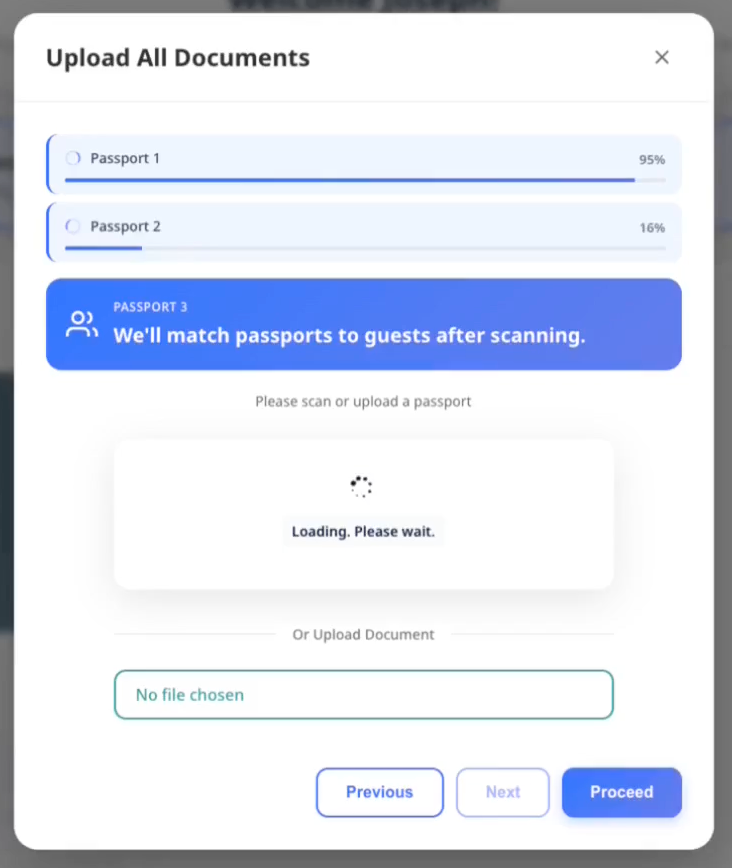
1단계: 모든 여권 스캔
- 객실 목록 상단에서 Upload All Documents를 선택합니다
- 각 게스트의 여권을 한 번에 하나씩 스캔합니다
- 진행 표시기가 각 여권의 업로드 상태를 보여줍니다
- 스캔이 실패하면 Rescan passport를 선택해 다시 시도합니다
2단계: 검토 및 배정
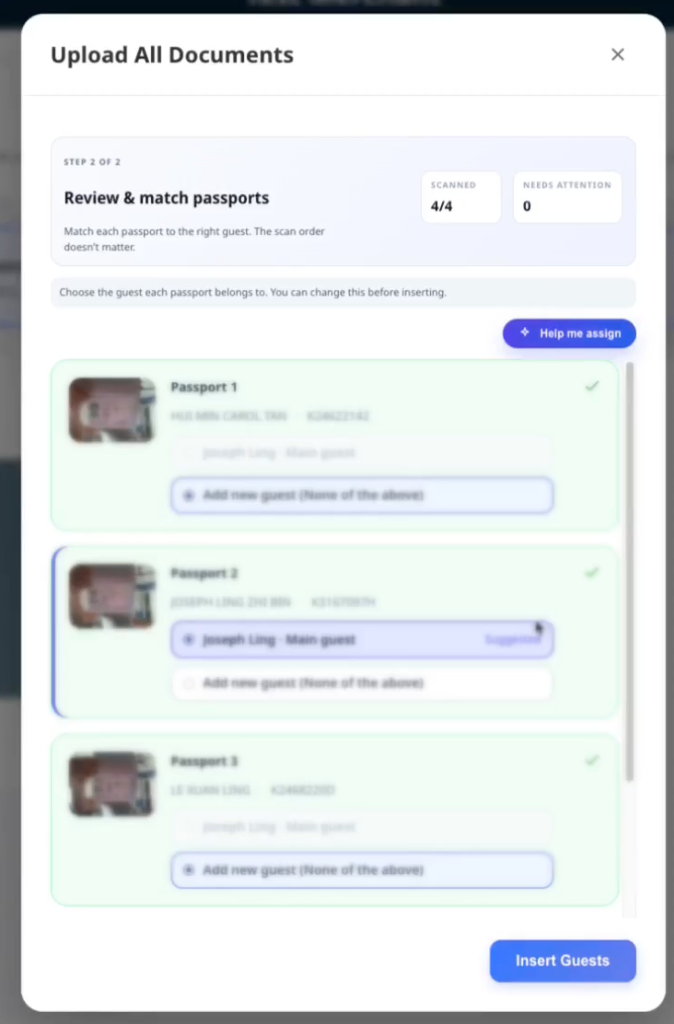
스캔이 끝나면 배정할 준비가 된 모든 여권 목록이 보입니다.
- ACI는 여권에 확실한 이름 일치가 없으면 예약된 적격 게스트 중 가장 가까운 게스트를 제안합니다
- 검토하는 동안 ACI는 직원 선택과 확실한 제안을 변경하지 않습니다
- 같은 여권에 일치할 수 있는 예약 게스트가 여러 명이면 ACI는 Choose guest를 표시하고 게스트를 선택할 때까지 Insert Guests를 비활성화합니다
- 제안이 맞으면 추가 작업이 필요하지 않습니다
- 다른 게스트에게 배정하려면 목록에서 해당 게스트를 선택합니다
- 새 사람을 추가하려면 Create new guest를 선택합니다
배정 표시 방식:
- 게스트 3명 이하: 카드형 선택 버튼
- 게스트 3명 초과: 간결하게 표시하기 위한 드롭다운 메뉴
ACI가 가장 가까운 게스트를 제안하면 저장하기 전에 여권과 선택된 게스트를 비교하세요. 제안된 게스트도 이름이 일치하지 않을 수 있습니다. 이름이 다르면 Insert Guests를 열 때 저장 전에 직원 검토 안내가 표시됩니다. 동명이인의 경우 이름이 같아도 해당 안내가 표시되지 않으므로 직접 올바른 게스트를 선택하세요.
3단계: 배정 저장
- 모든 여권-게스트 배정을 검토합니다
- 저장하려면 Insert Guests를 선택합니다
- 오류가 있으면 영향을 받은 여권 옆에 표시됩니다
- 문제를 개별적으로 수정한 뒤 필요하면 다시 시도합니다
배치 작업으로 보고된 수용 인원을 초과하는 게스트가 추가되면 AVA는 커밋하기 전에 해당 객실마다 확인을 요청합니다. Cancel을 선택하면 제출하지 않고 스테이징된 문서를 유지할 수 있습니다. 취소한 후 문서를 제거하거나, 배정을 조정하거나, 나중에 배치를 제출할 수 있습니다.
선택적 여분 슬롯은 한 번의 대량 업로드 세션에서 객실당 한 번만 적용됩니다. 추가 여분 게스트를 등록하려면 새 대량 업로드 세션을 시작하세요.
자주 보는 오류:
- "Document number not detected" → 더 좋은 조명으로 다시 스캔
- "Already uploaded for [guest]" → 다른 게스트에게 배정
- "Guest limit reached" → 새 게스트를 만들지 말고 기존 게스트에 배정
- "Payment method is not enabled for reservations" → Opera에서 예약에 사용할 결제 수단을 활성화한 후 다시 시도
Opera가 결제 수단 비활성화를 이유로 추가 게스트를 거부하면 AVA는 게스트에게 안전한 현지화 메시지를 표시합니다. 직원은 오류 정보에서 Opera의 결제 수단 세부 정보를 확인할 수 있습니다. Opera 추가 게스트 결제 거부를 참조하세요.
4단계: 예약 확인 (이름이 다를 때만)
스캔한 문서의 이름이 예약과 일치하지 않으면 AVA는 Insert Guests에서 멈추고 검토 패널을 표시합니다.
ACI에서 패널에는 해당 객실의 이름이 일치하지 않는 모든 여권과 선택된 게스트가 표시됩니다. 저장하기 전에 각 쌍을 검토하세요. 확인은 해당 안내에 표시된 쌍에만 적용됩니다. 나중에 다른 불일치가 발견되면 별도의 검토 안내가 표시됩니다.
-
각 Reservation name과 Passport name 쌍을 확인합니다.
-
모든 여권이 선택된 게스트의 것인지 확인합니다.
-
ACI에서는 숙소에서 활성화한 경우 직원 예외 승인을 선택합니다.
-
CCI에서는 게스트의 예약 확인을 엽니다.
-
여권 이름이 아닌 예약 이름을 입력하고 Verify를 선택합니다.
-
답변이 실패하면 직함이나 접미사를 포함한 예약 이름의 모든 부분을 유지합니다.
✓ 승인되면 AVA가 배정을 자동으로 저장합니다. Insert Guests를 다시 선택하지 않아도 됩니다.
AVA에 추가 예약 확인이 필요할 때 Verify Your Booking 패널이 나타납니다. 부분 일치 예약 이름 확인 및 Name Mismatch OTP Fallback을 참조하세요. ACI에서는 숙소에서 활성화한 경우 직원 예외 승인이 게스트 OTP를 대신할 수 있습니다. ACI 이름 불일치 직원 예외 승인를 참조하세요.
4. 게스트 정보 입력
-
Guest Information → Fill을 선택합니다
-
모든 필드를 확인합니다. 필수 필드는
*로 표시됩니다 -
필요하면 Document Number를 수정합니다
-
Save를 선택합니다
✓ Guest Information 단계가 완료로 표시됩니다
현재 흐름에서 Company가 활성화되어 있으면 Guest Information에 회사명을 입력합니다. AVA는 값을 정리하고 최대 80자까지 허용합니다. 이 값은 게스트 프로필과 등록 카드에 표시될 수 있습니다. 비어 있거나 숨겨진 Company 입력은 기존에 저장된 값을 삭제하지 않습니다.
추가 게스트의 경우 Guest Information 카드 상단에 **Same contact details as [main guest name]**가 표시됩니다. 현재 게스트 양식에 표시되는 공유 값을 복사하려면 켜세요. 아동 게스트의 경우 AVA는 주소나 여행 정보처럼 표시되는 필드만 복사합니다. 숨겨진 Email 및 Phone 필드는 아동 게스트에 대해 그대로 둡니다. 주소 또는 여행 정보가 있으면 AVA는 해당 필드를 복사한다고 설명합니다. 복사된 필드는 계속 보이며 편집할 수 있습니다. 옵션을 끄면 복사 전 아동의 값으로 되돌립니다. 복사할 주소나 여행 정보가 없으면 AVA는 토글을 비활성화하고 수동 입력 힌트를 표시합니다. 다른 추가 게스트의 경우 대표 게스트에게 표시되는 공유 값이 없으면 토글이 비활성화됩니다.
수동으로 그룹화한 ACI 예약에서는 AVA가 기본 예약의 주 게스트를 변경하지 않습니다. 선택한 각 추가 예약에 대해서는 해당 예약의 주 게스트 등록만 건너뜁니다. 숙박 게스트의 문서와 정보를 그 객실에 추가하세요. 건너뛴 게스트의 이름을 수정하면 AVA는 추가 게스트를 생성합니다. 이메일, 전화번호 또는 주소만 수정한 경우에는 해당 게스트 기록에 반영됩니다. 이렇게 하면 수정 사항이 기본 게스트를 덮어쓰지 않습니다.
게스트에게 전화번호가 없으면 AVA는 여권 국적을 기본 국가 코드로 사용합니다. 기존 전화번호는 저장된 국가 코드를 유지합니다.
게스트가 주소나 여행 관련 필드를 입력할 때 AVA는 Google Places를 게스트 국적에 맞게 조정합니다. 국적이 비어 있으면 호텔 국가를 기준으로 합니다.
Document Number 아래에 경고가 보이면 신분증을 다시 확인하세요. 경고는 체크인을 막지 않습니다.
게스트 정보 저장이 실패하는 경우
보이는 현상: Save를 선택한 뒤 Guest Information 카드가 오류 상태를 표시합니다.
해결:
-
필수 필드를 확인하고 잘못된 값을 수정합니다
-
다시 Guest Information → Fill을 엽니다
-
Save를 선택합니다
-
오류가 다시 나타나면 페이지를 새로고침하고 한 번 더 시도합니다
✓ 성공적으로 다시 시도하면 카드가 저장 상태로 돌아갑니다.
두 장치 ACI에서 AVA는 필드의 포커스가 해제되면 게스트 변경 사항을 초안으로 저장합니다. 페어링된 직원 장치는 일치하는 변경 후 열려 있는 Guest Information 양식을 자동으로 새로 고칩니다. AVA는 현재 활성 예약과 게스트만 새로 고치므로 다른 열린 양식은 변경되지 않습니다. 새로 고치는 동안 완료하지 않은 로컬 편집 내용은 양식에 남아 있습니다. 초안 저장은 최종 Save를 대신하거나 단계를 완료로 표시하지 않습니다. 설치된 iPad 게스트 앱에서는 소프트웨어 키보드가 닫힌 후 양식이 복구됩니다. 초안 요청이 아직 실행 중이면 Save 버튼에 즉시 Saving이 표시됩니다. 요청이 완료되기 전에 필드를 다시 편집하면 새 값이 계속 표시됩니다. 오래된 저장 응답은 최신 편집 내용을 덮어쓸 수 없습니다.
게스트 정보 변경 사항이 직원 장치에 표시되지 않음
보이는 현상: 게스트가 정보를 수정했지만 직원 장치에는 이전 값이 계속 표시됩니다.
해결:
-
게스트에게 현재 필드의 편집을 끝내도록 요청합니다.
-
게스트에게 필드 바깥을 탭하도록 요청합니다.
-
초안 업데이트를 잠시 기다립니다.
-
직원 장치에서 일치하는 Guest Information 양식을 열어 둡니다.
-
새로 고쳐진 값을 확인한 다음 Save를 선택합니다.
✓ 직원 장치에 최근 저장된 게스트 정보가 표시됩니다.
양식이 새로 고쳐지지 않으면 Guest Information → Fill을 다시 열고 시도하세요.
완료된 게스트 정보 편집
Guest Information 단계가 완료된 후 저장된 게스트 세부 정보를 수정하려면 Edit를 사용하세요.
CCI, pre-arrival 및 ACI에서 완료된 Guest Information을 편집할 수 있습니다. 문서 게이트는 완료된 양식을 다시 여는 것을 막지 않습니다. ACI에서는 기존 게스트 배정 규칙이 계속 적용됩니다.
순차 확인 패널을 펼치면 완료된 단계에 Edit가 표시됩니다. 객실이 아직 배정되지 않은 경우에도 이 작업을 사용할 수 있습니다. 카드가 Verified 또는 Checked-in으로 축소되면 간결한 카드 수준의 Edit 작업도 계속 표시됩니다. 이전에 완료되지 않은 문서 단계가 있어도 완료된 Guest Information 편집 작업은 숨겨지지 않습니다. ACI에서는 Guest Information이 완료되면 태블릿의 Send 작업이 숨겨집니다.
-
완료된 게스트의 객실 카드를 엽니다.
-
Guest Information → Edit를 선택합니다.
-
게스트 세부 정보를 수정합니다.
-
Save를 선택합니다.
✓ AVA는 이전 동기화가 있었더라도 변경된 게스트 세부 정보를 PMS와 동기화합니다.
완료된 게스트 정보가 변경된 경우에만 AVA가 기존 등록 카드를 교체합니다. 의미 있는 변경 없이 저장하면 AVA는 추가 카드를 만들지 않습니다. 양식이 아직 완료되지 않은 동안 등록 카드를 미리 만들지도 않습니다. 변경된 편집 내용이 저장되면 AVA는 백그라운드에서 대체 카드를 다시 생성하여 전달합니다. 게스트 업데이트가 성공하면 계속 진행할 수 있으므로 처리 중에 같은 편집 내용을 다시 제출하지 마세요.
완료된 게스트 정보가 저장되지 않음
보이는 현상: Save를 선택한 후 Edit 양식에 오류가 표시됩니다.
해결:
- 필수 필드를 확인하고 잘못된 값을 수정합니다.
- 예약을 한 번 새로 고칩니다.
- Guest Information → Edit를 다시 엽니다.
- 수정 내용을 다시 저장합니다.
게스트 세부 정보가 이미 변경되었다면 저장을 반복하기 전에 PMS를 확인하세요.
게스트 정보가 이미 업데이트되는 중임
보이는 현상: AVA에 "Guest information is already being updated."가 표시됩니다.
해결:
- 이전 업데이트가 완료될 때까지 기다립니다.
- 예약을 새로 고칩니다.
- 게스트 정보가 이미 변경되었는지 확인합니다.
- 저장된 정보가 여전히 올바르지 않을 때만 다시 시도합니다.
게스트 업데이트가 성공한 후에도 대체 등록 카드 처리가 계속될 수 있습니다.
게스트 태블릿 컨트롤이 키보드를 닫은 후 반응하지 않음
보이는 현상: 페어링된 iPad에 모달이 정상적으로 표시되지만 키보드를 닫은 후 아래쪽 컨트롤이 반응하지 않습니다.
해결:
- 게스트에게 현재 필드 바깥을 탭하도록 요청합니다.
- Saving이 표시되고 완료될 때까지 기다립니다.
- 페이지를 확대하지 않고 Save를 다시 선택합니다.
✓ 키보드가 닫힌 후 페어링된 게스트 태블릿에서 탭을 인식해야 합니다.
컨트롤이 계속 반응하지 않으면 Guest Information → Fill을 다시 열고 지원팀에 문의하세요.
5. 서명 캡처(필요한 경우)
-
Signature → Sign를 선택합니다
-
게스트의 서명을 캡처합니다
✓ Signature 단계가 완료로 표시됩니다
2장치 ACI에서는 추가 게스트가 배정된 Worker에서 서명을 제출할 수 있습니다. Worker를 직원 워크스테이션에 페어링된 상태로 유지하고 게스트 여정을 활성 상태로 두세요. 직원 워크스테이션에서 캡처한 서명에도 직원 장치 세션이 필요합니다.
참고: 기본적으로 대표 게스트가 서명해야 합니다. 일부 숙소는 모든 게스트의 서명을 요구합니다.
추가 게스트가 먼저 등록하는 경우
숙소에서 대표 게스트보다 추가 게스트가 먼저 등록하도록 허용할 수 있습니다. 이 옵션은 각 체크인 모드에 별도로 구성됩니다.
이 옵션이 활성화되면, 먼저 서명한 추가 게스트가 등록 대표자가 됩니다. AVA에는 별도의 대표자 선택기가 표시되지 않습니다. 대표자가 등록과 인증을 완료한 후 흐름이 계속됩니다.
PMS의 대표 게스트 신원은 변경되지 않습니다. 직원 지원 체크인에서는 직원에게 대표 게스트가 아직 대기 중이라는 알림이 표시됩니다. 대표 게스트는 나중에 페어링된 흐름을 통해 등록을 완료할 수 있습니다.
Mandatory Guest Registration이 꺼져 있으면 각 체크인 모드에 하나의 추가 게스트 우선 설정이 있습니다.
| 설정 | 등록 대표자가 될 수 있는 게스트 |
|---|---|
| Off | 어떤 추가 게스트도 먼저 객실 체크인을 완료할 수 없음 |
| On | PMS에 등록되었거나 로컬로 추가된 모든 추가 게스트가 먼저 객실을 대표할 수 있음 |
문서 업로드로 생성되었거나 ID 스캔 없이 생성된 게스트는 로컬 게스트로 유지됩니다. PMS 동기화만으로 해당 게스트가 사전 정의된 게스트가 되지는 않습니다.
Mandatory Guest Registration이 켜져 있으면 모든 PMS 게스트가 체크인이 끝나기 전에 등록을 완료해야 합니다. 끄면 주 게스트가 필수 대표자로 유지됩니다.
여권과 게스트 등록은 어떤 순서로든 완료할 수 있습니다. 폐기된 주 게스트 문서 순서 설정은 더 이상 게스트 생성이나 업로드를 차단하지 않습니다. 대표자 자격과 객실 체크인 완료를 제어하려면 추가 게스트 우선 설정을 사용하세요.
추가 게스트 우선 등록이 활성화되면 Add guest 스캔은 새 추가 게스트를 대상으로 합니다. AVA는 대표 게스트의 문서가 아직 없어도 대표 게스트를 대상으로 취급하지 않습니다. 대표 게스트의 문서를 확인하려면 대표 게스트 행에서 업로드를 시작하세요. 특정 게스트 행을 선택하면 이름 일치 확인은 계속 적용됩니다.
추가 게스트 우선 설정이 꺼져 있으면 주 게스트가 등록할 때까지 객실 체크인이 대기합니다.
Require predefined additional guests before check-in은 독립적인 설정입니다. 대표 게스트 객실에 있는 PMS 등록 추가 게스트의 완료 시점을 제어합니다. 등록 대표자가 될 수 있는 범위를 넓히거나 로컬 게스트를 사전 정의된 게스트로 만들지는 않습니다.
객실이 in-house 상태가 된 후 등록 완료
AVA가 객실을 in-house로 표시한 후에도 게스트는 등록을 완료할 수 있습니다.
-
예약의 동반자 흐름을 엽니다.
-
대기 중인 게스트를 선택합니다.
-
Guest Information, Document 및 필요한 인증 단계를 완료합니다.
-
게스트 등록을 저장합니다.
✓ 기본 예약을 다시 체크인하지 않고 게스트가 등록됩니다.
객실 체크인 후에도 여권 업로드를 사용할 수 있습니다. 필수 게스트 및 사전 정의된 게스트 요건은 최초 객실 체크인에만 적용됩니다.
대표 게스트가 아직 대기 중임
보이는 현상: 추가 게스트는 등록했지만 대표 게스트가 아직 완료하지 않았습니다.
해결:
-
직원 지원 체크인에서는 대표 게스트에게 도착하면 다시 오도록 안내합니다.
-
예약의 페어링된 흐름을 엽니다.
-
대표 게스트가 등록과 인증을 완료하도록 합니다.
-
대표 게스트가 완료한 후 체크인을 계속합니다.
✓ PMS는 원래 대표 게스트 신원을 유지합니다.
PMS에 게스트가 이미 체크인한 것으로 표시되면 다시 시도하기 전에 예약을 새로 고칩니다. AVA는 다른 PMS 체크인을 보내지 않고 확인된 도착을 조정할 수 있습니다. 다시 시도할 때 현재 인증된 직원 장치 또는 예약 세션을 사용합니다.
선택적 개인정보 동기화는 서명 제출을 차단하지 않습니다. PMS가 느리거나 사용할 수 없어도 AVA는 체크인을 계속하고 동의 동기화를 다시 시도합니다. AVA는 먼저 서명을 저장한 다음 백그라운드에서 후속 동기화를 완료합니다.
6. CCI 또는 ACI에서 얼굴 인증 실행
Facial Verification이 보이면:
-
Facial Verification → Verify를 선택합니다
-
화면 안내에 따라 카메라 절차를 진행합니다
✓ Facial Verification 단계가 완료로 표시됩니다
팁: 얼굴 인증은 해당 모드에서 활성화된 경우 Self Check-In (CCI) 또는 **Assisted Check-In (ACI)**에 나타납니다.
참고: AVA는 문서에서 가장 선명한 얼굴부터 비교합니다. 이렇게 하면 여권의 희미한 워터마크가 방해되지 않습니다.
AVA는 후속 동기화를 완료하기 전에 성공한 얼굴 인증 결과를 저장합니다. 연결된 서비스가 느리면 AVA가 동기화를 마치는 동안 체크인을 계속하세요.
그룹 사진 후속 처리가 지연되는 경우
AVA는 후속 업데이트를 시작하기 전에 각 Verified 그룹 사진 일치 결과를 저장합니다. 얼굴 인증 단계가 반환된 후에도 해당 업데이트는 백그라운드에서 계속됩니다.
AVA가 다시 시작되면 완료되지 않은 안전한 후속 작업을 자동으로 복구합니다. 후속 시스템 결과를 확인할 수 없으면 AVA는 운영 검토를 위해 해당 결과를 유지합니다.
이미 Verified로 표시된 일치 결과는 다시 촬영하지 마세요. 지원팀에 문의하기 전에 게스트 기록과 PMS를 확인하세요.
두 장치 ACI를 사용하는 경우
-
직원이 페어링된 게스트 태블릿으로 Facial Verification을 보냅니다.
-
직원 패널에서 Open tablet camera를 선택합니다.
-
게스트에게 카메라 안내를 따르도록 요청합니다.
-
일치에 실패하면 직원 패널에서 같은 얼굴 인증 단계를 다시 보냅니다.
✓ 게스트 태블릿이 카메라를 다시 열고 이전 불일치 상태를 지웁니다.
게스트의 문서 업로드가 완료된 후 Verify in person을 선택할 수도 있습니다. 먼저 얼굴 인증에 실패할 필요는 없습니다. 게스트의 신원을 직접 확인한 다음 필수 사유를 입력하세요.
✓ 다음 새로 고침 후 게스트에게 Staff approved가 표시됩니다.
얼굴 인증이 이미 실패한 경우에는 Staff override를 사용하세요. 인증된 직원 장치는 현재 ACI 여정에 계속 연결되어 있어야 합니다. 얼굴 인증 설정을 참조하세요.
한 게스트가 단계를 완료한 후에는 같은 직원 장치에서 다음 게스트를 계속 진행하세요. 직원 장치는 활성 두 장치 ACI 여정에 대한 제어를 유지합니다.
호텔에서 직원 제어 태블릿 촬영을 활성화한 경우 직원 패널에도 실시간 태블릿 미리보기가 표시됩니다. 게스트에게 태블릿을 바라보도록 요청한 다음 Capture를 선택하세요. 태블릿이 원본 해상도 사진을 촬영하여 얼굴 비교를 위해 전송합니다. 게스트에게는 업로드 및 인증이 완료되는 동안 대기 안내가 표시됩니다. 계속하기 전에 인증이 완료될 때까지 기다리세요.
업로드가 성공했다고 해서 얼굴 단계가 완료된 것으로 처리하지 마세요. AVA가 문서 비교를 완료하거나 직원이 승인된 예외 승인을 사용해야 합니다.
얼굴 인증이 실패하는 경우
- 더 선명한 사진을 위해 Take another selfie를 선택합니다
- 그래도 실패하면 Re-upload document를 선택해 다시 스캔합니다
7. 그룹 얼굴 인증 검토
그룹 인증이 활성화되어 있고 인증 가능한 게스트 중 하나 이상이 저장된 문서를 가지고 있으면 Room List에 표시됩니다. 문서 업로드 후 자동으로 열리지는 않습니다.
-
Verify group photo를 선택합니다.
-
모든 얼굴이 선명하게 보이도록 게스트에게 함께 서 달라고 요청합니다.
-
카메라 장치에서 Take group photo를 선택합니다.
-
Review group matches에서 제안된 각 일치를 검토합니다.
-
제안된 일치가 잘못되었으면 Reject match를 선택합니다.
-
얼굴이 없거나 불분명하면 Retake missing guests를 선택합니다.
-
결과를 검토한 후 Save matched guests를 선택합니다.
✓ 저장된 게스트에는 Verified가 표시됩니다. 해결되지 않은 필수 게스트는 계속 미완료 상태입니다.
AVA가 제안을 안전하게 사용할 수 없으면 해당 게스트를 미해결 상태로 유지합니다. 제안만으로는 게스트가 인증되거나 저장된 일치 항목으로 진행되지 않습니다. 영향받은 게스트에게 다음 사진에 참여하도록 요청한 후 Retake missing guests를 선택하세요.
얼굴 인증 면제가 적용된 아동에는 Not required가 표시됩니다. 아동은 일치 검사에서 제외되며 저장된 얼굴 이미지가 생성되지 않습니다.
문서의 인물 사진을 사용할 수 없으면 대신 Document needed가 표시됩니다. 이 게스트는 Retake missing guests에 표시되지 않습니다. 더 선명한 문서를 업로드하고 저장한 후 그룹 인증을 다시 실행하세요.
문서에 서로 다른 선명한 얼굴이 여러 개 있어도 AVA는 일치를 미해결 상태로 유지합니다. 신원 확인으로 한 사람의 얼굴임이 확인되지 않으면 중복 인물 사진 제안을 거부합니다. 불분명한 제안은 거부하고 수동으로 배정하지 마세요.
두 장치 ACI를 사용하는 경우
- 직원 장치의 Room List에서 Verify group photo를 선택합니다.
- 페어링된 게스트 태블릿에서 사진을 찍도록 게스트에게 요청합니다.
- 직원 장치에서 일치를 검토하고 저장합니다.
- 일부 게스트만 사진을 다시 찍어야 하면 Retake missing guests를 사용합니다.
✓ 게스트 태블릿은 사진을 촬영하지만 검토와 저장은 직원이 제어합니다.
8. 보증금 또는 결제 수집(셀프 체크인만)
Reservation Requirements에 Deposit 또는 Payment가 표시되면 결제 흐름은 여정에 따라 달라집니다.
셀프 체크인의 경우 예약 요구 사항에서 Pay를 선택합니다. 직원 지원 체크인의 경우 ACI 결제 설정이 켜져 있으면 인증된 직원이 적격 보증금 또는 결제 항목을 요청할 수 있습니다. 설정이 꺼져 있으면 ACI는 결제를 요청하지 않고 계속 진행합니다. 도착 전의 경우 AVA는 실시간 청구 금액을 사용하여 활성화된 객실 또는 보증금 결제를 표시합니다. 도착 전 결제는 온라인 게이트웨이를 사용하며 현금, 단말 또는 통합 결제 흐름을 사용하지 않습니다.
-
Pay를 선택합니다
✓ Pay가 스피너와 함께 Processing으로 바뀌고 AVA가 결제 단계를 준비하는 동안 사용할 수 없게 됩니다.
-
결제 단계를 완료합니다
✓ 결제 요구 사항이 완료로 표시됩니다
AVA는 다음 결제 단계를 열기 전에 객실 견적과 적용 가능한 패키지를 확인합니다. 해당 단계가 나타날 때까지 기다리세요. Processing으로 표시되는 동안 Pay를 다시 선택하지 마세요.
단일 객실 체크인에서 AVA는 결제 전에 최신 결제 가능 객실 견적을 사용합니다. 게스트를 추가하거나 예약을 수정하면 금액이 새로 고쳐질 수 있습니다. PMS에 이미 보증금이 기록되어 있으면 Payment Due가 총 요금보다 낮을 수 있습니다. 게스트가 결제하기 전에 새로 고쳐진 금액을 검토하세요.
단말 결제가 이미 완료되었다면, AVA는 재시도 시 요구 사항을 완료 상태로 유지합니다. 영수증에 실패한 결제로 표시되지 않으면 두 번째 결제를 시작하지 마세요.
참고: 셀프 체크인과 도착 전 체크인은 표시된 모든 결제가 성공해야 완료됩니다. ACI는 직원이 결제를 요청하고 ACI 결제 설정이 허용할 때만 결제가 필요합니다.
AVA는 체크아웃 시점까지 유효한 경우에만 보증금 사전 승인을 요청합니다. 정확한 만료 시점에는 요청을 건너뜁니다. 직접 판매 객실 요금은 호텔의 객실 수납 설정을 따릅니다.
9. 체크인 마무리
-
Proceed to Check-In을 선택합니다
-
진행 화면이 끝날 때까지 기다립니다
✓ 객실 카드가 체크인 완료 상태를 보여줍니다. ✓ AVA가 관리하는 전달 방식에서는 완료 전에 Room Access가 Success여야 합니다. ✓ 수동 또는 사용할 수 없는 전달 방식에서는 Room Access가 별도로 유지되는 동안 체크인이 완료될 수 있습니다.
AVA는 객실 배정 중 PIN, QR 키 또는 락커 자격 증명을 발급할 수 있습니다. 최종 체크인이 성공하면 AVA는 확인된 도착 게스트에게 해당 성공 액세스 결과를 유지합니다. 같은 자격 증명을 다시 발급할 필요가 없습니다. 결과가 계속 Pending 또는 Partial success로 표시되면 새로 고치고 객실 액세스 상태를 따릅니다.
인증된 직원 지원 체크인은 두 장치 ACI에서 지원되는 경우 보증금 규칙보다 먼저 직원 선택을 사용합니다. 저장된 Tick No Post by default on Assisted Check-In 설정은 직원 선택을 미리 선택합니다. 연결된 직원 장치에서는 Set No Post in the PMS 상자가 Proceed to Check-In 위에 표시됩니다. 직원은 이 상자를 선택하거나 해제할 수 있습니다. 보증금 설정은 ACI 직원 선택보다 우선하지 않습니다. 단일 장치 ACI와 게스트 태블릿은 저장된 설정을 사용하며 이 상자를 표시하지 않습니다. 키오스크 및 지원되는 도착 전 여정에서는 결제가 Do not collect로 설정되었거나 보증금이 0이면 No Post가 적용됩니다. 필수 보증금이 있는 키오스크 여정의 나머지 경우에는 Set No Post after Payment를 사용합니다. 이 토글이 꺼져 있으면 필수 보증금이 없는 키오스크 게스트에게만 No Post가 적용됩니다. 결제가 꺼져 있으면 결제 토글만 키오스크 결과를 결정합니다. 이 결정은 해당 작업에서 체크인하는 모든 예약에 적용됩니다. 원자적 다중 객실 ACI에서는 모든 객실 카드가 하나의 직원 선택을 공유합니다. 나중에 키오스크 동반 게스트를 처리할 때는 새 동반 예약에만 No Post가 적용됩니다. 객실 예약에는 다시 제한이 적용되지 않습니다. 인증된 ACI 결정은 위조된 요청 헤더로 대체할 수 없습니다. 이 후속 업데이트에 실패해도 체크인은 성공 상태로 유지됩니다. 필요한 경우 OPERA에서 예약을 확인하고 No Post를 수동으로 적용하세요. OPERA가 No Post를 지원한다고 보고하지 않으면 AVA는 요청을 건너뜁니다.
팁: 체크인 중에는 시스템이 Checking Availability → Assigning Room → Generating Keys → Finalizing 순으로 진행됩니다.
도착 전 등록인 경우
- 위의 필수 단계를 모두 완료합니다
- Proceed to Check-In 대신 Complete Pre-Arrival를 선택합니다
✓ 객실이 도착 전 완료로 표시됩니다. 객실 액세스는 투숙객이 도착할 때 발급됩니다.
PMS가 ETA 업데이트를 지원하면 AVA는 도착 전 등록 후 첫 번째 게스트의 예상 도착 시간을 PMS로 보냅니다. PMS가 이를 지원하지 않아도 체크인은 정상적으로 완료됩니다. Opera/OHIP 예약도 이제 이 업데이트 경로를 지원합니다.
이미 체크인된 객실인 경우
Proceed to Check-In을 선택해 남은 게스트를 완료합니다. 이 작업은 객실을 다시 배정하지 않습니다. 객실이 인하우스 상태가 된 후 동반 흐름을 사용하여 보류 중인 게스트를 등록할 수도 있습니다.
PMS 결과가 불명확한 경우
보이는 현상: 첫 번째 체크인 시도가 멈춘 것처럼 보입니다. PMS에서 체크인이 완료되었을 수 있는데 객실 배정이 차단될 수 있습니다.
해결:
- PMS에서 예약 상태를 확인합니다.
- AVA에서 예약을 새로 고칩니다.
- 저장된 도착 결정과 선택한 객실을 검토합니다.
- Proceed to Check-In을 다시 선택합니다.
AVA는 계속 진행하기 전에 기존 PMS 체크인을 조정합니다. 선택한 객실에 대해서는 중복 객실 배정을 건너뜁니다. 도착 검토, 자격 증명 및 최종 체크인은 계속 확인합니다.
PMS에서 게스트가 아직 체크인하지 않은 상태로 표시되면 AVA는 정상적인 객실 배정을 사용합니다. PMS를 사용할 수 없으면 복구될 때까지 기다린 후 다시 시도하세요.
Opera의 경우 AVA는 게스트의 최신 실시간 예약 상태에서 선택한 게스트를 확인합니다. 여기에는 Opera의 주 예약에 더 이상 공유 링크가 표시되지 않는 동반 게스트도 포함됩니다. AVA는 체크인을 완료로 표시하기 전에 게스트의 실시간 객실도 확인합니다.
Opera에 Checked In이 표시되는데 AVA가 여전히 결과를 명확히 표시하지 않으면 예약을 새로 고칩니다. 그런 다음 저장된 도착 결정을 검토하고 Proceed to Check-In을 다시 선택합니다. Opera에서 게스트를 수동으로 두 번 체크인하지 마세요.
10. 객실 액세스 제공
체크인 후 객실 카드의 Room Information을 엽니다. 전달이 필수가 아닌 경우 체크인이 완료된 후에도 후속 처리를 위해 객실 액세스를 사용할 수 있습니다.
- Room Number가 상단에 표시됩니다.
- Room Access는 구성된 전달 방식에 따라 달라집니다.
QRLOCK의 경우 적격 객실 배정 시 이메일을 보내기 전에 디지털 키 하나가 발급됩니다. 객실 카드에 전달 상태가 표시되며 이메일 재시도에서는 같은 키를 재사용합니다. 다른 키를 발급하지 않고 세부 정보를 다시 보내려면 Email room information을 사용합니다.
QR image (direct image) 전달을 선택하면 객실 카드는 저장된 게스트 링크와 별도로 QR 이미지를 로드합니다. 이미지가 로드되는 동안 또는 이미지 조회에 실패한 경우에도 카드에서 Open QR as a link를 사용할 수 있습니다.
링크에는 이미지와 동일한 만료 및 액세스 확인이 적용됩니다. QR 이미지 표시를 사용할 수 없어도 AVA는 호스팅 링크 환경을 계속 제공합니다.
Keycards를 사용하는 경우:
PMS와 통합된 인코더에서 Opera를 사용하면 AVA는 먼저 확인된 키 상태를 기다립니다. 이전 Opera 응답에는 해당 상태가 없을 수 있습니다. 그 경우 AVA는 저장된 객실, 키 수 및 유효 기간을 최대 30초 동안 확인합니다. 요청 시간이 초과되면 같은 객실에서 카드를 다시 시도하세요.
첫 번째 ACI 키카드 전에 AVA는 이미 인하우스 상태인 연결된 Opera 게스트도 확인합니다. 예약이 업데이트된 직후 Opera에서 공유 링크가 잠시 누락될 수 있습니다. 이 경우 AVA는 연결된 예약을 검색하므로 기존 게스트의 카드가 활성 상태로 유지됩니다. 동반 게스트가 계속 표시되지 않으면 인코딩 전에 예약을 새로 고칩니다.
AVA는 모든 키카드 요청에 대해 서버에서 NEW 또는 DUPLICATE를 결정합니다. 다른 게스트가 이미 인하우스 상태이면 해당 게스트의 카드를 보호하기 위해 DUPLICATE를 사용합니다. 객실을 변경한 후에는 새 객실에 NEW를 사용합니다. PMS가 공유 점유를 확인할 수 없으면 일반적인 NEW를 대체값으로 유지합니다.
예약 카드에 사용할 수 있는 객실 값이 없으면 인코딩 전에 AVA가 PMS를 통해 객실을 확인합니다. 긴 AVA PMS 식별자를 포함해 유효한 PMS 객실 식별자는 그대로 유효합니다. 객실 식별자를 편집하거나 줄일 필요가 없습니다.
-
ACI라면 먼저 인계를 확인합니다
-
지금 카드를 인코딩하려면 Create Keycard를 선택합니다
-
키카드가 미리 인코딩되어 있으면 Already Encoded를 선택합니다
-
안내가 나오면 각 카드를 인코딩합니다
-
카드 수가 더 적으면 키카드 모달에서 Complete Check-In을 선택합니다
✓ 인코더가 하나 온라인이면, AVA는 인코딩을 시작하기 전에 잠시 **Preparing keycard encoding...**를 표시합니다.
CCI 및 ACI의 추가 게스트 키카드
키카드 객실에서 추가 게스트가 점유 중인 객실에 체크인하면 AVA가 카드 한 장을 제안할 수 있습니다. 이 제안은 이제 **Self Check-In (CCI)**과 Assisted Check-In (ACI) 모두에 표시됩니다.
-
추가 게스트의 체크인을 완료합니다.
-
제안된 키카드 작업을 선택합니다.
-
AVA가 요청하면 온라인 인코더를 선택합니다.
-
빈 카드 한 장을 인코더에 놓습니다.
✓ AVA는 DUPLICATE를 사용하고 객실의 기존 카드를 계속 활성 상태로 유지합니다.
이 제안은 객실의 키카드 발급이 이미 완료된 경우에만 표시됩니다. 제안이 보이지 않으면 객실 카드를 새로 고치고 키카드 액세스가 구성되어 있는지 확인합니다.
ACI 키카드 유효 날짜 및 시간 설정
**Assisted Check-In (ACI)**에서는 Key valid until의 날짜와 시간을 모두 설정할 수 있습니다. 게스트의 늦은 체크아웃이나 연속 예약에 이 기능을 사용하세요.
- Key valid until 날짜와 시간을 검토합니다.
- 게스트의 숙박이 출발일 이후에도 이어지면 더 늦은 날짜를 선택합니다.
- 게스트가 액세스 권한을 잃어야 하는 시간을 선택합니다.
- 두 값을 모두 복원하려면 Reset to hotel default를 선택합니다.
- 각 카드의 인코딩을 계속합니다.
날짜는 예약 출발일에서 시작합니다. 이전 인코딩 날짜가 아직 미래라면 AVA는 해당 날짜를 재사용합니다. 시간은 이전 인코딩 또는 호텔 기본값을 따릅니다. 과거 날짜는 거부됩니다. 출발일을 변경하지 않으면 AVA는 일반 만료 동작을 사용합니다.
여러 카드를 인코딩하면 AVA는 모든 카드에 같은 날짜와 시간을 고정합니다. 날짜를 변경해도 키카드에만 영향을 주며 PMS 예약에는 영향을 주지 않습니다.
AVA는 키카드 인코딩이 성공할 때까지 현재 객실에 머뭅니다. 마지막으로 성공한 인코딩 응답이 카드를 회수된 상태로 표시한 후 다음 객실이 열립니다.
Win A Complimentary 1-Night Stay 모달이 나타나면 먼저 닫습니다. 그다음 Complete Check-In을 선택합니다.
Smart Locks를 사용하는 경우:
-
Show PIN을 선택합니다
-
게스트에게 PIN을 공유합니다
✓ 객실 액세스 카드가 아직 Pending 또는 Partial success이면, 먼저 준비 상태가 될 때까지 기다리세요.
Lockers를 사용하는 경우:
- Locker Number를 공유합니다
- Show Code를 선택해 락커 코드를 공유합니다
객실 액세스 메시지가 코드 대신 보이면 화면 안내를 따르세요.
Manage Locker Code와 락커 코드는 Settings → Room Access가 Locker Systems로 설정되어 있을 때만 나타납니다. AVA가 아직 객실 액세스 모드를 불러오는 중이면 기다렸다가 객실 카드에서 다시 시도하세요.
팁: WiFi가 구성되어 있으면 WiFi 섹션에 이름과 비밀번호가 표시됩니다. 객실 메모는 General Information 아래에 나타납니다.
객실 카드 메시지는 ko-KR 같은 지역 코드가 있어도 게스트 언어를 따릅니다.
직원 지원 체크인(ACI)을 사용하는 경우
체크인 후 화면에 Check-In Complete가 표시되고 게스트에게 장치를 돌려달라고 요청합니다. 객실에 키카드가 있으면 다음 작업은 ACI 설정에 따라 달라집니다.
- Two-device ACI: 체크인이 성공적으로 완료된 후 키카드 작업이 표시됩니다.
- One-device ACI: 키카드 작업이 표시되기 전에 게스트 인계를 확인합니다.
새 카드는 Create Keycard, 미리 준비된 카드는 Already Encoded를 사용합니다. 다중 객실 숙박에서는 키카드가 성공할 때까지 AVA가 다음 객실을 열지 않습니다.
문제 해결
특정 흐름에 직원 장치 인증이 필요함
보이는 현상: 직원 검색, 예약, 체크아웃 또는 체크인 작업을 사용할 수 없습니다. ACI에 Staff verification recommended가 표시됩니다.
발생 원인: 현재 브라우저의 STAFF 자격 증명이 없거나 오래되었거나 취소되었거나, 다른 장치 또는 호텔에 속해 있습니다.
해결:
- 올바른 직원 브라우저 또는 키오스크 장치를 사용 중인지 확인합니다.
- 관리자에게 Settings → Kiosk에서 최신 ACI 인증 QR을 표시해 달라고 요청합니다.
- ACI 준비 패널에서 Verify Device를 선택합니다.
- 카메라 액세스를 허용한 다음 QR을 스캔합니다.
- 현재 ACI 페이지가 다시 로드될 때까지 기다린 뒤 해당 흐름을 다시 시도합니다.
스캐너는 현재 브라우저 컨텍스트 안에서 인증을 유지합니다. 따라서 Web Clip, PWA 또는 브라우저 래퍼의 저장 공간을 보존하는 데 도움이 됩니다. QR은 일회용이므로 이미 스캔했다면 새 QR을 생성하세요.
인증 중에는 번호가 매겨진 5개 안내가 모두 표시됩니다. 반응형 미리보기와 상태 표시줄에는 카메라 진행 상태, 스캔 힌트 또는 카메라 오류가 표시됩니다. 가로 화면에서는 미리보기가 안내 옆에 놓입니다. ACI 직원 장치 인증을 참조하세요.
스캐너가 열리지 않으면 Settings → Kiosk에서 Re-verify staff device를 선택합니다. 같은 실제 장치에서 최신 일회용 링크를 완료하세요.
정확히 인증된 브라우저에 재설정 권한이 남아 있으면 AVA가 오래된 자격 증명을 자동으로 복구할 수 있습니다. 복구 후 AVA는 직원 작업을 표시하기 전에 예약 목록을 새로 불러옵니다. 준비 상태가 사라지면 AVA는 오래된 예약과 체크아웃 선택을 지웁니다. 키오스크 인증과 데모 모드는 기존 경로를 계속 사용합니다.
반복 조회 후 단일 장치 ACI가 중지됨
보이는 현상: 다시 검색한 후 단일 장치 ACI가 계속 진행되지 않습니다. "Unable to bind the assisted check-in journey to this staff device."가 표시될 수 있습니다.
해결:
- 같은 Staff Access 화면에서 예약을 다시 검색합니다.
- 예약의 객실 카드가 나타날 때까지 기다립니다.
- 같은 직원 장치에서 체크인을 계속합니다.
- AVA가 직원 인증을 요청하면 특정 흐름에 직원 장치 인증이 필요함을 따릅니다.
한 번 다시 시도한 후에도 여정이 차단되어 있으면 AVA를 새로 고치고 지원팀에 문의하세요.
Cloudbeds 예약 조회 시간 초과
보이는 현상: 조회가 계속 진행되다가 시간 초과 또는 서비스 사용 불가 오류를 표시합니다.
발생 원인: Cloudbeds가 응답하지 않으면 AVA는 20초 후 대기를 중지합니다.
해결:
- 몇 초 기다립니다.
- 조회를 다시 시도합니다.
- Cloudbeds에 연결할 수 있고 예약이 존재하는지 확인합니다.
- 시간 초과가 계속되면 지원팀에 문의합니다.
숙소가 체크인용으로 구성되지 않음
보이는 현상: 게스트에게 "현재 이 숙소에서는 셀프 체크인을 이용할 수 없습니다."가 표시됩니다. 직원에게는 "이 숙소는 아직 체크인용으로 구성되지 않았습니다."가 표시됩니다.
발생 원인: 숙소에 가맹점 레코드 또는 PMS 연동이 없습니다. 예약이 유효하더라도 AVA는 이 숙소에서 예약을 조회할 수 없습니다.
해결:
-
AVA에서 올바른 호텔이 선택되었는지 확인합니다.
-
Settings → Essentials → PMS Integration을 엽니다.
-
PMS를 연결하거나 AVA PMS 설정을 완료합니다.
-
설정이 성공적으로 저장된 후 조회를 다시 시도합니다.
✓ 숙소가 구성되면 정상적인 예약 조회가 다시 작동합니다.
객실 배정 중 PMS를 일시적으로 사용할 수 없음
보이는 현상: 객실 배정에 PMS를 일시적으로 사용할 수 없다는 메시지가 표시됩니다.
발생 원인: PMS가 제시간에 배정 요청에 응답하지 않았습니다. 이는 객실이 준비되지 않았다는 뜻은 아닙니다.
해결:
-
PMS에서 예약과 객실 상태를 확인합니다.
-
AVA에서 예약을 새로 고칩니다.
-
객실 배정을 한 번 다시 시도합니다.
✓ AVA가 객실을 배정하거나 실제 객실 준비 문제를 표시합니다.
AVA는 일시적인 PMS 장애에 대해 객실 미준비 이메일을 보내지 않습니다.
스캔 후 예약을 찾지 못함
보이는 현상: "Reservation not found"가 표시되거나 확인 화면으로 이동합니다.
첫 번째 일치 항목이 비활성이면 AVA가 이름 조회를 새로고침하고 활성 예약을 다시 찾습니다. 다시 검색하지 않아도 대체 예약이 나타날 수 있습니다.
정확한 조회에서 결과가 없으면 AVA는 Opera OTA 또는 외부 참조를 대문자로 한 번 다시 시도합니다. 예약이 여전히 나타나지 않으면 확인 번호로 검색하세요.
해결:
- 스캔 대신 확인 번호를 입력합니다
- 도착일이 오늘 또는 어제인지 확인합니다
- 예약이 취소되었거나 노쇼가 아닌지 확인합니다
Staff Access에서 그룹화된 객실이 누락됨
보이는 현상: Staff Access에서 객실의 확인 번호로 예약을 찾지 못합니다.
발생 원인: 다중 객실 예약은 하나의 그룹화된 결과로 표시될 수 있습니다. 객실의 확인 번호가 주 예약 번호와 다를 수 있습니다.
해결:
-
**Assisted Check-In (ACI)**에서 Staff Access를 엽니다.
-
객실의 확인 번호로 다시 검색합니다.
-
번호가 계속 표시되지 않으면 주 게스트의 전체 이름으로 검색합니다.
-
그룹화된 결과를 선택하고 각 객실의
Res#: <confirmation>레이블을 검토합니다. -
계속하기 전에 객실 번호와 확인 번호를 확인합니다.
✓ 객실별 확인 번호로 그룹화된 예약 결과를 열 수 있어야 합니다.
어떤 검색으로도 예약을 찾지 못하면 예약이 활성 상태이고 어제 또는 오늘 도착인지 확인하세요. 계속 누락되면 객실 확인 번호와 도착일을 첨부하여 지원팀에 문의하세요.
여러 예약이 찾음
보이는 현상: "Multiple reservations found."가 표시됩니다.
해결:
-
확인 번호로 검색합니다
-
Staff Access에서 예약 ID 또는 외부 예약 ID로 검색합니다
-
OPERA를 사용하는 ACI에서는 Staff Access에서 게스트의 전체 이름으로 검색합니다.
-
기본 예약을 선택한 다음 Other reservations with the same guest name을 검토합니다.
-
같은 도착에 해당하는 경우에만 추가 예약을 선택합니다.
✓ 선택한 각 예약이 계속 진행하기 전에 별도 옵션으로 표시됩니다.
같은 이름의 예약 그룹화를 사용할 수 없음
보이는 현상: 같은 이름의 예약을 선택할 수 없거나 AVA가 그룹화를 거부합니다. 예약을 선택한 뒤 인증에 실패하면 AVA가 직원 장치 인증 안내를 인라인으로 표시합니다. 예약 없음 모달은 열리지 않습니다.
해결:
- **Assisted Check-In (ACI)**을 사용 중인지 확인합니다.
- 수동 그룹화를 위해 키오스크 직원 장치가 인증되었는지 확인합니다.
- Staff Access에서 게스트의 전체 이름으로 검색합니다.
- 먼저 기본 예약을 선택합니다.
- 같은 게스트의 활성 예약 중 숙박 날짜가 겹치는 것만 선택합니다.
- 이미 체크인했거나 체크아웃 예정이거나 취소되었거나 다른 그룹에 속한 예약을 제거합니다.
키오스크 자격 증명을 사용할 수 없으면 AVA가 그룹화 작업을 로컬에서 중지합니다. 그룹화 요청을 API로 보내지 않습니다. 키오스크 장치를 인증한 후 그룹화 작업을 다시 시도하세요.
서버에 도달한 뒤 AVA가 요청을 거부하면 의도한 직원 장치를 다시 인증하세요. 이렇게 하면 자격 증명 누락, 무효, 잘못된 역할 또는 잘못된 가맹점으로부터 그룹화를 보호할 수 있습니다.
수동 그룹화에는 원자적 다중 객실 체크인을 지원하는 PMS 연결이 필요합니다. 조건을 충족하는 OPERA 예약을 여전히 그룹화할 수 없으면 지원팀에 문의하세요.
추가 객실에 추가 게스트가 표시됨
보이는 현상: 추가 객실에 복사된 주 프로필이 표시됩니다. 최종 예약 게스트를 등록할 수 없습니다.
해결:
-
Other reservations with the same guest name에서 예약을 선택했는지 확인합니다.
-
예약이 같은 게스트와 도착에 해당하는지 확인합니다.
-
그룹화 흐름을 종료한 다음 Staff Access에서 다시 시작합니다.
-
객실의 실제 게스트를 등록하기 전에 복사된 프로필이 숨겨졌는지 확인합니다.
✓ 추가 객실이 PMS 점유 인원을 늘리지 않고 예약된 게스트를 수용합니다.
그룹화된 ACI 흐름을 다시 시작한 후에도 복사된 프로필이 계속 표시되면 지원팀에 문의하세요.
체크인 버튼이 비활성화됨
보이는 현상: Proceed to Check-In에 "Complete all steps."가 표시됩니다.
확인할 항목:
- 모든 게스트의 Document Upload가 완료됨
- 각 게스트의 Guest Information이 저장됨
- 필요한 게스트의 Signature가 완료됨
- CCI 또는 ACI에 필요한 경우 Facial Verification이 완료됨
- 표시된 경우 Deposit과 Payment가 완료됨
- 누락된 게스트가 Check In Later로 표시되었거나 추가됨
결제 단계가 열리지 않음
보이는 현상: Pay가 비활성화된 상태로 Processing을 표시합니다.
해결:
- AVA가 객실 견적을 준비하고 해당 패키지를 확인하는 동안 기다립니다.
- Pay를 다시 선택하지 마세요. AVA가 중복 결제 시작을 차단합니다.
- 다음 결제 단계가 열리지 않으면 지원팀에 문의하세요.
도착 전 체크인의 경우 실시간 객실 또는 보증금 잔액을 사용할 수 있는지 확인하세요. 현재 금액을 안전하게 평가할 수 없으면 AVA는 결제 생성을 차단합니다.
예약 변경 후 결제 금액이 달라짐
보이는 현상: 게스트를 추가하거나 예약을 수정한 후 결제 금액이 변경됩니다.
발생 이유: AVA가 결제 전에 결제 가능한 객실 견적을 새로 고칩니다. 이미 전기된 보증금은 총 요금보다 Payment Due를 낮출 수도 있습니다.
해결 방법:
- 새로 고친 결제 단계의 로딩이 끝날 때까지 기다립니다.
- Payment Due를 현재 PMS 잔액과 비교합니다.
- 금액이 일치하지 않으면 결제를 수집하지 않습니다.
- 확인 번호와 스크린샷을 첨부하여 지원팀에 문의합니다.
객실이 준비되지 않았거나 너무 이른 경우
보이는 현상: "Room not ready", "No rooms available", 또는 Proceed to Check-In 후 체크인이 실패합니다.
해결:
- PMS 또는 Room Status에서 객실 상태를 확인합니다
- 허용된다면 다른 객실을 배정합니다
- 게스트가 아직 다른 객실을 완료해야 하면 Continue registration을 선택합니다
- 현재 체크인을 중단하려면 End session을 선택합니다
- 조기 체크인 정책을 따릅니다
두 장치 ACI에서는 먼저 객실 카드를 확인하세요. Dirty, Out of service 또는 Occupied이면 Find ready rooms를 선택합니다. 상태가 Unavailable이면 refresh icon을 선택하고 PMS 연결을 확인하세요. 일치하는 준비 객실이 없으면 안내 메시지를 따르고 하우스키핑 또는 PMS에서 객실 상태를 해결하세요. AVA가 직원 장치 인증을 요청하면 조회를 다시 시도하기 전에 인증을 완료하세요.
Cloudbeds의 경우 AVA는 자동 배정 전에 최신 예약, 미배정 객실 및 하우스키핑 데이터를 읽습니다. 명시적으로 하우스키핑의 빈 객실을 요청한 다음 선택한 객실을 다시 확인합니다. 이 데이터가 너무 오래되었거나 확인에 시간이 너무 오래 걸리면 AVA는 배정을 중지합니다. 이는 PMS 상태가 바뀐 뒤 객실이 배정되는 것을 방지합니다.
Continue registration을 선택하면 AVA는 다중 객실 게스트를 현재 Room List 흐름에 유지합니다. 모든 사람을 홈 화면으로 돌려보내지 않고 나머지 객실을 마칠 수 있습니다.
End session은 상단 바와 같은 키오스크 종료 동작을 사용합니다. 현재 세션을 닫고 게스트를 키오스크 시작 화면으로 돌려보냅니다. 브라우저 뒤로 가기는 같은 화면으로 돌아가며 관리되는 키오스크 할당을 유지합니다.
Opera를 사용하는 경우, 허용되지 않는 객실 조건은 이제 같은 객실 미준비 흐름을 사용합니다. 구성 객실 스위트라면 다시 시도하기 전에 연결된 모든 구성원 객실을 확인하세요.
주 게스트가 이미 투숙 중이면 AVA는 나중에 도착하는 연결된 동반 게스트를 위해 해당 객실을 유지합니다. 재배정이 활성화되어 있거나 호텔에 빈 객실이 없을 때 불필요한 객실 이동을 방지합니다. AVA는 체크인을 완료하기 전에 객실 준비 상태를 계속 확인합니다. 이 점유 객실 상황에서는 Pickup을 Clean, Inspected, Dirty와 함께 허용합니다. Out of Order 및 Out of Service는 계속 차단됩니다.
다중 객실 예약에서 한 객실이라도 아직 준비되지 않았으면 AVA는 전체 패밀리를 차단합니다. 다시 시도하기 전에 Housekeeping 또는 PMS에서 배정된 모든 객실을 확인하세요.
체크인 시간 후에도 사용할 수 있는 객실이 없으면 AVA는 예약을 대기열에 넣고 객실 미준비 이메일을 보냅니다. 객실 준비 완료 이메일은 나중에 계속 발송됩니다.
Furama의 경우 AVA는 배정을 기록하기 전에 사전 배정된 객실을 확인합니다. 객실은 점유, 잠금, 서비스 중단 또는 유지보수 차단 없이 비어 있음을 확인할 수 있어야 합니다. Allow Vacant Dirty Rooms가 활성화되어 있으면 승인된 Dirty 객실은 사용 가능합니다. 이 확인에 실패하면 AVA는 배정을 기록하지 않고 Room Not Ready 흐름을 사용합니다.
ACI 객실 배정이 새로 고쳐지지 않음
보이는 현상: 객실 상태가 Unavailable로 표시되거나 PMS 업데이트 후에도 객실 번호가 바뀌지 않습니다.
발생 이유: PMS가 예약에 대해 명확한 객실 배정 하나를 반환하지 않았습니다.
해결:
-
PMS에서 객실 배정을 확인합니다.
-
인증된 ACI 직원 화면에서 Assigned room 옆의 refresh icon을 선택합니다.
-
객실 상태와 점유 인원이 업데이트될 때까지 기다립니다.
-
객실이 여러 개 표시되면 PMS에서 의도한 배정을 유지합니다.
-
PMS 업데이트가 끝난 후 AVA를 다시 새로 고칩니다.
✓ PMS가 일치하는 배정 하나를 반환하면 AVA가 객실을 업데이트합니다.
ACI 객실 상태 업데이트 실패
보이는 현상: 객실 상태가 변경되지 않거나 AVA가 업데이트 실패를 보고합니다.
발생 이유: PMS가 요청한 상태를 확인하지 않았거나 객실이 먼저 변경되었습니다.
해결:
- PMS에서 배정된 객실을 확인합니다.
- 인증된 ACI 직원 화면에서 Assigned room 옆의 refresh icon을 선택합니다.
- 객실에 예상한 배정이 계속 있는지 확인합니다.
- Change room status를 선택하고 한 번 다시 시도합니다.
- 작업을 계속 사용할 수 없으면 PMS에서 직접 상태를 업데이트합니다.
PMS가 변경을 확인하지 못하면 AVA는 성공으로 보고하지 않습니다. 체크인, 객실 액세스 또는 다른 객실 작업이 제어권을 가져간 경우에도 업데이트를 중지합니다.
체크인 중 객실 상태 업데이트 중
보이는 현상: 객실 카드에 **Updating room status…**가 표시되고 체크인 작업이 비활성화됩니다.
발생 이유: 하우스키핑이 PMS에서 객실 상태 변경을 확인하기를 기다리고 있습니다. AVA는 객실 작업이 겹치는 것을 방지하기 위해 해당 객실의 체크인을 일시 중지합니다.
해결 방법:
- 객실 상태 업데이트가 완료될 때까지 몇 초 기다립니다.
- 체크인 작업을 다시 사용할 수 있게 되면 계속 진행합니다.
- 대기 중인 작업에 포함되지 않은 경우에만 다른 객실을 사용합니다.
- 필수 그룹 체크인이라면 참여하는 모든 객실을 사용할 수 있게 될 때까지 기다립니다.
AVA에 일시적인 객실 작업 충돌이 표시되면 OK를 선택합니다. 세션은 열린 상태로 유지되므로 몇 초 기다린 후 체크인 작업을 다시 시도하세요. 이 일시적인 충돌에서는 End session을 선택할 필요가 없습니다.
Cloudbeds 객실 배정에 최신 상태가 필요함
보이는 현상: Cloudbeds 객실 배정이 오래된 가용성 또는 배정 시간 초과 메시지와 함께 중지됩니다.
발생 이유: Cloudbeds의 객실, 예약 및 하우스키핑 결과가 하나의 현재 상태를 설명하지 않았습니다. 결과가 오래되었거나 공유 시간 제한이 만료되면 AVA는 배정을 기록하기 전에 중지합니다.
해결:
-
Cloudbeds에서 예약을 엽니다.
-
예약 날짜와 객실 유형을 확인합니다.
-
Cloudbeds 하우스키핑에서 일치하는 객실이 Vacant이며 준비되었는지 확인합니다.
-
진행 중인 객실 변경이나 하우스키핑 업데이트를 해결합니다.
-
AVA에서 예약을 새로 고칩니다.
-
객실 배정을 한 번 다시 시도합니다.
✓ Cloudbeds가 현재 상태와 일치하는 결과를 반환하면 AVA가 객실을 배정합니다.
AVA는 시간 초과 후 최종 객실 배정 기록을 자동으로 다시 실행하지 않습니다. 먼저 Cloudbeds에서 객실 배정을 확인한 다음, 배정이 이루어지지 않은 경우에만 다시 시도하세요.
선택적 오퍼 모달이 완료를 막음
보이는 현상: Complete Check-In 전에 Win A Complimentary 1-Night Stay 모달이 나타납니다.
해결:
- 모달을 닫습니다
- Complete Check-In을 다시 선택합니다
문서 업로드 실패
보이는 현상: "Document upload failed"가 표시되거나 업로드가 멈춥니다.
해결:
- 더 좋은 조명으로 다시 스캔합니다
- Upload Document를 선택하고 대신 선명한 사진을 고릅니다
- 문제가 계속되면 Use Confirmation Number Instead를 사용합니다
얼굴 인증이 필요한 경우 AVA는 업로드 중 문서의 인물 사진을 확인합니다. 인물 사진에서 사용할 수 있는 얼굴을 확인할 수 없으면 AVA는 업로드를 거부하고 다시 스캔하도록 요청합니다.
ACI에서는 문서 스캔이 PMS 점유 인원 업데이트를 시작하지 않습니다. 문서가 이미 저장되었다면 수용 인원 또는 요금 오류 후 다시 스캔하지 마세요. PMS 예약을 수정한 뒤 Registration 또는 최종 Proceed to Check-In을 다시 시도하세요.
ACI 문서 승인을 사용할 수 없음
보이는 현상: 문서 확인 실패가 표시되지만 직원 승인 작업을 사용할 수 없습니다.
해결:
- 흐름이 two-device ACI를 사용하는지 확인합니다.
- 직원 장치가 현재 호텔에 인증되었는지 확인합니다.
- 게스트 태블릿이 현재 예약에 페어링되어 있는지 확인합니다.
- Retry upload를 선택하고 문서 전체를 선명하게 촬영합니다.
- 실패가 계속되면 숙소의 수동 검토 정책에 따라 진행합니다.
✓ 현재 실패가 표시된 후 승인 가능한 실패에는 직원 승인 작업이 표시됩니다.
원래 직원 세션을 사용할 수 없으면 Room List에서 실패한 검토를 다시 엽니다. 페어링된 게스트 태블릿은 유휴 상태여야 하며, AVA는 동일한 키오스크, 흐름, 게스트, 자격 증명 및 이전 세션인지 확인해야 합니다. Retry upload 또는 직원 승인을 선택하기 전에 오류 옆에 표시된 실패한 업로드 문서를 검토하세요.
이름 불일치에는 ACI 이름 불일치 직원 예외 승인을 사용하세요.
문서에 출생 연도만 표시됨
보이는 현상: 여권 또는 신분증에 출생 연도만 표시되고 전체 생년월일은 표시되지 않습니다.
일부 신분 문서에는 공식적으로 출생 연도만 표시됩니다. AVA는 생년월일을 비워 두며 추정한 일이나 월을 절대 추가하지 않습니다.
여권의 경우 신뢰할 수 있는 기계 판독 영역에서 부분 날짜를 확인해야 합니다. 부분 생년월일만 있는 여권 외 문서는 인증을 통과할 수 없습니다.
해결:
-
대체 생년월일로 1월 1일을 입력하지 마세요.
-
여권이라면 기계 판독 영역을 포함한 문서 전체를 다시 스캔합니다.
-
여권이 아닌 문서라면 생년월일이 완전하게 표시된 허용 문서를 게스트에게 요청합니다.
-
조명을 고르게 하고 문서 페이지 전체를 촬영합니다.
✓ 신뢰할 수 있는 여권 기계 판독 영역에서 부분 날짜를 확인하면 AVA가 계속 진행할 수 있습니다.
흐림, 반사, 잘림 또는 필드 누락은 더 선명한 스캔이 필요합니다. 신뢰할 수 있는 여권 MRZ 데이터만 공식적으로 부분적인 생년월일을 확인할 수 있습니다.
Cloudbeds 점유 인원을 예약할 수 없음
보이는 현상: 체크인이 PMS_OCCUPANCY_NOT_BOOKABLE에서 중단됩니다.
직원 오류 세부 정보에 시도한 성인 및 아동 구분이 표시됩니다.
발생 이유: Cloudbeds에 해당 점유 인원, 객실 유형 또는 숙박 기간의 요금이 없습니다. 잘못된 생년월일 분류도 거부된 구분을 만들 수 있습니다.
ACI에서는 이 확인이 문서 저장 후 Registration 중 또는 최종 체크인 전에 수행됩니다. 문서가 이미 저장되었다면 다시 업로드할 필요가 없습니다.
해결:
-
시도한 Adults 및 Children 수를 확인합니다.
-
AVA에서 게스트의 생년월일과 Child Maximum Age를 확인합니다.
-
Cloudbeds에서 객실 유형, 날짜 및 점유 규칙을 확인합니다.
-
필요한 경우 Cloudbeds에서 예약 또는 요금제를 수정합니다.
-
AVA를 새로 고치고 체크인을 한 번 다시 시도합니다.
✓ Cloudbeds가 수정된 점유 인원을 승인하면 체크인을 계속할 수 있습니다.
사용할 수 없는 점유 인원을 다시 시도해도 Cloudbeds 요금이 생성되지는 않습니다. 수정한 구분도 계속 실패하면 지원팀에 문의하세요.
ACI 수용 인원 경고 후에도 등록이 완료되지 않음
보이는 현상: 수용 인원 경고 후 계속 진행했지만 PMS가 등록을 거부합니다.
발생 이유: 수용 인원 override는 시도를 허용할 뿐, PMS 업데이트 성공을 보장하지 않습니다. PMS는 점유 인원, 가용성, 가격 또는 게스트 생성을 여전히 거부할 수 있습니다.
해결:
-
AVA에서 게스트 수와 성인 또는 아동 구분을 확인합니다.
-
PMS에서 객실 유형, 날짜 및 점유 규칙을 확인합니다.
-
필요한 경우 PMS에서 예약을 수정합니다.
-
AVA를 새로 고친 뒤 등록을 한 번 다시 시도합니다.
-
재시도에 실패하면 표시된 PMS 오류를 따릅니다.
✓ PMS가 게스트 생성을 승인한 후에만 등록이 완료됩니다.
승인된 경고만으로 PMS가 모든 게스트를 저장했다는 뜻은 아닙니다. 등록이 완료된 후 PMS에서 게스트 목록을 확인하세요.
해당 날짜에 Cloudbeds 객실을 사용할 수 없음
보이는 현상: 체크인이 PMS_OCCUPANCY_UNAVAILABLE_FOR_DATES에서 중단됩니다.
메시지에서 날짜를 변경하거나 객실 수를 줄이라고 요청합니다.
발생 이유: Cloudbeds가 요청한 날짜 또는 객실 가용성을 수용할 수 없습니다. 이는 성인 또는 아동 구분이 잘못된 경우와 다릅니다.
점유 인원 업데이트는 완료되지 않습니다. 가용성이 변경되지 않은 동안 같은 요청을 반복하지 마세요.
해결:
-
Cloudbeds에서 예약 날짜, 객실 유형 및 사용 가능한 객실을 확인합니다.
-
사용 가능한 객실이나 날짜를 선택하거나 호텔 프런트 데스크 절차를 따릅니다.
-
Cloudbeds에 승인된 가용성이 표시된 후 AVA를 새로 고칩니다.
-
체크인을 한 번 다시 시도합니다.
✓ Cloudbeds가 요청한 가용성을 승인한 후 체크인을 계속할 수 있습니다.
Cloudbeds 소스 세금 설정 검토 필요
보이는 현상: 체크인이 PMS_RATE_PRESERVATION_SOURCE_TAX_UNSUPPORTED에서 중단됩니다.
Cloudbeds 점유 인원이 변경되지 않았다는 메시지가 표시될 수도 있습니다.
발생 이유: AVA가 예약 출처의 세금 또는 수수료 규칙을 안전하게 모델링하지 못했습니다.
AVA는 현재 게스트 수 변경에 대해 이를 최종 오류로 처리합니다. 출처-세금 표시를 저장하고 이후 재시도에서도 같은 안내를 유지합니다. 이후 재시도에서는 같은 점유 인원 요청을 Cloudbeds에 다시 보내지 않습니다.
해결:
-
출처 설정을 검토하기 전에 같은 게스트 수 변경을 다시 시도하지 마세요.
-
Cloudbeds에서 예약을 엽니다.
-
예약 출처, 객실 유형, 출처 세금 또는 수수료 규칙을 확인합니다.
-
Cloudbeds 관리자에게 지원되지 않는 출처 규칙을 수정해 달라고 요청합니다. 혼합 요금, 백분율이 아닌 요금, 판독할 수 없는 요금 또는 여러 개의 배타적 요금이 원인일 수 있습니다.
-
AVA를 새로 고치고 Registration 또는 최종 체크인을 한 번 다시 시도합니다.
✓ Cloudbeds에 지원되는 출처 정책이 표시된 후 체크인을 계속할 수 있습니다.
AVA는 Cloudbeds 점유 인원을 기록하기 전에 중단합니다. AVA가 예약된 총액을 안전하게 복원할 수 없을 때 재가격을 방지합니다. 이후 재시도에서는 이 안내를 유지하며 다른 점유 인원 요청을 보내지 않습니다.
객실 수익과 세금 사이에서 몇 센트가 이동해도 게스트 총액은 그대로일 수 있습니다. AVA는 최대 10센트의 서로 반대되는 동일 차이를 허용합니다. 출처를 고려한 업데이트는 최종 확인 재시도 후 최대 5센트의 일관된 총액 차이를 허용할 수 있습니다. 총액이 다르면 Cloudbeds가 정산 금액을 설명하는 메모를 추가합니다. 두 반올림 메모에 대해서도 수동 조정을 등록하지 마세요. 더 크거나 일관되지 않은 차이는 여전히 수동 검토가 필요합니다.
AVA가 게스트 수를 저장하는 동안 예약이 변경되면 PMS가 PMS_RESERVATION_CONCURRENT_MODIFICATION을 반환할 수 있습니다.
AVA는 변경을 보류하고 자동으로 다시 시도합니다.
이 코드가 없는 일반 409는 영구 오류로 남으며 아래의 수동 검토 절차를 사용합니다.
게스트 수 조정이 필요함
보이는 현상: 게스트 정보 저장 또는 최종 체크인 중 AVA에 게스트 수 조정 안내가 표시됩니다.
오류 코드는 PMS_GUEST_COUNT_RECONCILIATION_REQUIRED입니다.
발생 이유: PMS가 게스트 수 변경을 수동 검토 대상으로 격리했습니다. 같은 변경을 다시 시도해도 예약 문제를 해결할 수 없습니다.
해결:
- End session을 선택합니다.
- PMS에서 예약을 엽니다.
- 게스트 수와 예약 합계를 조정합니다.
- PMS 예약이 올바른지 확인합니다.
- AVA에서 새 등록을 시작합니다.
이 메시지의 유일한 복구 작업은 End session입니다. Continue registration을 선택하거나 격리된 변경을 다시 시도하지 마세요.
게스트 수 동기화 재시도 한도에 도달함
보이는 현상: 게스트 수 동기화가 반복해서 실패한 후 게스트에게 직원 지원 안내가 표시됩니다.
직원에게는 PMS_GUEST_COUNT_RETRY_EXHAUSTED가 표시될 수 있습니다.
발생 이유: 게스트에게 표시된 네 번의 시도 후에도 PMS 또는 네트워크 오류가 계속되었습니다. AVA는 게스트 재시도 루프를 중지하지만 게스트 수 변경은 대기 상태로 유지합니다.
해결:
-
게스트에게 같은 단계를 다시 시도하도록 요청하지 마세요.
-
직원 지원 또는 수동 체크인 절차를 진행합니다.
-
PMS의 등록 게스트 수와 예약을 비교합니다.
-
수가 일치하지 않으면 PMS 예약을 수정합니다.
-
직원 흐름에서 허용하면 대기 중인 게스트 수 변경을 재개합니다.
✓ 게스트는 차단된 재시도를 반복하지 않고 직원 지원을 통해 계속 진행할 수 있습니다.
PMS가 다시 사용 가능해진 후에도 직원 흐름을 재개할 수 없으면 지원팀에 문의하세요.
PMS 게스트 등록이 확인되지 않음
보이는 현상: 게스트 인증 후에도 등록이 대기 상태로 남아 있습니다. AVA는 계속하기 전에 다시 시도하거나 리셉션에 검토를 요청하라고 안내합니다.
발생 이유: PMS가 이 예약의 게스트를 확인하지 않았습니다. PMS 응답이 지연되었거나 불완전하거나 다른 예약에 연결되었을 수 있습니다.
해결:
-
PMS에서 예약과 게스트 프로필을 확인합니다.
-
게스트가 활성 예약에 연결되어 있는지 확인합니다.
-
예약 확인 번호와 객실이 올바른지 확인합니다.
-
AVA를 새로 고치고 대기 중인 Registration 단계를 한 번 다시 시도합니다.
-
등록이 계속 대기 상태이면 리셉션에 체크인을 완료하도록 요청합니다.
✓ PMS가 일치하는 예약 게스트를 확인한 후에만 AVA가 계속 진행합니다.
AVA에서 문서나 게스트 정보가 저장되었다고 해서 게스트가 추가되었다고 간주하지 마세요. 등록이 확인될 때까지 AVA는 이후 PMS 업로드와 체크인 작업을 보호합니다.
대량 업로드 오류
보이는 현상: Upload All Documents 모드에서 특정 여권 옆에 오류가 표시됩니다. 예:
- "Document number not detected"
- "Already uploaded for [guest name]"
- "Guest limit reached"
- "Payment method is not enabled for reservations"
해결:
- 감지 오류는 Rescan passport를 선택하고 더 좋은 조명에서 다시 스캔합니다
- 중복 오류는 여권을 다른 게스트에게 배정합니다
- 게스트 한도는 새 게스트를 만들지 말고 기존 게스트에 배정합니다
- Opera 결제 수단 오류는 Opera에서 예약에 사용할 결제 수단을 활성화합니다
- 오류가 계속되면 모달을 닫고 문제가 있는 여권은 개별 업로드를 사용합니다
스캐너 작업이 화면 아래에 있음
보이는 현상: 스캐너가 열렸지만 Proceed, Next 또는 업로드 링크가 보이지 않습니다.
해결:
-
작업 표시줄이 나타날 때까지 스캐너 모달 안에서 스크롤합니다.
-
스캔하는 동안 브라우저 창을 전체 높이로 유지합니다.
-
고정 작업 표시줄에서 Proceed 또는 Next를 선택합니다.
-
컨트롤이 계속 숨겨져 있으면 모달을 닫고 Upload All Documents를 다시 엽니다.
✓ 문서를 검토하거나 캡처하는 동안 스캐너가 작업 표시줄을 계속 표시합니다.
대량 업로드 중 인증 코드 요청
보이는 현상: Insert Guests를 선택하면 저장 대신 Verify Your Booking 패널이 열립니다. 이는 AVA가 이름 불일치를 경계선 수준으로 감지했을 때 발생합니다.
해결:
-
예약 이메일을 열고 4자리 코드를 찾습니다
-
코드를 입력하고 Verify Code를 선택합니다
-
이메일이 아직 도착하지 않았다면 카운트다운이 끝난 뒤 Resend Code를 선택합니다
-
코드가 계속 실패하면 가장 최근 이메일을 읽고 있는지 다시 확인합니다
-
예약 이메일에 액세스할 수 없으면 게스트에게 리셉션에 문의하도록 안내합니다
✓ 코드가 승인되면 AVA가 배정을 자동으로 저장합니다.
문서 이름이 다르지만 확인 패널이 보이지 않으면, 이름 일치가 이 대체 흐름을 실행하기에 너무 약할 수 있습니다. OTP Fallback for Name Mismatch 또는 booking name verification for partial matches가 꺼져 있을 수도 있습니다. Document Checks를 참고하세요. ACI에서는 숙소에 직원 예외 승인이 활성화되어 있는지 확인하세요. 활성화되어 있으면 예외 승인 안내가 게스트 OTP를 대신합니다.
얼굴 인증이 계속 실패함
보이는 현상: "Facial Verification Failed", 일치하지 않음 화면 또는 사용할 수 없는 문서 인물 사진 메시지가 나타납니다.
해결:
- AVA가 셀피를 다시 찍으라고 요청하면 더 밝은 조명에서 셀피를 다시 찍습니다.
- AVA가 문서를 교체하라고 요청하면 문서 전체를 다시 스캔합니다.
- 인쇄된 인물 사진을 선명하고 중앙에 오도록 하며 눈부심이 없게 합니다.
- 교체 문서가 저장된 후에도 같은 게스트로 계속 진행합니다.
- 저장된 셀피가 없으면 Retake selfie를 선택하고 새 셀피를 촬영합니다.
- 게스트가 여전히 통과하지 못하면 수동 검토 정책을 따릅니다.
✓ AVA는 복구 작업을 원래 게스트에 연결하고 가능한 경우 저장된 셀피를 다시 확인합니다.
그룹 얼굴 인증을 시작할 수 없음
보이는 현상: Room List에 Verify group photo가 표시되지 않습니다.
해결:
- Enable Group Facial Verification이 켜져 있는지 확인합니다.
- 이 모드에서 얼굴 인증과 ID Scan이 켜져 있는지 확인합니다.
- Require smile liveness가 꺼져 있는지 확인합니다.
- 적어도 한 명의 게스트에게 저장된 문서가 있는지 확인합니다.
- 설정을 변경한 후 Room List를 새로 고칩니다.
✓ 인증 가능한 게스트가 준비되면 그룹 작업이 표시됩니다.
그룹 얼굴 인증에서 게스트가 미해결 상태로 남음
보이는 현상: 일부 게스트에 Missing, Needs retake 또는 Document needed가 표시됩니다.
해결:
- Document needed가 표시된 게스트의 문서를 업로드하고 저장합니다.
- Missing 또는 Needs retake가 표시된 게스트만 다음 사진에 참여하도록 요청합니다.
- 게스트에게 해당한다고 명확히 볼 수 없는 제안 일치는 거부합니다.
- Save matched guests를 다시 선택합니다.
✓ 성공적으로 일치한 항목은 저장된 상태로 유지되고, 미해결 게스트는 계속 검토할 수 있습니다.
보이는 현상: 문서를 업로드한 후 게스트가 Document needed 상태로 변경됩니다.
해결:
- 카메라 프레임 안에서 문서 전체를 스캔합니다.
- 인쇄된 인물 사진 전체가 눈부심 없이 선명하게 보이도록 합니다.
- 문서 이미지에서 다른 사람의 얼굴을 제거합니다.
- 새 문서를 저장합니다.
- 그룹 인증을 다시 시작합니다.
Document needed가 표시된 게스트에게 Retake missing guests를 선택하지 마세요. 해당 게스트가 다시 일치 검사에 참여하려면 사용할 수 있는 새 문서가 필요합니다.
처리 중 제안이 거부되면 AVA는 해당 제안을 검토용으로 준비된 상태로 유지합니다. 거부된 제안을 수동으로 배정하지 말고 영향을 받은 게스트의 사진을 다시 촬영하세요.
서명 또는 얼굴 인증이 너무 오래 걸림
보이는 현상: 서명 또는 얼굴 인증 단계가 예상보다 오래 걸립니다.
해결:
- AVA가 결과 저장을 완료할 때까지 잠시 기다립니다.
- 단계가 완료로 표시되면 체크인을 계속합니다.
- 나중에 게스트 또는 예약 기록을 새로 고쳐 후속 세부 정보를 확인합니다.
- 새로 고친 후 저장된 결과나 게스트 상태가 없으면 지원팀에 문의합니다.
AVA는 연결된 서비스의 응답이 느려도 저장된 서명 또는 얼굴 인증 결과를 유지합니다. 게스트 화면 단계가 반환된 후에도 남은 동기화가 완료될 수 있습니다.
그룹 사진 인증의 경우 AVA는 재시작 후 안전하게 완료되지 않은 EVA 또는 PMS 후속 작업도 복구합니다. 확인되지 않은 후속 시스템 결과는 운영 검토를 위해 계속 사용할 수 있습니다. AVA가 예약을 PMS에서 불러온 경우 성공한 PMS 게스트 업데이트는 확인 단계까지 도달할 수 있습니다. 전달 대상이나 인증 영수증이 실제로 변경되면 수동 검토가 여전히 필요합니다. 지원팀의 안내가 없는 한 저장된 Verified 일치를 다시 시도하지 마세요.
ACI 직원 예외 승인을 사용할 수 없음
보이는 현상: 두 장치 ACI에서 Verify in person 또는 Staff override를 사용할 수 없습니다.
해결:
- 직원 장치가 현재 호텔에 인증되었는지 확인합니다.
- 게스트 태블릿이 현재 예약에 계속 페어링되어 있는지 확인합니다.
- Verify in person을 사용하려면 게스트의 문서 업로드가 완료되었는지 확인합니다.
- Staff override를 사용한다면 직원 패널에서 Facial Verification을 다시 보냅니다.
- 게스트에게 얼굴 인증 단계를 다시 완료하도록 요청합니다.
- 활성 얼굴 인증 실패 화면을 계속 표시한 다음 Staff override를 선택합니다.
- 게스트 신원을 직접 확인한 후 사유를 입력합니다.
✓ 문서 업로드 후에는 Verify in person이, 활성 실패에 대해서는 Staff override가 작동해야 합니다.
계속 사용할 수 없으면 수동 검토 정책을 따르고 지원팀에 문의하세요.
두 장치 ACI에서 직원 카메라를 사용할 수 없음
보이는 현상: 페어링된 태블릿은 연결되어 있지만 직원 카메라 미리보기 또는 Capture 작업이 표시되지 않습니다.
해결:
- Settings → Security → Identity Verification에서 호텔이 Staff take photos using the guest tablet을 활성화했는지 확인합니다.
- ID Scan과 ACI 얼굴 인증이 활성화되어 있는지 확인합니다.
- Require smile liveness가 꺼져 있는지 확인합니다.
- 두 장치에서 구성을 새로 고칩니다.
- 새 ACI 여정에서 얼굴 단계를 다시 엽니다.
✓ 활성 게스트에 대한 태블릿 미리보기가 직원 패널에 표시되어야 합니다.
미리보기가 만료되었다면 Reconnect를 선택합니다. 태블릿이 계속 오프라인이면 얼굴 단계를 다시 시도하기 전에 다시 페어링하세요.
첫 번째 게스트 후 직원 제어가 중지됨
보이는 현상: 첫 번째 게스트가 얼굴 인증을 완료했지만 이후 게스트 작업이 실패합니다. "Request does not match the active assisted check-in journey."가 표시될 수 있습니다.
해결:
- 동일하게 인증된 직원 장치와 활성 예약을 유지합니다.
- 게스트 태블릿이 계속 페어링되어 있고 현재 게스트 단계를 표시하는지 확인합니다.
- 직원 페이지를 한 번 새로 고칩니다.
- 영향을 받은 게스트 단계를 다시 보내고 작업을 다시 시도합니다.
- 오류가 계속되면 ACI 세션을 종료하고 새 세션을 시작합니다.
✓ 태블릿을 다시 페어링하지 않아도 직원 장치가 이후 게스트를 제어해야 합니다.
새 세션에서도 같은 오류가 표시되면 지원팀에 문의하세요. 호텔, 예약 번호, 영향을 받은 게스트 및 오류 발생 시간을 함께 제공하세요.
두 장치 ACI에서 직원 상태가 최신이 아닐 수 있음
보이는 현상: 오래된 상태 메시지가 표시되거나 직원 화면에 게스트가 마지막으로 완료한 단계가 표시되지 않습니다.
발생 원인: 직원 장치가 업데이트를 받기 전에 게스트 태블릿에서 단계가 완료되었습니다. 잠시 연결 문제가 발생하면 직원 장치가 응답을 놓칠 수도 있습니다.
해결:
-
인증된 직원 장치에서 같은 예약을 계속 열어 둡니다.
-
AVA가 게스트의 저장된 진행 상태를 새로 고치는 동안 기다립니다.
-
게스트 태블릿이 계속 페어링되어 연결되어 있는지 확인합니다.
-
오래된 상태 메시지가 표시되는 동안 완료된 단계를 다시 보내지 마세요.
-
메시지가 사라지지 않으면 직원 페이지를 한 번 새로 고칩니다.
-
저장된 진행 상태가 그대로이면 세션을 종료하고 다시 시작합니다.
✓ 복구 후 AVA에 게스트의 최신 저장 진행 상태가 표시되어야 합니다. ✓ 이 새로 고침 중에도 결제, 객실 액세스 및 다른 예약은 변경되지 않습니다.
AVA는 실패한 진행 상태 조회를 자동으로 재시도합니다. 게스트 세션이 종료된 후 오래된 상태 표시가 사라질 수 있습니다. 한 번 새로 고치고 새 세션을 시작한 후에도 표시가 계속되면 지원팀에 문의하세요.
ACI 재전송으로 카메라가 다시 열리지 않음
보이는 현상: 같은 ACI 얼굴 인증 단계를 다시 보내도 게스트 태블릿에 이전 불일치 화면이 계속 표시됩니다.
해결:
-
직원 패널에 올바른 예약이 계속 표시되는지 확인합니다.
-
직원 패널에서 Facial Verification을 다시 보냅니다.
-
게스트 태블릿에서 카메라가 다시 열릴 때까지 기다립니다.
-
게스트에게 얼굴 인증 단계를 다시 완료하도록 요청합니다.
-
태블릿에 Pair this tablet이 표시되면 먼저 두 장치 페어링을 복원합니다.
✓ 게스트 태블릿에 새로운 얼굴 인증 안내가 표시되어야 합니다.
직원 지원 체크인 설정을 참조하세요.
객실 액세스가 표시되지 않음
보이는 현상: 체크인 후 코드나 키카드 옵션이 없습니다.
해결:
- 객실 카드를 새로고침하고 체크인이 완료되었는지 확인합니다
- Room Access가 Pending 또는 Partial success이면 완료될 때까지 기다립니다.
- Settings → Room Access로 가서 활성 객실 액세스 방식을 확인합니다
- 체크인으로 돌아가 Room Information을 다시 엽니다
- Room Access 오류 메시지가 있으면 안내를 따릅니다
- 여전히 액세스가 보이지 않으면 지원팀에 문의합니다
AVA가 객실 배정 중 PIN, QR 키 또는 락커 자격 증명을 발급했다면 최종 체크인 후 새로 고칩니다. AVA는 도착한 게스트와 일치시킬 수 있는 경우 성공한 결과를 유지합니다.
Room Access가 구조화된 실패를 반환하면 AVA는 이제 상위 시스템의 메시지를 먼저 표시합니다.
여기에는 Room Access 또는 PMS의 중첩된 message 또는 error.message 텍스트가 포함될 수 있습니다.
이 흐름에서 더 이상 [object Object]가 표시되지 않습니다.
키카드 객실을 확인할 수 없음
보이는 현상: 예약 객실을 확인할 수 없어 키카드 흐름을 열 수 없습니다.
해결:
- 객실 카드를 새로 고칩니다.
- PMS에서 예약에 객실이 배정되었는지 확인합니다.
- Room Information을 다시 엽니다.
- Create Keycard를 다시 시도합니다.
- 객실이 배정되었는데도 메시지가 반복되면 지원팀에 문의합니다.
AVA는 유효한 긴 PMS 객실 식별자와 내부 형식처럼 보이는 식별자를 허용합니다. 객실 식별자를 수동으로 변경하지 마세요.
ACI에서 키카드 컨트롤이 숨겨짐
보이는 현상: 체크인 후 Create Keycard 또는 Already Encoded가 보이지 않습니다.
해결:
-
사용 중인 ACI 설정을 확인합니다
-
one-device ACI라면 직원 인계를 확인합니다
-
two-device ACI라면 체크인이 성공적으로 완료되었는지 확인합니다
-
완료된 체크인에서 객실 카드가 새로 고쳐질 때까지 기다립니다
-
카드에 This room is occupied가 계속 표시되면 객실 카드에서 Refresh를 선택합니다
-
버튼이 나타나면 Create Keycard 또는 Already Encoded를 선택합니다
✓ AVA는 게스트의 객실을 변경하지 않고 체크인된 객실 화면을 복원합니다.
체크인 후 게스트 본인의 객실에 Find ready rooms를 선택하지 마세요. AVA가 카드를 복구하는 동안 오래된 객실 카드 사본에서 해당 경고가 표시될 수 있습니다.
한 번 새로 고친 후에도 키카드 컨트롤이 계속 숨겨져 있으면 PMS에서 예약이 체크인 상태인지 확인합니다.
첫 번째 키카드 전에 Opera 동반 게스트가 누락됨
보이는 현상: 주 게스트는 인하우스 상태이지만 키카드를 인코딩하기 전에 연결된 Opera 동반 게스트가 표시되지 않습니다.
발생 원인: 예약이 업데이트된 후 Opera에서 공유 링크가 잠시 누락될 수 있습니다.
해결:
-
Opera 업데이트가 완료될 때까지 몇 초 기다립니다.
-
AVA에서 예약 또는 Operations View를 새로 고칩니다.
-
Opera에서 주 게스트와 동반 게스트가 같은 객실을 사용하는지 확인합니다.
-
객실 카드를 열고 Create Keycard를 다시 선택합니다.
✓ AVA는 첫 번째 키카드 요청 전에 연결된 인하우스 게스트를 확인합니다.
기존 게스트에게 이미 작동하는 카드가 있으면 교체 카드를 선택하지 마세요. 추가 카드가 필요할 때만 중복 카드를 선택합니다.
Opera에 공유 링크가 표시된 후에도 연결된 게스트가 계속 누락되면 지원팀에 문의하세요.
다른 데스크가 이 객실을 작업 중임
보이는 현상: AVA에서 다른 데스크가 객실을 작업 중이라고 표시합니다.
발생 원인: 해당 데스크가 먼저 객실 작업을 시작했습니다. 작업이 끝나거나 사용자가 인계할 때까지 AVA가 객실을 보호합니다. AVA는 해당 데스크가 활성 상태이거나 게스트 태블릿으로 객실을 서비스하는 동안 객실을 보호합니다. 열려 있지만 유휴 상태인 데스크는 일반적으로 5분 후 객실 차단을 멈춥니다.
해결:
- 메시지에서 데스크 이름과 객실 번호를 확인합니다.
- 해당 데스크에 객실을 완료해 달라고 요청하거나, 계속 진행해도 되는지 확인합니다.
- 다른 데스크가 계속 작업해야 하면 Leave it with the named desk를 선택합니다.
- 자신이 객실 담당자이면 Take over room을 선택합니다.
- AVA가 인계를 완료한 후 작업을 다시 시도합니다.
인계가 성공하면 다른 데스크의 저장된 진행 상태를 계속 사용할 수 있습니다. 인계에 실패하면 잠시 기다린 후 Take over room을 다시 선택합니다. 객실에 더 이상 활성 작업이 표시되지 않으면 작업을 다시 시도합니다. AVA는 인계를 확인하도록 요청하지 않고 유휴 객실을 자동으로 인계합니다. 이전 데스크의 태블릿에서 게스트가 제출 중이면 제출이 완료될 때까지 기다립니다.
다른 데스크의 변경 사항이 표시되지 않음
보이는 현상: 다른 데스크가 객실을 변경했지만 화면에는 이전 상태가 계속 표시됩니다.
해결:
- 두 데스크의 인터넷 연결이 안정적인지 확인합니다.
- 인증된 직원 데스크에서 예약을 열어 둡니다.
- 실시간 업데이트 알림이 표시될 때까지 몇 초 기다립니다.
- 객실이 변경되지 않으면 예약을 한 번 새로 고칩니다.
- 작업을 반복하기 전에 다른 데스크의 화면을 확인합니다.
두 개 이상의 예약에서 실시간 업데이트가 작동하지 않으면 지원팀에 문의하세요.
계속 해결되지 않나요?
다음 경우 success@vouch-technologies.com으로 문의하세요.
- ❌ 스캔 또는 확인 번호 후에도 예약을 찾지 못함
- ❌ Cloudbeds 예약 조회가 시간 초과되거나 서비스 오류를 표시함
- ❌ 모든 단계를 완료해도 체크인이 계속 차단됨
- ❌ 재인증 후에도 두 장치 ACI 또는 같은 이름 그룹화를 사용할 수 없음
- ❌ 체크인 후 객실 액세스가 나타나지 않음
함께 보내면 좋은 정보:
- 오류 스크린샷
- 예약 확인 번호
- 게스트 이름과 도착일
- 문제가 시작된 시각